
Tutorial: Triplet Loss Layer Design for CNN
Tutorial: Triplet Loss Layer Design for CNN
Xiao Wang 2016.05.02
Triplet Loss Layer could be a trick for further improving the accuracy of CNN. Today, I will introduce the whole process, and display the code for you. This tutorial mainly from the blog:
http://blog.csdn.net/tangwei2014/article/details/46812153
http://blog.csdn.net/tangwei2014/article/details/46788025
and the paper: <FaceNet: A Unified Embedding for Face Recognition and Clustering>.
First, Let's talk about how to add the layer into caffe and make test this layer to check whether it works or not. And then, we will discuss the paper and introduce the process of how the triplet loss come from. In the new version of caffe framework, it mainly consists of these steps for add a new layer i.e.
step 1. add the paprameter message in the corresponding layer, which located in ./src/caffe/proto/caffe.proto ;
step 2. add the declaration information of the layer in ./include/caffe/***layers.hpp ;
step 3. add the corresponding .cpp and .cu files in ./src/caffe/layers/, realize the function of the new added layer;
step 4. add test code of new added layers in ./src/caffe/gtest/, test its foreward and back propagation and its computation speed.
Let's do it step by step.
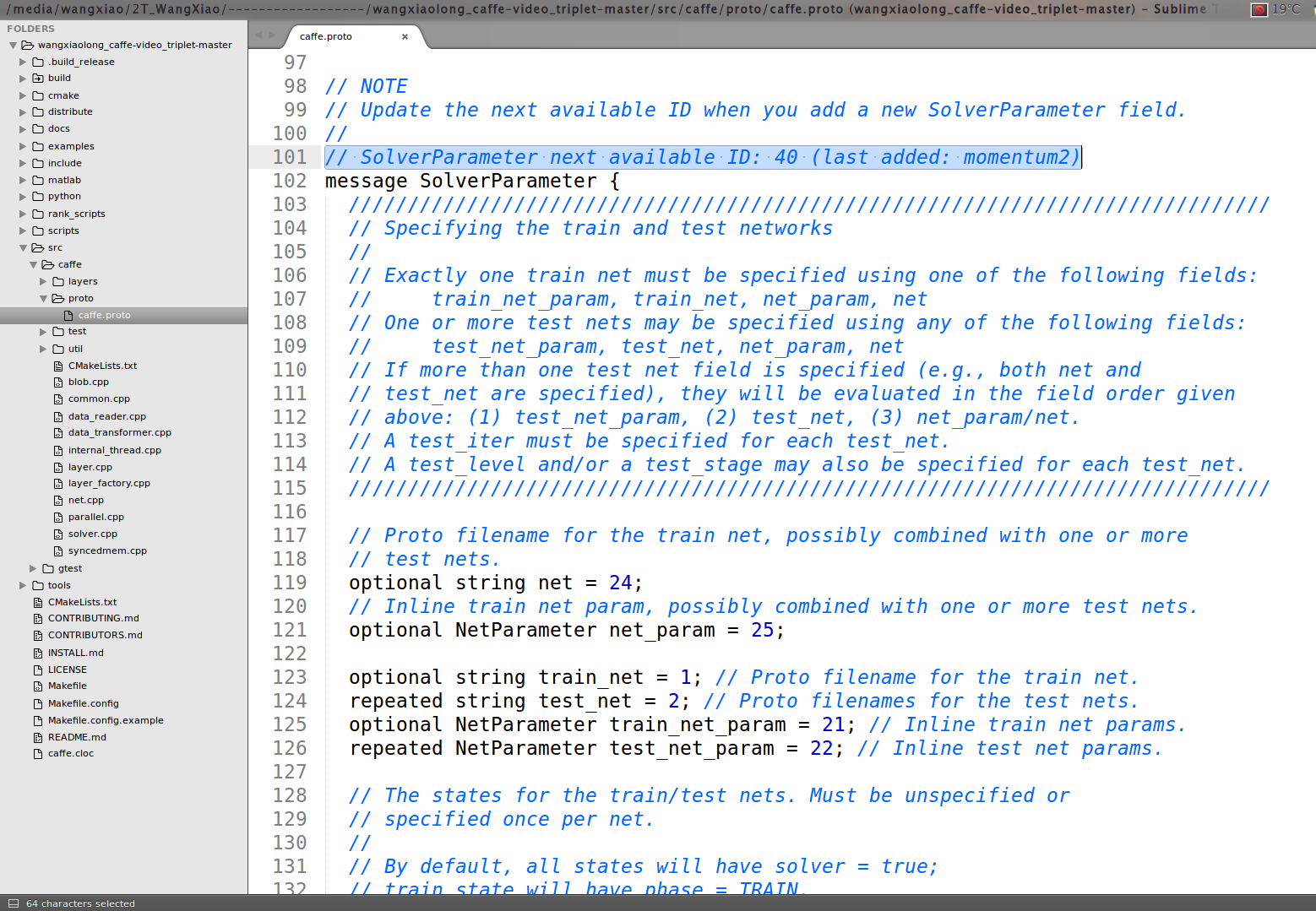
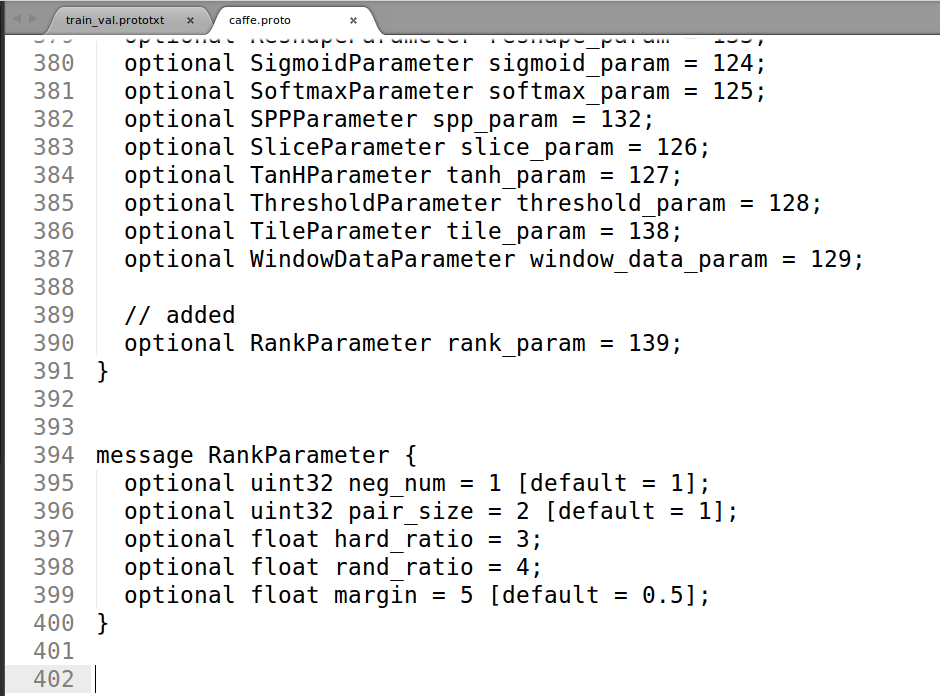
First, we add triplet loss layer in caffe.proto file:
we could found that in line 101, it said: SolverParameter next available ID: 40 (last added: momentum2), thus we add the ID: 40 as the new added information :
message RankParameter {
optional uint32 neg_num = 1 [default = 1];
optional uint32 pair_size = 2 [default = 1];
optional float hard_ratio = 3;
optional float rand_ratio = 4;
optional float margin = 5 [default = 0.5];
}
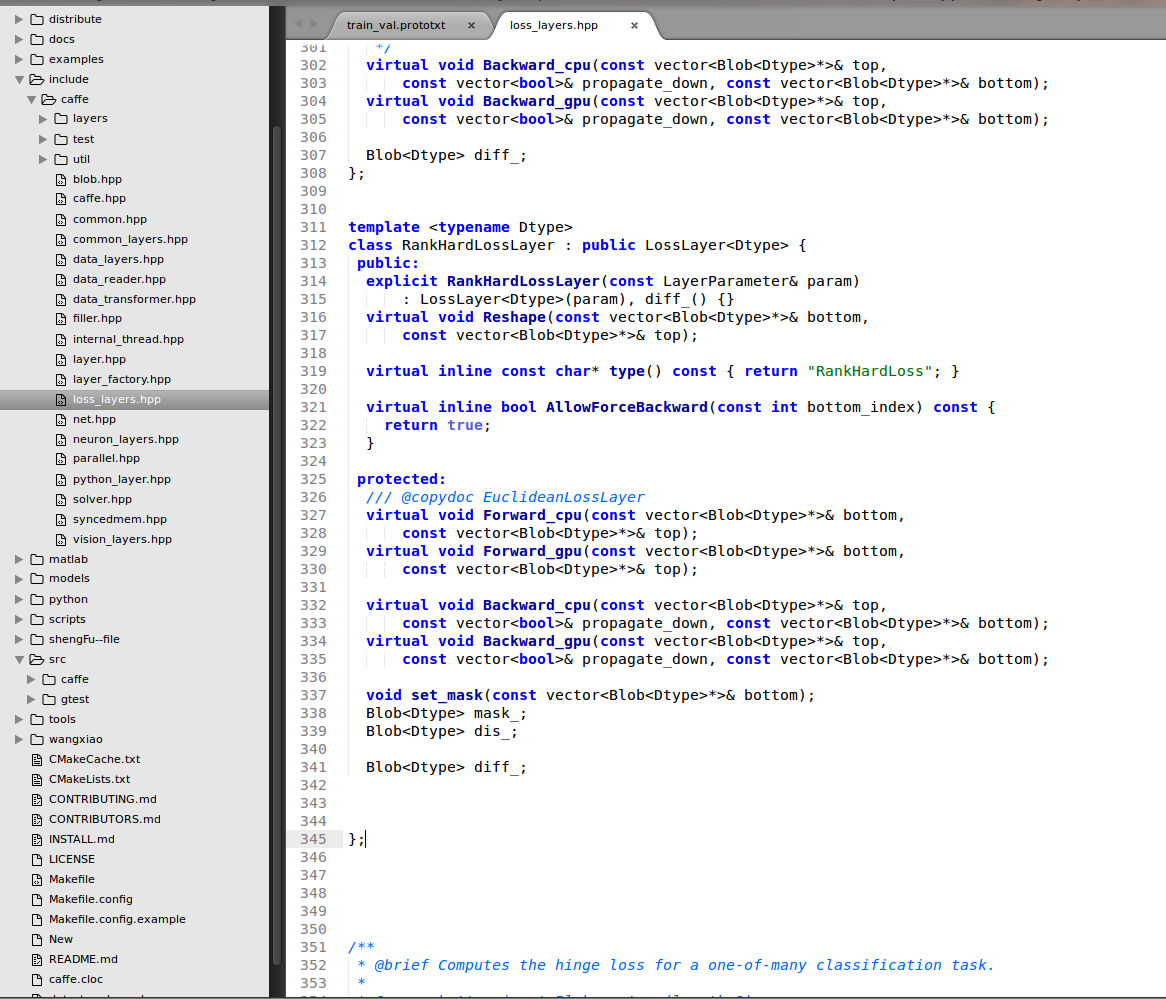
Second, we add the declearation information about triplet loss layer in ./include/caffe/TripletLoss_layers.hpp
Third, We compile the triplet loss layer of .cpp and .cu file
First of all is the .cpp file
 #include <vector>

 #include <algorithm>

 #include <cmath>

 #include <cfloat>

 #include "caffe/layer.hpp"

 #include "caffe/util/io.hpp"

 #include "caffe/util/math_functions.hpp"

 #include "caffe/vision_layers.hpp"

 using std::max;

 using namespace std;

 using namespace cv;

 namespace caffe {

 int myrandom (int i) { return caffe_rng_rand()%i;}

 template <typename Dtype>

 void RankHardLossLayer<Dtype>::Reshape(

   const vector<Blob<Dtype>*>& bottom, const vector<Blob<Dtype>*>& top) {

   LossLayer<Dtype>::Reshape(bottom, top);

   diff_.ReshapeLike(*bottom[]);

   dis_.Reshape(bottom[]->num(), bottom[]->num(), , );

   mask_.Reshape(bottom[]->num(), bottom[]->num(), , );

 }

 template <typename Dtype>

 void RankHardLossLayer<Dtype>::set_mask(const vector<Blob<Dtype>*>& bottom)

 {

     RankParameter rank_param = this->layer_param_.rank_param();

     int neg_num = rank_param.neg_num();

     int pair_size = rank_param.pair_size();

     float hard_ratio = rank_param.hard_ratio();

     float rand_ratio = rank_param.rand_ratio();

     float margin = rank_param.margin();

     int hard_num = neg_num * hard_ratio;

     int rand_num = neg_num * rand_ratio;

     const Dtype* bottom_data = bottom[]->cpu_data();

     const Dtype* label = bottom[]->cpu_data();

     int count = bottom[]->count();

     int num = bottom[]->num();

     int dim = bottom[]->count() / bottom[]->num();

     Dtype* dis_data = dis_.mutable_cpu_data();

     Dtype* mask_data = mask_.mutable_cpu_data();

     for(int i = ; i < num * num; i ++)

     {

         dis_data[i] = ;

         mask_data[i] = ;

     }

     // calculate distance

     for(int i = ; i < num; i ++)

     {

         for(int j = i + ; j < num; j ++)

         {

             const Dtype* fea1 = bottom_data + i * dim;

             const Dtype* fea2 = bottom_data + j * dim;

             Dtype ts = ;

             for(int k = ; k < dim; k ++)

             {

               ts += (fea1[k] * fea2[k]) ;

             }

             dis_data[i * num + j] = -ts;

             dis_data[j * num + i] = -ts;

         }

     }

     //select samples

     vector<pair<float, int> >negpairs;

     vector<int> sid1;

     vector<int> sid2;

     for(int i = ; i < num; i += pair_size)

     {

         negpairs.clear();

         sid1.clear();

         sid2.clear();

         for(int j = ; j < num; j ++)

         {

             if(label[j] == label[i])

                 continue;

             Dtype tloss = max(Dtype(), dis_data[i * num + i + ] - dis_data[i * num + j] + Dtype(margin));

             if(tloss == ) continue;

             negpairs.push_back(make_pair(dis_data[i * num + j], j));

         }

         if(negpairs.size() <= neg_num)

         {

             for(int j = ; j < negpairs.size(); j ++)

             {

                 int id = negpairs[j].second;

                 mask_data[i * num + id] = ;

             }

             continue;

         }

         sort(negpairs.begin(), negpairs.end());

         for(int j = ; j < neg_num; j ++)

         {

             sid1.push_back(negpairs[j].second);

         }

         for(int j = neg_num; j < negpairs.size(); j ++)

         {

             sid2.push_back(negpairs[j].second);

         }

         std::random_shuffle(sid1.begin(), sid1.end(), myrandom);

         for(int j = ; j < min(hard_num, (int)(sid1.size()) ); j ++)

         {

             mask_data[i * num + sid1[j]] = ;

         }

         for(int j = hard_num; j < sid1.size(); j++)

         {

             sid2.push_back(sid1[j]);

         }

         std::random_shuffle(sid2.begin(), sid2.end(), myrandom);

         for(int j = ; j < min( rand_num, (int)(sid2.size()) ); j ++)

         {

             mask_data[i * num + sid2[j]] = ;

         }

     }

 }

 template <typename Dtype>

 void RankHardLossLayer<Dtype>::Forward_cpu(const vector<Blob<Dtype>*>& bottom,

     const vector<Blob<Dtype>*>& top) {

     const Dtype* bottom_data = bottom[]->cpu_data();

     const Dtype* label = bottom[]->cpu_data();

     int count = bottom[]->count();

     int num = bottom[]->num();

     int dim = bottom[]->count() / bottom[]->num();

     RankParameter rank_param = this->layer_param_.rank_param();

     int neg_num = rank_param.neg_num();      //

     int pair_size = rank_param.pair_size();  //

     float hard_ratio = rank_param.hard_ratio();

     float rand_ratio = rank_param.rand_ratio();

     float margin = rank_param.margin();

     Dtype* dis_data = dis_.mutable_cpu_data();

     Dtype* mask_data = mask_.mutable_cpu_data();

     set_mask(bottom);

     Dtype loss = ;

     int cnt = neg_num * num / pair_size * ;

     for(int i = ; i < num; i += pair_size)

     {

         for(int j = ; j < num; j++)

         {

             if(mask_data[i * num + j] == )

                 continue;

             Dtype tloss1 = max(Dtype(), dis_data[i * num + i + ] - dis_data[i * num + j] + Dtype(margin));

             Dtype tloss2 = max(Dtype(), dis_data[i * num + i + ] - dis_data[(i + ) * num + j] + Dtype(margin));

             loss += tloss1 + tloss2;

         }

     }

     loss = loss / cnt;

     top[]->mutable_cpu_data()[] = loss;

 }

 template <typename Dtype>

 void RankHardLossLayer<Dtype>::Backward_cpu(const vector<Blob<Dtype>*>& top,

     const vector<bool>& propagate_down, const vector<Blob<Dtype>*>& bottom) {

     const Dtype* bottom_data = bottom[]->cpu_data();

     const Dtype* label = bottom[]->cpu_data();

     Dtype* bottom_diff = bottom[]->mutable_cpu_diff();

     int count = bottom[]->count();

     int num = bottom[]->num();

     int dim = bottom[]->count() / bottom[]->num();

     RankParameter rank_param = this->layer_param_.rank_param();

     int neg_num = rank_param.neg_num();

     int pair_size = rank_param.pair_size();

     float hard_ratio = rank_param.hard_ratio();

     float rand_ratio = rank_param.rand_ratio();

     float margin = rank_param.margin();

     Dtype* dis_data = dis_.mutable_cpu_data();

     Dtype* mask_data = mask_.mutable_cpu_data();

     for(int i = ; i < count; i ++ )

         bottom_diff[i] = ;

     int cnt = neg_num * num / pair_size * ;

     for(int i = ; i < num; i += pair_size)

     {

         const Dtype* fori = bottom_data + i * dim;

         const Dtype* fpos = bottom_data + (i + ) * dim;

         Dtype* fori_diff = bottom_diff + i * dim;

         Dtype* fpos_diff = bottom_diff + (i + ) * dim;

         for(int j = ; j < num; j ++)

         {

             if(mask_data[i * num + j] == ) continue;

             Dtype tloss1 = max(Dtype(), dis_data[i * num + i + ] - dis_data[i * num + j] + Dtype(margin));

             Dtype tloss2 = max(Dtype(), dis_data[i * num + i + ] - dis_data[(i + ) * num + j] + Dtype(margin));

             const Dtype* fneg = bottom_data + j * dim;

             Dtype* fneg_diff  = bottom_diff + j * dim;

             if(tloss1 > )

             {

                 for(int k = ; k < dim; k ++)

                 {

                     fori_diff[k] += (fneg[k] - fpos[k]); // / (pairNum * 1.0 - 2.0);

                     fpos_diff[k] += -fori[k]; // / (pairNum * 1.0 - 2.0);

                     fneg_diff[k] +=  fori[k];

                 }

             }

             if(tloss2 > )

             {

                 for(int k = ; k < dim; k ++)

                 {

                     fori_diff[k] += -fpos[k]; // / (pairNum * 1.0 - 2.0);

                     fpos_diff[k] += fneg[k]-fori[k]; // / (pairNum * 1.0 - 2.0);

                     fneg_diff[k] += fpos[k];

                 }

             }

         }

     }

     for (int i = ; i < count; i ++)

     {

         bottom_diff[i] = bottom_diff[i] / cnt;

     }

 }

 #ifdef CPU_ONLY

 STUB_GPU(RankHardLossLayer);

 #endif

 INSTANTIATE_CLASS(RankHardLossLayer);

 REGISTER_LAYER_CLASS(RankHardLoss);

 }  // namespace caffe
and the .cu file
 #include <vector>

 #include "caffe/layer.hpp"

 #include "caffe/util/io.hpp"

 #include "caffe/util/math_functions.hpp"

 #include "caffe/vision_layers.hpp"

 namespace caffe {

 template <typename Dtype>

 void RankHardLossLayer<Dtype>::Forward_gpu(const vector<Blob<Dtype>*>& bottom,

     const vector<Blob<Dtype>*>& top) {

   Forward_cpu(bottom, top);

 }

 template <typename Dtype>

 void RankHardLossLayer<Dtype>::Backward_gpu(const vector<Blob<Dtype>*>& top,

     const vector<bool>& propagate_down, const vector<Blob<Dtype>*>& bottom) {

    Backward_cpu(top, propagate_down, bottom);

 }

 INSTANTIATE_LAYER_GPU_FUNCS(RankHardLossLayer);

 }  // namespace caffe
Finally, we make the caffe file and check whether have some mistakes about it.
--------------------------------------------------------------------------------------------------------------------------------------------------------------------------------------------------------------------------------------------------------------------------------------------------------------------------------------------
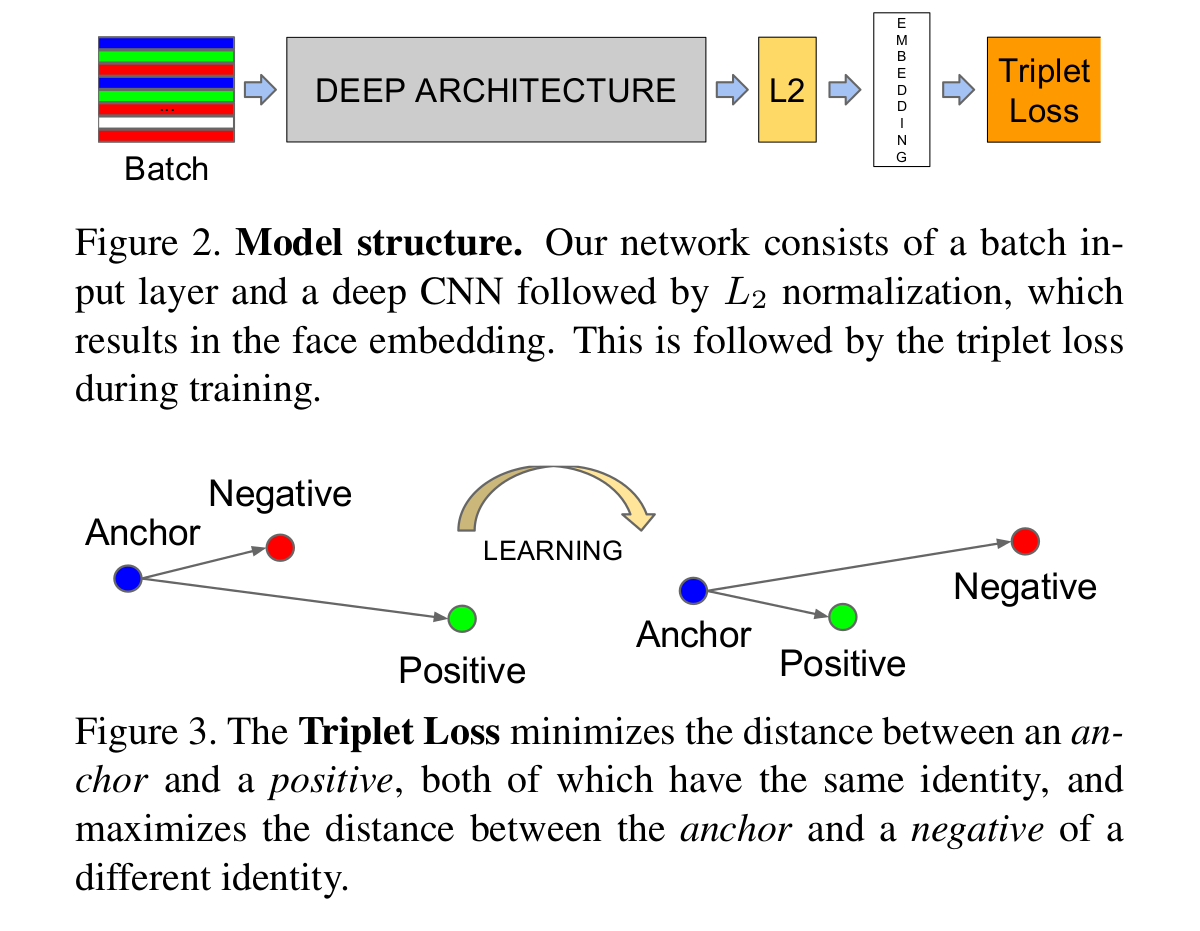
Let's continue to talk about the triplet loss:
Just like the above figure showns, the triplet loss usually have three components, i.e. the anchors, the positive, and the negative. What we are going to do is try to reduce the distance between the archor and the same, and push the different from the anchors.

Thus, the whole loss could be described as following:

Only select triplets randomly may lead to slow converage of the network, and we need to find those hard triplets, that are active and can therefore contribute to improving the model. The following section will give you an explanination about the approach.
Triplet Selection:
There are two appproaches for generate triplets, i.e.
1. Generate triplets offline every n steps, using the most recent newwork checkpoint and computing the argmin and argmax on a subset of the data.
2. Generate the triplets online. This can be done by selecting the hard positive/negative exemplars form within a mini-batch.
This paper use all anchor-positive pairs in a mini-batch while still selecting the hard negatives. the all anchor-positive method was more stable and converaged slightly faster at the begining of training.
The code could refer the github page: https://github.com/wangxiao5791509/caffe-video_triplet
layer {

    name: "loss"

    type: "RankHardLoss"

    rank_param{

        neg_num: 4

        pair_size: 2

        hard_ratio: 0.5

        rand_ratio: 0.5

        margin: 1

    }

    bottom: "norml2"

    bottom: "label"

}
Triplet Loss Implementation using Pytorch:
the following document comes from: https://pytorch.org/docs/stable/nn.html#tripletmarginloss
Creates a criterion that measures the triplet loss given an input tensors x1, x2, x3 and a margin with a value greater than 0. This is used for measuring a relative similarity between samples. A triplet is composed by a, p and n: anchor, positive examples and negative example respectively. The shapes of all input tensors should be (N,D)(N,D).
The distance swap is described in detail in the paper Learning shallow convolutional feature descriptors with triplet losses by V. Balntas, E. Riba et al.
The loss function for each sample in the mini-batch is:
where d(xi,yi)=∥xi−yi∥pd(xi,yi)=‖xi−yi‖p.
| Parameters: |
|
|---|
- Shape:
-
- Input: (N,D)(N,D) where D is the vector dimension.
- Output: scalar. If reduce is False, then (N).
>>> triplet_loss = nn.TripletMarginLoss(margin=1.0, p=2)

>>> input1 = torch.randn(100, 128, requires_grad=True)

>>> input2 = torch.randn(100, 128, requires_grad=True)

>>> input3 = torch.randn(100, 128, requires_grad=True)

>>> output = triplet_loss(input1, input2, input3)

>>> output.backward()
Example:
import torch.nn as nn

triplet_loss = nn.TripletMarginLoss(margin=1.2, p=2)

# 计算特征向量

anchor = model.forward(data[0])

positive = model.forward(data[1])

negative = model.forward(data[2])

# 计算三元组loss

loss = triplet_loss.forward(anchor, positive, negative)

loss.backward()

optimizer.step()
Tutorial: Triplet Loss Layer Design for CNN的更多相关文章
- 怎样在caffe中添加layer以及caffe中triplet loss layer的实现
关于triplet loss的原理.目标函数和梯度推导在上一篇博客中已经讲过了.详细见:triplet loss原理以及梯度推导.这篇博文主要是讲caffe下实现triplet loss.编程菜鸟.假 ...
- 论文笔记之: Person Re-Identification by Multi-Channel Parts-Based CNN with Improved Triplet Loss Function
Person Re-Identification by Multi-Channel Parts-Based CNN with Improved Triplet Loss Function CVPR 2 ...
- Paper Reading: In Defense of the Triplet Loss for Person Re-Identification
In Defense of the Triplet Loss for Person Re-Identification 2017-07-02 14:04:20 This blog comes ...
- Re-ID with Triplet Loss
一篇讲Person Re-ID的论文,与人脸识别(认证)有非常多相通的地方. 文章链接: <In Defense of the Triplet Loss for Person Re-Identi ...
- triplet loss 在深度学习中主要应用在什么地方?有什么明显的优势?
作者:罗浩.ZJU链接:https://www.zhihu.com/question/62486208/answer/199117070来源:知乎著作权归作者所有.商业转载请联系作者获得授权,非商业转 ...
- Facenet Triplet Loss
Triplet Loss 在人脸识别中,Triplet loss被用来进行人脸嵌入的训练.如果你对triplet loss很陌生,可以看一下吴恩达关于这一块的课程.Triplet loss实现起来并不 ...
- triplet loss
因为待遇低,因为工作不开心,已经严重影响了自己的工作积极性和工作效率,这几天发觉这样对自己实在是一种损失,决定提高工作效率,减少工作时间. 说说最近做的tracking, multi-object t ...
- Triplet Loss(转)
参考:https://blog.csdn.net/u013082989/article/details/83537370 作用:用于对差异较小的类别进行区分
- Caffe的loss layer(转)
英文可查:地址 1.SoftmaxWithLoss 对一对多的分类任务计算多项逻辑斯蒂损失,并通过softmax传递预测值,来获得各类的概率分布.该层可以分解为SoftmaxLayer+Multino ...
随机推荐
- MySQL的高级查询
高级查询 1.连接查询(对列的扩展) 第一种形式select * from Info,Nation #会形成笛卡尔积 select * from Info,Nation where Info.Nati ...
- xcode插件种类
古人云“工欲善其事必先利其器”,打造一个强大的开发环境,是立即提升自身战斗力的绝佳途径!以下是搜集的一些有力的XCode插件. 1.全能搜索家CodePilot 2.0 你要找的是文件?是文件夹? ...
- Ubuntu 14.10 下安装中文输入法
系统默认带的是IBUS,这个不怎么好用,我们需要安装一个新的框架FCITX 1 打开软件中心,输入fcitx,安装flexible input method framework 2 下载需要的输入法, ...
- BZOJ 2393 Cirno的完美算数教室
就是爆搜嘛. 先从大到小排个序能减去dfs树上很大的一部分.这个技巧要掌握. #include<iostream> #include<cstdio> #include<c ...
- BZOJ 3997 组合数学
好厉害. 注意到到了(i,j)就一定到不了(i-1,j+1),那么可以dp啦.dp[i][j]表示(i,j)右上角都清了的方案数. #include<iostream> #include& ...
- 渐进记法(O,Ω,Θ)
第一次在<算法导论>中看到这三种渐进记法的符号,当时对此一窍不通,所以也就没有注意它们,直接把他们忽略了,知道学习算法的时候,才知道当初的做法有多傻,因为一个算法的好坏以及复杂度,可以用它 ...
- Python文本(字面值)
Python中的文本是一些内置类型的常量表示方法. 字符串和字节 字符串是一系列的字符序列,Python中用单引号(''),双引号(""),或者三个单引号(''' ''')三个双引 ...
- Nodejs创建https服务器(Windows 7)
为了实验一下WebRTC,搭了个简单的https服务器.说说步骤: 生成OpenSSL证书 使用Nodejs的https模块建立服务器 OpenSSL 证书 我机子Windows 7,安装了Cygwi ...
- Android动态Java代码调整window大小
Android调整window大小 举一个例子,设置当前的APP所需要的屏幕高度为设备高度的一半: Window window = getActivity().getWindow(); WindowM ...
- 12、SQL基础整理(运算符与优先级)
运算符 + - * / %(取余),赋值运算符 = declare @jia int set @jia = 1+1 print @jia declare @jia int set @jia = 10% ...