
CMake使用教程
通过编写CMakeLists.txt,可以控制生成的Makefile,从而控制编译过程。CMake自动生成的Makefile不仅可以通过make命令构建项目生成目标文件,还支持安装(make
install)、测试安装的程序是否能正确执行(make test,或者ctest)、生成当前平台的安装包(make
package)、生成源码包(make
package_source)、产生Dashboard显示数据并上传等高级功能,只要在CMakeLists.txt中简单配置,就可以完成很多复杂的功能,包括写测试用例。
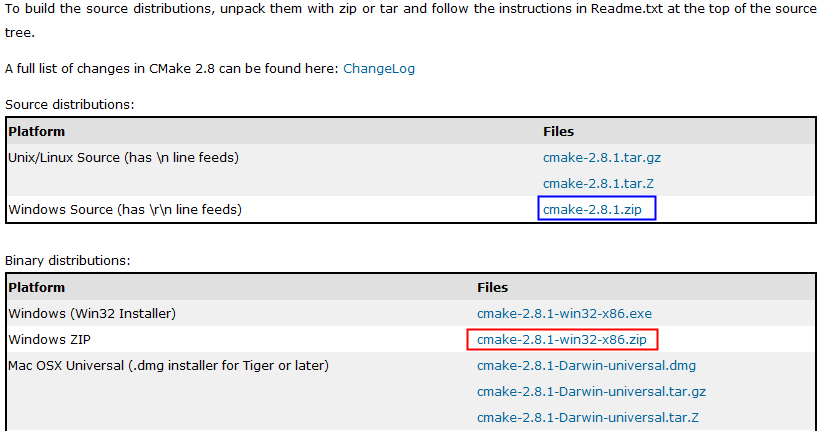
CMake使用步骤:
cmake-2.8.1-win32-x86/bin/cmake-gui.exe
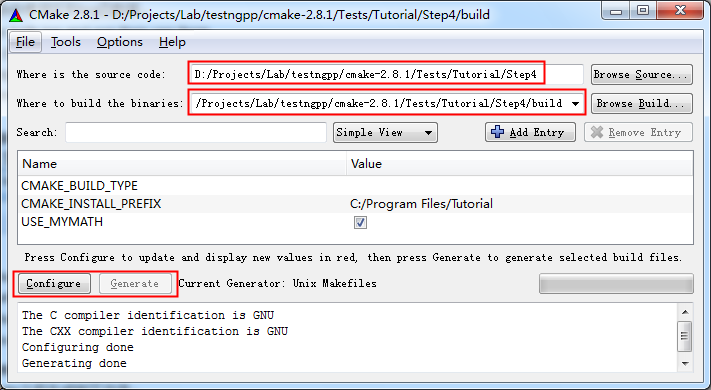
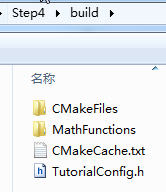
执行Configure:
运行之后,生成了如下文件:
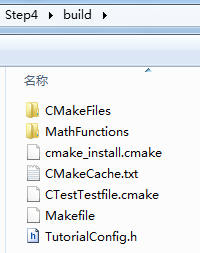
生成Makefile:
执行Generate之后生成如下文件:

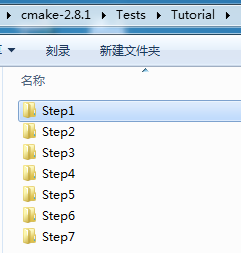
install,无法运行make test,但可以参考。)
简单的程序编译。
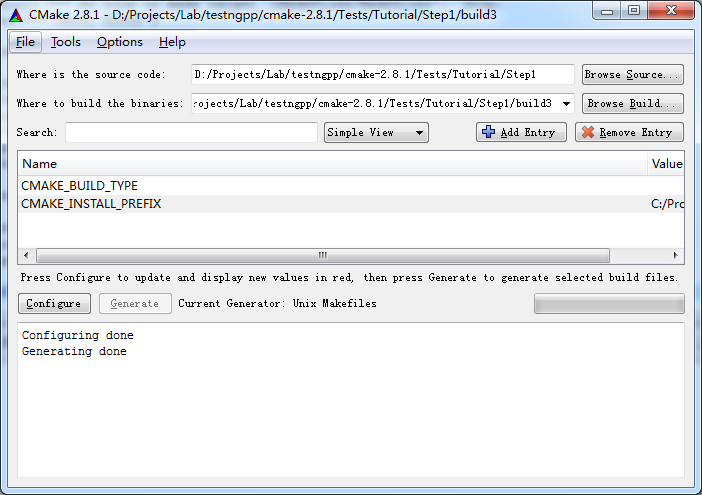
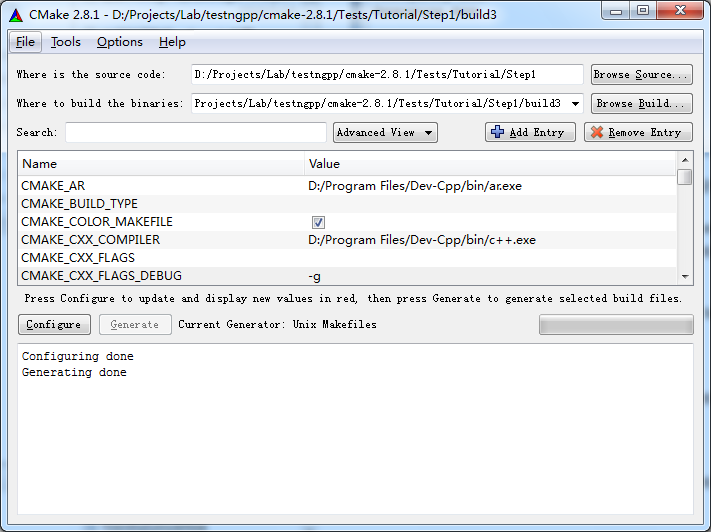
D:/Projects/Lab/testngpp/cmake-2.8.1/Tests/Tutorial/Step1/build3>make
Linking CXX executable Tutorial.exe
[100%] Built target Tutorial
D:/Projects/Lab/testngpp/cmake-2.8.1/Tests/Tutorial/Step1/build3>Tutorial.exe
Tutorial.exe Version 1.0
Usage: Tutorial.exe number
D:/Projects/Lab/testngpp/cmake-2.8.1/Tests/Tutorial/Step1/build3>Tutorial.exe 4
The square root of 4 is 2
2、Step2
把子目录编译为库,并且链接到最终的可执行文件。
add_subdirectory (MathFunctions) # 使得子目录MathFunctions也能被编译
# add the executable
add_executable (Tutorial tutorial.cxx)
target_link_libraries (Tutorial MathFunctions)
产生makefile:
D:/Projects/Lab/testngpp/cmake-2.8.1/Tests/Tutorial/Step2/build>make
[ 50%] Building CXX object MathFunctions/CMakeFiles/MathFunctions.dir/mysqrt.cxx
.obj
Linking CXX static library libMathFunctions.a
[ 50%] Built target MathFunctions
Linking CXX executable Tutorial.exe
[100%] Built target Tutorial
3、Step3
macro (do_test arg result)
add_test (TutorialComp${arg} Tutorial ${arg})
set_tests_properties (TutorialComp${arg}
PROPERTIES PASS_REGULAR_EXPRESSION ${result})
endmacro (do_test)
do_test (25 "25 is 5")
do_test (-25 "-25 is 0")
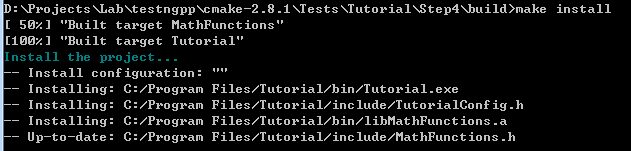
执行make install:
D:/Projects/Lab/testngpp/cmake-2.8.1/Tests/Tutorial/Step3/build>make install
[ 50%] "Built target MathFunctions"
[100%] "Built target Tutorial"
Install the project...
-- Install configuration: ""
-- Installing: C:/Program Files/Tutorial/bin/Tutorial.exe
-- Installing: C:/Program Files/Tutorial/include/TutorialConfig.h
-- Installing: C:/Program Files/Tutorial/bin/libMathFunctions.a
-- Installing: C:/Program Files/Tutorial/include/MathFunctions.h
安装结果:
C:/Program Files/Tutorial>tree /f
C:.
├─bin
│ libMathFunctions.a
│ Tutorial.exe
│
└─include
MathFunctions.h
TutorialConfig.h
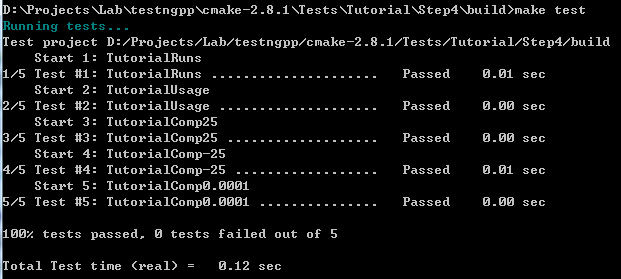
执行make test:
D:/Projects/Lab/testngpp/cmake-2.8.1/Tests/Tutorial/Step3/build>make test
Running tests...
Test project D:/Projects/Lab/testngpp/cmake-2.8.1/Tests/Tutorial/Step3/build
Start 1: TutorialRuns
1/5 Test #1: TutorialRuns ..................... Passed 0.01 sec
Start 2: TutorialComp25
2/5 Test #2: TutorialComp25 ................... Passed 0.01 sec
Start 3: TutorialNegative
3/5 Test #3: TutorialNegative ................. Passed 0.01 sec
Start 4: TutorialSmall
4/5 Test #4: TutorialSmall .................... Passed 0.00 sec
Start 5: TutorialUsage
5/5 Test #5: TutorialUsage .................... Passed 0.00 sec
修改一个测试用例,让它不过:
修改顶层CMakeLists.txt,然后重新Configure和Generate,然后make test即可看到结果。
D:/Projects/Lab/testngpp/cmake-2.8.1/Tests/Tutorial/Step3/build>make test
Running tests...
Test project D:/Projects/Lab/testngpp/cmake-2.8.1/Tests/Tutorial/Step3/build
Start 1: TutorialRuns
1/5 Test #1: TutorialRuns ..................... Passed 0.01 sec
Start 2: TutorialComp25
2/5 Test #2: TutorialComp25 ...................***Failed Required regular expre
ssion not found.Regex=[25 is 3
] 0.01 sec
Start 3: TutorialNegative
3/5 Test #3: TutorialNegative ................. Passed 0.01 sec
Start 4: TutorialSmall
4/5 Test #4: TutorialSmall .................... Passed 0.01 sec
Start 5: TutorialUsage
5/5 Test #5: TutorialUsage .................... Passed 0.01 sec
2 - TutorialComp25 (Failed)
Errors while running CTest
make: *** [test] Error 8
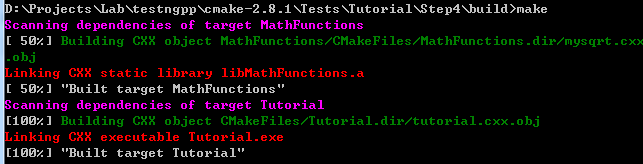
4、Step4
检查方法:
# does this system provide the log and exp functions?
include (CheckFunctionExists.cmake)
check_function_exists (log HAVE_LOG)
check_function_exists (exp HAVE_EXP)
(2)修改.in文件,定义宏。(修改TutorialConfig.h.in,cmake执行中会把宏定义为合适的值,生成TurorialConfig.h,供编译时使用)
// does the platform provide exp and log functions?
#cmakedefine HAVE_LOG
#cmakedefine HAVE_EXP
#if defined (HAVE_LOG) && defined (HAVE_EXP)
result = exp(log(x)*0.5);
#else // otherwise use an iterative approach
5、Step5
D:/Projects/Lab/testngpp/cmake-2.8.1/Tests/Tutorial/Step5/build>make
Scanning dependencies of target MakeTable
[ 25%] Building CXX object MathFunctions/CMakeFiles/MakeTable.dir/MakeTable.cxx.
obj
Linking CXX executable MakeTable.exe
[ 25%] "Built target MakeTable"
[ 50%] Generating Table.h
'.' 不是内部或外部命令,也不是可运行的程序
或批处理文件。
make[2]: *** [MathFunctions/Table.h] Error 1
make[1]: *** [MathFunctions/CMakeFiles/MathFunctions.dir/all] Error 2
make: *** [all] Error 2
问题分析:
MakeTable: cmake_check_build_system
$(MAKE) -f CMakeFiles/Makefile2 MakeTable
.PHONY : MakeTable
再看Makefile2文件,找到出错时正在编译的目标。
MathFunctions/CMakeFiles/MakeTable.dir/all:
$(MAKE) -f MathFunctions/CMakeFiles/MakeTable.dir/build.make MathFunctions/CMakeFiles/MakeTable.dir/depend
$(MAKE) -f MathFunctions/CMakeFiles/MakeTable.dir/build.make MathFunctions/CMakeFiles/MakeTable.dir/build
$(CMAKE_COMMAND) -E cmake_progress_report D:/Projects/Lab/testngpp/cmake-2.8.1/Tests/Tutorial/Step5/build/CMakeFiles 1
@echo "Built target MakeTable"
.PHONY : MathFunctions/CMakeFiles/MakeTable.dir/all
Make规则的执行顺序是按照命令的先后顺序:
echo "First line."
echo "Second line."
那么make结果:
D:/Users/Desktop>make
echo "First line."
First line.
echo "Second line."
Second line.
6、Step6
D:/Projects/Lab/testngpp/cmake-2.8.1/Tests/Tutorial/Step6/build>make package
[ 50%] "Built target MathFunctions"
[100%] "Built target Tutorial"
Run CPack packaging tool...
CPack Error: Cannot find NSIS registry value. This is usually caused by NSIS not
being installed. Please install NSIS from http://nsis.sourceforge.net
CPack Error: Cannot initialize the generator NSIS
make: *** [package] Error 1
D:/Projects/Lab/testngpp/cmake-2.8.1/Tests/Tutorial/Step6/build>make package
[ 50%] "Built target MathFunctions"
[100%] "Built target Tutorial"
Run CPack packaging tool...
CPack: Create package using NSIS
CPack: Install projects
CPack: - Run preinstall target for: Tutorial
CPack: - Install project: Tutorial
CPack: Compress package
CPack: Finalize package
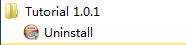
CPack: Package D:/Projects/Lab/testngpp/cmake-2.8.1/Tests/Tutorial/Step6/build/T
utorial-1.0.1-win32.exe generated.

D:/Projects/Lab/testngpp/cmake-2.8.1/Tests/Tutorial/Step6/build>make package_sou
rce
Run CPack packaging tool for source...
CPack Error: Cannot find a suitable ZIP program
CPack Error: Cannot initialize the generator ZIP
make: *** [package_source] Error 1
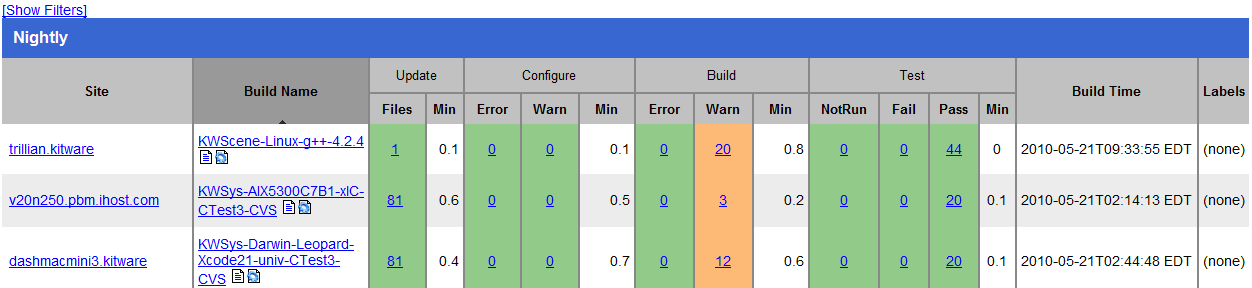

ental
Site: JELLY-PC2
Build name: Win32-make
Create new tag: 20100521-1833 - Experimental
Configure project
Each . represents 1024 bytes of output
. Size of output: 0K
Build project
Each symbol represents 1024 bytes of output.
'!' represents an error and '*' a warning.
. Size of output: 0K
0 Compiler errors
0 Compiler warnings
Test project D:/Projects/Lab/testngpp/cmake-2.8.1/Tests/Tutorial/Step7/build
Start 1: TutorialRuns
1/9 Test #1: TutorialRuns ..................... Passed 0.01 sec
Start 2: TutorialUsage
2/9 Test #2: TutorialUsage .................... Passed 0.01 sec
Start 3: TutorialComp4
3/9 Test #3: TutorialComp4 .................... Passed 0.01 sec
Start 4: TutorialComp9
4/9 Test #4: TutorialComp9 .................... Passed 0.01 sec
Start 5: TutorialComp5
5/9 Test #5: TutorialComp5 .................... Passed 0.01 sec
Start 6: TutorialComp7
6/9 Test #6: TutorialComp7 .................... Passed 0.01 sec
Start 7: TutorialComp25
7/9 Test #7: TutorialComp25 ................... Passed 0.01 sec
Start 8: TutorialComp-25
8/9 Test #8: TutorialComp-25 .................. Passed 0.01 sec
Start 9: TutorialComp0.0001
9/9 Test #9: TutorialComp0.0001 ............... Passed 0.01 sec
100% tests passed, 0 tests failed out of 9
Total Test time (real) = 0.19 sec
Performing coverage
Cannot find any coverage files. Ignoring Coverage request.
Submit files (using http)
Using HTTP submit method
Drop site:http://
Error when uploading file: D:/Projects/Lab/testngpp/cmake-2.8.1/Tests/Tutoria
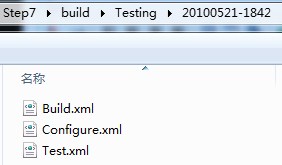
l/Step7/build/Testing/20100521-1833/Build.xml
Error message was: couldn't connect to host
Problems when submitting via HTTP
Errors while running CTest
CMake使用教程的更多相关文章
- CMake入门教程(转帖)
本文转自:https://www.cnblogs.com/never--more/p/6921837.html CMake入门教程 参考文献:http://www.ibm.com/developerw ...
- cmake全面教程
1. 官网教程 2. 中文教程 3. Modern CMake
- CMake基础教程
如果需要配置和检查我们工程中的所有依赖,那么可以选用CMake工具:但是,这并不是必须的,因为我们可以使用其他的工具或者是IDE(比如Makefiles或者Visual Studio)来配置我们的工程 ...
- cmake简易教程
用cmake替代makefile,构建项目还是蛮简单实用的. 工程目录下src放源代码,build保存所有的编译过程和结果. 首先看看src目录下的源代码结构: 最顶层CMakeLists.txt内容 ...
- CMake 实践教程
本篇博客是根据 <<CMake Practice>> 一文编写, 目的有三: 其一: 提取出其中的精要部分; 其二: 对其中不易理解的地方进行简要说明; 其三: 方便后续查找复 ...
- Linux下CMake简明教程
转载地址:https://blog.csdn.net/whahu1989/article/details/82078563 CMake是开源.跨平台的构建工具,可以让我们通过编写简单的配置文件去生成本 ...
- [转载] CMake Official Tutorial——教程还是官方的好
CMake官方教程传送门:https://cmake.org/cmake-tutorial/ 以下的内容跟官方教程基本一致,少数地方根据自己的测试有所改动: A Basic Starting Poin ...
- CMake使用总结(转的)+自己的实践心得
来自https://www.mawenbao.com/note/cmake.html 总结CMake的常用命令,并介绍有用的CMake资源. CMake意为cross-platform make,可用 ...
- CMake使用总结
总结CMake的常用命令,并介绍有用的CMake资源. CMake意为cross-platform make,可用于管理c/c++工程.CMake解析配置文件CMakeLists.txt生成Makef ...
随机推荐
- 【HAOI2006】【BZOJ1051】【p1233】最受欢迎的牛
BZOJ难得的水题(其实是HA太弱了) 原题: 每一头牛的愿望就是变成一头最受欢迎的牛.现在有N头牛,给你M对整数(A,B),表示牛A认为牛B受欢迎. 这 种关系是具有传递性的,如果A认为B受欢迎,B ...
- GDB调试器
/*this project used for gdb debug c programs*//*At first,using compile command turn out the executab ...
- javascript面向对象规则汇总以及json
javascript中一切皆对象,而且定义非常灵活, 于是出现了一些相对其他编程语言环境下匪夷所思的代码: ---------------------------------------------- ...
- <input>标签中获得鼠标与否的样式变化——js实现
<!DOCTYPE html> <html> <head lang="zh"> <meta http-equiv="X-UA-C ...
- Android Facebook和Twitter分享
1. 背景 在年初的时候,公司的项目有个新的需求,在英文版的应用中加入Facebook和Twitter分享功能. 2. 完成情况 由于这个项目比较急,所以开发这个功能从预研到接入总共耗时一周.后来,在 ...
- A quest for the full InnoDB status
When running InnoDB you are able to dig into the engine internals, look at various gauges and counte ...
- lvm使用总结-转
由于安装的kvm需要扩容,研究了下lvm的使用. LVM(Logical Volume Manager)逻辑卷管理器,做法是将物理分区通过软件组合未一个独立的大磁盘(VG,卷组),然后把这个大磁盘分成 ...
- 关于jquery easyui treegrid的问题
我是用的django web开发架构: 想实现如下功能: 权限架构 点击checkbox时,能获取该checkbox的值: 代码如下: <tr> <th field="na ...
- 【转】WMI使用的WIN32_类库名
ShadowBy--Win32_ShadowContext--Win32_ShadowCopy--Win32_ShadowDiffVolumeSupport--Win32_ShadowFor--Win ...
- Review Board——在线代码审查工具
代码审查(Code Review)不但可以提高质量,而且还是一个知识共享和指导的极好的手段.不幸的是,准备工作的辛苦和工具支持的缺乏让代码审查很容易被延至“稍后再议”.Review Board的目标便 ...