
Python数据分析之pandas入门
一、pandas库简介
二、pandas库的安装
三、Series的使用

import pandas as pd

ser=pd.Series([12,33,55,66])

print(ser)

'''输出为

0    12

1    33

2    55

3    66

dtype: int64

'''
运行上面的代码,可以知道,如果不指定标签,那么默认标签就是从0开始递增,我们也可以在声明一个Series对象时给它指定标签:
import pandas as pd

ser=pd.Series([12,33,55,66],index=['a','s','d','f'])

print(ser)

'''输出为:

a    12

s    33

d    55

f    66

dtype: int64

'''
import pandas as pd

ser=pd.Series([12,33,55,66])

print(ser[2])

ser[2]=99

print(ser[2])

'''输出为:

55

99

'''
import pandas as pd

ser=pd.Series([12,33,55,66])

ser2=ser/2

print(ser2)

import numpy as np

print(np.log(ser))

'''输出为:

0     6.0

1    16.5

2    27.5

3    33.0

dtype: float64

0    2.484907

1    3.496508

2    4.007333

3    4.189655

dtype: float64

'''
import pandas as pd

dic={'wife':'kathy','son':'mary','mother':'lily','father':'tom'}

ser=pd.Series(dic)

print(ser)

'''输出为:

wife      kathy

son        mary

mother     lily

father      tom

dtype: object

'''
四、DataFrame的使用
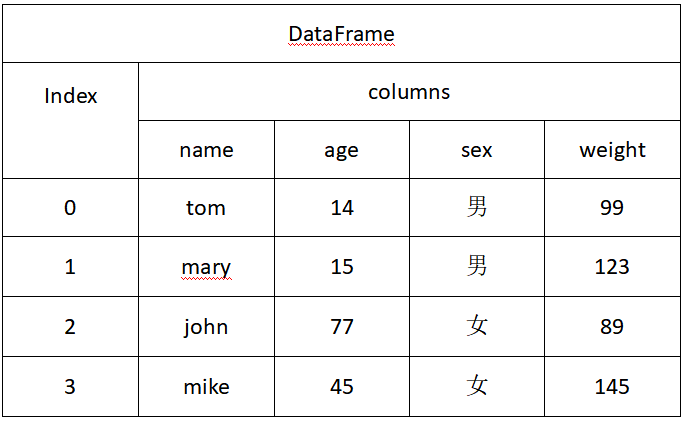
import pandas as pd

dic={'name':['tom','mary','john','mike'],'age':[14,15,77,45],'sex':['男','男','女','男']}

frame=pd.DataFrame(dic)

print(frame)

'''输出为:

   name  age sex

0   tom   14   男

1  mary   15   男

2  john   77   女

3  mike   45   男

'''
import pandas as pd

dic={'name':['tom','mary','john','mike'],'age':[14,15,77,45],'sex':['男','男','女','男']}

frame=pd.DataFrame(dic)

frame['weight']=[89,99,145,123]

print(frame)

'''输出为:

   name  age sex  weight

0   tom   14   男      89

1  mary   15   男      99

2  john   77   女     145

3  mike   45   男     123

'''
import pandas as pd

dic={'name':['tom','mary','john','mike'],'age':[14,15,77,45],'sex':['男','男','女','男']}

frame=pd.DataFrame(dic)

print(frame.T)

'''输出为:

        0     1     2     3

name  tom  mary  john  mike

age    14    15    77    45

sex     男     男     女     男

'''
五、Series与DataFrame对象之间的运算
import pandas as pd

import numpy as np

frame=pd.DataFrame(np.arange(16).reshape((4,4)),index=['age','name','sex','weight'],columns=['john','tom','mary','cathy'])

print(frame)

ser=pd.Series(np.arange(4),index=['john','tom','mary','cathy'])

print(ser)

res=frame-ser

print(res)

'''输出为:

        john  tom  mary  cathy

age        0    1     2      3

name       4    5     6      7

sex        8    9    10     11

weight    12   13    14     15

john     0

tom      1

mary     2

cathy    3

dtype: int32

        john  tom  mary  cathy

age        0    0     0      0

name       4    4     4      4

sex        8    8     8      8

weight    12   12    12     12

'''
Python数据分析之pandas入门的更多相关文章
- Python 数据处理库 pandas 入门教程
Python 数据处理库 pandas 入门教程2018/04/17 · 工具与框架 · Pandas, Python 原文出处: 强波的技术博客 pandas是一个Python语言的软件包,在我们使 ...
- Python数据分析库pandas基本操作
Python数据分析库pandas基本操作2017年02月20日 17:09:06 birdlove1987 阅读数:22631 标签: python 数据分析 pandas 更多 个人分类: Pyt ...
- Python数据分析之pandas基本数据结构:Series、DataFrame
1引言 本文总结Pandas中两种常用的数据类型: (1)Series是一种一维的带标签数组对象. (2)DataFrame,二维,Series容器 2 Series数组 2.1 Series数组构成 ...
- Python 数据分析:Pandas 缺省值的判断
Python 数据分析:Pandas 缺省值的判断 背景 我们从数据库中取出数据存入 Pandas None 转换成 NaN 或 NaT.但是,我们将 Pandas 数据写入数据库时又需要转换成 No ...
- 利用python进行数据分析之pandas入门
转自https://zhuanlan.zhihu.com/p/26100976 目录: 5.1 pandas 的数据结构介绍5.1.1 Series5.1.2 DataFrame5.1.3索引对象5. ...
- Python数据分析之pandas学习
Python中的pandas模块进行数据分析. 接下来pandas介绍中将学习到如下8块内容:1.数据结构简介:DataFrame和Series2.数据索引index3.利用pandas查询数据4.利 ...
- python数据分析之pandas数据选取:df[] df.loc[] df.iloc[] df.ix[] df.at[] df.iat[]
1 引言 Pandas是作为Python数据分析著名的工具包,提供了多种数据选取的方法,方便实用.本文主要介绍Pandas的几种数据选取的方法. Pandas中,数据主要保存为Dataframe和Se ...
- Python数据分析之pandas
Python中的pandas模块进行数据分析. 接下来pandas介绍中将学习到如下8块内容:1.数据结构简介:DataFrame和Series2.数据索引index3.利用pandas查询数据4.利 ...
- Python数据分析之Pandas操作大全
从头到尾都是手码的,文中的所有示例也都是在Pycharm中运行过的,自己整理笔记的最大好处在于可以按照自己的思路来构建矿建,等到将来在需要的时候能够以最快的速度看懂并应用=_= 注:为方便表述,本章设 ...
随机推荐
- [javascript] javascript 实现数据滚动加载
// tpl generate var tmpl = (function (cache, $) { return function (str, data) { var fn = !/\s/.test( ...
- 1*1卷积核在GoogleLeNet中的作用
1. 实现跨通道的交互和信息整合 1×1的卷积层(可能)引起人们的重视是在NIN的结构中,论文中林敏师兄的想法是利用MLP代替传统的线性卷积核,从而提高网络的表达能力.文中同时利用了跨通道poolin ...
- C# DataGridView中单元格Cell改变事件
DataGridView控件中的各种事件都无法直接响应Cell中内容的变化,包括KeyPress等事件,可以采用下面方法 private void dataGridViewBarcode_Editin ...
- C# 子线程调用主线程窗体的解决方法
摘自其他人博客,自己试过确实解决问题.(如在自己定义的线程里面给textbox赋值) 由于Windows窗体控件本质上不是线程安全的.因此如果有两个或多个线程适度操作某一控件的状态(set value ...
- Android .9 图片
最初对 .9 图片不是十分理解,一些教程让人摸不到头脑. 最近重新研究终于明白了它的原理. 其实最重要的一点记住就可以了,就是 .9 图片的四条黑边的意义,每条黑边的意义都不一样: 顶部:在水平拉伸的 ...
- 面向对象——单例模式,五种方式
单例模式:多次实例化的结果指向同一个实例 实现方式 一.使用类方法(调用创新对象,函数返回原定对象) import settings class Mysql: __instance = None de ...
- 跟着刚哥学习Spring框架--事务配置(七)
事务 事务用来保证数据的完整性和一致性. 事务应该具有4个属性:原子性.一致性.隔离性.持久性.这四个属性通常称为ACID特性.1.原子性(atomicity).一个事务是一个不可分割的工作单位,事务 ...
- 调用notify()后,当前线程执行完synchronized块中的所有代码才会释放锁
package com.pinnet.test; public class Demo { public static void main(String[] args) { Demo demo = ne ...
- DNS 预解析
DNS 解析也是需要时间的,可以通过预解析的方式来预先获得域名所对应的 IP. <link rel="dns-prefetch" href="//yuchengka ...
- maven搭建ssm初级框架
喜欢的朋友可以关注下,粉丝也缺. 前言: 想必大家对smm框架已经熟悉的不能再熟悉了,它是由Spring.SpringMVC.MyBatis三个开源框架整合而成,常作为数据源较简单的web项目的框架. ...