
基于vue的悬浮碰撞窗口(用于打广告的)组件
由于项目需要改写了一个悬浮碰撞弹窗组件
<template>

	<div class="floatLayer">

		<a class="close-btn" href="javascript:;" @click.stop="closeView">×</a>

		<img  :src="json.src" alt="">

	</div>

</template>

<script>

	export default{

		data(){

			return{

				object: [],

				left:0,

				top:0,

				interval:30,

				distance:2,

				directionX:1,

				directionY:1,

				zIndex:100,

				target:"_blank",

				cursor:"pointer",

				i:0

			}

		},

		props:['json'],

		mounted(){

			this.init(this.json);

		},

		methods:{

			closeView(){

				this.$emit("closeView");

			},

			init(json){

				var obj = document.querySelector(".floatLayer");

				//自定义

				obj.left=parseInt(json.left || this.left);

				obj.top = parseInt(json.top || this.top);

        obj.interval = json.interval || this.interval;

        obj.distance = json.distance || this.distance;

        obj.directionX = json.directionX || this.directionX;

        obj.directionY = json.directionY || this.directionY;

        obj.index = this.object.length;

        obj.url = json.url;

        obj.target = json.target || this.target;

        obj.t=null;

        //事件

        if (obj.url != undefined){

        	obj.onclick = function () {

              switch (this.target) {

                  case "_blank":

                      open(this.url);

                      break;

                  case "_parent":

                      parent.location = this.url;

                  case "_top":

                      top.location = this.url;

                      break;

                  case "_self":

                      location = this.url;

                      break;

              }

          }

        }

        if (!json.noHoverPause) {

            obj.onmouseover = function () {

                clearInterval(this.t);

            }

            obj.onmouseout = function () {

                obj.t=setInterval(function(){that.float(obj.index)}, obj.interval);

            }

        }

        obj.src = json.src;

        obj.style.cursor = json.cursor || this.cursor;

        obj.style.position = "absolute";

        obj.style.left = obj.left + "px";

        obj.style.top = obj.top + "px";

        obj.style.zIndex = json.zIndex || this.zIndex;

        obj.style.width = json.width || "";

        obj.style.height = json.height || "";

        obj.style.directionX=json.directionX || this.directionX;

        obj.style.directionY=json.directionY || this.directionY;

        this.object.push(obj);

        //console.log(this.object)

        document.body.appendChild(obj);

        let that=this;

        console.log(obj.t)

        obj.t=setInterval(function(){that.float(obj.index)}, obj.interval);

      },

      float(index) {

      	//console.log("dd",index);

	        var pageWidth = document.documentElement.clientWidth;

	        var pageHeight = document.documentElement.clientHeight;

	        var scrollLeft = document.documentElement.scrollLeft;

	        var scrollTop = document.documentElement.scrollTop;

	        var obj = this.object[index];

	        //console.log("s",obj)

	        obj.left = obj.left + obj.directionX * obj.distance;

	        if (obj.left <= scrollLeft) {

	            obj.left = scrollLeft;

	            obj.directionX = 1;

	        }

	        if (obj.left + obj.offsetWidth >= pageWidth + scrollLeft - 1) {

	            obj.left = pageWidth + scrollLeft - 1 - obj.offsetWidth;

	            obj.directionX = -1;

	        }

	        obj.top = obj.top + obj.directionY * obj.distance;

	        if (obj.top <= scrollTop) {

	            obj.top = scrollTop;

	            obj.directionY = 1;

	        }

	        if (obj.top + obj.offsetHeight >= pageHeight + scrollTop - 1) {

	            obj.top = pageHeight + scrollTop - 1 - obj.offsetHeight;

	            obj.directionY = -1;

	        }

	        obj.style.left = obj.left + "px";

	        obj.style.top = obj.top + "px";

	    }

		}

	}

</script>

<style>

	.floatLayer{

		position:fixed;

		left:0;

		top:0;

		z-index:100;

	}

	.close-btn{

		display:block;

		position:absolute;

		right:0px;

		top:0px;

		width:40px;

		height:40px;

		line-height:40px;

		text-align: center;

		overflow:hidden;

		font-size: 30px;

		background:#ccc;

		color:#fff;

		z-index:110;

	}

	.close-btn:hover{

		color:#B50900;

		background:#ccc;

	}

	.floatLayer img{

		position:relative;

		z-index:101;

	}

</style>
调用方式(加上了多个悬浮碰撞弹窗)
<float-view v-if="showView" :json="json" @closeView="closeView"></float-view>
<float-view v-if="showView2" :json="json2" @closeView="closeView2"></float-view>

数据来源模拟的

json:{

        src: 'https://www.ssdfz.net/ImageFiles/20180419130336830.jpg',

        url: 'http://www.baidu.com',

        left: ,

        top: ,

        directionX: ,

        directionY: ,

        distance: null,

        interval: null,

        target: null,

        zIndex: null,

        width: null,

        height: null,

        noHoverPause: null, //鼠标经过时不停止,为true时不停止

        cursor: null,

      },
json2:{
src: 'https://www.ssdfz.net/ImageFiles/20180424095347234.jpg',
url: 'http://www.baidu.com',
left: 0,
top: 0,
directionX: 1,
directionY: 1,
distance: null,
interval: null,
target: null,
zIndex: null,
width: null,
height: null,
noHoverPause: null, //鼠标经过时不停止,为true时不停止
cursor: null,
},
父组件的基本操作
父组件控制显示隐藏

data(){

  return{

      showView:true,

      showView2:true,

  }

},

methods:{

    closeView(val){

      this.showView=false;

    },

    closeView2(val){

      this.showView2=false;

    },

}
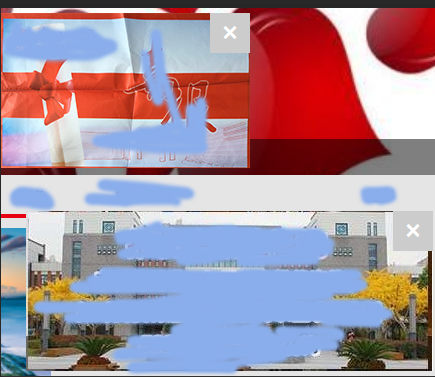
效果图
基于vue的悬浮碰撞窗口(用于打广告的)组件的更多相关文章
- 基于Vue的工作流项目模块中,使用动态组件的方式统一呈现不同表单数据的处理方式
在基于Vue的工作流项目模块中,我们在查看表单明细的时候,需要包含公用表单信息,特定表单信息两部分内容.前者表单数据可以统一呈现,而后者则是不同业务的表单数据不同.为了实现更好的维护性,把它们分开作为 ...
- 【技术博客】基于vue的前端快速开发(工具篇)
一.Vue教程 vue.js是一套构建用户界面的渐进式框架.vue采用自底向上增量开发的设计.vue的核心库只关心视图层,非常容易学习,非常容易与其它库和已有项目整合.vue完全有能力驱动采用单文件组 ...
- [译]基于Vue.js的10个最佳UI框架,用于构建移动应用程序
原文查看10 Best Vue.js based UI Frameworks for Building Mobile Apps 如果您期待使用Vue.js构建移动应用程序,那么您可以选择许多可用的UI ...
- 基于Vue、Springboot网站实现第三方登录之QQ登录,以及邮件发送
基于Vue.Springboot实现第三方登录之QQ登录 前言 一.前提(准备) 二.QQ登录实现 1.前端 2.后端 1.application.yml 和工具类QQHttpClient 2.QQL ...
- 基于Vue开发的门户网站展示和后台数据管理系统
基于Vue的前端框架有很多,这几年随着前端技术的官方应用,总有是学不完的前端知识在等着我们,一个人的精力也是有限,不可能一一掌握,不过我们学习很大程度都会靠兴趣驱动,或者目标导向,最终是可以以点破面, ...
- Codrops 教程:基于 CSS3 的精美模态窗口效果
Codrops 分享了漂亮的模态窗口效果实现方法,希望给前端开发人员提供一些创新显示对话框的启示.这个方案使用了触发按钮(或任何的 HTML 元素),在点击的时候出现一个模态窗口,带有简单的过渡(或动 ...
- 基于Vue实现后台系统权限控制
原文地址:http://refined-x.com/2017/08/29/基于Vue实现后台系统权限控制/,转载请注明出处. 用Vue/React这类双向绑定框架做后台系统再适合不过,后台系统相比普通 ...
- 优秀的基于VUE移动端UI框架合集
1. vonic 一个基于 vue.js 和 ionic 样式的 UI 框架,用于快速构建移动端单页应用,很简约,是我喜欢的风格 star 2.3k 中文文档 在线预览 2.vux 基于WeUI和Vu ...
- 基于VUE框架 与 其他框架间的基本对比
基于VUE框架的基本描述 与 其他框架间的基本对比 2018-11-03 11:01:14 A B React React 和 Vue 有许多相似之处,它们都有: 使用 Virtual DOM 提供 ...
随机推荐
- Linux sed命令使用方法
sed(Stream Editor)是Linux中文本处理使用非常广泛的工具,可以对文件内容进行替换.删除.新增.选取特定行等功能.下面通过sed常用实例介绍sed命令的使用方法. sed基本语法 s ...
- requirejs源码分析
- HttpURLConnection 添加代理
//创建代理服务器 Proxy proxy = new Proxy(Proxy.Type.HTTP, new InetSocketAddress("www.proxyaddress.com& ...
- python 如何注释
一.单行注释 单行注释以#开头,例如: print 6 #输出6 二.多行注释 (Python的注释只有针对于单行的注释(用#),这是一种变通的方法) 多行注释用三引号' ...
- python os模块的使用(转)
os模块包含普遍的操作系统功能. 注意:函数参数path是文件或目录的路径,filename是文件的路径,dirname是目录的路径,路径可以是相对路径,也可绝对路径 常见或重要的函数为加粗字体 os ...
- js高级-函数的四种调用模式
1.对象方法调用模式 方法内部的this指向当前调用者的对象d 定义类 (构造函数) function Dog (dogName){ //创建一个空对象 让空对象==this this.name ...
- 支付宝支付Java代码
支付宝调用流程 开发前的准备工作 配置应用网关 应用网关里面填写的值就是商户后台的异步回调地址.也就是在支付宝付完款之后,由支付宝调用商户,便于商户验证订单各信息和更新订单状态 授权回调地址 授权回调 ...
- get请求中url传参中文乱码问题--集锦
一:get请求url中带有中文参数,有三种方式进行处理防止中文乱码 1.如果使用tomcat作为服务器,那么修改tomcat配置文件conf/server.xml中,在 <Connector ...
- mongodb数据到MySQL数据库 的迁移步骤
废话少说,直接上干货. 1.mongoexport -d shengyang -c testData -f _id,x,name,name1,name2 --type=csv -o new.csv 用 ...
- spring-boot-devtools Idea 热部署
1 pom.xml文件 注:热部署功能spring-boot-1.3开始有的 <!--添加依赖--> <dependency> <groupId>org.sprin ...