
B/S FastReprot使用
FastReport 交流群
群 号:554714044
前言
由于公司开发新产品,前后端分离.netcore +Angular ,之前C/S项目一直使用FastReport ,考虑到员工切换比较困难,而且最最重要的是BS版少了很多内容,例如合计,函数最常用的功能都没有,所以B/S端打印控件继续沿用C/S模式。
一、逻辑视图

二、具体实现
1.Winform设计
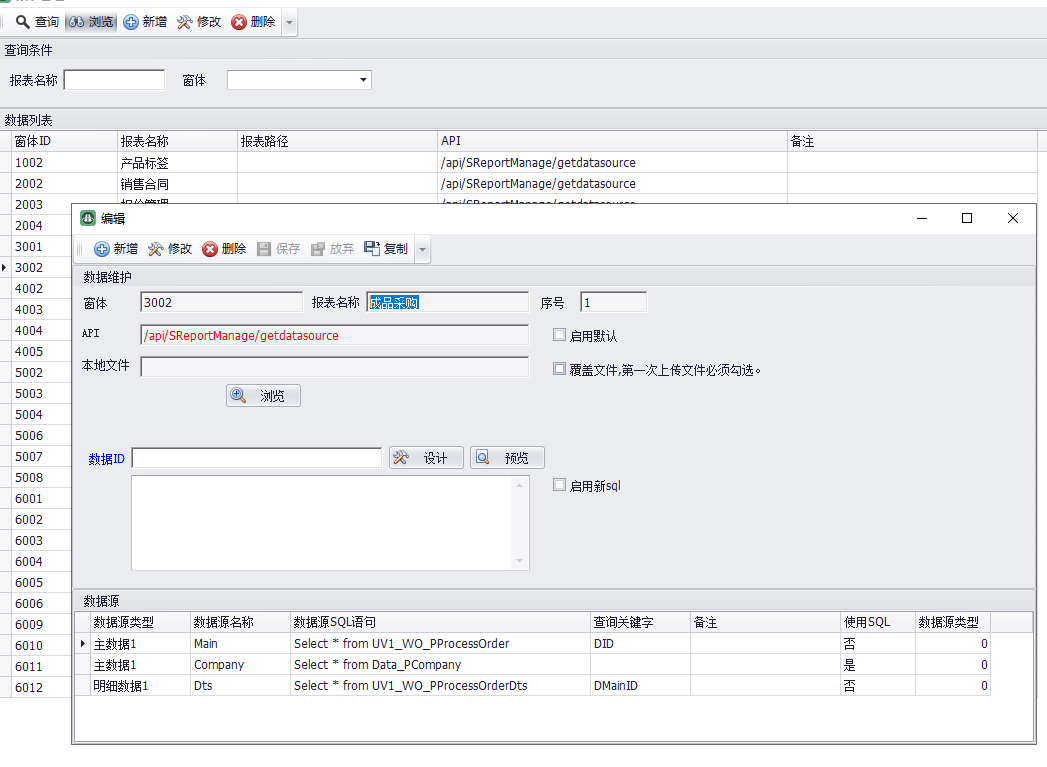
如上图所示,这里做了一个打印模板与数据源的管理。在这里可以指定具体页面要调什么后端接口,打印什么数据,打印格式设计。全部WinForm实现。将数据源与打印格式模板存储到数据库。后端直接调取即可。
优点:1.与之前WinForm版无缝对接,开发人员不用学习即可使用。
2.做到数据源与打印格式集中化管理,而且可以根据客户需求,实施人员自己调整添加打印格式,不需要开发程序。
3.数据源多样化,可以根据特殊需求,自己拼接sql,也可以直接查询数据库表。满足客户多样化,个性化需求。
4.可以根据具体单据ID,调试打印格式。
缺点:WinForm 没有做成网络版,此设计器只能在服务器端(内网)使用。(本来设计就是要服务器设计,下面的人员用不到,缺点还可以接受
)
以下是部分代码
       /// <summary>

         /// 绑定数据明细

         /// </summary>

         public void BindGridDts()

         {

             SReportManageDtsRule rule = new SReportManageDtsRule();

             DataTable dtDts = rule.RShow(" AND DMainID=" + SysString.ToDBString(HTDataID) + " ORDER BY DSeq", ProcessGrid.GetQueryField(gridView1));

             gridView1.GridControl.DataSource = dtDts;

             gridView1.GridControl.Show();

         }

         /// <summary>

         /// 新增

         /// </summary>

         public string EntityAdd()

         {

             SReportManageRule rule = new SReportManageRule();

             SReportManage entity = EntityGet();

             SReportManageDts[] entitydts = EntityDtsGet();

             SReportFile entityFile = new SReportFile();

             if (chkMB.Checked)

             {

                 entityFile.DContext = HttSoft.WinUIBase.FastReportX.ConvertToBinaryByPath(txtFilePath.Text.Trim());

                 entityFile.DFileName = entity.DFileName;

             }

             rule.RAdd(entity, entitydts, entityFile);

             return entity.DID;

         }

         /// <summary>

         /// 修改

         /// </summary>

         public void EntityUpdate()

         {

             SReportManageRule rule = new SReportManageRule();

             SReportManage entity = EntityGet();

             SReportManageDts[] entitydts = EntityDtsGet();

             SReportFile entityFile = new SReportFile();

             if (chkMB.Checked)

             {

                 entityFile.DID = entity.DFileID;

                 entityFile.SelectByID();

                 entityFile.DContext = HttSoft.WinUIBase.FastReportX.ConvertToBinaryByPath(txtFilePath.Text.Trim());

                 entityFile.DFileName = entity.DFileName;

             }

             rule.RUpdate(entity, entitydts, entityFile);

         }

         /// <summary>

         /// 设置

         /// </summary>

         public void EntitySet()

         {

             SReportManage entity = new SReportManage();

             entity.DID = HTDataID;

             bool findFlag = entity.SelectByID();

             drpForm.Text = SysConvert.ToString(entity.DMenuID);

             txtReportName.Text = entity.DReportName.ToString();

             txtDSeq.Text = entity.DSeq.ToString();

             txtAPI.Text = entity.DWebApi.ToString();

             BindGridDts();

         }

         /// <summary>

         /// 删除

         /// </summary>

         public void EntityDelete()

         {

             SReportManageRule rule = new SReportManageRule();

             SReportManage entity = EntityGet();

             rule.RDelete(entity);

         }

         #region 自定义方法

         /// <summary>

         /// 获得实体

         /// </summary>

         /// <returns></returns>

         private SReportManage EntityGet()

         {

             SReportManage entity = new SReportManage();

             entity.DID = HTDataID;

             entity.SelectByID();

             entity.DMenuID = SysConvert.ToString(drpForm.Text.Trim());

             entity.DReportName = txtReportName.Text.Trim();

             entity.DSeq = SysConvert.ToInt32(txtDSeq.Text.Trim());

             entity.DWebApi = txtAPI.Text.Trim();

             entity.DFileName = txtReportName.Text.Trim() + ".frx";

             return entity;

         }

         /// <summary>

         /// 获得实体

         /// </summary>

         /// <returns></returns>

         private SReportManageDts[] EntityDtsGet()

         {

             int index = ;

             for (int i = ; i < gridView1.RowCount; i++)

             {

                 if (SysConvert.ToString(gridView1.GetRowCellValue(i, "SqlName")) != "")

                 {

                     index++;

                 }

             }

             SReportManageDts[] entitydts = new SReportManageDts[index];

             index = ;

             for (int i = ; i < gridView1.RowCount; i++)

             {

                 if (SysConvert.ToString(gridView1.GetRowCellValue(i, "SqlName")) != "")

                 {

                     entitydts[index] = new SReportManageDts();

                     entitydts[index].DMainID = SysConvert.ToString(gridView1.GetRowCellValue(i, "DMainID"));

                     if (entitydts[index].DMainID == HTDataID && HTDataID != "")//已存在表示修改

                     {

                         entitydts[index].DID = SysConvert.ToString(gridView1.GetRowCellValue(i, "DID"));

                         entitydts[index].SelectByID();

                     }

                     else//新增

                     {

                         entitydts[index].DMainID = HTDataID;

                         entitydts[index].DSeq = i + ;

                     }

                     entitydts[index].DMainID = SysConvert.ToString(gridView1.GetRowCellValue(i, "DMainID"));

                     entitydts[index].DSeq = SysConvert.ToInt32(gridView1.GetRowCellValue(i, "DSeq"));

                     entitydts[index].DataSourceName = SysConvert.ToString(gridView1.GetRowCellValue(i, "DataSourceName"));

                     entitydts[index].SqlName = SysConvert.ToString(gridView1.GetRowCellValue(i, "SqlName"));

                     entitydts[index].SqlStr = SysConvert.ToString(gridView1.GetRowCellValue(i, "SqlStr"));

                     entitydts[index].QueryName = SysConvert.ToString(gridView1.GetRowCellValue(i, "QueryName"));

                     entitydts[index].SqlFlag = SysConvert.ToInt32(gridView1.GetRowCellValue(i, "SqlFlag"));

                     entitydts[index].SourceType = SysConvert.ToInt32(gridView1.GetRowCellValue(i, "SourceType"));

                     entitydts[index].Remark = SysConvert.ToString(gridView1.GetRowCellValue(i, "Remark"));

                     index++;

                 }

             }

             return entitydts;

         }

         #endregion

 //添加一个基础模板

         private void btnLook_Click(object sender, EventArgs e)

         {

             try

             {

                 if (HTFormStatus == FormStatus.新增 || HTFormStatus == FormStatus.修改)

                 {

                     openFileDialog1.FileName = "";

                     openFileDialog1.Filter = "(*.frx)|*.frx|(*.fr3)|*.fr3|(*.*)|*.*";

                     openFileDialog1.ShowDialog();

                     if (openFileDialog1.FileName != string.Empty)

                     {

                         txtFilePath.Text = openFileDialog1.FileName;

                     }

                 }

             }

             catch (Exception E)

             {

                 MessageBox.Show(E.Message);

             }

         }

 //窗体加载

         private void HSPrintEdit_Load(object sender, EventArgs e)

         {

             //Common.BindFormID(drpForm);

             Common.BindReportSource(drpReportSource, true);

         }

 //设计

         private void btnDesign_Click(object sender, EventArgs e)

         {

             try

             {

                 if (HTDataID == "")

                 {

                     MessageBox.Show("请先保存单据");

                     return;

                 }

                 SReportManage reportManage = new SReportManage();

                 reportManage.DID = HTDataID;

                 reportManage.SelectByID();

                 if (reportManage.DFileID == "")

                 {

                     MessageBox.Show("没有找到打印格式");

                     return;

                 }

                 if (!chksql.Checked)

                 {

                     if (SysConvert.ToString(txtDataID.Text.Trim()) == "")

                     {

                         MessageBox.Show("请输入数据源ID");

                         return;

                     }

                     FastReport.ReportRun(HTDataID, (int)ReportPrintType.设计, new string[] { "DID", "DMainID" }, new string[] { SysConvert.ToString(txtDataID.Text.Trim()), SysConvert.ToString(txtDataID.Text.Trim()) });

                 }

                 else

                 {

                     if (SysConvert.ToString(txtsql.Text.Trim()) == "")

                     {

                         MessageBox.Show("请输入数据源sql");

                         return;

                     }

                     DataTable dt = SysUtils.Fill(txtsql.Text.Trim());

                     FastReport.ReportRunTable(HTDataID, (int)ReportPrintType.设计, dt);

                 }

             }

             catch (Exception E)

             {

                 MessageBox.Show(E.Message);

             }

         }

 //预览

         private void btnPreview_Click(object sender, EventArgs e)

         {

             try

             {

                 if (HTDataID == "")

                 {

                     MessageBox.Show("请先保存单据");

                     return;

                 }

                 SReportManage reportManage = new SReportManage();

                 reportManage.DID = HTDataID;

                 reportManage.SelectByID();

                 if (reportManage.DFileID == "")

                 {

                     MessageBox.Show("没有找到打印格式");

                     return;

                 }

                 if (!chksql.Checked)

                 {

                     if (SysConvert.ToString(txtDataID.Text.Trim()) == "")

                     {

                         MessageBox.Show("请输入数据源ID");

                         return;

                     }

                     FastReport.ReportRun(HTDataID, (int)ReportPrintType.预览, new string[] { "DID", "DMainID" }, new string[] { SysConvert.ToString(txtDataID.Text.Trim()), SysConvert.ToString(txtDataID.Text.Trim()) });

                 }

                 else

                 {

                     if (SysConvert.ToString(txtsql.Text.Trim()) == "")

                     {

                         MessageBox.Show("请输入数据源");

                         return;

                     }

                     DataTable dt = SysUtils.Fill(txtsql.Text.Trim());

                     FastReport.ReportRunTable(HTDataID, (int)ReportPrintType.预览, dt);

                 }

             }

             catch (Exception E)

             {

                 MessageBox.Show(E.Message);

             }

         }
2.MVC端
为了将打印格式发布出去,这里特意做了一个mvc的程序,放在前端与后端之间,作为桥梁。
因为客户端只需要预览和打印,所以这里我只做了一个预览+打印的接口。设计在WinForm端处理,这里不需要。
以下是Preview的代码实现。
      public ActionResult Preview()

         {

             webReport = new WebReport();

             webReport.Width = Unit.Percentage();

             webReport.Height = Unit.Percentage();

             string DataID = Request.QueryString["id"];

             string ReportID = Request.QueryString["rid"];

             string token = Request.QueryString["token"];

             ReportModel model = new ReportModel();

             model.DataID = DataID;

             model.ReportID = ReportID;

             String token2 = "Bearer " + token;

             HttpClient client = new HttpClient();

             client.BaseAddress = _baseAddress;

             client.DefaultRequestHeaders.Accept.Add(new MediaTypeWithQualityHeaderValue("application/json"));

             client.DefaultRequestHeaders.Add("Authorization", "Bearer " + token);

             //获取模板文件地址,获取打印数据源webapi接口地址

             #region 获取模板文件地址,获取打印数据源webapi接口地址

             var jsonStr = JsonConvert.SerializeObject(model);

             HttpContent cont = new StringContent(jsonStr);

             cont.Headers.ContentType = new MediaTypeHeaderValue("application/json");

             var returnStr = "";

             HttpResponseMessage resp = client.PostAsync("/api/SReportManage/getdataurl", cont).Result;//post提交数据,

             if (resp.IsSuccessStatusCode)

             {

                 returnStr = resp.Content.ReadAsStringAsync().Result;

             }

             ReportResult dtos = JsonConvert.DeserializeObject<ReportResult>(returnStr);

             #endregion

             //获取打印数据源

             #region 获取打印数据源

             HttpClient client2 = new HttpClient();

             client2.BaseAddress = _baseAddress;

             client2.DefaultRequestHeaders.Accept.Add(new MediaTypeWithQualityHeaderValue("application/json"));

             client2.DefaultRequestHeaders.Add("Authorization", "Bearer " + token);

             var jsonStr2 = JsonConvert.SerializeObject(model);

             HttpContent cont2 = new StringContent(jsonStr2);

             cont2.Headers.ContentType = new MediaTypeHeaderValue("application/json");

             var returnStr2 = "";

             HttpResponseMessage resp2 = client2.PostAsync(dtos.Data.WebApi, cont2).Result;//post提交数据,

             if (resp2.IsSuccessStatusCode)

             {

                 returnStr2 = resp2.Content.ReadAsStringAsync().Result;

             }

             ReportSourceResult result = JsonConvert.DeserializeObject<ReportSourceResult>(returnStr2);

             if (result != null)

             {

                 for (int i = ; i < result.Data.Count; i++)

                 {

                     webReport.Report.RegisterData(result.Data[i].dtsource, result.Data[i].TBName);

                     webReport.Report.GetDataSource(result.Data[i].TBName).Enabled = true;

                 }

             }

             #endregion

             //webReport.Report.Load(dtos.Data.FileUrl + "Test.frx");

             webReport.Report.Load(ConfigurationManager.AppSettings["ReportFilePath"] + dtos.Data.FileUrl);

             webReport.ToolbarStyle = ToolbarStyle.Small;

             webReport.ToolbarIconsStyle = ToolbarIconsStyle.Blue;

             webReport.ToolbarBackgroundStyle = ToolbarBackgroundStyle.Custom;

             //webReport.PrintPdf();

             webReport.PreviewMode = true;//预览模式

             webReport.PrintInPdf = true;//在PDF打印

             //webReport.DesignerPath = "~/WebReportDesigner/index.html";

             //webReport.DesignerSavePath = "~/App_Data/DesignedReports";

             //webReport.DesignerSaveCallBack = "~/Report/SaveDesignedReport";

             webReport.ID = "DesignReport";

             ViewBag.WebReport = webReport;

             return View();

         }
其中以下几点是我做了特殊化的设置
webReport.ToolbarStyle = ToolbarStyle.Small; //将原先的图标变小(太大太难看了)
webReport.ToolbarIconsStyle = ToolbarIconsStyle.Blue;
webReport.ToolbarBackgroundStyle = ToolbarBackgroundStyle.Custom;
(下拉菜单的汉化还没有找到,需要研究一下。)
webReport.PreviewMode = true;//预览模式
webReport.PrintInPdf = true;//在PDF打印
这里就是对接前端的打印接口。前端只需要调取我发布的网址,并且把我需要的参数(数据ID,打印模板ID,token传送给我即可。)
3.后端
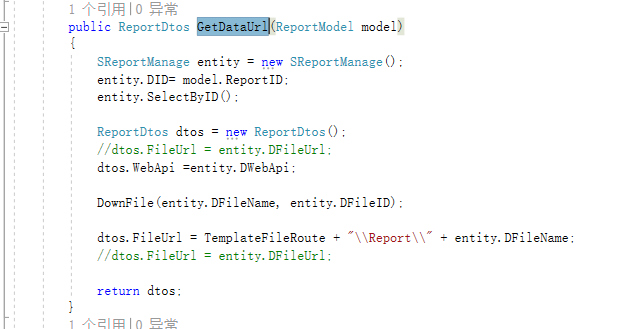
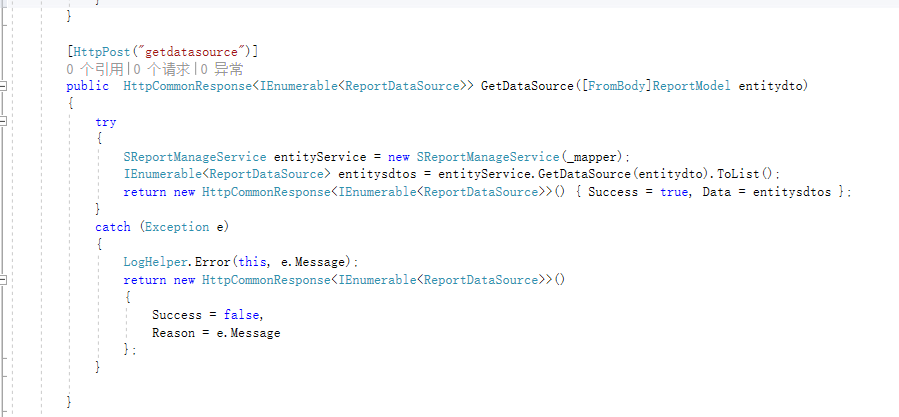
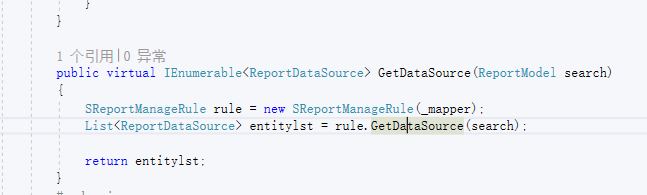
后端接口主要是实现根据MVC端传送过来的打印模板ID,将数据源和模板传送给MVC端。由MVC端进行拼接组装。
主要代码如下:
         public List<ReportDataSource> GetDataSource(ReportModel entitydto)

         {

             try

             {

                 List<ReportDataSource> lst = new List<ReportDataSource>();

                 IDBTransAccess sqlTrans = TransSysUtils.GetDBTransAccess();

                 try

                 {

                     sqlTrans.OpenTrans();

                     lst = this.GetDataSource(entitydto, sqlTrans);

                     sqlTrans.CommitTrans();

                     return lst;

                 }

                 catch (Exception TE)

                 {

                     sqlTrans.RollbackTrans();

                     throw TE;

                 }

             }

             catch (BaseException)

             {

                 throw;

             }

             catch (Exception E)

             {

                 throw new BaseException(E.Message);

             }

         }

         public List<ReportDataSource> GetDataSource(ReportModel entitydto, IDBTransAccess sqlTrans)

         {

             try

             {

                 List<ReportDataSource> lst = ReportRun(entitydto.ReportID, new string[] { "DID","DMainID" }, new string[] { entitydto.DataID,entitydto.DataID }, sqlTrans);

                 return lst;

             }

             catch (BaseException)

             {

                 throw;

             }

             catch (Exception E)

             {

                 throw new BaseException(E.Message);

             }

         }

         #endregion

         public List<ReportDataSource> ReportRun(string reportID, string[] queryName, string[] queryValue, IDBTransAccess sqlTrans)

         {

             List<ReportDataSource> lst = new List<ReportDataSource>();

             string sql = "Select * from Data_SReportManageDts where DMainID=" + SysString.ToDBString(reportID);

             DataTable dtSource = sqlTrans.Fill(sql);

             if (dtSource.Rows.Count > )

             {

                 foreach (DataRow dr in dtSource.Rows)

                 {

                     bool findSource = false;

                     string conditionStr = string.Empty;

                     if (SysConvert.ToInt32(dr["SqlFlag"]) == )

                     {

                         string[] tempA = dr["QueryName"].ToString().Split(' ');

                         for (int q = ; q < queryName.Length; q++)

                         {

                             for (int fi = ; fi < tempA.Length; fi++)

                             {

                                 if (queryName[q].ToString().ToUpper() == tempA[fi].ToUpper())

                                 {

                                     if (conditionStr != string.Empty)

                                     {

                                         conditionStr += " AND ";

                                     }

                                     conditionStr += queryName[q].ToString() + "=" + SysString.ToDBString(queryValue[q]);

                                     findSource = true;

                                     break;

                                 }

                             }

                         }

                     }

                     else

                     {

                         conditionStr = SysConvert.ToString(dr["QueryName"]).ToUpper();

                         for (int i = ; i < queryName.Length; i++)

                         {

                             string queryStr = "{" + queryName[i].ToUpper() + "}";

                             conditionStr = conditionStr.Replace(queryStr, SysString.ToDBString(queryValue[i]));

                         }

                         if (conditionStr.Contains("{") || conditionStr.Contains("}"))

                         {

                             findSource = false;

                         }

                         else

                         {

                             findSource = true;

                         }

                     }

                     if (findSource)

                     {

                         if (SysConvert.ToInt32(dr["SqlFlag"]) == )

                         {

                             sql = "select * from (" + dr["SqlStr"].ToString() + ") a where " + conditionStr;

                         }

                         else

                         {

                             sql = dr["SqlStr"].ToString() + " " + conditionStr;

                         }

                         DataTable dt = sqlTrans.Fill(sql);

                         ReportDataSource source = new ReportDataSource();

                         source.dtsource = dt;

                         source.TBName = dr["SqlName"].ToString();

                         lst.Add(source);

                     }

                     else

                     {

                         if (dr["SqlStr"].ToString() != string.Empty)

                         {

                             sql = dr["SqlStr"].ToString();

                             DataTable dt = sqlTrans.Fill(sql);

                             ReportDataSource source = new ReportDataSource();

                             source.dtsource = dt;

                             source.TBName = dr["SqlName"].ToString();

                             lst.Add(source);

                         }

                     }

                 }

             }

             return lst;

         }
FastReport 交流群
群 号:554714044
B/S FastReprot使用的更多相关文章
- FastReport调用Delphi中的自定义函数(人民币大写金额)mtm
1. 在 FormCreate 中向FastReprot添加函数 (fPrint)窗口 procedure TfPrint.FormCreate(Sender: TObject); frxReport ...
随机推荐
- swift textfiled 输入完毕 return 隐藏键盘 方法
学习swift 真是件头疼的事情 会的人少,又没有OC基础,所以 且学切珍惜吧. 在做登录的时候发现textfiled 自动调用键盘后不能隐藏?头疼 ~~~~询问了好多人 终于有人自写解答 为了方便后 ...
- SpringMVC学习笔记:单例与并发问题
Spring中的Bean默认都是单例(singleton),Spring中Bean的scope属性有五种类型: singleton 表示在spring容器中的单例,通过spring容器获得该bean时 ...
- c++四舍五入的新方法
将原来的数加上0.5,如果是需要进位的加上0.5就进位了,如果不需要进位的加上0.5也小于1,被int型省略掉.
- Linux服务器上新增开放端口号
开放端口的方法: 方法一:命令行方式 1. 开放端口命令: /sbin/iptables -I INPUT -p tcp --dport 8080 -j ACCEPT ...
- 2018.11.01 NOIP训练 树的排列(树形dp)
传送门 跟这道题差不多. 只不过是让权值小的儿子做权值大的儿子的父亲而已. 代码
- css扩大超链接的点击范围
给a标签设置display:block后,它会根据盒模型计算a标签的实际大小.这时候,你可以使用hover伪类使a的整个盒模型生效..link a{display:block;padding:2px ...
- myBatis中if test 字符串注意事项
错误写法: <if test="userName == 'boshen'"> AND `USER_NAME` = #{userName} </if> 正确写 ...
- CDATASection类型——数据采集
CDATASection类型只针对基于XML的文档,表示的是CDATA区域 CDATASection类型和comment类型都是继承自基于Text类型,除了splitText()之外的所有字符串方法 ...
- jquery实现图片上传前本地预览功能
HTML <img id="pic" src="" > <input id="upload" name="fil ...
- vue+大文件分片上传
最近公司在使用vue做工程项目,实现大文件分片上传. 网上找了一天,发现网上很多代码都存在很多问题,最后终于找到了一个符合要求的项目. 工程如下: 对项目的大文件上传功能做出分析,怎么实现大文件分片上 ...