
实现Hibernate框架的CRUD
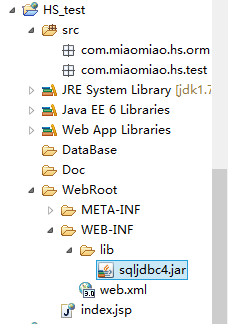
1.创建Web项目HS_test如图所示:
2.创建数据库DBHSTest,在数据库中创建表Teacher,并插入数据

3.在Myeclipse中调出DB Brower视图
右键->New:
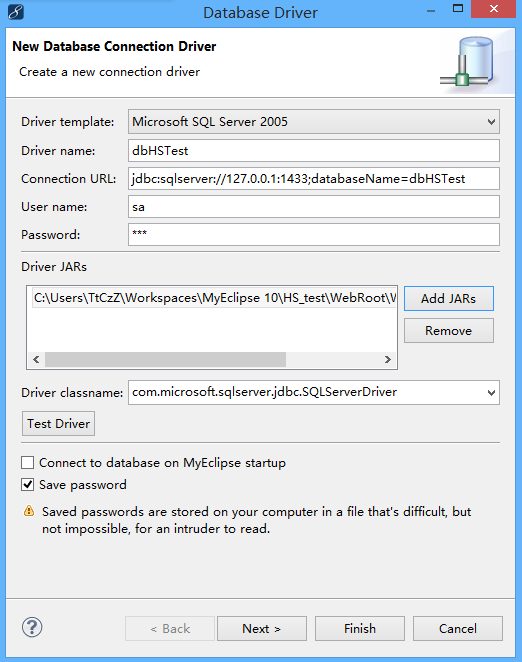
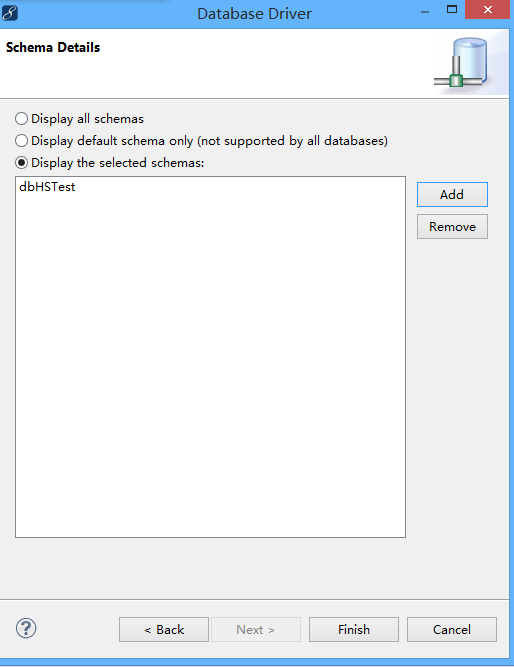
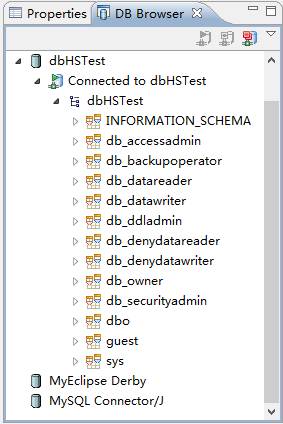
连接后如图所示:
4.导入Hibernate
右击项目->myeclipse->Add Hibernate Capabilities:
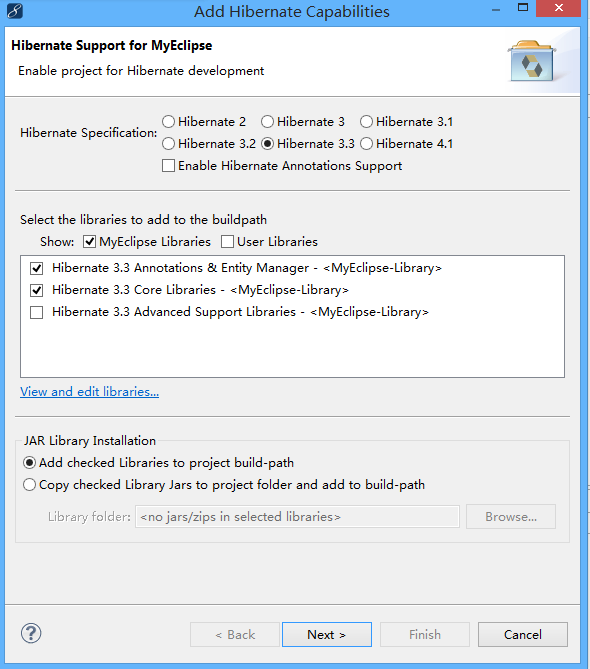
选择Hibernate3.3 点击Next:

默认设置,在src文件夹下创建hibernate.cfg.xml文件,点击Next:
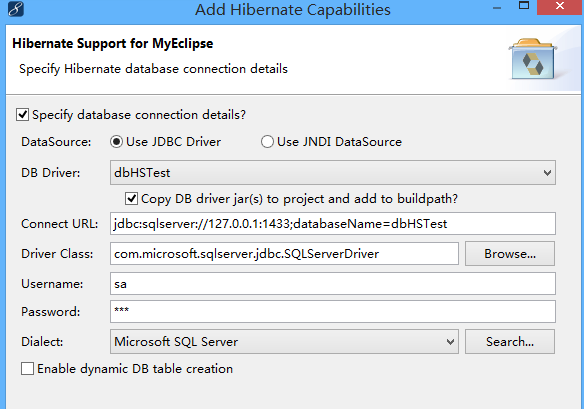
选择之前新建的DB Driver:DBHSTest,配置自动显示出来,点击Next:

将 HibernateSessionFactory类建立在com.miaomiao.hs.test包下,点击Finish,完成导入。
查看hibernate.cfg.xml文件:
<?xml version='1.0' encoding='UTF-8'?>

<!DOCTYPE hibernate-configuration PUBLIC

          "-//Hibernate/Hibernate Configuration DTD 3.0//EN"

          "http://hibernate.sourceforge.net/hibernate-configuration-3.0.dtd">

<!-- Generated by MyEclipse Hibernate Tools.                   -->

<hibernate-configuration>

    <session-factory>

        <property name="dialect">org.hibernate.dialect.SQLServerDialect</property>

        <property name="connection.url">jdbc:sqlserver://127.0.0.1:1433;databaseName=dbHSTest</property>

        <property name="connection.username">sa</property>

        <property name="connection.password">123</property>

        <property name="connection.driver_class">com.microsoft.sqlserver.jdbc.SQLServerDriver</property>

        <property name="myeclipse.connection.profile">dbHSTest</property>

    </session-factory>

</hibernate-configuration>
5.创建ORM映射 反向工程
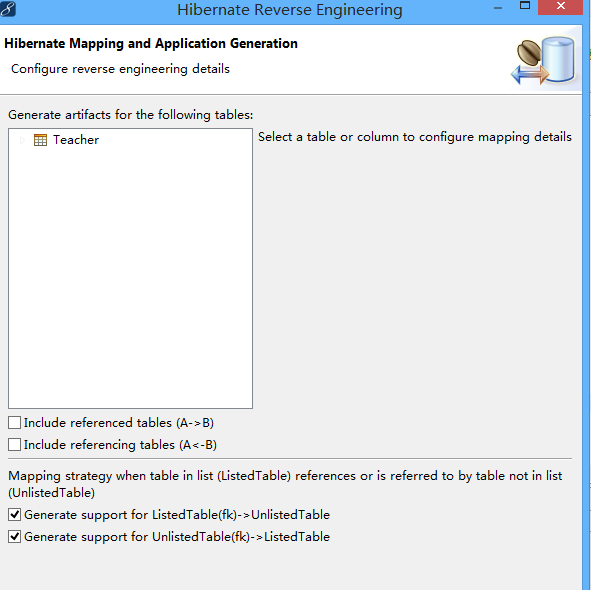
(1)选择DB Brower 下的dbHSTest ->...->dbo->table->Teacher,右键,选择Hibernate ReverseEngineering:
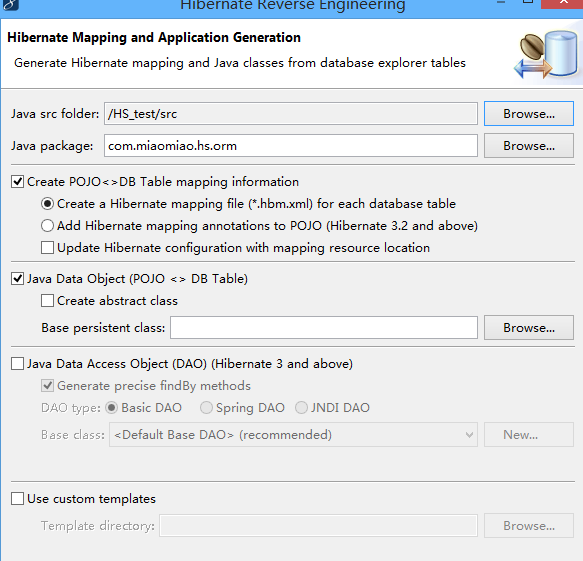
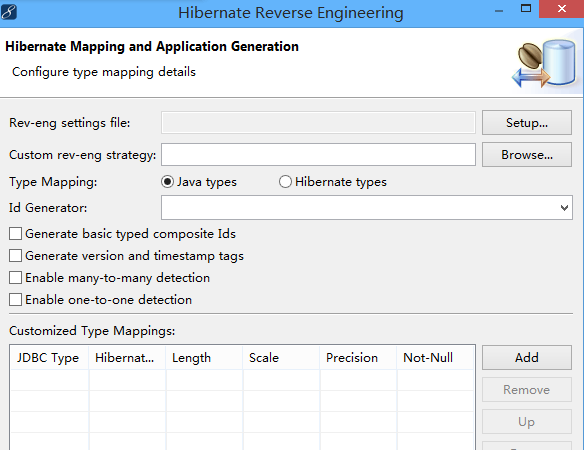
如图选择,点击Next,全部默认设置
创建完成后,生成如图Java文件和xml文件:
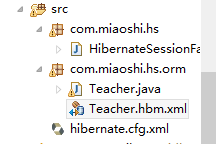
Teacher.hbm.xml文件内容
<?xml version="1.0" encoding="utf-8"?>

<!DOCTYPE hibernate-mapping PUBLIC "-//Hibernate/Hibernate Mapping DTD 3.0//EN"

"http://hibernate.sourceforge.net/hibernate-mapping-3.0.dtd">

<!--

    Mapping file autogenerated by MyEclipse Persistence Tools

-->

<hibernate-mapping>

    <class name="com.miaoshi.hs.orm.Teacher" table="Teacher" schema="dbo" catalog="dbHSTest">

        <id name="id" type="java.lang.String">

            <column name="ID" length="10" />

            <generator class="assigned" />

        </id>

        <property name="name" type="java.lang.String">

            <column name="Name" length="20" not-null="true" />

        </property>

    </class>

</hibernate-mapping>
Teacher.java文件内容:
package com.miaoshi.hs.orm;

/**

 * Teacher entity. @author MyEclipse Persistence Tools

 */

public class Teacher implements java.io.Serializable {

    // Fields

    private String id;

    private String name;

    // Constructors

    /** default constructor */

    public Teacher() {

    }

    /** full constructor */

    public Teacher(String id, String name) {

        this.id = id;

        this.name = name;

    }

    // Property accessors

    public String getId() {

        return this.id;

    }

    public void setId(String id) {

        this.id = id;

    }

    public String getName() {

        return this.name;

    }

    public void setName(String name) {

        this.name = name;

    }

}
6.实现对数据库的增删改查
(1)显示教师信息
<%@ page language="java" import="java.util.*" pageEncoding="UTF-8"%>

<%@page import="com.miaoshi.hs.orm.Teacher"%>

<%@page import="com.miaoshi.hs.HibernateSessionFactory"%>

<%@page import="org.hibernate.Session"%>

<%@page import="org.hibernate.Query"%>

<%

String path = request.getContextPath();

String basePath = request.getScheme()+"://"+request.getServerName()+":"+request.getServerPort()+path+"/";

%>

<!DOCTYPE HTML PUBLIC "-//W3C//DTD HTML 4.01 Transitional//EN">

<html>

  <head>

    <base href="<%=basePath%>">

    <title>My JSP 'TeacherList.jsp' starting page</title>

    <meta http-equiv="pragma" content="no-cache">

    <meta http-equiv="cache-control" content="no-cache">

    <meta http-equiv="expires" content="0">

    <meta http-equiv="keywords" content="keyword1,keyword2,keyword3">

    <meta http-equiv="description" content="This is my page">

    <!--

    <link rel="stylesheet" type="text/css" href="styles.css">

    -->

  </head>

  <body>

    <%

        Session ss = HibernateSessionFactory.getSession();

        ss.beginTransaction();

        Query query = ss.createQuery("from Teacher");

        List<Teacher> teachers = query.list();

        ss.getTransaction().commit();

        ss.close();

     %>

     <center>

    教师列表<br><br>

    <a href="TeacherAdd.html">添加</a>

        <table border="1" cellspacing="0" cellpadding="4">

            <tr>

                <th>工号</th>

                <th>姓名</th>

                <th>操作</th>

            </tr>

            <% for(int i = 0;i<teachers.size();i++){ %>

            <tr>

                <td><%=teachers.get(i).getId() %></td>

                <td><%=teachers.get(i).getName() %></td>

                <td><a href="StudentEdit.jsp?ID=<%=teachers.get(i).getId()%>">编辑</a>

                <a href="servlet/StudentDelete.do?ID=<%=teachers.get(i).getId()%>">删除</a></td>

            </tr>

            <%} %>

        </table>

    </center>

  </body>

</html>
(2)增加教师信息
TeacherAdd.html
<!DOCTYPE html>

<html>

  <head>

    <title>TeacherAdd.html</title>

    <meta http-equiv="keywords" content="keyword1,keyword2,keyword3">

    <meta http-equiv="description" content="this is my page">

    <meta http-equiv="content-type" content="text/html; charset=UTF-8">

    <!--<link rel="stylesheet" type="text/css" href="./styles.css">-->

  </head>

  <body>

    <form id="form1" name="form1" method="post"

        action="/servlet/TeacherAdd">

        <center>

            添加教师信息<br> <br> 工号<input type="text" id="ID" name="ID"><br>

            <br> 姓名<input type="text" id="Name" name="Name"><br>

            <br> <input type="submit" value="确定">

        </center>

    </form>

  </body>

</html>
创建TeacherAdd的Servlet
package com.miaoshi.hs;

import java.io.IOException;

import java.io.PrintWriter;

import javax.servlet.ServletException;

import javax.servlet.http.HttpServlet;

import javax.servlet.http.HttpServletRequest;

import javax.servlet.http.HttpServletResponse;

import org.hibernate.Session;

import com.miaoshi.hs.HibernateSessionFactory;

import com.miaoshi.hs.orm.Teacher;

public class TeacherAdd extends HttpServlet {

    /**

     * The doGet method of the servlet. <br>

     *

     * This method is called when a form has its tag value method equals to get.

     *

     * @param request the request send by the client to the server

     * @param response the response send by the server to the client

     * @throws ServletException if an error occurred

     * @throws IOException if an error occurred

     */

    public void doGet(HttpServletRequest request, HttpServletResponse response)

            throws ServletException, IOException {

        response.setContentType("text/html");

        PrintWriter out = response.getWriter();

        out.println("<!DOCTYPE HTML PUBLIC \"-//W3C//DTD HTML 4.01 Transitional//EN\">");

        out.println("<HTML>");

        out.println("  <HEAD><TITLE>A Servlet</TITLE></HEAD>");

        out.println("  <BODY>");

        out.print("    This is ");

        out.print(this.getClass());

        out.println(", using the GET method");

        out.println("  </BODY>");

        out.println("</HTML>");

        out.flush();

        out.close();

    }

    /**

     * The doPost method of the servlet. <br>

     *

     * This method is called when a form has its tag value method equals to post.

     *

     * @param request the request send by the client to the server

     * @param response the response send by the server to the client

     * @throws ServletException if an error occurred

     * @throws IOException if an error occurred

     */

    public void doPost(HttpServletRequest request, HttpServletResponse response)

            throws ServletException, IOException {

        request.setCharacterEncoding("UTF-8");

        String strID = "";

        String strName = "";

        strID = request.getParameter("ID");

        strName = request.getParameter("Name");

        Session session =  HibernateSessionFactory.getSession();

        try{

            session.beginTransaction();

            Teacher student = new Teacher();

            student.setId(strID);

            student.setName(strName);

            session.save(student);

            session.getTransaction().commit();

            session.close();

            response.sendRedirect("../TeacherList.jsp");

        }

        catch(Exception e){

            session.clear();

            response.setContentType("text/html");

            PrintWriter out = response.getWriter();

            out.println("<!DOCTYPE HTML PUBLIC \"-//W3C//DTD HTML 4.01 Transitional//EN\">");

            out.println("<HTML>");

            out.println("  <HEAD><TITLE>Add fail</TITLE></HEAD>");

            out.println("  <BODY>");

            out.print("    add fail! ");

            out.println("  <a href='../TeacherList.jsp'>return</a>");

            out.println(e.getMessage());

            //out.print(this.getClass());

            out.println("  </BODY>");

            out.println("</HTML>");

            out.flush();

            out.close();

        }

    }

}
未完待续。。。
实现Hibernate框架的CRUD的更多相关文章
- 为什么要用Hibernate框架? 把SessionFactory,Session,Transcational封装成包含crud的工具类并且处理了事务,那不是用不着spring了?
既然用Hibernate框架访问管理持久层,那为何又提到用Spring来管理以及整合Hibernate呢?把SessionFactory,Session,Transcational封装成包含crud的 ...
- Hibernate框架—简介
ORM对象/关系数据库映射 ORM全称Object/Relation Mapping,对象/关系数据库映射,可以理解成一种规范.该框架的基本特征:完成面向对象的编程语言到关系数据库之间的映射. ORM ...
- Hibernate框架--配置,映射,主键
SSH框架: Struts框架, 基于mvc模式的应用层框架技术! Hibernate, 基于持久层的框架(数据访问层使用)! Spring, 创建对象处理对象的依赖关系以及框架整合! Da ...
- Hibernate框架笔记01_环境搭建_API_CRUD
目录 1. Hibernate框架的概述 1.1 什么是框架 1.2 经典三层架构 1.3 Hibernate框架 2 Hibernate入门 2.1 下载Hibernate的开发包 2.2 创建项目 ...
- JPA、Hibernate框架、通用mapper
JPA是描述对象-关系表的映射关系,将运行期实体对象持久化到数据库中,提出以面向对象方式操作数据库的思想. Hibernate框架核心思想是ORM-实现自动的关系映射.缺点:由于关联操作提出Hql语法 ...
- JPA、Hibernate框架、通用mapper之间的关系及通用mapper的具体实现
JPA是描述对象-关系表的映射关系,将运行期实体对象持久化到数据库中,提出以面向对象方式操作数据库的思想. Hibernate框架核心思想是ORM-实现自动的关系映射.缺点:由于关联操作提出Hql语法 ...
- Hibernate框架第一天
**框架和CRM项目的整体介绍** 1. 什么是CRM * CRM(Customer Relationship Management)客户关系管理,是利用相应的信息技术以及互联网技术来协调企业与顾客间 ...
- Hibernate框架学习笔记
Hibernate 是一个 JDO( Java Data Objects)工具.它的工作原理是通过文件把值对象(Java对象)和 数据库表之间建立起一个映射关系,还提供数据查询和获取数据的方法. ...
- Hibernate框架基础
Hibernate框架基础 Hibernate框架 ORM概念 O, Object 对象 R, Realtion 关系 (关系型数据库: MySQL, Oracle…) M,Mapping 映射 OR ...
随机推荐
- es查询时报 Data too large
报错如下: 原因: https://www.cnblogs.com/jiu0821/p/6526930.html 参数 indices.fielddata.cache.size 控制有多少堆内存是分配 ...
- CHAR 和VARCHAR的区别
CHAR(10)是不可变长度为10的字符串,占的存储空间始终为10个字符的长度,而VARCHAR(10)是可变长度的字符串,故而可以节省空间.例如:储存"aaaaabbbbb",则 ...
- 整合mybaties 逆向生成 pojo mapper.xml
第一步:配置properties 第二步:放入generatorConfig.xml文件 在总目录下 这个是生成工具 第三步:放入工具类,自动生成用的, pom里面要加入6个依赖 第四步:运行u ...
- github学习心得。哈哈,今天上传了自己的项目!
使用github托管代码 仓库(Repository) 用来存放项目代码,每个项目对应一个仓库.如果有多个项目了就需要多个仓库 收藏(star) 仓库主页star按钮,意思为收藏项目的人数 复制克隆项 ...
- mysql 5.7.3.0-m13安装教程
安装mysql百度经验地址:(默认安装,除了选择不更新和选择保存路径,其它基本是下一步下一步) http://jingyan.baidu.com/article/7e440953d6f0702fc1e ...
- InvalidArgumentError (see above for traceback): Assign requires shapes of both tensors to match. lhs shape= [2048,38] rhs shape= [2048,2]
做tensorflow object detection 中,清空下checkpoint就可以啦
- SSM综合练习
CRM系统 CRM项目外观 1. 开发环境 IDE: Eclipse Neon Release (4.6.0) Jdk: 1.8 数据库: MySQL 2. 创建数据库 创建crm数据库,这里使用的是 ...
- linux配置虚拟域名
linux环境下面配置虚拟主机域名 第一步:在root目录下面(即根目录)ls(查看文件)cd进入etc目录find hosts文件vi hosts 打开hosts文件并进行编辑在打开的文件最下面添加 ...
- java spring bean的什么周期
http://www.cnblogs.com/TIMHY/p/7794973.html
- 微信小程序开发攻略
首先,需要明确的一点是,小程序开发就是前端开发的一个小分支. 其次,小程序开发框架是一个精简版的React ,并且开发比较简单 . 第一步 获取AppId 小程序注册入口http://https:// ...