
Spring Boot -05- 多模块结构项目构建与测试(详细图文教程)IDEA 版
Spring Boot -05- 多模块结构项目构建与测试(详细图文教程)IDEA 版
百度很多博客都不详细,弄了半天才把 Spring Boot 多模块项目构建开发整的差不多,特地重新创建配置,记录一下,也分享给有需要的人
本篇也会非常详细的介绍涉及的基础知识点,更多都写在注释上了
先放成功截图:
(1)项目结构:

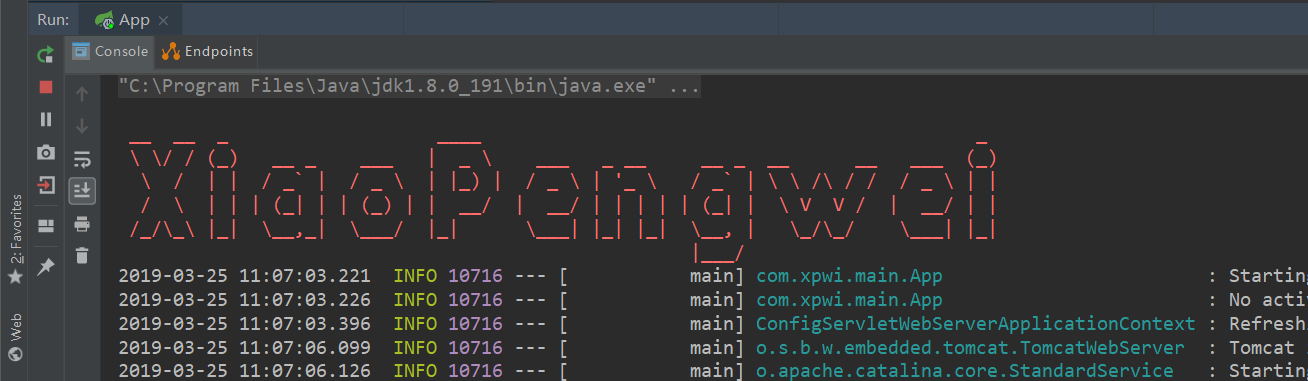
(2)启动:
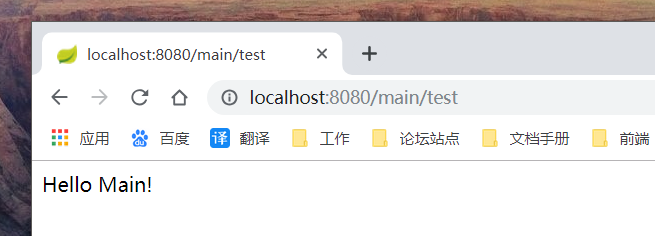
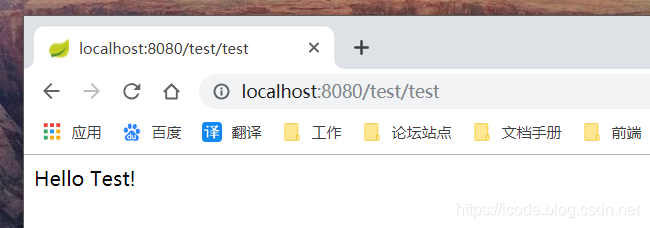
(3)测试主子模块:
(4)测试子模块依赖:

第一步:创建父模块,子模块
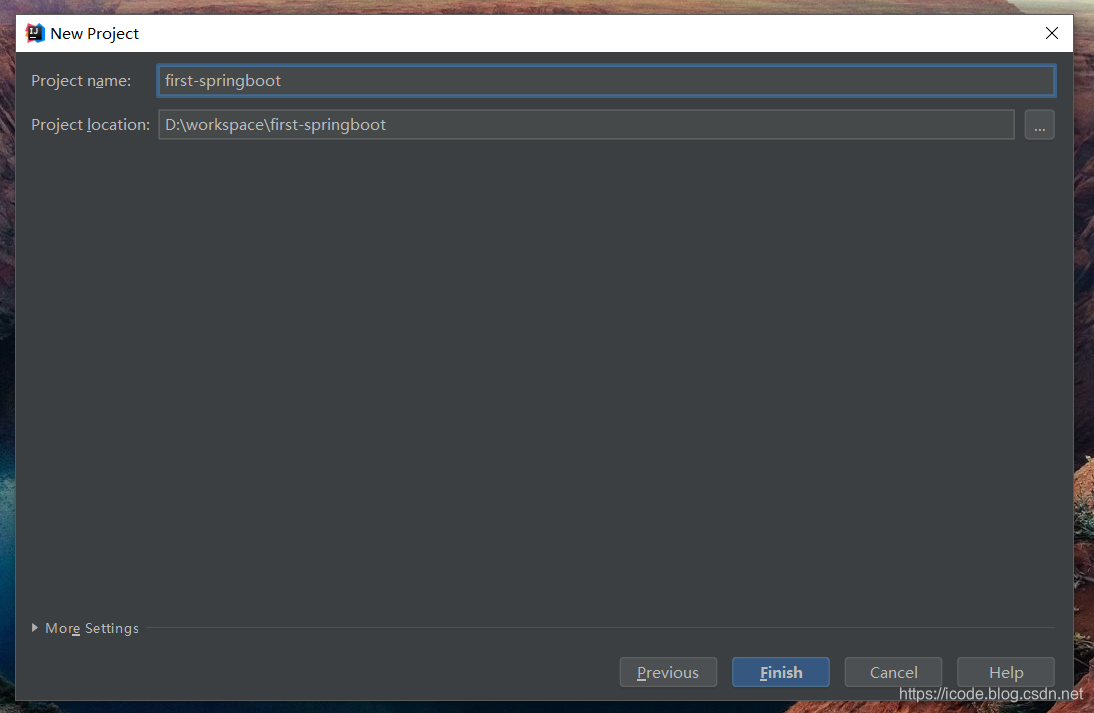
(1)打开创建项目窗口,点击 Create New Project
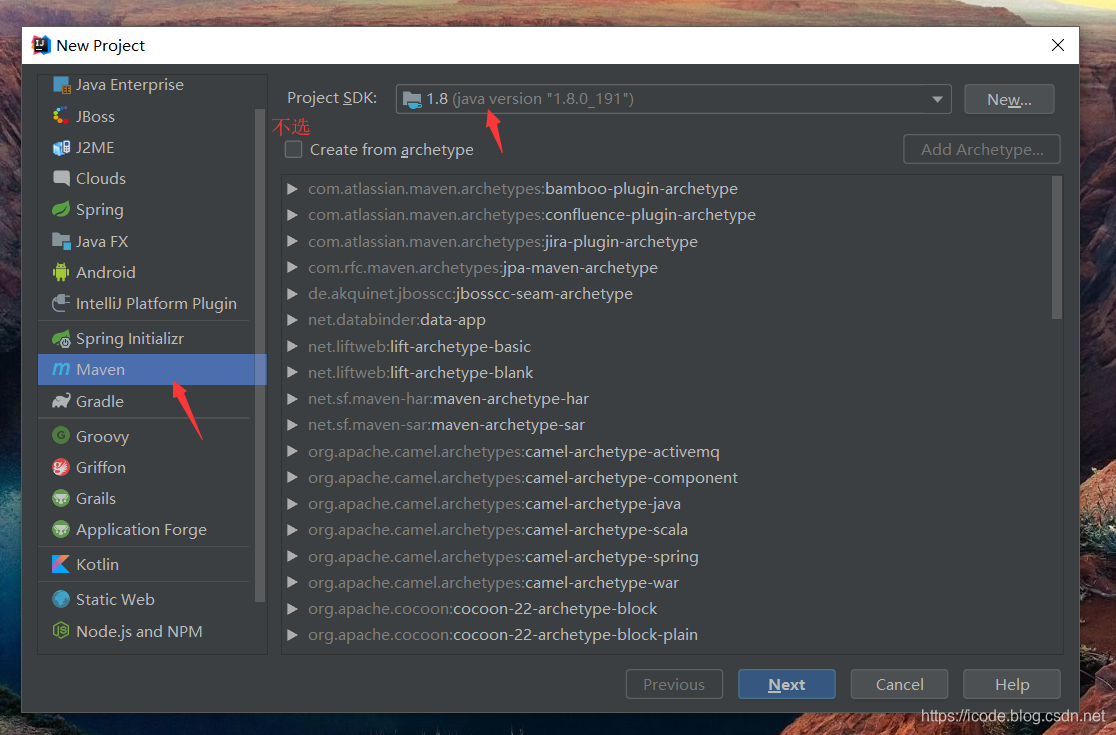
(2)填写
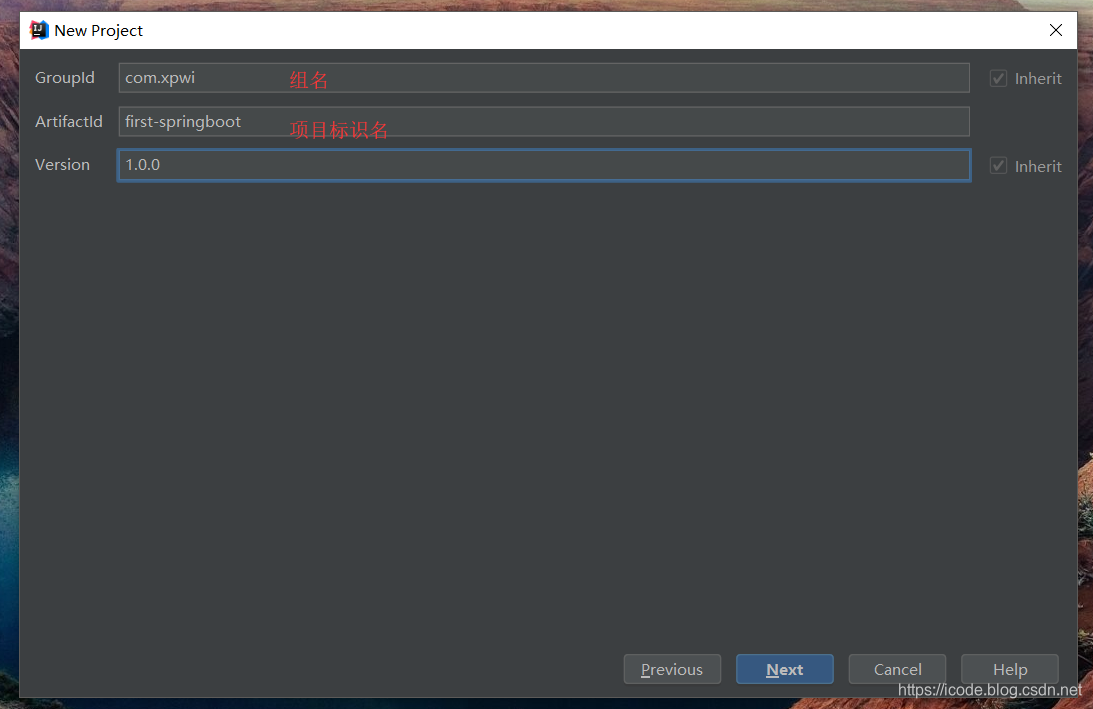
(3)填写
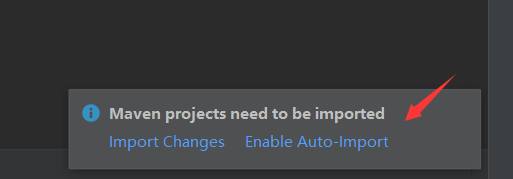
(4)Maven 自动导入
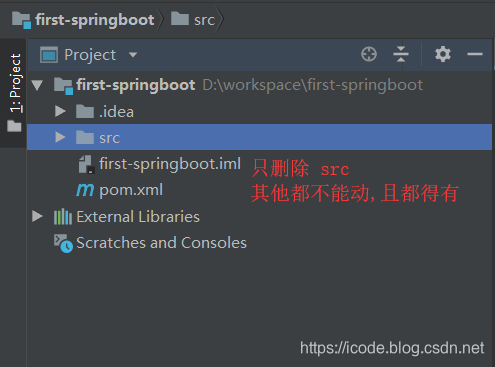
(5)没有 iml 文件,请重新创建,请看截图:
(6)在父项目上,右键新建模块

(7)这里用 xpwi-main
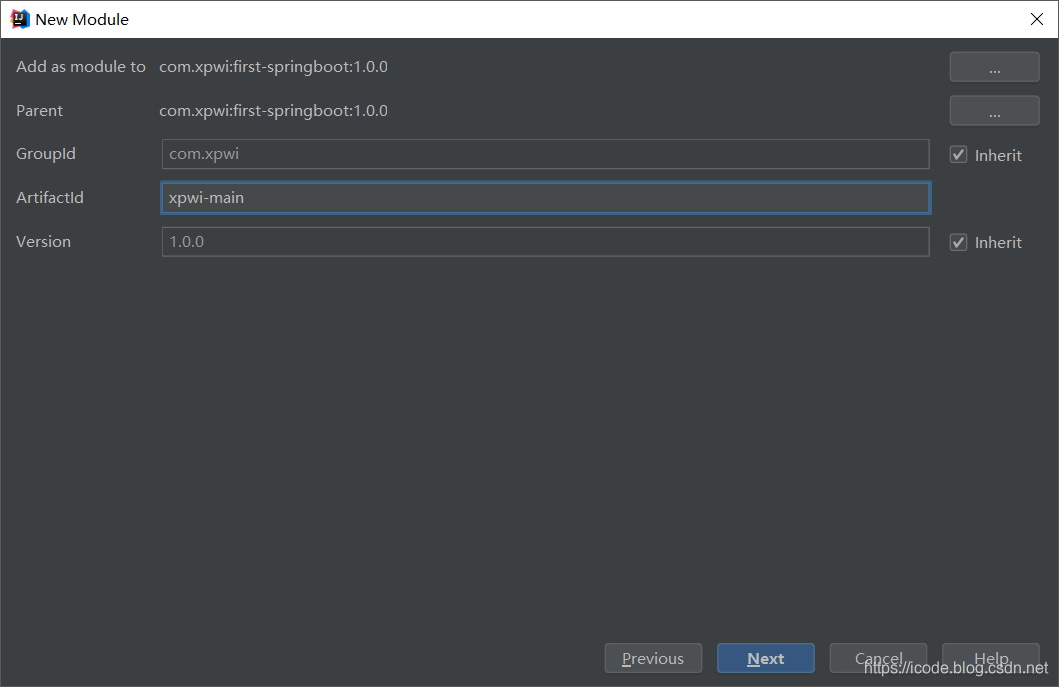
(8)填写
(提示:这个名字建议个上面的一致,不然项目名和文件夹名不一致哈)
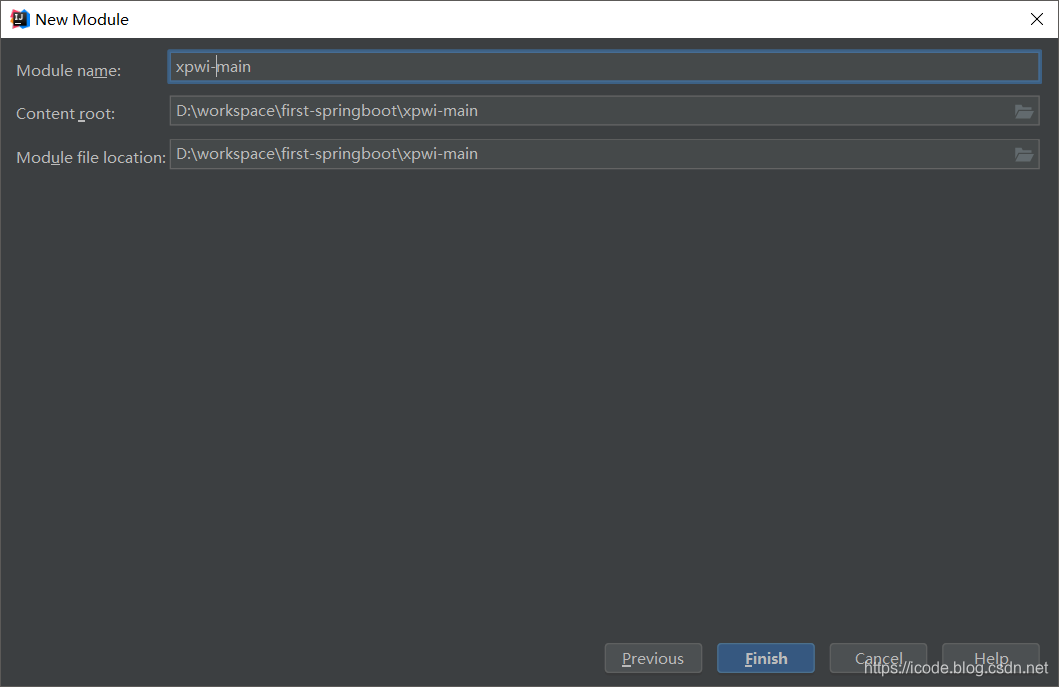
(9)依次类推,创建自己需要的子模块
(10)然后去创建包,示例:
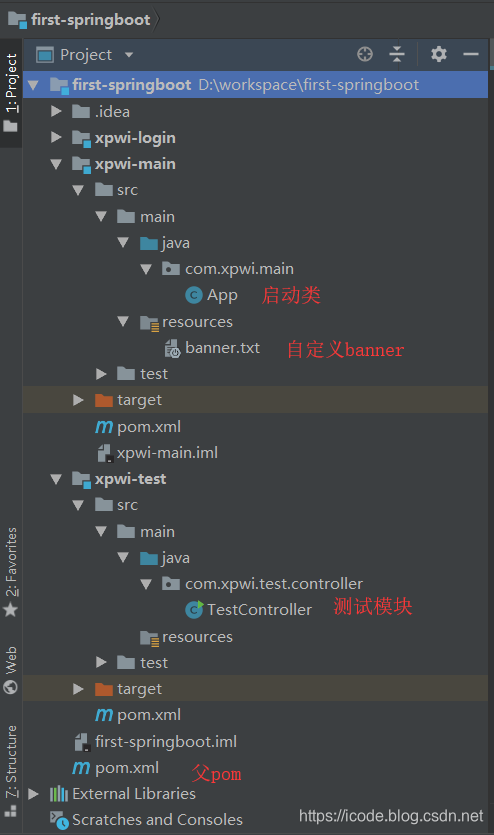
第二步:父 pom.xml 配置
请查看详细注释,根据自己的项目修改
注意:
- 子模块那个是不需要配置的,由创建时自动生成
- dependencyManagement 也在注释上讲解了
<?xml version="1.0" encoding="UTF-8"?>

<project xmlns="http://maven.apache.org/POM/4.0.0"

         xmlns:xsi="http://www.w3.org/2001/XMLSchema-instance"

         xsi:schemaLocation="http://maven.apache.org/POM/4.0.0 http://maven.apache.org/xsd/maven-4.0.0.xsd">

    <modelVersion>4.0.0</modelVersion>

    <!--基本信息-->

    <description>Spring Boot 多模块构建示例</description>

    <groupId>com.xpwi</groupId>

    <artifactId>first-springboot</artifactId>

    <!--父 pom 的 packing 必须为 pom,请核查-->

    <packaging>pom</packaging>

    <version>1.0.0</version>

    <!--指定整个项目的父项目-->

    <parent>

        <groupId>org.springframework.boot</groupId>

        <artifactId>spring-boot-starter-parent</artifactId>

        <version>2.0.5.RELEASE</version>

    </parent>

    <!--模块:这里声明多个子模块 -->

    <!--注意,这个不用手动自己去写,因为创建的时候是会自动生成的-->

    <modules>

        <module>xpwi-test</module>

        <module>xpwi-main</module>

        <module>xpwi-login</module>

    </modules>

    <!--属性变量配置-->

    <properties>

        <java.version>1.8</java.version>

    </properties>

    <!--加载依赖管理-->

    <!--注意:如果使用dependencyManagement,只是对版本进行管理,不会直接引入jar  -->

    <!--是为了在这里配置版本,为了让子模块pom或者本pom的直接dependencies不单独配置版本 -->

    <!--如果没有版本,会先到这里找版本号,以免版本冲突  -->

    <dependencyManagement>

        <dependencies>

            <dependency>

                <groupId>org.springframework.boot</groupId>

                <artifactId>spring-boot-starter-web</artifactId>

                <version>2.0.5.RELEASE</version>

            </dependency>

        </dependencies>

    </dependencyManagement>

    <!--公共模块加载,非公共模块请一般放在子pom进行加载-->

    <dependencies>

        <dependency>

            <groupId>org.springframework.boot</groupId>

            <artifactId>spring-boot-starter-web</artifactId>

        </dependency>

    </dependencies>

    <build>

        <plugins>

            <plugin>

                <!--插件-->

                <groupId>org.springframework.boot</groupId>

                <artifactId>spring-boot-maven-plugin</artifactId>

                <version>2.0.1.RELEASE</version>

                <executions>

                    <execution>

                        <goals>

                            <goal>repackage</goal>

                        </goals>

                    </execution>

                </executions>

            </plugin>

        </plugins>

    </build>

</project>
第三步:子 pom.xml 配置
请查看详细注释,根据自己的项目修改
注意:
- 父模块依赖
- 子模块与子模块依赖
<?xml version="1.0" encoding="UTF-8"?>

<project xmlns="http://maven.apache.org/POM/4.0.0"

         xmlns:xsi="http://www.w3.org/2001/XMLSchema-instance"

         xsi:schemaLocation="http://maven.apache.org/POM/4.0.0 http://maven.apache.org/xsd/maven-4.0.0.xsd">

    <parent>

        <artifactId>first-springboot</artifactId>

        <groupId>com.xpwi</groupId>

        <version>1.0.0</version>

    </parent>

    <modelVersion>4.0.0</modelVersion>

    <artifactId>xpwi-main</artifactId>

    <dependencies>

        <!--这个已经移动到父 pom 了-->

        <!--<dependency>-->

        <!--<groupId>org.springframework.boot</groupId>-->

        <!--<artifactId>spring-boot-starter-web</artifactId>-->

        <!--</dependency>-->

        <!--现在是去加载自己创建的模块-->

        <!--就是加载子模块对子模块的依赖-->

        <dependency>

            <groupId>com.xpwi</groupId>

            <artifactId>xpwi-test</artifactId>

            <version>1.0.0</version>

        </dependency>

        <dependency>

            <groupId>com.xpwi</groupId>

            <artifactId>xpwi-login</artifactId>

            <version>1.0.0</version>

        </dependency>

    </dependencies>

</project>
第四步:创建启动类,本模块测试类
(1)创建两个文件
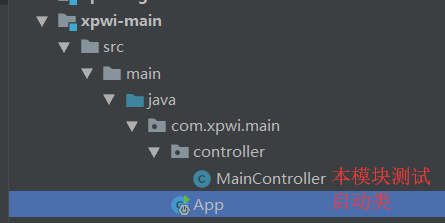
(2)启动类 App.java 源代码:
package com.xpwi.main;

import org.springframework.boot.SpringApplication;

import org.springframework.boot.autoconfigure.SpringBootApplication;

import org.springframework.context.annotation.ComponentScan;

import org.springframework.web.bind.annotation.RestController;

import java.util.Date;

/**

 * 描述:Spring Boot 多模块测试项目

 * @author Xiao Pengwei

 * @since  2019-03-25

 */

@SpringBootApplication

@RestController

//扫描 main,test 模块中的下的所有包

//在 pom 加载子模块依赖才可以骚包

@ComponentScan({"com.xpwi.main","com.xpwi.test"})

public class App {

    public static void main(String[] args) {

        //启动 Web 容器

        SpringApplication.run(App.class, args);

        System.out.println("[启动成功]"+new Date());

    }

}
(3)MainController.java 文件源代码:
package com.xpwi.main.controller;

import org.springframework.web.bind.annotation.RequestMapping;

import org.springframework.web.bind.annotation.RestController;

/**

 * 描述:本模块测试类

 * @author Xiao Pengwei

 * @since  2019-03-25

 */

@RestController

@RequestMapping("/main")

public class MainController {

    //请求映射,当请求 /main/test 时执行该方法

    @RequestMapping("/test")

    public String home() {

        return "Hello Main!";

    }

}
第五步:子模块依赖测试类
(1)结构:

(2)TestController 文件源代码:
package com.xpwi.test.controller;

import org.springframework.web.bind.annotation.RequestMapping;

import org.springframework.web.bind.annotation.RestController;

/**

 * 描述:子模块依赖测试

 * @author Xiao Pengwei

 * @since  2019-03-25

 */

@RestController

@RequestMapping("test")

public class TestController {

    //请求映射,当请求 /home 时执行该方法

    @RequestMapping("/test")

    public String home() {

        return "Hello Test!";

    }

}
第六步:启动与测试
(1)启动:
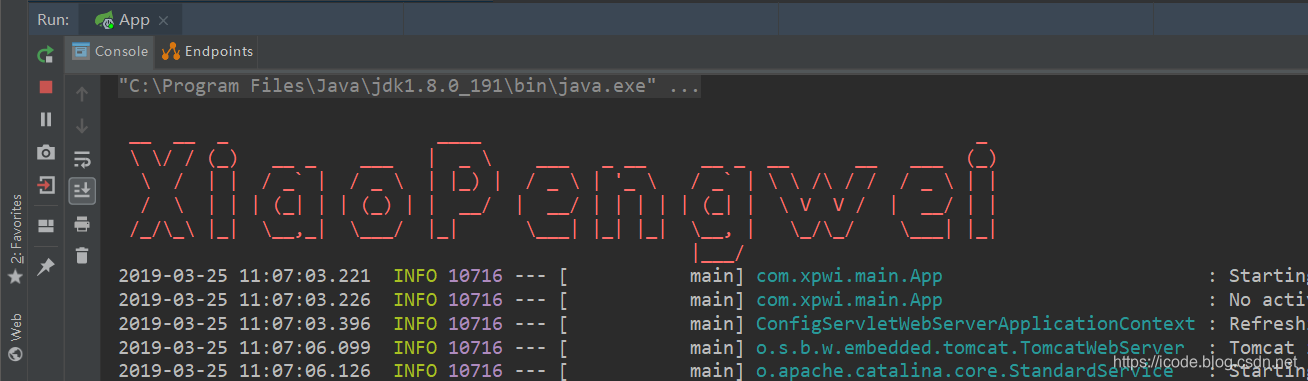
(2)测试主子模块:

(3)测试子模块依赖:
自定义 banner
一键加技术朋友群
Spring Boot -05- 多模块结构项目构建与测试(详细图文教程)IDEA 版的更多相关文章
- [转] 使用Spring Boot和Gradle创建项目
Spring Boot 是由 Pivotal 团队提供的全新框架,其设计目的是用来简化新 Spring 应用的初始搭建以及开发过程.该框架使用了特定的方式来进行配置,从而使开发人员不再需要定义样板化的 ...
- spring boot / cloud (三) 集成springfox-swagger2构建在线API文档
spring boot / cloud (三) 集成springfox-swagger2构建在线API文档 前言 不能同步更新API文档会有什么问题? 理想情况下,为所开发的服务编写接口文档,能提高与 ...
- 八个开源的 Spring Boot 前后端分离项目,一定要收藏!
八个开源的 Spring Boot 前后端分离项目 最近前后端分离已经在慢慢走进各公司的技术栈,不少公司都已经切换到这个技术栈上面了.即使贵司目前没有切换到这个技术栈上面,我们也非常建议大家学习一下前 ...
- spring cloud和spring boot两个完整项目
spring cloud和spring boot两个完整项目 spring cloud 是基于Spring Cloud的云分布式后台管理系统架构,核心技术采用Eureka.Fegin.Ribbon.Z ...
- Spring Boot 创建hello world项目
Spring Boot 创建hello world项目 1.创建项目 最近在学习Spring Boot,这里记录使用IDEA创建Spring Boot的的过程 在1出勾选,选择2,点击Next 这里填 ...
- Spring Boot 2+gRPC 学习系列1:搭建Spring Boot 2+gRPC本地项目
Spring Boot 2+gRPC 学习系列1:搭建Spring Boot 2+gRPC本地项目 https://blog.csdn.net/alinyua/article/details/8303 ...
- 10个Spring Boot快速开发的项目,接私活利器(快速、高效)
本文为大家精选了 码云 上优秀的 Spring Boot 语言开源项目,涵盖了企业级系统框架.文件文档系统.秒杀系统.微服务化系统.后台管理系统等,希望能够给大家带来一点帮助:) 1.项目名称:分布式 ...
- Spring Boot + JPA 多模块项目无法注入 JpaRepository 接口
问题描述 Spring Boot + JPA 多模块项目,启动报异常: nested exception is org.springframework.beans.factory.NoSuchBean ...
- SpringBoot项目构建、测试、热部署、配置原理、执行流程
SpringBoot项目构建.测试.热部署.配置原理.执行流程 一.项目构建 二.测试和热部署 三.配置原理 四.执行流程
随机推荐
- Executor框架(一)
类继承关系 更详细的继承关系: ExecutorComplitionService类 在说Executor接口及实现类之前,先聊聊ExecutorComplitionService. 成员变量 pri ...
- gulp 使用入门
什么是gulp? 用自动化构建工具增强你的工作流程! Gulp 是基于node.js的一个前端自动化构建工具,开发者可以使用它构建自动化工作流程(前端集成开发环境). 使用gulp你可以简化工作量,让 ...
- 【转】linux sar命令详解
原文地址:http://lovesoo.org/linux-sar-command-detailed.html sar(System Activity Reporter系统活动情况报告)是目前 Lin ...
- Web开发者应知的URL编码知识
原文出处:http://blog.jobbole.com/42246/ 本文首先阐述了人们关于统一资源定位符(URL)编码的普遍的误读,其后通过阐明HTTP场景下的URL encoding 来引出我们 ...
- 简易的命令行聊天室程序(Winsock,服务器&客户端)
代码中使用WinSock2函数库,设计并实现了简单的聊天室功能.该程序为命令行程序.对于服务器和客户端,需要: 服务器:创建监听套接字,并按本地主机绑定:主线程监听并接受来自客户端的请求,并为该客户端 ...
- 局域网使用visual studio配合iis调试手机app
描述:开发一款手机应用程序,服务器配置在iis,当局域网中即只有路由器无外网如何设置实时调试手机应用程序? vs配合iis调试程序的两种方式? 使用vs的debug(f5)调试网站比较常见,然而当网站 ...
- LVS+keepalived+nginx+tomcat部署实现
拓扑如下所示 # 节点分布情况 LVS-dr-master eth0: 192.168.146.141 LVS-dr-slave eth0: 192.168.146.142 nginx1: eth0: ...
- js闭包应用
先来看一个例子: function foo() { var a = 10; function bar() { a *= 2; return a; } return bar; } var baz = f ...
- RabbitMQ学习系列一:windows下安装RabbitMQ服务
Rabbit MQ 是建立在强大的Erlang OTP平台上,因此安装Rabbit MQ的前提是安装Erlang. 第一步下载erlang:http://www.erlang.org/download ...
- effective VBA
For Append As: Open "1.txt" For Append As #1Open "1.txt"就是打开名为1.txt的文件For Append ...