
spring init method destroy method
在java的实际开发过程中,我们可能常常需要使用到init method和destroy method,比如初始化一个对象(bean)后立即初始化(加载)一些数据,在销毁一个对象之前进行垃圾回收等等。
周末对这两个方法进行了一点学习和整理,倒也不是专门为了这两个方法,而是在巩固spring相关知识的时候提到了,然后感觉自己并不是很熟悉这个,便好好的了解一下。
根据特意的去了解后,发现实际上可以有三种方式来实现init method和destroy method。
要用这两个方法,自然先要知道这两个方法究竟是干嘛用的。而从字面意思就很容易理解,一个是加载,一个是销毁。
下边就正式代码演示三种创建方式:
一、@Bean注解方式:
首先要创建一个至少拥有两个方法的类,一个方法充当init method,另一个充当destroy method。
package springTest2;

public class Test1 {

    public void init() {

        System.out.println("this is init method1");

    }

    public Test1() {

        super();

        System.out.println("构造函数1");

    }

    public void destroy() {

        System.out.println("this is destroy method1");

    }

}
这里很显然只是一个普通的java类,拥有一个无参构造和另外两个方法。
需要注意的是,这里的init和destroy两个方法名实际上是可以随意取得,不叫这个也没有问题,只不过算是一种约定俗称,一般都是这样叫。
另外我们也知道,这个构造方法也是可以不要的,因为会隐式的自动创建,但是为了更清楚的看到init和destroy是什么时候执行,我们就显示的写出来。
创建好了这个类,我们就可以使用@Bean注解的方式指定两个方法,以让他们生效。
package springTest2;

import org.springframework.context.annotation.Bean;

import org.springframework.context.annotation.ComponentScan;

import org.springframework.context.annotation.Configuration;

@Configuration

@ComponentScan("springTest2")

public class ConfigTest {

    @Bean(initMethod = "init", destroyMethod = "destroy")

    Test1 test1() {

        return new Test1();

    }

}
这里边的@Configguration注解是告诉spring这个类是一个配置类,相当于我们的xml文件,@ComponentScan则是指定需要spring来扫描的包,相当于xml中的context:component-scan属性。
而@Bean后边的initMethod和destroyMethod就是在声明这是一个baen的同时指定了init和destroy方法,方法名从功能实现上来说可以随意。
到这里我们就已经用第一种方式写好了,为了验证成功与否,再写一个main方法验证一下:
package springTest2;

import org.springframework.context.annotation.AnnotationConfigApplicationContext;

public class MainTest {

    public static void main(String[] args) {

        AnnotationConfigApplicationContext context = new AnnotationConfigApplicationContext(ConfigTest.class);

                System.out.println("#################################");

        context.close();

    }

}
运行之后结果如图: 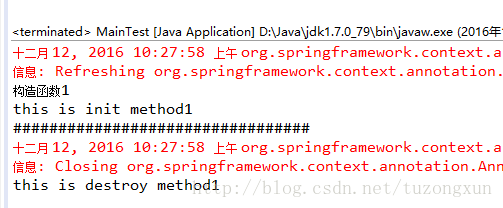
根据打印顺序可以看到,首先是构造函数,也就是创建了bean,紧接着执行了init,然后再context.close要销毁bean之前又执行了destroy。
二、JSR-250注解的方式(需要导入jsr250-api的jar包):
首先依然是创建一个拥有构造方法在内的三个方法的java类:
package springTest2;

import javax.annotation.PostConstruct;

import javax.annotation.PreDestroy;

public class Test2 {

    @PostConstruct

    public void init() {

        System.out.println("this is init method2");

    }

    public Test2() {

        super();

        System.out.println("构造函数2");

    }

    @PreDestroy

    public void destroy() {

        System.out.println("this is destroy method2");

    }

}
很显然,这里和上一个类不同的是,在init和destroy方法上加入了两个注解,@PostConstruct和上边@Bean后的initMethod相同,而@PreDestroy则是和destroyMethod做用相同。
既然这里有了区别,已经指定了init method和destroy method,那么后边声明bean的时候自然也会有不同,也就不需要再指定一遍:
package springTest2;

import org.springframework.context.annotation.Bean;

import org.springframework.context.annotation.ComponentScan;

import org.springframework.context.annotation.Configuration;

@Configuration

@ComponentScan("springTest2")

public class ConfigTest {

    @Bean

    Test2 test2() {

        return new Test2();

    }

}
所以,如上代码中只需要简单的声明这是一个bean就可以了,类上边的两个注解和上一个例子中的意思相同。
再测试一下:
package springTest2;

import org.springframework.context.annotation.AnnotationConfigApplicationContext;

public class MainTest {

    public static void main(String[] args) {

        AnnotationConfigApplicationContext context = new AnnotationConfigApplicationContext(ConfigTest.class);

                System.out.println("#################################");

        context.close();

    }

}
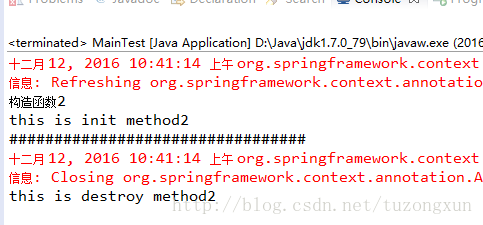
结果如下:
三、xml配置的方式:
这种方式实际上是和第一种对应的,只不过细节上略有改变而已,首先,创建的java类完全一样:
package springTest2;

public class Test3 {

    public void init() {

        System.out.println("this is init method3");

    }

    public Test3() {

        super();

        System.out.println("构造函数3");

    }

    public void destroy() {

        System.out.println("this is destroy method3");

    }

    public void test() {

        System.out.println("testttttttt");

    }

}
不同的地方就在于,第一个例子中是使用注解告诉spring这个类相当于一个配置文件,而这里则是实实在在的配置文件spring.xml:
<?xml version="1.0" encoding="UTF-8"?>

<beans xmlns="http://www.springframework.org/schema/beans"

    xmlns:xsi="http://www.w3.org/2001/XMLSchema-instance"

    xsi:schemaLocation="http://www.springframework.org/schema/beans

http://www.springframework.org/schema/beans/spring-beans.xsd">

<bean id="initOrDestroyTest" class="springTest2.Test3" init-method="init" destroy-method="destroy">

</bean>

</beans>
这个配置大概也能算是spring.xml中最简单的一个配置了吧,除开必要的文件头,就只有一个bean,而且bean里边也只有id,calss和init以及destroy方法。
因为简单,所以一目了然,id只是为了其他地方引用,class是指定这个bean对应的类,而后边两个属性则和用@Bean声明时一模一样。
因为这里声明bean和指定两个方法是用的xml配置,因此在测试的时候也就需要稍微有一点点改变:
package springTest2;

import org.springframework.context.support.ClassPathXmlApplicationContext;

public class MainTest {

    public static void main(String[] args) {

        ClassPathXmlApplicationContext context1 = new ClassPathXmlApplicationContext("spring.xml");

        System.out.println("#################################");

        context1.close();

    }

}
区别在于这里直接加载了配置文件,而不是java类,使用的是ClassPathxXmlApplicationContext而不是AnnotationConfigApplicationContext。
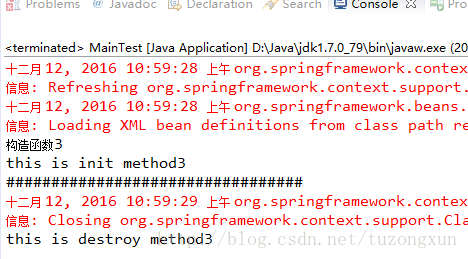
结果如下:
这里需要说明的一点是,在实际的web应用使用时,可以在web.xml中使用类似下边的配置来加载bean,实现init method:
<servlet-name>dispatcher</servlet-name>

    <servlet-class>org.springframework.web.servlet.DispatcherServlet</servlet-class>

    <init-param>

      <param-name>contextConfigLocation</param-name>

      <param-value>classpath:spring.xml</param-value>

    </init-param>

    <load-on-startup>1</load-on-startup>

  </servlet>

  <servlet-mapping>

    <servlet-name>dispatcher</servlet-name>

    <url-pattern>/</url-pattern>

  </servlet-mapping>
然后启动tomcat结果如下: 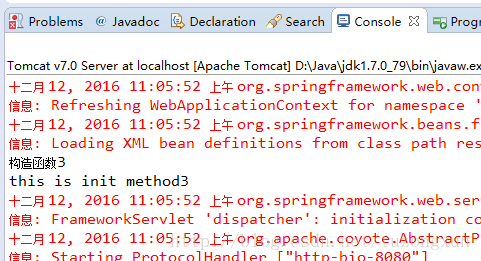
这里边没有调用destroy method,原因是spring本身代码就需要我们手动调用销毁bean的方法,像前边的几个例子中的context.close就是。
如果不手动调用这个方法,bean就不会被销毁,也就不会去调用destroy method,这也就是为何这里在web.xml中配置后,启动tomcat 只打印了构造函数和init方法中的内容。
例子都是很简单的,而通过简单的例子对比可能能更进一步理解相关的知识,理解了才能在实际应用中更好的进行选择和集成。
spring init method destroy method的更多相关文章
- java代码中init method和destroy method的三种使用方式
在java的实际开发过程中,我们可能常常需要使用到init method和destroy method,比如初始化一个对象(bean)后立即初始化(加载)一些数据,在销毁一个对象之前进行垃圾回收等等. ...
- EurekaClient项目启动报错Invocation of destroy method failed on bean with name 'scopedTarget.eurekaClient': org.springframework.beans.factory.BeanCreationNotAllowedException: Error creating bean with name 'e
Disconnected from the target VM, address: '127.0.0.1:51233', transport: 'socket' Eureka Client的使用 使用 ...
- Invoking destroy method 'close' on bean with name 'dataSource'
Invoking destroy method 'close' on bean with name 'dataSource' Spring与Mybatis整合时出现的问题,找了一晚上结果是一个属性写错 ...
- JavaEE开发之Spring中Bean的作用域、Init和Destroy方法以及Spring-EL表达式
上篇博客我们聊了<JavaEE开发之Spring中的依赖注入以及AOP>,本篇博客我们就来聊一下Spring框架中的Bean的作用域以及Bean的Init和Destroy方法,然后在聊一下 ...
- Invocation of destroy method failed on bean with name ‘XXXX’
项目启动报错问题:Invocation of destroy method failed on bean with name 'scopedTarget.eurekaClient': org.spri ...
- 关于.ToList(): LINQ to Entities does not recognize the method ‘xxx’ method, and this method cannot be translated into a store expression.
LINQ to Entities works by translating LINQ queries to SQL queries, then executing the resulting quer ...
- 『重构--改善既有代码的设计』读书笔记----Replace Method with Method Object
有时候,当你遇到一个大型函数,里面的临时变量和参数多的让你觉得根本无法进行Extract Method.重构中也大力的推荐短小函数的好处,它所带来的解释性,复用性让你收益无穷.但如果你遇到上种情况,你 ...
- Servlet Filter 中init和destroy问题
测试源码如下: package com.FilterTest.Filter; import java.io.IOException; import javax.servlet.Filter; impo ...
- org.springframework.expression.spel.SpelEvaluationException: EL1004E: Method call: Method service() cannot be found on com.my.blog.springboot.thymeleaf.util.MethodTest type
前言 本文中提到的解决方案,源码地址在:springboot-thymeleaf,希望可以帮你解决问题. 至于为什么已经写了一篇文章thymeleaf模板引擎调用java类中的方法,又多此一举的单独整 ...
随机推荐
- 将16进制的颜色转为rgb颜色
在前端面试过程中,常常会遇到这样一种类型的题目: 使用js将16进制的颜色值转为rgb颜色! 反而在项目中,不怎么遇到这种问题,也很少有这种需求的项目. 但毕竟面试中常常遇到,我自己在之前的面试的时候 ...
- CentOS7自定义安装git
1. 介绍 使用Coding管理项目,上面要求使用的git版本为1.8.0以上,而很多yum源上自动安装的git版本为1.7,所以需要掌握手动编译安装git方法. 2. 安装git依赖包yum ins ...
- System.Data.DbType映射关系
有如下类型的映射对照: System.Data.SqlClient.SqlDbType System.Data.OleDb.OleDbType System.Data.Odbc.OdbcType S ...
- gentoo virtualbox 无法启动
以前的 virtualbox 可以启动,现在无法启动. 原因是因为更新了内核,而 virtualbox 的模块没有跟着更新,所以导致无法启动. emerge --ask --oneshot @modu ...
- 学生管理系统.c
直接贴代码了 另有:python调用c程序的实现 #define _CRT_SECURE_NO_WARNINGS #include<iostream> using namespace st ...
- WebForm(内置函数)
Response - 响应对象1.定义:Response对象用于动态响应客户端请示,控制发送给用户的信息,并将动态生成响应.若指定的cookie不存在,则创建它.若存在,则将自动进行更新.结果返回给客 ...
- IIS编辑器错误信息:CS0016解决方案
错误信息: 运行asp.net程序时候,编译器错误消息: CS0016: 未能写入输出文件“c:\Windows\Microsoft.NET\Framework\v2.0.50727\Temporar ...
- python之type
>>> isinstance(object,type) True >>> isinstance(list,type) True >>> isins ...
- django之register_model(self, app_label, model):
前面在阅读apps_install源码时,一直不明白app的model是什么时候导入的,今天在看modelbase源码时,看到了new_class._prepare() new_class._meta ...
- native.js 判断是否安装某app
例:是否安装微信 function isWeixin() { var UIApplication = plus.ios.importClass("UIApplication"); ...