
python学习笔记_week21
上节内容回顾:

    1、请求周期

        url> 路由 > 函数或类 > 返回字符串或者模板语言?

        Form表单提交:

            提交 -> url > 函数或类中的方法

                                - ....

                                HttpResponse('....')

                                render(request,'index.html')

                                redirect('/index/')

             用户  <    <  返回字符串

             (当接受到redirect时)自动发起另外一个请求

             --> url   .....

        Ajax:

            $.ajax({

                url: '/index/',

                data: {'k': 'v', 'list': [1,2,3,4], 'k3': JSON.stringfy({'k1': 'v'}))}, $(form对象).serilize()

                type: 'POST',

                dataType: 'JSON':

                traditional: true,   #多选(如下拉框)要加traditional

                success:function(data){              #回调函数

                    location.reload()              # 刷新

                    location.href = "某个地址"     # 跳转

                }

            })

            提交 -> url -> 函数或类中的方法

                            HttpResponse('{}')  #可定制性更高

                            render(request, 'index.html', {'name': 'v1'})

                            <h1>{{ name }}</h1> -->  #用户拿到不能做特殊的处理

                            <h1>v1</h1>

                            XXXXXXX redirect...不可以 ,只能reload,href

            用户    <<<<<  字符串

    2、路由系统URL

        a. /index/                               ->  函数或类

        b. /index/(\d+)                            ->  函数或类

        c. /index/(?P<nid>\d+)                   ->  函数或类

        d. /index/(?P<nid>\d+) name='root'          ->  函数或类

            reverse()

            {% url 'root' 1%}

        e. /crm/    include('app01.urls')        -> 路由分发

        f. 默认值

            url(r'^index/', views.index, {'name': 'root'}),

            def index(request,name):

                print(name)

                return HttpResponse('OK')

        g. 命名空间     #用于函数生成url

            /admin/    include('app01.urls',namespace='m1')

            /crm/      include('app01.urls',namespace='m2')

            app01.urls

            /index/    name = 'n1'

            reverser('m1:n1')

    3、

        def func(request):

            request.POST

            request.GET

            request.FILES

            request.getlist

            request.method

            request.path_info

            return render,HttpResponse,redirect

    4、

        render(request, 'index.html')

        # for

        # if

        # 索引.   keys  values items    all

    5、

        class User(models.Model):

            username = models.CharField(max_length=32)

            email = models.EmailField()

        有验证功能

            Django Admin

        无验证功能:

            User.objects.create(username='root',email='asdfasdfasdfasdf')

            User.objects.filter(id=1).update(email='')

        class UserType(models.Model):

            name = models.CharField(max_length=32)

        class User(models.Model):

            username = models.CharField(max_length=32)

            email = models.EmailField()

            user_type = models.ForeignKey("UserType")

        user_list = User.objects.all()

        for obj user_list:  #对象列表

            obj.username,obj.email,obj.user_type_id,obj.user_type.name,obj.user_type.id

        user = User.objects.get(id=1) #单个对象

        user.

        User.objects.all().values("username","user_type__name",)   #注意__

        class UserType(models.Model):

            name = models.CharField(max_length=32)

        class User(models.Model):

            username = models.CharField(max_length=32)

            email = models.EmailField()

            user_type = models.ForeignKey("UserType")

            m = models.ManyToMany('UserGroup')

        class UserGroup(models.Model):

            name = ....

        obj = User.objects.get(id=1)

        obj.m.add(2)

        obj.m.add(2,3)

        obj.m.add(*[1,2,3])

        obj.m.remove(...)

        obj.m.clear()

        obj.m.set([1,2,3,4,5])

        obj.m.all() # 多个组,UserGroup对象

        obj.m.filter(name='CTO')

知识点:

    URL

        - 两个

    Views

        - 请求的其他信息

        from django.core.handlers.wsgi import WSGIRequest

        request.environ

        request.environ['HTTP_USER_AGENT']

        - 装饰器

            FBV:

                def auth(func):

                    def inner(reqeust,*args,**kwargs):

                        v = reqeust.COOKIES.get('username111')

                        if not v:

                            return redirect('/login/')

                        return func(reqeust, *args,**kwargs)

                    return inner

            CBV:

                from django import views

                from django.utils.decorators import method_decorator

                @method_decorator(auth,name='dispatch')

                class Order(views.View):

                    # @method_decorator(auth)

                    # def dispatch(self, request, *args, **kwargs):

                    #     return super(Order,self).dispatch(request, *args, **kwargs)

                    # @method_decorator(auth)

                    def get(self,reqeust):

                        v = reqeust.COOKIES.get('username111')

                        return render(reqeust,'index.html',{'current_user': v})

                    def post(self,reqeust):

                        v = reqeust.COOKIES.get('username111')

                        return render(reqeust,'index.html',{'current_user': v})

    Templates

        - 母版...html    ---可以模板渲染(会自动搞到一起再渲染)

            extends 只能继承一个母版

            include 可以有多个

        - 自定义函数

            simple_tag

                a. app下创建templatetags目录 #templatetags目录名不能改

                b. 任意xxoo.py文件

                c. 创建template对象 register(对象名)不能改

                d.

                    @register.simple_tag

                    def func(a1,a2,a3....)

                        return "asdfasd"

                e. settings中注册APP

                f. html顶部 {% load xxoo %}

                g. {% 函数名 arg1 arg2 %} #空格没关系

                缺点:

                    不能作为if条件

                优点:

                    参数任意

            filter

                a. app下创建templatetags目录

                b. 任意xxoo.py文件

                c. 创建template对象 register

                d.

                    @register.filter

                    def func(a1,a2)

                        return "asdfasd"

                e. settings中注册APP

                f. 顶部 {% load xxoo %}

                g. {{ 参数1|函数名:"参数二,参数三" }} {{ 参数1|函数名:数字 }}

                缺点:

                    最多两个参数,不能加空格

                优点:

                    能作为if条件

    分页(自定义的分页)

        XSS:

            {{ page_str|safe }}

            mark_safe(page_str)

    cookie

        客户端浏览器上的一个文件

            {"user": 'dachengzi'}

        参数:

        key,              键

        value='',         值

        max_age=None,     超时时间

        expires=None,     超时时间(IE requires expires, so set it if hasn't been already.)

        path='/',         Cookie生效的路径,/ 表示根路径,特殊的:跟路径的cookie可以被任何url的页面访问

        domain=None,      Cookie生效的域名

        secure=False,     https传输

        httponly=False    只能http协议传输,无法被JavaScript获取(不是绝对,底层抓包可以获取到也可以被覆盖)

    session :装饰器

    Models

        - 一大波操作

    Form验证

        -

    缓存

    中间件

    信号

    CSRF

    Admin/ModelForm

作业:

    主机管理:

        1、单表操作

        2、一对多

        3、多对多

        要求:

            a. 删除对话框

            b. 修改,添加新URL

            c. 基于cookie进行用户认证

            d. 定制显示个数

            e. 分页

    预习:

        Form: http://www.cnblogs.com/wupeiqi/articles/6144178.html

        Model:http://www.cnblogs.com/wupeiqi/articles/6216618.html
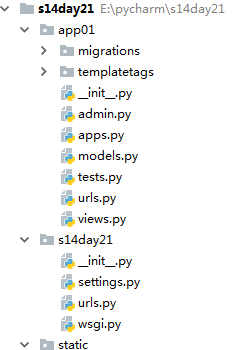
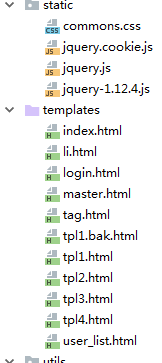
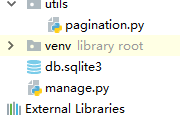
 from django.shortcuts import render, HttpResponse,redirect

 from django.urls import reverse

 # Create your views here.

 # def index(request):

 #     # v = reverse('author:index')

 #     # print(v)

 #     from django.core.handlers.wsgi import WSGIRequest

 #     # print(type(request))

 #     #封装了所有用户请求信息

 #     # print(request.environ)

 #     # for k,v in request.environ.items():

 #     #     print(k,v)

 #     # print(request.environ['HTTP_USER_AGENT'])

 #     # request.POST

 #     # request.GET

 #     # request.COOKIES

 #

 #     return HttpResponse('OK')

 def tpl1(request):

     user_list = [1, 2, 3, 43]

     return render(request, 'tpl1.html', {'u': user_list})

 def tpl2(request):

     name = 'root'

     return render(request, 'tpl2.html', {'name': name})

 def tpl3(request):

     status = "已经删除"

     return render(request, 'tpl3.html', {'status': status})

 def tpl4(request):

     name = "IYMDFjfdf886sdf"

     return render(request, 'tpl4.html', {'name': name})

 from  utils import pagination

 LIST = []

 for i in range(500):

     LIST.append(i)

 def user_list(request):

     current_page = request.GET.get('p', 1) #1表示默认显示第一页

     current_page = int(current_page)

     val = request.COOKIES.get('per_page_count',10)

     print(val)

     val = int(val)

     page_obj = pagination.Page(current_page,len(LIST),val)

     data = LIST[page_obj.start:page_obj.end]

     page_str = page_obj.page_str("/user_list/")

     return render(request, 'user_list.html', {'li': data,'page_str': page_str})

 ########################### cookie ###########################

 user_info = {

     'dachengzi': {'pwd': ""},

     'kanbazi': {'pwd': "kkkkkkk"},

 }

 def login(request):

     if request.method == "GET":

         return render(request,'login.html')

     if request.method == "POST":

         u = request.POST.get('username')

         p = request.POST.get('pwd')

         dic = user_info.get(u)

         if not dic:

             return render(request,'login.html')

         if dic['pwd'] == p:

             res = redirect('/index/')

             # res.set_cookie('username111',u,max_age=10)

             # import datetime

             # current_date = datetime.datetime.utcnow()

             # current_date = current_date + datetime.timedelta(seconds=5)

             # res.set_cookie('username111',u,expires=current_date)

             res.set_cookie('username111',u)

             res.set_cookie('user_type',"asdfjalskdjf",httponly=True) #httponly用js获取不到

             return res

         else:

             return render(request,'login.html')

 def auth(func):

     def inner(reqeust,*args,**kwargs):

         v = reqeust.COOKIES.get('username111')

         if not v:

             return redirect('/login/')

         return func(reqeust, *args,**kwargs)

     return inner

 @auth

 def index(reqeust):

     # 获取当前已经登录的用户

     v = reqeust.COOKIES.get('username111')

     return render(reqeust,'index.html',{'current_user': v})

 from django import views

 from django.utils.decorators import method_decorator

 @method_decorator(auth,name='dispatch')

 class Order(views.View):

     # @method_decorator(auth)

     # def dispatch(self, request, *args, **kwargs):

     #     return super(Order,self).dispatch(request, *args, **kwargs)

     # @method_decorator(auth)

     def get(self,reqeust):

         v = reqeust.COOKIES.get('username111')

         return render(reqeust,'index.html',{'current_user': v})

     def post(self,reqeust):

         v = reqeust.COOKIES.get('username111')

         return render(reqeust,'index.html',{'current_user': v})

 def order(reqeust):

     # 获取当前已经登录的用户

     v = reqeust.COOKIES.get('username111')

     return render(reqeust,'index.html',{'current_user': v})

 def cookie(request):

     # request.COOKIES

     # request.COOKIES['username111']

     request.COOKIES.get('username111')  #获取cookie

     response = render(request,'index.html')

     response = redirect('/index/')

     response.set_cookie('key',"value")# 设置cookie,关闭浏览器失效

     response.set_cookie('username111',"value",max_age=10)# 设置cookie, N秒只有失效

     import datetime

     current_date = datetime.datetime.utcnow()

     current_date = current_date + datetime.timedelta(seconds=5)

     response.set_cookie('username111',"value",expires=current_date) # 设置cookie, 截止时间失效

     response.set_cookie('username111',"value",max_age=10)

     # request.COOKIES.get('...')

     # response.set_cookie(...)

     obj = HttpResponse('s')

     obj.set_signed_cookie('username',"kangbazi",salt="asdfasdf") #加密文

     request.get_signed_cookie('username',salt="asdfasdf") #解密

     return response
 from django.conf.urls import url,include

 from django.contrib import admin

 from app01 import views

 urlpatterns = [

     # url(r'^admin/', admin.site.urls),

     # url(r'^index/', views.index),

     # url(r'^index/', views.index, {'name': 'root'}),

     # url(r'^a/', include('app01.urls', namespace='author')),

     url(r'^tpl1/', views.tpl1),

     url(r'^tpl2/', views.tpl2),

     url(r'^tpl3/', views.tpl3),

     url(r'^tpl4/', views.tpl4),

     url(r'^user_list/', views.user_list),

     url(r'^login/', views.login),

     url(r'^index/', views.index),

     url(r'^order/', views.Order.as_view()),

 ]
 <!DOCTYPE html>

 <html lang="en">

 <head>

     <meta charset="UTF-8">

     <title></title>

 </head>

 <body>

     <h1>欢迎登录:{{ current_user }}</h1>

 </body>

 </html>
<li>{{ item }}</li>
 <!DOCTYPE html>

 <html lang="en">

 <head>

     <meta charset="UTF-8">

     <title></title>

 </head>

 <body>

     <form action="/login/" method="POST">

         <input type="text" name="username" placeholder="用户名" />

         <input type="password" name="pwd" placeholder="密码" />

         <input type="submit" />

     </form>

 </body>

 </html>
 <!DOCTYPE html>

 <html lang="en">

 <head>

     <meta charset="UTF-8">

     <title>{% block title %} {% endblock %}</title>

     <link rel="stylesheet" href="/static/commons.css" />

     <style>

         .pg-header{

             height: 50px;

             background-color: seashell;

             color: green;

         }

     </style>

     {% block css %} {% endblock %}

 </head>

 <body>

     <div class="pg-header">小男孩管理</div>

     <div>

         <a>asdf</a>

         <a id="">asdf</a>

         <a>asdf</a>

         <a>asdf</a>

         <a>asdf</a>

     </div>

     <iframe src="/"></iframe>

 </body>

 </html>
 <!DOCTYPE html>

 <html lang="en">

 <head>

     <meta charset="UTF-8">

     <title></title>

     <link rel="stylesheet" href="/static/commons.css" />

     <style>

         .pg-header{

             height: 48px;

             background-color: seashell;

             color: green;

         }

     </style>

 </head>

 <body>

     <div class="pg-header">小男孩管理</div>

     <h1>用户管理</h1>

     <ul>

         {% for i in u %}

             <li>{{ i }}</li>

         {% endfor %}

     </ul>

     <script src="/static/jquery.js"></script>

 </body>

 </html>
 {% extends 'master.html' %}

 {% block title %}用户管理{% endblock %}

 {% block content %}

     <h1>用户管理</h1>

     <ul>

         {% for i in u %}

             <li>{{ i }}</li>

         {% endfor %}

     </ul>

     {% for i in u %}

         {% include 'tag.html' %}

     {% endfor %}

 {% endblock %}

 {% block css %}

     <style>

         body{

             background-color: red;

         }

     </style>

 {% endblock %}

 {% block js %}

     <script></script>

 {% endblock %}
 <!DOCTYPE html>

 <html lang="en">

 <head>

     <meta charset="UTF-8">

     <title></title>

         <link rel="stylesheet" href="/static/commons.css" />

     <style>

         .pg-header{

             height: 48px;

             background-color: seashell;

             color: green;

         }

     </style>

 </head>

 <body>

     <div class="pg-header">小男孩管理</div>

      <h1>修改密码{{ name }}</h1>

     <script src="/static/jquery.js"></script>

 </body>

 </html>
 <!DOCTYPE html>

 <html lang="en">

 <head>

     <meta charset="UTF-8">

     <title></title>

     <link rel="stylesheet" href="/static/commons.css" />

     <style>

         .pg-header{

             height: 48px;

             background-color: seashell;

             color: green;

         }

     </style>

 </head>

 <body>

     <div class="pg-header">小女孩管理</div>

     <h3> {{ status }}</h3>

     <script src="/static/jquery.js"></script>

 </body>

 </html>
 {% load xxoo %}

 <!DOCTYPE html>

 <html lang="en">

 <head>

     <meta charset="UTF-8">

     <title></title>

 </head>

 <body>

     {{ name }}

     {{ name|lower }}

     {{ name|truncatechars:"3" }}

     {% houyafan  2  5  6 %}

     {{ "maliya"|jiajingze:30 }}

 </body>

 </html>
 <!DOCTYPE html>

 <html lang="en">

 <head>

     <meta charset="UTF-8">

     <title></title>

     <style>

         .pagination .page{

             display: inline-block;

             padding: 5px;

             background-color: cyan;

             margin: 5px;

         }

         .pagination .page.active{

             background-color: brown;

             color: white;

         }

     </style>

 </head>

 <body>

     <ul id="len">

         {% for item in li %}

             {% include 'li.html' %}

         {% endfor %}

     </ul>

     <div>

         <select id="ps" onchange="changePageSize(this)">

             <option value="10">10</option>

             <option value="30">30</option>

             <option value="50">50</option>

             <option value="100">100</option>

         </select>

     </div>

     <div class="pagination">

         {{ page_str }}

     </div>

     <script src="/static/jquery-1.12.4.js"></script>

     <script src="/static/jquery.cookie.js"></script>

     <script>

         $(function(){

                 var v = $.cookie('per_page_count',$("#len li").length,{'path': "/user_list/`"});

                 console.log(v);

                 $('#ps').val($("#len li").length);

         });

         function changePageSize(ths){

             var v = $(ths).val();

             console.log(v);

             $.cookie('per_page_count',v, {'path': "/user_list/"});

             location.reload();

         }

     </script>

 </body>

 </html>
 from django.utils.safestring import mark_safe

 class Page:

     def __init__(self, current_page, data_count, per_page_count=10, pager_num=7):

         self.current_page = current_page

         self.data_count = data_count

         self.per_page_count = per_page_count

         self.pager_num = pager_num

     @property

     def start(self):

         return (self.current_page - 1) * self.per_page_count

     @property

     def end(self):

         return self.current_page * self.per_page_count

     @property

     def total_count(self):

         v, y = divmod(self.data_count, self.per_page_count)

         if y:

             v += 1

         return v

     def page_str(self, base_url):

         page_list = []

         if self.total_count < self.pager_num:

             start_index = 1

             end_index = self.total_count + 1

         else:

             if self.current_page <= (self.pager_num + 1) / 2:

                 start_index = 1

                 end_index = self.pager_num + 1

             else:

                 start_index = self.current_page - (self.pager_num - 1) / 2

                 end_index = self.current_page + (self.pager_num + 1) / 2

                 if (self.current_page + (self.pager_num - 1) / 2) > self.total_count:

                     end_index = self.total_count + 1

                     start_index = self.total_count - self.pager_num + 1

         if self.current_page == 1:

             prev = '<a class="page" href="javascript:void(0);">上一页</a>'

         else:

             prev = '<a class="page" href="%s?p=%s">上一页</a>' % (base_url, self.current_page - 1,)

         page_list.append(prev)

         for i in range(int(start_index), int(end_index)):

             if i == self.current_page:

                 temp = '<a class="page active" href="%s?p=%s">%s</a>' % (base_url, i, i)

             else:

                 temp = '<a class="page" href="%s?p=%s">%s</a>' % (base_url, i, i)

             page_list.append(temp)

         if self.current_page == self.total_count:

             nex = '<a class="page" href="javascript:void(0);">下一页</a>'

         else:

             nex = '<a class="page" href="%s?p=%s">下一页</a>' % (base_url, self.current_page + 1,)

         page_list.append(nex)

         jump = """

         <input type='text'  /><a onclick='jumpTo(this, "%s?p=");'>GO</a>

         <script>

             function jumpTo(ths,base){

                 var val = ths.previousSibling.value;

                 location.href = base + val;

             }

         </script>

         """ % (base_url,)

         page_list.append(jump)

         page_str = mark_safe("".join(page_list))

         return page_str
python学习笔记_week21的更多相关文章
- python学习笔记整理——字典
python学习笔记整理 数据结构--字典 无序的 {键:值} 对集合 用于查询的方法 len(d) Return the number of items in the dictionary d. 返 ...
- VS2013中Python学习笔记[Django Web的第一个网页]
前言 前面我简单介绍了Python的Hello World.看到有人问我搞搞Python的Web,一时兴起,就来试试看. 第一篇 VS2013中Python学习笔记[环境搭建] 简单介绍Python环 ...
- python学习笔记之module && package
个人总结: import module,module就是文件名,导入那个python文件 import package,package就是一个文件夹,导入的文件夹下有一个__init__.py的文件, ...
- python学习笔记(六)文件夹遍历,异常处理
python学习笔记(六) 文件夹遍历 1.递归遍历 import os allfile = [] def dirList(path): filelist = os.listdir(path) for ...
- python学习笔记--Django入门四 管理站点--二
接上一节 python学习笔记--Django入门四 管理站点 设置字段可选 编辑Book模块在email字段上加上blank=True,指定email字段为可选,代码如下: class Autho ...
- python学习笔记--Django入门0 安装dangjo
经过这几天的折腾,经历了Django的各种报错,翻译的内容虽然不错,但是与实际的版本有差别,会出现各种奇葩的错误.现在终于找到了解决方法:查看英文原版内容:http://djangobook.com/ ...
- python学习笔记(一)元组,序列,字典
python学习笔记(一)元组,序列,字典
- Pythoner | 你像从前一样的Python学习笔记
Pythoner | 你像从前一样的Python学习笔记 Pythoner
- OpenCV之Python学习笔记
OpenCV之Python学习笔记 直都在用Python+OpenCV做一些算法的原型.本来想留下发布一些文章的,可是整理一下就有点无奈了,都是写零散不成系统的小片段.现在看 到一本国外的新书< ...
随机推荐
- java网络编程Socket通信详解
Java最初是作为网络编程语言出现的,其对网络提供了高度的支持,使得客户端和服务器的沟通变成了现实,而在网络编程中,使用最多的就是Socket.像大家熟悉的QQ.MSN都使用了Socket相关的技术. ...
- VBA Dumper v0.1.4.2, 提取office文档中的VBA代码,监查宏病毒恢复代码(演示版
http://club.excelhome.net/thread-970051-1-1.html VBA Dumper 0.1.4.2更新,填补国内同类程序空白 此程序为演示版,可以在无office的 ...
- 易出错的bug避免
1:for(var i:int=0;i<p.numChildren;i++) { p.removeChildAt(i); } 或 for(var i:int=0;i& ...
- HiveQL详解
Hive 是基于Hadoop 构建的一套数据仓库分析系统,它提供了丰富的SQL查询方式来分析存储在Hadoop 分布式文件系统中的数据,可以将结构化的数据文件映射为一张数据库表,并提供完整的SQL查询 ...
- Mina2 udp--zhengli
一.包与类名. 1.所有类和方法严格使用驼峰法命名.例:SSLFilter 更名为 SslFilter.NIO传输类在命名时增加 Nio 前缀.因为NIO 并不是 socket/datagram 传输 ...
- NodeJs使用async让代码按顺序串行执行
描述 由于nodejs中的函数调用都是异步执行的,而笔者在工程开发中函数A需要四五个参数,而这四五个参数值都是通过函数调用获得,因此按顺序写代码时,执行到函数A时,往往函数A需要的参数值因为参数的异步 ...
- 改变端口的方法phpstudy
document.ready 一个页面可以用无数次: window.onload 一个页面只能用一次,并且在最顶层: 用户交互:用户在网页上的一些行为: 服务交互:Ajax: 组件:(白话:按照我的规 ...
- 1120 Friend Numbers (20 分)
1120 Friend Numbers (20 分) Two integers are called "friend numbers" if they share the same ...
- ueditor 正在读取目录
ueditor 版本为1.3.6 项目版本为2.0 引用 <script src="../ueditor/ueditor.config.js" type="tex ...
- library之目录
组件之fragment: Android viewpager结合fragment的相关优化: 组件之webview: WebView的使用及实战(cookie同步和cookie清除); Android ...