
Elasticsearch集群搭建及使用Java客户端对数据存储和查询
本次博文发两块,前部分是怎样搭建一个Elastic集群,后半部分是基于Java对数据进行写入和聚合统计。
一、Elastic集群搭建
1. 环境准备。
该集群环境基于VMware虚拟机、CentOS 7系统,公司目前用的服务器系统基本全是CentOS系统,因此就选了这个。Elasticsearch需要依赖的最低环境就是JDK8,且要配置好环境变量JAVA_HOME. Elasticsearch的安装也可以查看官网给出的安装说明。
虚拟机系统采用的是最小化安装,没有安装桌面程序。安装完程序再安装JDK,配置环境变量即可。
2. 集群搭建。
2.1 安装包解压
下载完成后的Elastic包为elasticsearch-6.3.2.tar.gz,对其解压。
# 将elastic包加压到目录 /data/elastic 下

tar zxvf elasticsearch-6.3..tar.gz -C /data/elastic
2.2 配置文件修改
解压后的路径为/data/elastic/elasticsearch-6.3.2,在/data/elastic目录下新增两个文件夹,为data,logs,其中data用来存储节点数据,logs用来存储日志,下面在修改配置文件中需要用到。修改config/elasticsearch.yml如下。
# 集群名称

cluster.name: elastic_test

# 节点名称

node.name: node-

# 数据目录,刚才创建的data目录

path.data: /data/elastic/data

#日志路径 ,刚才创建的logs目录

path.logs: /data/elastic/logs

#绑定地址,修改为任何机器都能访问

network.host: 0.0.0.0

#端口,默认9200,不做修改

#http.port:

# 集群节点,当节点启动后平台就会发现

discovery.zen.ping.unicast.hosts: ["172.16.106.190", "172.16.106.191", "172.16.106.192"]

# 最小主节点数量,配置2
# 该配置告诉ELasticsearch当没有足够的master候选节点的时候,不进行master节点选举,等master节点足够了才进行选举

discovery.zen.minimum_master_nodes: 2
2.3 其他机器修改
修改完一台机器后,同样其他两台机器类似修改,注意把节点名称改为不一样的就可以了。
2.4 集群启动
启动说明:elasticsearch的启动不能使用root用户,所以要新建一个普通用户。以下是具体操作。
# 新建一个用户组为elasticgp

groupadd elasticgp

# 新建一个用户名为elastic的用户,并且归属到elasticgp用户组

useradd -g elasticgp elastic

# 给用户设置密码

passwd elastic

# 上面已经减了一个文件夹,/data/elastic,该文件夹存储了elastic软件和数据目录data及日志目录logs

# 现在将elastic目录的归属组修改成elastgp

chgrp -R elasticgp elastic/

# 将文件目录/data/elastic所属用户修改为用户elastic

chown -R elastic elastic/
用户配置好后切换到elastic用户进行启动程序。
# 切换到elastic用户

su elastic

# 切换到程序目录下

cd /data/elastic/elasticsearch-6.3.

# 后台启动程序

./bin/elasticsearch -d

# 查看输出日志

tailf ../logs/elastic_test.log
2.5 问题排查
启动的时候可能会出现以下两个问题

问题1:将当前用户的软硬限制调大
修改文件 /etc/security/limits.conf
# elastic用户的软限制 当然也可用*代替,标识修改所有用户

elastic soft nofile

# elastic用户的硬限制 当然也可用*代替,标识修改所有用户

elastic hard nofile
问题2:修改/etc/sysctl.conf
vm.max_map_count=
问题3: 启动内存设置
在内存不充足的情况下,可以修改elastic的初始内存,在/data/elastic/elasticsearch-6.3.2/config目录下有配置文件
# 将内存使用设置为512M

-Xms512M

-Xmx512M
问题4:端口是否开放
elastic需要用到9200和9300两个端口,可以用telnet来查看端口是否开放,以下是修改防火墙打开端口的命令。
集群中的节点通过端口 9300 彼此通信。如果这个端口没有打开,节点将无法形成一个集群。
# 永久开放9200端口

firewall-cmd --permanent --zone=public --add-port=/tcp

# 永久开放9300端口

firewall-cmd --permanent --zone=public --add-port=/tcp

#重新加载防火墙配置,使开放端口生效

firewall-cmd --reload
2.6 集群状态查看
如下图,通过访问某一个节点,查看所有的节点,其中node-1为主节点。

如下图,查看集群健康状态

以上为elasticsearch集群具体安装过程。具体的API调用说明可以查看官网CAT_API和Cluster_APIs等等。
2.7 kibana 使用
集群搭建好之后,可用通过kibana来访问集群的一个节点,然后做一下简单的测试。先去官网下载kibana安装包
https://www.elastic.co/downloads/kibana
我是下载的mac客户端,其他客户端应该也是一样的。
解压kibana安装包后,在bin目录下执行
# 查看kibana命令帮助

./bin/kibana -h
会看到如下提示:
Usage: bin/kibana [command=serve] [options]

  Kibana is an open source (Apache Licensed), browser based analytics and search dashboard for Elasticsearch.

  Commands:

    serve  [options]  Run the kibana server

    help  <command>   Get the help for a specific command

  "serve" Options:

    -h, --help                 output usage information

    -e, --elasticsearch <uri>  Elasticsearch instance

    -c, --config <path>        Path to the config file, can be changed with the CONFIG_PATH environment variable as well. Use multiple --config args to include multiple config files.

    -p, --port <port>          The port to bind to

    -q, --quiet                Prevent all logging except errors

    -Q, --silent               Prevent all logging

    --verbose                  Turns on verbose logging

    -H, --host <host>          The host to bind to

    -l, --log-file <path>      The file to log to

    --plugin-dir <path>        A path to scan for plugins, this can be specified multiple times to specify multiple directories

    --plugin-path <path>       A path to a plugin which should be included by the server, this can be specified multiple times to specify multiple paths

    --plugins <path>           an alias for --plugin-dir
其中我们需要用的就是 -e 参数,来连接指定的elasticsearch
# 启动kibana,连接到制定的Elastic服务节点

./bin/kibana -e http://172.16.106.201:9200
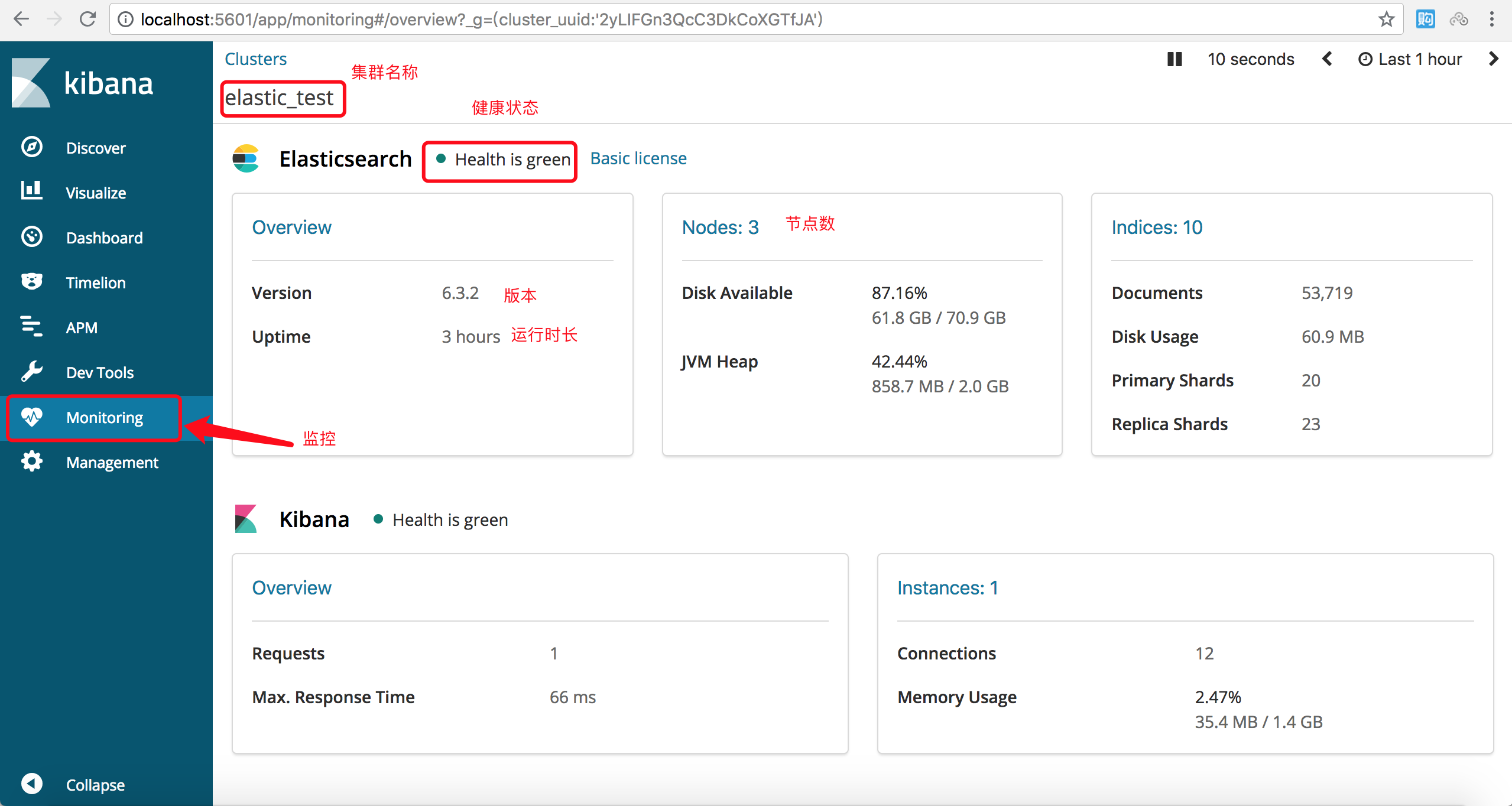
启动成功后可以访问localhost:5601,如下图,点击监控菜单看到集群的一些状态信息。indices是索引数量,除了自己新建的索引Elasticsearch本身也有一些索引。
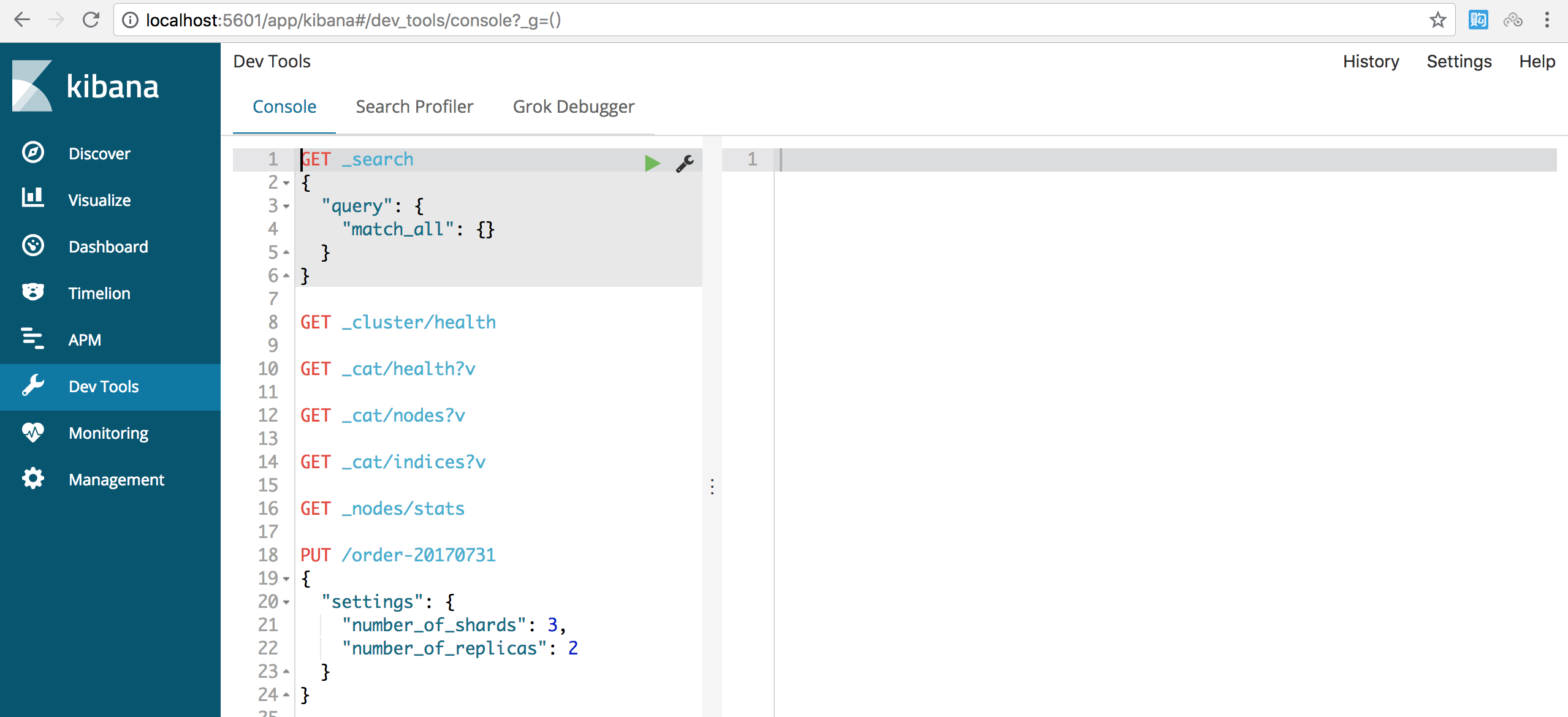
如下图,点击DevTools菜单,可以对集群节点上的数据进行查询了。
二、Java客户端对数据存储和查询
1. 客户端配置,可以查看官网详细配置
采用maven管理,添加依赖的pom配置即可
    <!-- Java High Level REST Client -->

        <dependency>

            <groupId>org.elasticsearch.client</groupId>

            <artifactId>elasticsearch-rest-high-level-client</artifactId>

            <version>6.3.2</version>

            <exclusions>

                <exclusion>

                    <groupId>org.elasticsearch</groupId>

                    <artifactId>elasticsearch</artifactId>

                </exclusion>

            </exclusions>

        </dependency>

        <!-- Client 包缺少一些东西,因此引入此包

            可以具体查看ISSUE https://github.com/elastic/elasticsearch/issues/26959

         -->

        <dependency>

            <groupId>org.elasticsearch</groupId>

            <artifactId>elasticsearch</artifactId>

            <version>6.3.2</version>

        </dependency>
2. 以下是测试主要代码
package com.woasis.elastic.demo;

import org.apache.http.HttpHost;

import org.elasticsearch.action.get.GetRequest;

import org.elasticsearch.action.get.GetResponse;

import org.elasticsearch.action.index.IndexRequest;

import org.elasticsearch.action.index.IndexResponse;

import org.elasticsearch.action.search.SearchRequest;

import org.elasticsearch.action.search.SearchResponse;

import org.elasticsearch.client.RestClient;

import org.elasticsearch.client.RestHighLevelClient;

import org.elasticsearch.common.xcontent.XContentBuilder;

import org.elasticsearch.common.xcontent.XContentFactory;

import org.elasticsearch.index.query.QueryBuilders;

import org.elasticsearch.search.SearchHit;

import org.elasticsearch.search.SearchHits;

import org.elasticsearch.search.builder.SearchSourceBuilder;

import org.springframework.util.StringUtils;

import org.springframework.web.bind.annotation.GetMapping;

import org.springframework.web.bind.annotation.RestController;

import java.io.IOException;

import java.text.SimpleDateFormat;

import java.util.Date;

import java.util.Random;

@RestController

public class IndexController {

    private static RestHighLevelClient client = new RestHighLevelClient(

            RestClient.builder(

                    new HttpHost("172.16.106.201",9200, "http"),

                    new HttpHost("172.16.106.202",9200, "http"),

                    new HttpHost("172.16.106.203",9200, "http")

            )

    );

    /**

     * 向索引下增加数据

     * @param indexName

     * @param type

     * @return

     */

    @GetMapping("/putdata")

    public String putDataForIndex(String indexName, String type){

        if (StringUtils.isEmpty(indexName)){

            return "请指定索引名称";

        }

        SimpleDateFormat simpleDateFormat = new SimpleDateFormat("yyyy-MM-dd");

        StringBuilder indexBuilder = new StringBuilder();

        indexBuilder.append(indexName);

        indexBuilder.append("-");

        indexBuilder.append(simpleDateFormat.format(new Date()));

        String fullIndexName = indexBuilder.toString();

        System.out.println("索引名称是:"+fullIndexName);

        Random random = new Random();

        try {

            XContentBuilder contentBuilder = XContentFactory.jsonBuilder();

            contentBuilder.startObject();

            contentBuilder.field("name", "people"+System.currentTimeMillis());

            contentBuilder.field("age", random.nextInt(30));

            contentBuilder.field("createDate", new Date());

            contentBuilder.endObject();

            //索引请求

            IndexRequest indexRequest = new IndexRequest(fullIndexName, type).source(contentBuilder);

            IndexResponse indexResponse = client.index(indexRequest);

            System.out.println(indexResponse.getIndex());

//            client.close();

        } catch (IOException e) {

            e.printStackTrace();

        }

        return "SUCCESS";

    }

    /**

     * 根据索引名称,type,id获取数据

     * @return

     */

    @GetMapping("/getdata")

    public String getData(){

        //Get请求

        GetRequest getRequest = new GetRequest("people-2018-07-31","student", "DfLL72QBGxN1JyvW1KG4");

        try {

            GetResponse response = client.get(getRequest);

            System.out.println("index:"+response.getIndex());

            System.out.println("type:"+response.getType());

            System.out.println("id:"+response.getId());

            System.out.println("sourceString:"+response.getSourceAsString());

        } catch (IOException e) {

            e.printStackTrace();

        }

        return "SUCCESS";

    }

    /**

     * 搜索数据

     * @return

     */

    @GetMapping("/searchdata")

    public String searchData(){

        //Search请求

        SearchRequest searchRequest = new SearchRequest("people-2018-07-31");

        //查询过滤条件

        SearchSourceBuilder searchSourceBuilder = new SearchSourceBuilder();

        searchSourceBuilder.query(QueryBuilders.termQuery("name","people1533031470255"));

        searchRequest.source(searchSourceBuilder);

        try {

            SearchResponse searchResponse = client.search(searchRequest);

            SearchHits searchHits = searchResponse.getHits();

            for (SearchHit hit : searchHits){

                System.out.println("index:"+hit.getIndex());

                System.out.println("type:"+hit.getType());

                System.out.println("id:"+hit.getId());

                System.out.println("sourceString:"+hit.getSourceAsString());

            }

        } catch (IOException e) {

            e.printStackTrace();

        }

        return "SUCCESS";

    }

}
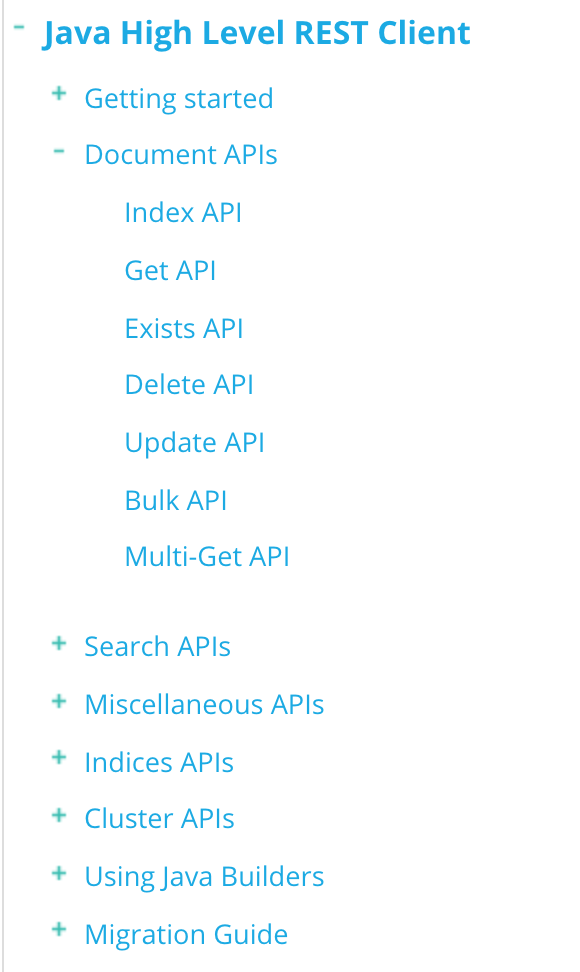
官方在各个API使用方式上都有详细的讲解,有用到的可以在官网查看。跳转地址
该demo程序使用spring boot搭建,可以查看Github源码https://github.com/liuzwei/elastic-demo
Elasticsearch集群搭建及使用Java客户端对数据存储和查询的更多相关文章
- elasticsearch集群搭建实例
elasticsearch集群搭建实例 下个月又开始搞搜索了,几个月没动这块还好没有落下. 晚上在自己虚拟机上搭建了一个简易搜索集群,分享一下. 操作系统环境: Red Hat 4.8.2-16 el ...
- 和我一起打造个简单搜索之ElasticSearch集群搭建
我们所常见的电商搜索如京东,搜索页面都会提供各种各样的筛选条件,比如品牌.尺寸.适用季节.价格区间等,同时提供排序,比如价格排序,信誉排序,销量排序等,方便了用户去找到自己心里理想的商品. 站内搜索对 ...
- CentOS 7下ElasticSearch集群搭建案例
最近在网上看到很多ElasticSearch集群的搭建方法,本人在这人使用Elasticsearch5.0.1版本,介绍如何搭建ElasticSearch集群并安装head插件和其他插件安装方法. 一 ...
- Es学习第十课,ElasticSearch集群搭建
前面几课我们已经把ES的基本概念和查询了解了,大家知道ES的核心优势就是天生支持分布式,所以,这课我们专门讲讲怎么搭建实现ES的集群部署. ES分布式原理 1.es分布式概念 主分片(Primary ...
- kafka集群搭建和使用Java写kafka生产者消费者
1 kafka集群搭建 1.zookeeper集群 搭建在110, 111,112 2.kafka使用3个节点110, 111,112 修改配置文件config/server.properties ...
- Elasticsearch集群搭建
现有两部机器:192.168.31.86,192.168.31.87 参考以往博文对Elasticsearch进行配置完成:http://www.cnblogs.com/zhongshengzhe ...
- ElasticStack之Elasticsearch集群搭建
需搭建服务器环境 操作系统 Host:port node 1 CentOS 7.2.1511 11.1.11.127:9200 node1 2 CentOS 7.2.1511 11.1.11.128: ...
- Elasticsearch集群搭建教程及生产环境配置
Elasticsearch 是一个极其强大的搜索和分析引擎,其强大的部分在于能够对其进行扩展以获得更好的性能和稳定性. 本教程将提供有关如何设置 Elasticsearch 集群的一些信息,并将添加一 ...
- elasticsearch 集群搭建及启动常见错误
1.系统环境 三台服务器(最好是单数台,跟master选举方式有关),确保机器互相ping的通,且都需要装了jdk 8环境,机器IP和 elasticsearch 的节点名称如下: cluster n ...
随机推荐
- 2018.11.01 bzoj4325: NOIP2015 斗地主(贪心+搜索)
传送门 原来一直以为是一道大模拟. 没想到是一道搜索+最优性剪枝 如何搜最优呢? 我们考虑怎么最快出完. 大概是应该尽量出当前能出出去最多的吧. 于是我们选择优先出顺子. 这样做有什么好处呢? 我们会 ...
- 解决maltab的中文和英文字体问题,中文乱码
用比较好看的编程字体,偏偏不显示中文,用支持中文的字体,英文不是等宽的,非常难看. 最近在网上找这方面的解决方法,发现解决问题的方法还是有的. 其实这个问题的原因就是系统自带的等宽字体,不支持中文,解 ...
- CentOS7安装MySQL并设置远程登陆
1 下载并安装MySQL官方的 Yum Repository [root@localhost ~]# wget -i -c http://dev.mysql.com/get/mysql57-commu ...
- CentOS7 安装可视化脚本安装包Webmin
一.简介 Webmin是一个基于Web的Linux系统管理界面.你就可以通过图形化的方式设置用户账号.Apache.DNS.文件共享等服务. 二.安装 1.下载安装包到本地Windows系统 http ...
- 《深入浅出MFC》系列之动态创建
/*************************************************************************************************** ...
- Unix传奇
转自 http://coolshell.cn/articles/2322.html 了解过去,我们才能知其然,更知所以然.总结过去,我们才会知道我们明天该如何去规划,该如何去走.在时间的滚轮中,许许多 ...
- 关于memcached
代振军 http://www.cnblogs.com/daizhj/archive/2009/03/23/1386652.html http://www.cnblogs.com/daizhj/arch ...
- 学习c++需要知道
1.c++投入和经济产出比目前较低,c++很复杂,学习难度高.周期长.而且开发效率低. 2.但是c++趋紧于完美语言,它囊括了多种编程范型.它运行效率高,对计算机有着极致的控制能力.适用于低层. 3. ...
- noip第6课作业
1. 数据统计 [问题描述] 输入N个整数,求出它们的最小值.最大值和平均值(保留3位小数).输入保证这些数都是不超过1000的整数.(1<=N<=1000) [样例输入] 8 2 ...
- Java方法、构造方法的重载;创建对象;调用方法
方法的重载 概念:多个同名但是不同参数的方法称为方法的重载 作用:编译器会根据调用时传递的实际参数自动判断具体调用的是哪个重载方法 特点:方法名相同:同一作用域:参数不同:数量不同 类型不同 顺序不同 ...