
Spring入门详细教程(一)
一、spring概述
Spring是一个开放源代码的设计层面框架,他解决的是业务逻辑层和其他各层的松耦合问题,因此它将面向接口的编程思想贯穿整个系统应用。Spring是于2003 年兴起的一个轻量级的Java 开发框架,由Rod Johnson创建。简单来说,Spring是一个分层的JavaSE/EE full-stack(一站式) 轻量级开源框架。
二、Spring特点
1、方便解耦,简化开发。
2、AOP编程的支持。
3、声明式事务的支持。
4、方便程序的测试
5、方便集成各种优秀框架
三、spring下载
下载地址:https://repo.spring.io/libs-release-local/org/springframework/spring/
进入后可选择下载版本,选择版本后,进入目录结构。其中dist是最终发布版本,包含开发所需lib和源码。docs是开发文档。schema是一些约束文件。
四、spring搭建入门案例
1、在eclipse中创建一个动态的web工程。
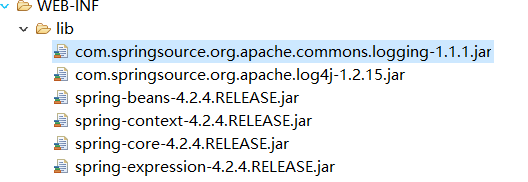
2、导入spring的基础lib包到lib文件夹下。
3、编写一个实体User类
package com.jichi.entity;

public class User {

    private String name;

    private Integer age ;

    public String getName() {

        return name;

    }

    public void setName(String name) {

        this.name = name;

    }

    public Integer getAge() {

        return age;

    }

    public void setAge(Integer age) {

        this.age = age;

    }

}
4、创建applicationContext.xml文件
在src文件下,新建applicationContext.xml文件,同时引入约束。
<?xml version="1.0" encoding="UTF-8"?>

<beans xmlns="http://www.springframework.org/schema/beans"

    xmlns:xsi="http://www.w3.org/2001/XMLSchema-instance"

    xmlns:util="http://www.springframework.org/schema/util"

    xmlns:jee="http://www.springframework.org/schema/jee"

    xmlns:lang="http://www.springframework.org/schema/lang"

    xmlns:jms="http://www.springframework.org/schema/jms"

    xmlns:aop="http://www.springframework.org/schema/aop"

    xmlns:tx="http://www.springframework.org/schema/tx"

    xmlns:context="http://www.springframework.org/schema/context"

    xmlns:jdbc="http://www.springframework.org/schema/jdbc"

    xmlns:cache="http://www.springframework.org/schema/cache"

    xmlns:mvc="http://www.springframework.org/schema/mvc"

    xmlns:oxm="http://www.springframework.org/schema/oxm"

    xmlns:task="http://www.springframework.org/schema/task"

    xmlns:tool="http://www.springframework.org/schema/tool"

    xmlns:websocket="http://www.springframework.org/schema/websocket"

    xsi:schemaLocation="

        http://www.springframework.org/schema/beans http://www.springframework.org/schema/beans/spring-beans.xsd

        http://www.springframework.org/schema/util http://www.springframework.org/schema/util/spring-util.xsd

        http://www.springframework.org/schema/jee http://www.springframework.org/schema/jee/spring-jee.xsd

        http://www.springframework.org/schema/lang http://www.springframework.org/schema/lang/spring-lang.xsd

        http://www.springframework.org/schema/jms http://www.springframework.org/schema/jms/spring-jms.xsd

        http://www.springframework.org/schema/aop http://www.springframework.org/schema/aop/spring-aop.xsd

        http://www.springframework.org/schema/tx http://www.springframework.org/schema/tx/spring-tx.xsd

        http://www.springframework.org/schema/context http://www.springframework.org/schema/context/spring-context.xsd

        http://www.springframework.org/schema/jdbc http://www.springframework.org/schema/jdbc/spring-jdbc.xsd

        http://www.springframework.org/schema/cache http://www.springframework.org/schema/cache/spring-cache.xsd

        http://www.springframework.org/schema/mvc http://www.springframework.org/schema/mvc/spring-mvc.xsd

        http://www.springframework.org/schema/oxm http://www.springframework.org/schema/oxm/spring-oxm.xsd

        http://www.springframework.org/schema/task http://www.springframework.org/schema/task/spring-task.xsd

        http://www.springframework.org/schema/tool http://www.springframework.org/schema/tool/spring-tool.xsd

        http://www.springframework.org/schema/websocket http://www.springframework.org/schema/websocket/spring-websocket.xsd">

</beans>
5、在beans内将user实体配置进去
<bean name="user" class="com.jichi.entity.User"></bean>
6、书写测试代码
public class TestDemo {

    @Test

    public void test1(){

        ApplicationContext ac = new ClassPathXmlApplicationContext("applicationContext.xml");

        User user = (User) ac.getBean("user");

        System.out.println(user);

    }

}
7、结果显示,将user对象交给spring容器管理成功
com.jichi.entity.User@db5e9c
五、spring中的工厂BeanFactory与ApplicationContext的区别
1、BeanFactory
spring原始接口,功能较为单一,在从容器中获得对象的时候才会创建对象。
2、ApplicationContext
每次启动容器的时候,初始化容器中的所有对象并提供更多功能。
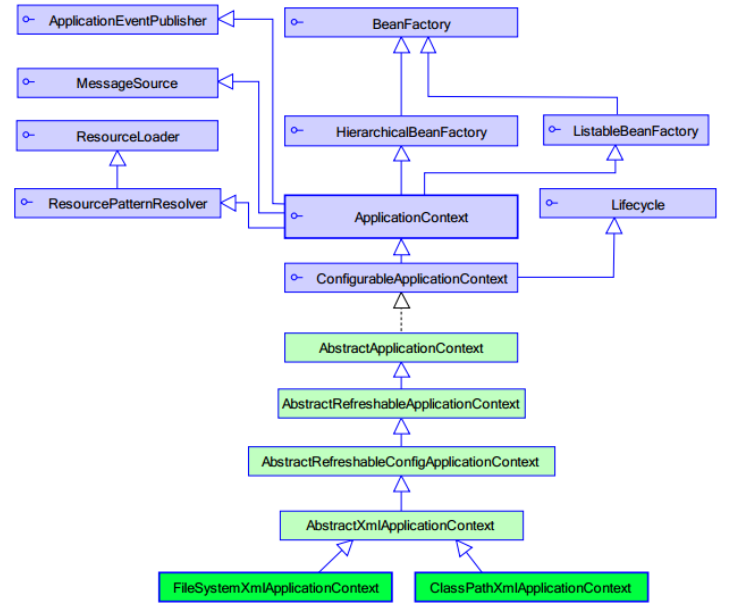
其中的实现类ClassPathXmlApplicationContext是加载类路径下的spring配置文件,FileSystemXmlApplicationContext是加载本地磁盘下spring的配置文件。
3、实现图
4、结论
web开发中,使用applicationContext。
在资源匮乏的环境可以使用BeanFactory。
六、spring的bean元素属性详解
1、class:被容器管理对象的完整类名。
2、name:被容器管理对象的名称,根据此名称从容器中获得该对象,可以重复,可以使用特殊字符。
3、id:被容器管理对象的唯一标识,id不可重复,不可使用特殊字符,作用与name相同,建议使用name。
4、scope:
(1)singleton(默认):单例对象,该对象在spring容器中只会存在一个。
(2)prototype:多例模式,配置为多例的对象不会在spring容器中创建,只有在从容器中要获取该对象的时候,容器对该对象进行创建,每次创建都是一个新的对象。注意在与struts2配合使用的时候,struts2中的action对象必须要配置成prototype这种多例模式。
(3)request:web项目中,创建一个对象,将其存放在request域中。
(4)session:web项目中,创建一个对象,将其存放在session域中。
5、init-method与destory-method
init-method是对象创建的时候所执行的方法,destory-method是对象销毁时所执行的方法。对象必须是单例的,同时容器关闭的时候,对象的销毁方法才会执行。
<bean name="user" class="com.jichi.entity.User" init-method="init" destroy-method="destory"></bean>
public class User {

    private String name;

    private Integer age ;

    public String getName() {

        return name;

    }

    public void setName(String name) {

        this.name = name;

    }

    public Integer getAge() {

        return age;

    }

    public void setAge(Integer age) {

        this.age = age;

    }

    public void init(){

        System.out.println("初始");

    }

    public void destory(){

        System.out.println("销毁");

    }

}
七、spring创建对象的方式
1、空参构造方法
<bean name="user" class="com.jichi.entity.User" ></bean>
2、静态工厂实例化
(1)创建一个工厂类
public class UserFactory {

    public static User createUser(){

        return new User();

    }

}
(2)配置
<bean name="user" class="com.jichi.factory.UserFactory" factory-method="createUser"></bean>
3、实例工厂实例化
(1)创建一个工厂类
public class UserFactory {

    public static User createUser(){

        return new User();

    }

}
(2)配置
<bean name="user" factory-bean="userFactory" factory-method="createUser"></bean>
Spring入门详细教程(一)的更多相关文章
- spring入门详细教程(五)
前言 本篇紧接着spring入门详细教程(三),建议阅读本篇前,先阅读第一篇,第二篇以及第三篇.链接如下: Spring入门详细教程(一) https://www.cnblogs.com/jichi/ ...
- Spring入门详细教程(四)
前言 本篇紧接着spring入门详细教程(三),建议阅读本篇前,先阅读第一篇,第二篇以及第三篇.链接如下: Spring入门详细教程(一) https://www.cnblogs.com/jichi/ ...
- Spring入门详细教程(三)
前言 本篇紧接着spring入门详细教程(二),建议阅读本篇前,先阅读第一篇和第二篇.链接如下: Spring入门详细教程(一) https://www.cnblogs.com/jichi/p/101 ...
- Spring入门详细教程(二)
前言 本篇紧接着spring入门详细教程(一),建议阅读本篇前,先阅读第一篇.链接如下: Spring入门详细教程(一) https://www.cnblogs.com/jichi/p/1016553 ...
- ThinkJS框架入门详细教程(二)新手入门项目
一.准备工作 参考前一篇:ThinkJS框架入门详细教程(一)开发环境 安装thinkJS命令 npm install -g think-cli 监测是否安装成功 thinkjs -v 二.创建项目 ...
- 经典Spring入门基础教程详解
经典Spring入门基础教程详解 https://pan.baidu.com/s/1c016cI#list/path=%2Fsharelink2319398594-201713320584085%2F ...
- Xcode和github入门详细教程
Xcode和github详细教程! 主要是参考了现在网上的一些资料给没整过的人一个详细的指南. (1)先在github上注册账号,自行解决! (2)在导航栏右上角new一个repository(仓库) ...
- SpringBoot入门详细教程
一.SpringBoot入门 1.SpringBoot简介 SpringBoot是整个Spring技术栈的整合,来简化Spring应用开发,约定大于配置,去繁从简,just run 就能创建一 个独立 ...
- windows下Gulp入门详细教程 &&gulp安装失败的原因(红色)
以下教程亲自实践可行: 另外添加一个Gulp自动编译.压缩.更新.测试的教程链接:https://markpop.github.io/2014/09/17/Gulp%E5%85%A5%E9%97%A8 ...
随机推荐
- Log4Net在MVC下的配置以及运用线程队列记录异常信息
Log4Net是用来记录日志的,可以将程序运行过程中的信息输出到一些地方(文件.数据库.EventLog等),日志就是程序的黑匣子,可以通过日志查看系统的运行过程,从而发现系统的问题.日志的作用:将运 ...
- Spring Boot中使用断路器
断路器本身是电路上的一种过载保护装置,当线路中有电器发生短路时,它能够及时的切断故障电路以防止严重后果发生.通过服务熔断(也可以称为断路).降级.限流(隔离).异步RPC等手段控制依赖服务的延迟与失败 ...
- SLAM入门之视觉里程计(3):两视图对极约束 基础矩阵
在上篇相机模型中介绍了图像的成像过程,场景中的三维点通过"小孔"映射到二维的图像平面,可以使用下面公式描述: \[ x = MX \]其中,\(c\)是图像中的像点,\(M\)是一 ...
- 读写锁ReentrantReadWriteLock:读读共享,读写互斥,写写互斥
介绍 DK1.5之后,提供了读写锁ReentrantReadWriteLock,读写锁维护了一对锁:一个读锁,一个写锁.通过分离读锁和写锁,使得并发性相比一般的排他锁有了很大提升.在读多写少的情况下, ...
- Mybatis源码解析-MapperRegistry代理注册mapper接口
知识储备 SqlsessionFactory-mybatis持久层操作数据的前提,具体的解析是通过SqlSessionFactoryBean生成的,可见>>>Spring mybat ...
- Ubuntu 安装网卡驱动
搭建Linux平台的无线热点,需要无线网卡和驱动都要支持 AP. 试了下Ubuntu平台默认驱动并不支持AP模式,所以需要更换驱动,具体操作步骤如下: 1.找到自己网卡芯片的型号,由于我的环境是搭建在 ...
- IDEA的几个常用配置,日常开发必备。
用了IDEA有很长时间了,身边的同事朋友也都慢慢的开始都从Eclipse切换到IDEA了,其实无论是Eclipse还是IntelliJ IDEA都是开发工具而已,各自都有优点.但是刚从Eclipse切 ...
- 使用Asp.Net Core MVC 开发项目实践[第四篇:基于EF Core的扩展2]
上篇我们说到了基于EFCore的基础扩展,这篇我们讲解下基于实体结合拉姆达表达式的自定义更新以及删除数据. 先说下原理:其实通过实体以及拉姆达表达式生成SQL语句去执行 第一种更新扩展: 自定义更新字 ...
- Linux下获取java堆栈文件并进行分析
当服务器内存飙升或者cpu负载飙升的时候,可以使用如下步骤排查问题: 1.终端输入top命令,键盘大写的情况下按P(cpu负载率从高到低排序)或者M(内存使用率从高到低排序),可以查看导致cpu或者内 ...
- 海量数据处理之BitMap
有这样一种场景:一台普通PC,2G内存,要求处理一个包含40亿个不重复并且没有排过序的无符号的int整数,给出一个整数,问如果快速地判断这个整数是否在文件40亿个数据当中? 问题思考: 40亿个int ...