
通过zabbix自带api进行主机的批量添加操作
通过zabbix自带api进行批量添加主机
我们需要监控一台服务器的时候,当客户端装好zabbix-agent端并正确配置以后,需要在zabbix-server的web gui界面进行添加zabbix-agent操作,填写host_name,访问名,ip地址,端口还有模板等信息
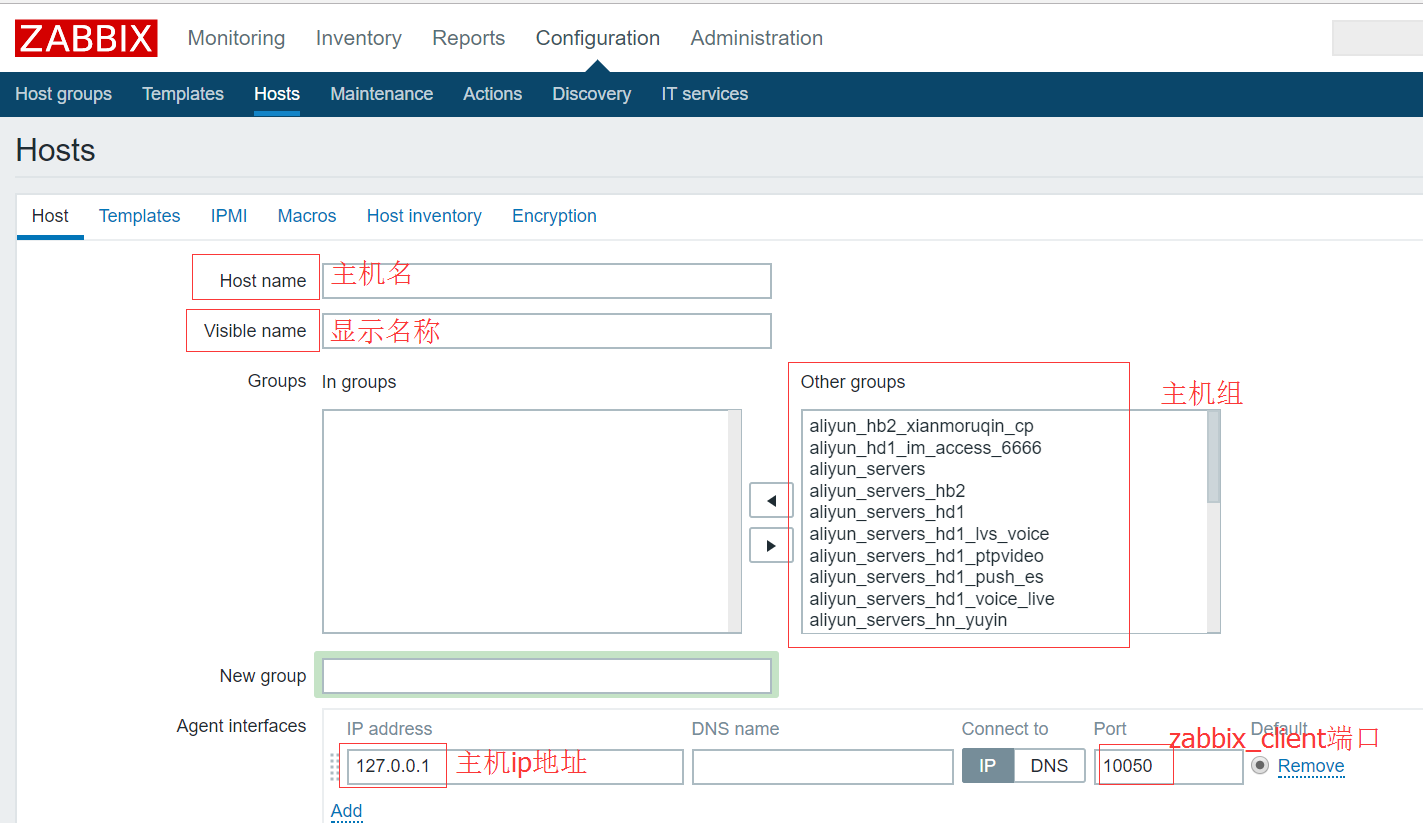

这样操作比较方便,但当我们需要添加的主机有上百台甚至千台时效率就比较低了,一般有如下解决方案:
1.通过自动发现,自动注册主机
2.通过zabbix_api的方式进行批量操作
今天我们使用第二种方式进行操作,定制性较强,不容易出错
主要是通过读取excel主机列表信息,发送post请求操作zabbix的api进行主机自动添加
环境:
zabbix版本: zabbix3.0.4
python版本:python2.7
api参考文档
# https://www.zabbix.com/documentation/3.0/manual/api
host列表信息如下
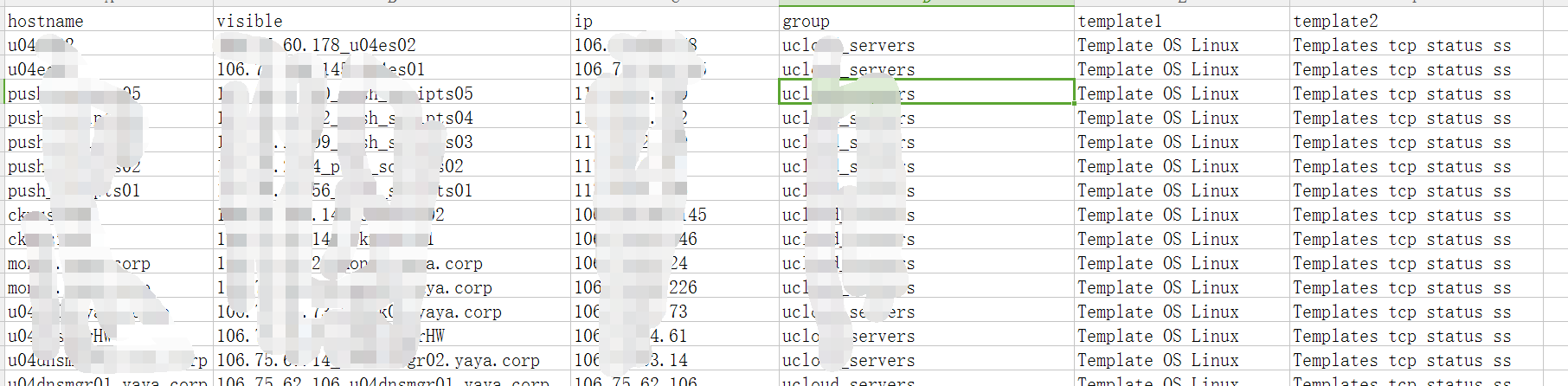
批量添加主机的zabbix_api代码:
#coding:utf-8 import json
import urllib2
from urllib2 import URLError
import sys
import xlrd # 测试ok
class ZabbixTools:
def __init__(self):
#self.url = 'http://10.11.0.215/zabbix/api_jsonrpc.php']
# 一般不需要带/zabbix这个路径,否则可能无法找到api
self.url = 'http://10.11.0.215/api_jsonrpc.php'
self.header = {"Content-Type":"application/json"} # 登陆验证
def user_login(self):
data = json.dumps({
"jsonrpc": "2.0",
"method": "user.login",
"params": {
"user": 'admin',
"password": 'zabbix'
},
"id": 0
}) request = urllib2.Request(self.url, data)
for key in self.header:
request.add_header(key, self.header[key]) try:
result = urllib2.urlopen(request)
except URLError as e:
print "Auth Failed, please Check your name and password:", e.code
else:
response = json.loads(result.read())
result.close()
self.authID = response['result']
return self.authID # 获取主机
def host_get(self,hostName):
data = json.dumps({
"jsonrpc":"2.0",
"method":"host.get",
"params":{
"output":["hostid","name"],
"filter":{"host":hostName}
},
"auth":self.user_login(),
"id":1,
}) request = urllib2.Request(self.url, data)
for key in self.header:
request.add_header(key, self.header[key]) try:
result = urllib2.urlopen(request)
except URLError as e:
if hasattr(e, 'reason'):
print 'We failed to reach a server.'
print 'Reason: ', e.reason
elif hasattr(e, 'code'):
print 'The server could not fulfill the request.'
print 'Error code: ', e.code
else:
response = json.loads(result.read())
result.close()
print "Number Of %s: " % hostName, len(response['result'])
lens=len(response['result'])
if lens > 0:
return response['result'][0]['name']
else:
return "" # 获取主机组
def hostgroup_get(self, hostgroupName):
data = json.dumps({
"jsonrpc":"2.0",
"method":"hostgroup.get",
"params":{
"output": "extend",
"filter": {
"name": [
hostgroupName,
]
}
},
"auth":self.user_login(),
"id":1,
}) request = urllib2.Request(self.url, data)
for key in self.header:
request.add_header(key, self.header[key]) try:
result = urllib2.urlopen(request)
except URLError as e:
print "Error as ", e
else:
response = json.loads(result.read())
result.close() lens=len(response['result'])
if lens > 0:
self.hostgroupID = response['result'][0]['groupid']
return response['result'][0]['groupid']
else:
print "no GroupGet result"
return "" # 获取模板
def template_get(self, templateName):
data = json.dumps({
"jsonrpc":"2.0",
"method": "template.get",
"params": {
"output": "extend",
"filter": {
"host": [
templateName,
]
}
},
"auth":self.user_login(),
"id":1,
}) request = urllib2.Request(self.url, data)
for key in self.header:
request.add_header(key, self.header[key]) try:
result = urllib2.urlopen(request)
except URLError as e:
print "Error as ", e
else:
response = json.loads(result.read())
result.close()
self.templateID = response['result'][0]['templateid']
return response['result'][0]['templateid'] # 创建host
#def host_create(self, hostName,visibleName,hostIp,dnsName,proxyName, hostgroupName, templateName1, templateName2):
def host_create(self, hostName,visibleName,hostIp, hostgroupName, templateName1):
data = json.dumps({
"jsonrpc":"2.0",
"method":"host.create",
"params":{
"host": hostName,
"name": visibleName,
#"proxy_hostid": self.proxy_get(proxyName),
"interfaces": [
{
"type": 1,
"main": 1,
"useip": 1,
"ip": hostIp,
"dns": "",
"port": ""
}
],
"groups": [
{
"groupid": self.hostgroup_get(hostgroupName)
}
],
"templates": [
{
"templateid": self.template_get(templateName1) }
],
},
"auth": self.user_login(),
"id":1
})
request = urllib2.Request(self.url, data)
for key in self.header:
request.add_header(key, self.header[key]) try:
result = urllib2.urlopen(request)
except URLError as e:
print "Error as ", e
else:
response = json.loads(result.read())
result.close()
print "host : %s is created! id is %s\n" % (hostip, response['result']['hostids'][0])
self.hostid = response['result']['hostids']
return response['result']['hostids'] # 创建host,两个模板
def host_create_with2templates(self, hostName,visibleName,hostIp, hostgroupName, templateName1, templateName2):
data = json.dumps({
"jsonrpc":"2.0",
"method":"host.create",
"params":{
"host": hostName,
"name": visibleName,
#"proxy_hostid": self.proxy_get(proxyName),
"interfaces": [
{
"type": 1,
"main": 1,
"useip": 1,
"ip": hostIp,
"dns": "",
"port": ""
}
],
"groups": [
{
"groupid": self.hostgroup_get(hostgroupName)
}
],
"templates": [
{
"templateid": self.template_get(templateName1) },
{
"templateid": self.template_get(templateName2) }
],
},
"auth": self.user_login(),
"id":1
})
request = urllib2.Request(self.url, data)
for key in self.header:
request.add_header(key, self.header[key]) try:
result = urllib2.urlopen(request)
except URLError as e:
print "Error as ", e
else:
response = json.loads(result.read())
result.close()
print "host : %s is created! id is %s\n" % (hostip, response['result']['hostids'][0])
self.hostid = response['result']['hostids']
return response['result']['hostids'] # 创建host,两个模板
def host_create_with3templates(self, hostName,visibleName,hostIp, hostgroupName, templateName1, templateName2, templateName3):
data = json.dumps({
"jsonrpc":"2.0",
"method":"host.create",
"params":{
"host": hostName,
"name": visibleName,
#"proxy_hostid": self.proxy_get(proxyName),
"interfaces": [
{
"type": 1,
"main": 1,
"useip": 1,
"ip": hostIp,
"dns": "",
"port": ""
}
],
"groups": [
{
"groupid": self.hostgroup_get(hostgroupName)
}
],
"templates": [
{
"templateid": self.template_get(templateName1) },
{
"templateid": self.template_get(templateName2) },
{
"templateid": self.template_get(templateName3) }
],
},
"auth": self.user_login(),
"id":1
})
request = urllib2.Request(self.url, data)
for key in self.header:
request.add_header(key, self.header[key]) try:
result = urllib2.urlopen(request)
except URLError as e:
print "Error as ", e
else:
response = json.loads(result.read())
result.close()
print "host : %s is created! id is %s\n" % (hostip, response['result']['hostids'][0])
self.hostid = response['result']['hostids']
return response['result']['hostids'] # zabbix_proxy获取函数
def proxy_get(self, ProxyName):
data = json.dumps({
"jsonrpc":"2.0",
"method": "proxy.get",
"params": {
"output": "extend",
"selectInterface": "extend",
"filter": {
"host": [ ProxyName, ]
}
},
"auth":self.user_login(),
"id":1,
}) request = urllib2.Request(self.url, data)
for key in self.header:
request.add_header(key, self.header[key]) try:
result = urllib2.urlopen(request)
except URLError as e:
print "Error as ", e
else:
response = json.loads(result.read())
result.close()
self.templateID = response['result'][0]['proxyid']
return response['result'][0]['proxyid'] # 程序的入口
if __name__ == "__main__":
# 实例化ZabbixTools对象
test = ZabbixTools() #result = test.host_get('node5.chinasoft.com')
#print result # 获取host列表
workbook = xlrd.open_workbook('host_list.xls')
for row in xrange(workbook.sheets()[0].nrows):
hostname=workbook.sheets()[0].cell(row,0).value
visible=workbook.sheets()[0].cell(row,1).value
hostip=workbook.sheets()[0].cell(row,2).value
#dnsname=workbook.sheets()[0].cell(row,3).value
#proxy=workbook.sheets()[0].cell(row,4).value
hostgroup=workbook.sheets()[0].cell(row,3).value
hosttemp=workbook.sheets()[0].cell(row,4).value
hosttemp2=workbook.sheets()[0].cell(row,5).value
hosttemp3=workbook.sheets()[0].cell(row,6).value hostgroup=hostgroup.strip() hostnameGet=test.host_get(hostname) if hostnameGet.strip() != '':
print "%s have exist! Cannot recreate !\n" % hostnameGet
continue # 主机有三个模板的情况
if hostnameGet.strip() == '' and hosttemp != '' and hosttemp2 != '' and hosttemp3 != '':
print hostname + ',' + visible + ',' + hostip + ',' + hostgroup + ',' + hosttemp + ',' + hosttemp2 + ',' + hosttemp3
test.host_create_with3templates(hostname,visible,hostip,hostgroup,hosttemp,hosttemp2,hosttemp3)
continue # 两个模板的情况
if hostnameGet.strip() == '' and hosttemp != '' and hosttemp2 != '':
print hostname + ',' + visible + ',' + hostip + ',' + hostgroup + ',' + hosttemp + ',' + hosttemp2
test.host_create_with2templates(hostname,visible,hostip,hostgroup,hosttemp,hosttemp2)
continue # 一个模板的情况
if hostnameGet.strip() == '' and hosttemp != '':
print hostname + ',' + visible + ',' + hostip + ',' + hostgroup + ',' + hosttemp
test.host_create(hostname,visible,hostip,hostgroup,hosttemp)
#coding:utf- import json
import urllib2
from urllib2 import URLError
import sys
import xlrd # 定义zabbix工具类
# 需要修改zabbix_server的url登录服务端的账号密码
class ZabbixTools:
def __init__(self):
self.url = 'http://10.11.0.215/zabbix/api_jsonrpc.php'
# self.url = 'http://10.11.0.215/api_jsonrpc.php'
self.header = {"Content-Type":"application/json"} # 登陆验证
def user_login(self):
data = json.dumps({
"jsonrpc": "2.0",
"method": "user.login",
"params": {
"user": 'admin',
"password": 'pass'
},
"id":
}) request = urllib2.Request(self.url, data)
for key in self.header:
request.add_header(key, self.header[key]) try:
result = urllib2.urlopen(request)
except URLError as e:
print "Auth Failed, please Check your name and password:", e.code
else:
response = json.loads(result.read())
result.close()
self.authID = response['result']
return self.authID # 获取主机
def host_get(self,hostName):
data = json.dumps({
"jsonrpc":"2.0",
"method":"host.get",
"params":{
"output":["hostid","name"],
"filter":{"host":hostName}
},
"auth":self.user_login(),
"id":,
}) request = urllib2.Request(self.url, data)
for key in self.header:
request.add_header(key, self.header[key]) try:
result = urllib2.urlopen(request)
except URLError as e:
if hasattr(e, 'reason'):
print 'We failed to reach a server.'
print 'Reason: ', e.reason
elif hasattr(e, 'code'):
print 'The server could not fulfill the request.'
print 'Error code: ', e.code
else:
response = json.loads(result.read())
result.close()
print "Number Of %s: " % hostName, len(response['result'])
lens=len(response['result'])
if lens > :
return response['result'][]['name']
else:
return "" # 获取主机组
def hostgroup_get(self, hostgroupName):
data = json.dumps({
"jsonrpc":"2.0",
"method":"hostgroup.get",
"params":{
"output": "extend",
"filter": {
"name": [
hostgroupName,
]
}
},
"auth":self.user_login(),
"id":,
}) request = urllib2.Request(self.url, data)
for key in self.header:
request.add_header(key, self.header[key]) try:
result = urllib2.urlopen(request)
except URLError as e:
print "Error as ", e
else:
response = json.loads(result.read())
result.close() lens=len(response['result'])
if lens > :
self.hostgroupID = response['result'][]['groupid']
return response['result'][]['groupid']
else:
print "no GroupGet result"
return "" # 获取模板
def template_get(self, templateName):
data = json.dumps({
"jsonrpc":"2.0",
"method": "template.get",
"params": {
"output": "extend",
"filter": {
"host": [
templateName,
]
}
},
"auth":self.user_login(),
"id":,
}) request = urllib2.Request(self.url, data)
for key in self.header:
request.add_header(key, self.header[key]) try:
result = urllib2.urlopen(request)
except URLError as e:
print "Error as ", e
else:
response = json.loads(result.read())
result.close()
# print 'template_get_result:%s' % response['result']
self.templateID = response['result'][]['templateid']
return response['result'][]['templateid'] # 创建主机组hostgroup
def hostgroup_create(self, hostgroupName): data = json.dumps({
"jsonrpc": "2.0",
"method": "hostgroup.create",
"params": {
"name": hostgroupName
},
"auth": self.user_login(),
"id":
})
# print "hostgroupid:|%s|" % hostgroupid
# 查询主机组是否存在,如果不存在就创建
hostgroupid = self.hostgroup_get(hostgroupName)
if hostgroupid == '':
request = urllib2.Request(self.url, data)
for key in self.header: request.add_header(key, self.header[key])
try:
result = urllib2.urlopen(request)
print 'result:%s' % result
except URLError as e:
print "Error as ", e
else:
response = json.loads(result.read())
result.close()
# print 'result groupid:%s' % response['result']['groupids']
return response['result']['groupids'] # 创建host
#def host_create(self, hostName,visibleName,hostIp,dnsName,proxyName, hostgroupName, templateName1, templateName2):
def host_create(self, hostName,visibleName,hostIp, hostgroupName, templateName1): data = json.dumps({
"jsonrpc":"2.0",
"method":"host.create",
"params":{
"host": hostName,
"name": visibleName,
#"proxy_hostid": self.proxy_get(proxyName),
"interfaces": [
{
"type": ,
"main": ,
"useip": ,
"ip": hostIp,
"dns": "",
"port": ""
}
],
"groups": [
{
"groupid": self.hostgroup_get(hostgroupName)
}
],
"templates": [
{
"templateid": self.template_get(templateName1) }
],
},
"auth": self.user_login(),
"id":
})
request = urllib2.Request(self.url, data)
for key in self.header:
request.add_header(key, self.header[key]) try:
result = urllib2.urlopen(request)
except URLError as e:
print "Error as ", e
else:
response = json.loads(result.read())
result.close()
print "host : %s is created! id is %s\n" % (hostip, response['result']['hostids'][])
self.hostid = response['result']['hostids']
return response['result']['hostids'] # 创建host,两个模板
def host_create_with2templates(self, hostName,visibleName,hostIp, hostgroupName, templateName1, templateName2): data = json.dumps({
"jsonrpc":"2.0",
"method":"host.create",
"params":{
"host": hostName,
"name": visibleName,
#"proxy_hostid": self.proxy_get(proxyName),
"interfaces": [
{
"type": ,
"main": ,
"useip": ,
"ip": hostIp,
"dns": "",
"port": ""
}
],
"groups": [
{
"groupid": self.hostgroup_get(hostgroupName)
}
],
"templates": [
{
"templateid": self.template_get(templateName1) },
{
"templateid": self.template_get(templateName2) }
],
},
"auth": self.user_login(),
"id":
})
request = urllib2.Request(self.url, data)
for key in self.header:
request.add_header(key, self.header[key]) try:
result = urllib2.urlopen(request)
except URLError as e:
print "Error as ", e
else:
response = json.loads(result.read())
result.close()
print "host : %s is created! id is %s\n" % (hostip, response['result']['hostids'][])
self.hostid = response['result']['hostids']
return response['result']['hostids'] # 创建host,3个模板
def host_create_with3templates(self, hostName,visibleName,hostIp, hostgroupName, templateName1, templateName2, templateName3): data = json.dumps({
"jsonrpc":"2.0",
"method":"host.create",
"params":{
"host": hostName,
"name": visibleName,
#"proxy_hostid": self.proxy_get(proxyName),
"interfaces": [
{
"type": ,
"main": ,
"useip": ,
"ip": hostIp,
"dns": "",
"port": ""
}
],
"groups": [
{
"groupid": self.hostgroup_get(hostgroupName)
}
],
"templates": [
{
"templateid": self.template_get(templateName1) },
{
"templateid": self.template_get(templateName2) },
{
"templateid": self.template_get(templateName3) }
],
},
"auth": self.user_login(),
"id":
})
request = urllib2.Request(self.url, data)
for key in self.header:
request.add_header(key, self.header[key]) try:
result = urllib2.urlopen(request)
except URLError as e:
print "Error as ", e
else:
response = json.loads(result.read())
result.close()
print "host : %s is created! id is %s\n" % (hostip, response['result']['hostids'][])
self.hostid = response['result']['hostids']
return response['result']['hostids'] # zabbix_proxy获取函数
def proxy_get(self, ProxyName):
data = json.dumps({
"jsonrpc":"2.0",
"method": "proxy.get",
"params": {
"output": "extend",
"selectInterface": "extend",
"filter": {
"host": [ ProxyName, ]
}
},
"auth":self.user_login(),
"id":,
}) request = urllib2.Request(self.url, data)
for key in self.header:
request.add_header(key, self.header[key]) try:
result = urllib2.urlopen(request)
except URLError as e:
print "Error as ", e
else:
response = json.loads(result.read())
result.close()
self.templateID = response['result'][]['proxyid']
return response['result'][]['proxyid'] # 程序的入口
if __name__ == "__main__":
# 实例化ZabbixTools对象
test = ZabbixTools() # 读取excel的每一行,获取host信息列表 workbook = xlrd.open_workbook('host_list02.xls')
for row in xrange(workbook.sheets()[].nrows):
hostname=workbook.sheets()[].cell(row,).value
visible=workbook.sheets()[].cell(row,).value
hostip=workbook.sheets()[].cell(row,).value
#dnsname=workbook.sheets()[].cell(row,).value
#proxy=workbook.sheets()[].cell(row,).value
hostgroup=workbook.sheets()[].cell(row,).value
hosttemp=workbook.sheets()[].cell(row,).value
hosttemp2=workbook.sheets()[].cell(row,).value
hosttemp3=workbook.sheets()[].cell(row,).value hostgroup=hostgroup.strip()
# 判断是否有这个主机组,如果没有就创建
hostgroupid = test.hostgroup_get(hostgroup)
if hostgroupid == '':
test.hostgroup_create(hostgroup) hostnameGet=test.host_get(hostname) if hostnameGet.strip() != '':
print "%s have exist! Cannot recreate !\n" % hostnameGet
continue
# 目前只支持有3个模板的主机,如果有更多模板,需要修改函数,必须保证每一个模板在server端都是存在的否则会报错
if hostnameGet.strip() == '' and hosttemp != '' and hosttemp2 != '' and hosttemp3 != '':
print hostname + ',' + visible + ',' + hostip + ',' + hostgroup + ',' + hosttemp + ',' + hosttemp2 + ',' + hosttemp3
test.host_create_with3templates(hostname,visible,hostip,hostgroup,hosttemp,hosttemp2,hosttemp3)
continue if hostnameGet.strip() == '' and hosttemp != '' and hosttemp2 != '':
print hostname + ',' + visible + ',' + hostip + ',' + hostgroup + ',' + hosttemp + ',' + hosttemp2
test.host_create_with2templates(hostname,visible,hostip,hostgroup,hosttemp,hosttemp2)
continue if hostnameGet.strip() == '' and hosttemp != '':
print hostname + ',' + visible + ',' + hostip + ',' + hostgroup + ',' + hosttemp
test.host_create(hostname,visible,hostip,hostgroup,hosttemp)
通过zabbix自带api进行主机的批量添加操作的更多相关文章
- Zabbix 4.0 API 实践,主机/主机群组 批量添加模板和删除模板
场景 我们日常在管理Zabbix 的时候,经常会需要批量添加模板和批量删除模板,Zabbix页面是提供的批量链接的功能,但是它链接的也只是当前页的主机,我们想扩展这个功能,在链接的时候,可以批量链接整 ...
- 通过Zabbix API实现对主机的增加(无主机资产的添加和带主机资产的添加)、删除、获取主机id、获取模板id、获取组id
config.yaml存储zabbix的信息(主要包括zabbix server的url .请求头部.登陆的用户名密码) Zabbix_Config: zabbix_url: http://192.1 ...
- PHP通过ZABBIX API获取主机信息 VS 直接从数据库获取主机信息
最近项目需要获取linux主机的一些信息,如CPU使用率,内存使用情况等.由于我们本身就装了zabbix系统,所以我只用知道如何获取信息即可,总结有两种方法可以获取. 一.通过ZABBIX API获取 ...
- Zabbix使用python批量添加主机及主机资产信息-从零到无
- - 时间:2020年11月10日 - - 作者:飞翔的小胖猪 前言: 使用zabbix作为基础环境的监控系统时,面对现网在用的2000+台把这些主机添加到zabbix监控中是一个问题,当然zabb ...
- zabbix利用api批量添加item,并且批量配置添加graph
关于zabbix的API见,zabbixAPI 1item批量添加 我是根据我这边的具体情况来做的,本来想在模板里面添加item,但是看了看API不支持,只是支持在host里面添加,所以我先在一个ho ...
- 通过zabbix自带模板监控windowsPC机器
通过zabbix自带模板监控windowsPC机器 作者:尹正杰 版权声明:原创作品,谢绝转载!否则将追究法律责任. 欢迎加入:高级运维工程师之路 598432640 相信有很多 ...
- zabbix的Java API(一)
上文说了,我是对zabbix做第二次开发的小白,既然要对zabbix做第二次开发又是小白,那么就得来研究zabbix提供的相关API了. 于是我在zabbix网站各种找,终于在下面网址找到了: htt ...
- zabbix3.0.4使用shell脚本和zabbix自带模板两种方法添加对指定进程和端口的监控
zabbix3.0.4添加对进程的监控: 方法一:通过自定义命令进行监控 主要思路: 通过 ps -ef|grep sdk-push-1.0.0.jar |grep -v grep|wc -l 这个命 ...
- zabbix通过snmp监控linux主机
1.安装net-snmp [root@db01 ~]# yum install -y net-snmp 2.修改配置文件 [root@db01 ~]# vim /etc/snmp/snmpd.conf ...
随机推荐
- 2018牛客网暑期ACM多校训练营(第二场)J Farm(树状数组)
题意 n*m的农场有若干种不同种类作物,如果作物接受了不同种类的肥料就会枯萎.现在进行t次施肥,每次对一个矩形区域施某种类的肥料.问最后枯萎的作物是多少. 分析 作者:xseventh链接:https ...
- python socket 编程
TCP IPv4 # server.py import socket import threading import time s = socket.socket(socket.AF_INET,soc ...
- CSS脱离文档流&浮动
什么是文档流? 将窗体从上至下分成一行一行,并在每行中按从左至右依次排放元素,称为文档流,也称为普通流.这个应该不难理解,HTML中全部元素都是盒模型,盒模型占用一定的空间,依次排放在HTML中,形成 ...
- 谈谈java程序代码保护及license设计
理论上讲,不存在牢不可破的漏洞,只是时间和成本问题.通常我们认为的不可破解,说的是破解需要难以接受的时间和成本.对于java程序来说,class文件很容易被反编译,所以理论上而言,对java程序做li ...
- kindeditor<=4.1.5 文件上传漏洞利用
kindeditor<=4.1.5 文件上传漏洞 - Kindeditor <=4.1.5 file upload vulnerability and use 漏洞存影响版本:小于等于4. ...
- LOJ #6374「SDWC2018 Day1」网格
模拟赛考过的题 当时太菜了现在也一样只拿到了$ 30$分 回来填个坑 LOJ #6374 题意 你要从$ (0,0)$走到$ (T_x,T_y)$,每次移动的坐标增量满足$ 0 \leq \Delta ...
- Django REST framework 第二章 Request and Response
此章节开始真正的撰写REST framework的核心代码,介绍一系列必要的建立设计 Request Objects REST framework介绍了一个Request对象用来扩展常规的HttpRe ...
- Python11 RabbitMQ Redis
本节内容 1.RabbitMQ 2.Redis RabbitMQ队列 安装 http://www.rabbitmq.com/install-standalone-mac.html 安装python r ...
- 自制rpm包
参考自:https://blog.csdn.net/u010384744/article/details/80929319 https://blog.csdn.net/samxx8/article/d ...
- ionic 照相机 Camera
1.官网: https://ionicframework.com/docs/native/camera/#DestinationType 2.引入插件 $ ionic cordova plugin a ...