
技巧性极强的strings命令
打印文件中的可打印字符串(print the strings of printable characters in files)。常用来在二进制文件中查找字符串,与grep配合使用。strings命令输出的字符串长度为4个或4个以上的,长度小于4的字符串将不予打印,我们可以通过-n参数调整,strings -n 2 filename
strings命令是在对象文件或者二进制文件中查找可打印的字符串,有很多的用途,例如一个用法就是在编译的so中定义字符串常量作为动态库的版本号,然后就可以使用strings+grep 组合命令查看当前编译的so的版本号了。输入strings -h查看strings命令的用法:
用法:strings [选项] [文件]

 打印 [文件] (默认为标准输入) 中可打印的字符串

 选项为:

  -a - --all                Scan the entire file, not just the data section [default]

  -d --data                 Only scan the data sections in the file

  -f --print-file-name      Print the name of the file before each string

  -n --bytes=[number]       Locate & print any NUL-terminated sequence of at

  -<number>                   least [number] characters (default ).

  -t --radix={o,d,x}        Print the location of the string in base ,  or

  -w --include-all-whitespace Include all whitespace as valid string characters

  -o                        An alias for --radix=o

  -T --target=<BFDNAME>     Specify the binary file format

  -e --encoding={s,S,b,l,B,L} Select character size and endianness:

                            s = -bit, S = -bit, {b,l} = -bit, {B,L} = -bit

  -s --output-separator=<string> String used to separate strings in output.

  @<file>                   Read options from <file>

  -h --help                 Display this information

  -v -V --version           Print the program's version number

strings:支持的目标: elf64-x86- elf32-i386 elf32-iamcu elf32-x86- a.out-i386-linux pei-i386 pei-x86- elf64-l1om elf64-k1om elf64-little elf64-big elf32-little elf32-big pe-x86- pe-bigobj-x86- pe-i386 plugin srec symbolsrec verilog tekhex binary ihex

将 bug 报告到 <http://www.sourceware.org/bugzilla/>
在libc.so.6是c标准库,而这个标准库的制作者为了让库的使用者知道该库兼容哪些版本的标准库,就在这个库中定义了一些字符串常量,比如我的系统是centos6.8-x64,我的c标准库在/lib64/libc.so.6,可以直接运行该标准库文件,或者使用ldd --version查看当前版本,以下显示当前版本为2.12
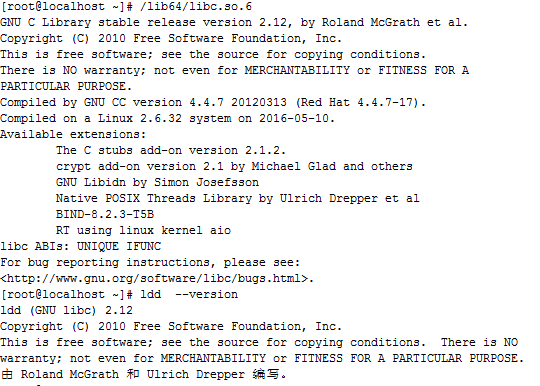
而使用strings /lib64/libc.so.6 | grep GLIBC,可查看向下兼容的版本:
[root@localhost ~]# strings /lib64/libc.so. | grep GLIBC

GLIBC_2.2.5

GLIBC_2.2.6

GLIBC_2.

GLIBC_2.3.2

GLIBC_2.3.3

GLIBC_2.3.4

GLIBC_2.

GLIBC_2.

GLIBC_2.

GLIBC_2.

GLIBC_2.

GLIBC_2.

GLIBC_2.

GLIBC_2.

GLIBC_2.

GLIBC_PRIVATE
https://blog.csdn.net/stpeace/article/details/46641069
技巧性极强的strings命令的更多相关文章
- 抗干扰性极强非接触式读卡13.56mhz芯片:SI522
由于智能门锁产品不断地火爆,市场上的不断出现破解的方法.对此中科微联合深圳市动能世纪科技有限公司不断满足市场需求,推出一款抗干扰性极强的13.56mhz芯片. 该芯片出了抗干扰性强以外还直接PIN2P ...
- linux中的strings命令简介2
摘自:http://blog.csdn.net/stpeace/article/details/46641069 linux中的strings命令简介 之前我们聊过linux strings的用法和用 ...
- linux中的strings命令简介
摘自:http://blog.csdn.net/stpeace/article/details/46641069 linux中的strings命令简介 在linux下搞软件开发的朋友, 几乎没有不知道 ...
- linux中的strings命令
strings - print the strings of printable characters in files. 意思是, 打印文件中可打印的字符. 我来补充一下吧 ...
- Sort功能极强!
Sort功能极强! 可以排string: sort(a.begin(),a.end()); 普通数组 结合结构体 逆序 而且贼快
- 用strings命令查看kafka-log内容
kafka的log内容格式还不没怎么了解,想快速浏览消息内容的话,除了使用它自带的kafka-console-consumer.sh脚本,还可以直接去看log文件本身,不过内容里有部分二进制字符,通过 ...
- 用strings命令查看kafka-log内容 过滤二进制编码
kafka的log内容格式还不没怎么了解,想快速浏览消息内容的话,除了使用它自带的kafka-console-consumer.sh脚本,还可以直接去看log文件本身,不过内容里有部分二进制字符,通过 ...
- centos Linux系统日常管理2 tcpdump,tshark,selinux,strings命令, iptables ,crontab,TCP,UDP,ICMP,FTP网络知识 第十五节课
centos Linux系统日常管理2 tcpdump,tshark,selinux,strings命令, iptables ,crontab,TCP,UDP,ICMP,FTP网络知识 第十五节课 ...
- strings命令的实现 2014-06-02 00:17 355人阅读 评论(0) 收藏
本程序实现从文件中提取连续4个以上的可打印字符.模仿linux中string命令 #include <stdio.h> #include<stdlib.h> #include ...
随机推荐
- Day10--Python--动态传参,作用域
python的三目运算a = 10b = 20c = a if a > b else b #先判断中间的条件a > b是否成立,成立返回if前面的值,不成立返回else后面的值,也可以 c ...
- RabbitMQ入门-路由-有选择的接受消息
比如一个日志系统,之前的处理方式呢,是各种类型(info,error,warning)的消息都发给订阅者,可是实际情况上不一定都需要.可能A需要error,其他的都不需要.那么就引入了今天的处理方式- ...
- 苹果电脑利用curl下载数据集
在看tensorflow书上迁徙学习的这一部分的时候,书上说利用 curl http://download.tensorflow.org/example_images/flower_photos.tg ...
- hdu 3415"Max Sum of Max-K-sub-sequence"(单调队列)
传送门 题意: 给出一个有 N 个数字([-1000 , 1000],N ≤ 105)的环状序列: 让你求一个和最大的连续子序列,并记录起始点. 要求这个连续子序列的长度小于等于K,加和相同的不同区间 ...
- Linux设备树(二 节点)
二 节点(node)的表示 首先说节点的表示方法,除了根节点只用一个斜杠“/”表示外,其他节点的表示形式如“node-name@unit-address”.@前边是节点名字,后边是节点地址.节点名字的 ...
- smarty缓存
huancun.php代码 <?php$p =1;if( !empty($_GET["page"])){ $p =$_GET["page"];}$file ...
- eslint相关工具
eslint工具 1. vscode搜索eslint安装,就可以在写代码时报eslint的错误了 2.文件 --> 首选项 --> 设置 --> 选ESLint --> 勾选A ...
- How-to: Do Statistical Analysis with Impala and R
sklearn实战-乳腺癌细胞数据挖掘(博客主亲自录制视频教程) https://study.163.com/course/introduction.htm?courseId=1005269003&a ...
- PostMan打不开怎么解决
如题: 解决办法: 1.找到以下两个路径直接删除文件,注安装路径不同有可能不同 C:\Users\Administrator\AppData\Roaming\Postman C:\Users\Admi ...
- ACM-ICPC 2018 南京赛区网络预赛 I Skr (马拉车+hash去重)或(回文树)
https://nanti.jisuanke.com/t/30998 题意 给一串由0..9组成的数字字符串,求所有不同回文串的权值和.比如说“1121”这个串中有“1”,“2”,“11”,“121” ...