
微信小程序滚动Tab选项卡:左右可滑动切换
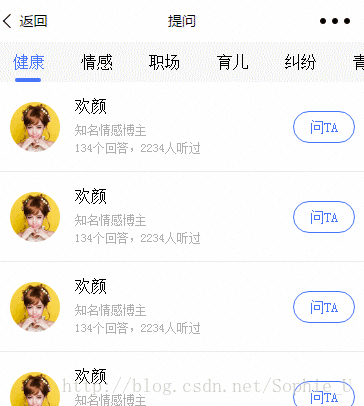
最终效果如上。问题:
1、tab标题总共8个,所以一屏无法全部显示。
2、tab内容区左右滑动切换时,tab标题随即做标记(active)。
3、当active的标题不在当前屏显示时,要使其能显示到当前屏中。
一、wxml结构
tab标题因一排八个,所以使用 scroll-view组件,使其可横向滚动。
tab内容可左右滑动切换,使用swiper组件实现
为了偷懒,所以数据都通过wx:for遍历重复出来。
说明:
1、设置data-current属性用于:点击当前项时,通过点击事件swichNav中处理e.dataset.current取到点击的目标值。
2、swiper组件的current组件用于控制当前显示哪一页
3、swiper组件绑定change事件switchTab,通过e.detail.current拿到当前页
<view >

<scroll-view scroll-x="true" class="tab-h" scroll-left="{{scrollLeft}}">

<view class="tab-item {{currentTab==0?'active':''}}" data-current="0" bindtap="swichNav">健康</view>

<view class="tab-item {{currentTab==1?'active':''}}" data-current="1" bindtap="swichNav">情感</view>

<view class="tab-item {{currentTab==2?'active':''}}" data-current="2" bindtap="swichNav">职场</view>

<view class="tab-item {{currentTab==3?'active':''}}" data-current="3" bindtap="swichNav">育儿</view>

<view class="tab-item {{currentTab==4?'active':''}}" data-current="4" bindtap="swichNav">纠纷</view>

<view class="tab-item {{currentTab==5?'active':''}}" data-current="5" bindtap="swichNav">青葱</view>

<view class="tab-item {{currentTab==6?'active':''}}" data-current="6" bindtap="swichNav">全部</view>

<view class="tab-item {{currentTab==7?'active':''}}" data-current="7" bindtap="swichNav">其他</view>

</scroll-view>

<swiper class="tab-content" current="{{currentTab}}" duration="300" bindchange="switchTab"

style="height:{{winHeight}}rpx">

<swiper-item wx:for="{{[0,1,2,3,4,5,6,7]}}">

<scroll-view scroll-y="true" class="scoll-h" >

<block wx:for="{{[1,2,3,4,5,6,7,8]}}" wx:key="*this">

<view class="item-ans">

<view class="avatar">

<image class="img" src="http://ookzqad11.bkt.clouddn.com/avatar.png"></image>

</view>

<view class="expertInfo">

<view class="name">欢颜</view>

<view class="tag">知名情感博主</view>

<view class="answerHistory">134个回答,2234人听过 </view>

</view>

<navigator url="/pages/askExpert/expertDetail" class="askBtn">问TA</navigator>

</view>

</block>

</scroll-view>

</swiper-item>

</swiper>

</view>
三、js部分
微信小程序在开发起来,个人感觉挺像vue的,以数据驱动视图的更新。所以在小程序中,不能直接操作dom,当然也不能使用jquery之类的库。
var app = getApp();

Page({

data:{

winHeight:"",//窗口高度

currentTab:0, //预设当前项的值

scrollLeft:0, //tab标题的滚动条位置

expertList:[{ //假数据

img:"avatar.png",

name:"欢顔",

tag:"知名情感博主",

answer:134,

listen:2234

}]

},

// 滚动切换标签样式

switchTab:function(e){

this.setData({

currentTab:e.detail.current

});

this.checkCor();

},

// 点击标题切换当前页时改变样式

swichNav:function(e){

var cur=e.target.dataset.current;

if(this.data.currentTaB==cur){return false;}

else{

this.setData({

currentTab:cur

})

}

},

//判断当前滚动超过一屏时,设置tab标题滚动条。

checkCor:function(){

if (this.data.currentTab>4){

this.setData({

scrollLeft:300

})

}else{

this.setData({

scrollLeft:0

})

}

},

onLoad: function() {

var that = this;

// 高度自适应

wx.getSystemInfo( {

success: function( res ) {

var clientHeight=res.windowHeight,

clientWidth=res.windowWidth,

rpxR=750/clientWidth;

var calc=clientHeight*rpxR-180;

console.log(calc)

that.setData( {

winHeight: calc

});

}

});

},

footerTap:app.footerTap

})
三、wxss样式
.tab-h{

height: 80rpx;width: 100%; box-sizing: border-box;overflow: hidden;line-height: 80rpx;background: #F7F7F7; font-size: 16px; white-space: nowrap;position: fixed;top: 0; left: 0; z-index: 99;}

.tab-item{margin:0 36rpx;display: inline-block;}

.tab-item.active{color: #4675F9;position: relative;}

.tab-item.active:after{ content: "";display: block;height: 8rpx;width: 52rpx;background: #4675F9;position: absolute; bottom: 0;left: 5rpx;border-radius: 16rpx;}

.item-ans{ width: 100%;display: flex; flex-grow: row no-wrap;justify-content: space-between; padding: 30rpx;box-sizing: border-box; height: 180rpx;align-items: center;border-bottom: 1px solid #F2F2F2;}

.avatar{width: 100rpx;height: 100rpx;position: relative;padding-right: 30rpx;}

.avatar .img{width: 100%;height: 100%;}

.avatar .doyen{width: 40rpx;height: 40rpx;position: absolute;bottom: -2px;right: 20rpx;}

.expertInfo{font-size: 12px;flex-grow: 2;color: #B0B0B0;line-height: 1.5em;}

.expertInfo .name{font-size: 16px;color:#000;margin-bottom: 6px;}

.askBtn{ width: 120rpx;height: 60rpx;line-height: 60rpx;text-align: center;font-size: 14px; border-radius: 60rpx;border: 1px solid #4675F9; color:#4675F9;}

.tab-content{margin-top: 80rpx;}

.scoll-h{height: 100%;}
微信小程序滚动Tab选项卡:左右可滑动切换的更多相关文章
- 微信小程序滚动Tab实现左右可滑动切换
--------------------------------------------------------wxml---------------------------------------- ...
- 微信小程序-滚动Tab选项卡
前言:今天呢 给大家详细讲解一下滚动Tab选项卡:左右可滑动切换的效果,希望对大家做项目时候有用! 以前也遇到过这个,但是没有做记录.转载来源于:https://www.jianshu.com/p/9 ...
- 转载【微信小程序】:微信小程序滚动Tab选项卡:左右可滑动切换(仿某宝)
1.本文转载至:http://blog.csdn.net/sophie_u/article/details/71745125 2.效果: 3.最终效果如上.问题: 1).tab标题总共8个,所以一屏无 ...
- 微信小程序滚动tab的实现
微信小程序滚动tab的实现 1.目的:为了解决滚动版本的tab,以及实现虹吸效果. 2.方案:自己动手写了一个Demo,用于测试实现如上的效果.其代码有做参考,在这里先声明.具体的参照如下:重庆大学二 ...
- 微信小程序写tab切换
微信小程序之tab切换效果,如图: 最近在学习微信小程序并把之前的公司app搬到小程序上,挑一些实现效果记录一下(主要是官方文档里没说的,毕竟官方文档只是介绍功能) .wxml代码: <view ...
- NO--19 微信小程序之scroll-view选项卡与跳转(二)
本篇为大家介绍为何我们在最后做交互的时候,并没有使用上一篇讲的选项卡的效果. scroll-view与跳转.gif (如无法查看图片,还请翻看上一篇!) 大家注意看,在我点击跳转后,首先能看到的是 ...
- 微信小程序实现tabs选项卡
选项卡在我们的日常开发中,使用的还是蛮多的,但是微信小程序中却没有直接提供选项卡组件,不过我们可以变通通过 scroll-view 和 swiper 组件来实现一个选项卡的功能. 需求: 实现一个选项 ...
- 微信小程序-滚动消息通知
写在前面: 微信小程序学的不太多,做了一个简单的项目,回来很快时间内把在深圳两天的房租给赚回来了. 这次我主要想总结一下微信小程序实现上下滚动消息提醒,主要是利用swiper组件来实现,swiper组 ...
- 微信小程序-滚动消息通知效果
这次我主要想总结一下微信小程序实现上下滚动消息提醒,主要是利用swiper组件来实现,swiper组件在小程序中是滑块视图容器. 我们通过vertical属性(默认为false,实现默认左右滚动)设置 ...
随机推荐
- 数据库 价格字段 设置 decimal(8,2),价格为100W,只显示999999.99
DECIMAL(M,D),M是数字最大位数,D是小数点右侧数字个数,整数M-D位 decimal(8,2)数值范围是 -999999.99 ~ 999999.99 1000000超过了6位,严格模式下 ...
- ELK-6.5.3学习笔记–使用filebeat管理微服务日志
微服务日志打印. 转载于http://www.eryajf.net/2369.html 上边是输出了nginx日志,从而进行展示,以及各种绘图分析,而现在的需求是,要将微服务当中的日志汇总到elk当中 ...
- Linux如何查看机器的配置信息
Linux如何查看机器的配置信息 1.查看内存信息 cat /proc/meminfo [root@web ~]# cat /proc/meminfo MemTotal: kB MemFree: kB ...
- bzoj4034 线段树+dfs序
https://www.lydsy.com/JudgeOnline/problem.php?id=4034 有一棵点数为 N 的树,以点 1 为根,且树点有边权.然后有 M 个 操作,分为三种: 操作 ...
- 网络编程基础【day10】:操作系统介绍
一.为什么要有操作系统 现代的计算机系统主要是由一个或者多个处理器,主存,硬盘,键盘,鼠标,显示器,打印机,网络接口及其他输入输出设备组成. 一般而言,现代计算机系统是一个复杂的系统. 其一:如果每位 ...
- python第四次周末大作业
''' 选课系统开发 系统登录需要有两类用户:学生.管理员,针对不用用户提供不同功能: 学生用户 :对于学生用户来说,登陆之后有三个功能 1.查看所有课程 2.选择课程 3.查看所选课程 4.删除已选 ...
- Mysql:索引实战
MySQL主要提供2种方式的索引:B-Tree索引,Hash索引 B树索引具有范围查找和前缀查找的能力,对于有N节点的B树,检索一条记录的复杂度为O(LogN).相当于二分查找. 哈希索引只能做等于查 ...
- [JDK8] Optional
我们知道 Java 8 增加了一些很有用的 API, 其中一个就是 Optional. 如果对它不稍假探索, 只是轻描淡写的认为它可以优雅的解决 NullPointException 的问题, 于是代 ...
- CSS-Naming-Conventions--BEM
BEM BEM : Block Element Modifier There are only two hard problems in Computer Sciences:cache invalid ...
- Storm基本原理概念及基本使用
1. 背景介绍 1.1 离线计算是什么 离线计算:批量获取数据.批量传输数据.周期性批量计算数据.数据展示: 代表技术:Sqoop批量导入数据.HDFS批量存储数据.MapReduce批量计算数据.H ...