
tensorflow faster rann
github 上大神的代码 https://github.com/endernewton/tf-faster-rcnn.git
在自己跑的过程中的问题:
1. 数据集的问题:
作者实现了 voc,coco数据集接口。由于我要跑自己的数据,所以要重写数据接口。为了方便我将自己的数据格式改为voc的数据格式,使用原来voc的数据接口pascal_voc.py。
voc 数据格式中需要文件:
data
-----VOCdevkit2007 (自己可以改)
|
----VOC2007
|
-----Annotations (目标的标注文件.xml)
-----ImageSets
|
----- trainval.txt (用于训练的图像名)
----- test.txt (用于测试的图像名)
-----JPEGImages (jpg 图像)
具体 .xml 文件编写根据自己已有的数据
写xml 文件主要内容:
from  xml.dom.minidom import Document

doc=Document()

Annotation=doc.createElement('annotation')  # 创建annotation 域

doc.appendChild(Annotation) # 写入annotation 域

object=doc.createElement('object')

Annotation.appendChild('object')

# 写入name

object_name=doc.createElement('name')

object_name_text=doc.createTextNode('分类类别名')

object_name.appendChild(object_name_text)

object.appendChild(object_name)

# 写入difficult,虽然不用,但是如果不加直接使用pascal_voc会出错

object_difficult=doc.createElement('difficult')

object_difficult_text=doc.createTextNode('0')

object_difficult.appendChild(object_difficult_text)

object.appendChild(object_difficult)

# 写入box

bndbox=doc.createElement('bndbox')

object.appendChild(bndbox)

object_box=doc.createElement('bndbox')

object_box_xmin=doc.createElement('xmin')

object_box_xmin_text=doc.createTextNode(str(image_box[0]))

object_box_xmin.appendChild(object_box_xmin_text)

bndbox.appendChild(object_box_xmin)

object_box_ymin=doc.createElement('ymin')

object_box_ymin_text=doc.createTextNode(str(image_box[1]))

object_box_ymin.appendChild(object_box_ymin_text)

bndbox.appendChild(object_box_ymin)

object_box_xmax=doc.createElement('xmax')

object_box_xmax_text=doc.createTextNode(str(image_box[2]))

object_box_xmax.appendChild(object_box_xmax_text)

bndbox.appendChild(object_box_xmax)

object_box_ymax=doc.createElement('ymax')

object_box_ymax_text=doc.createTextNode(str(image_box[3]))

object_box_ymax.appendChild(object_box_ymax_text)

bndbox.appendChild(object_box_ymax)

f=open(filename,"w")

f.write(doc.toprettyxml(indent="   "))

f.close()
得到:
<annotation>

   <object>

      <name>abc</name>

      <difficult>0</difficult>

      <bndbox>

         <xmin>107</xmin>

         <ymin>155</ymin>

         <xmax>193</xmax>

         <ymax>214</ymax>

      </bndbox>

   </object>

</annotation>
改pascal_voc.py 文件,修改自己的classes,以及xml中对应域的名字等。
2. 数据完成之后,就可以用来训练了,此时出现问题:
Assign requires shapes of both tensors to match. lhs shape= [2048,124] rhs shape= [2048,84]
因为我现在变为30类,30+1 (背景),31*4=124 (4为box 的定位),而原来为84类。
怎么改最后的输出类别个数?在caffe中可以直接在prototxt 定义的网络结构中改,在tensorflow中怎么改呢?
- 我们执行train_faster_rcnn 传入了(gpuId, dataset, net) 调用tools/trainval_net.py
- 在trainval_net.py 中调用net=resnetv1, load 网络模型, 调用models/train_net
- 在train_net 中调用train_model 函数,定义计算图,在initialize 函数中对sess 进行初始化
  def initialize(self, sess):

    # Initial file lists are empty

    np_paths = []

    ss_paths = []

    # Fresh train directly from ImageNet weights

    print('Loading initial model weights from {:s}'.format(self.pretrained_model))

    variables = tf.global_variables()

    # Initialize all variables first

    sess.run(tf.variables_initializer(variables, name='init'))

    var_keep_dic = self.get_variables_in_checkpoint_file(self.pretrained_model)

    # Get the variables to restore, ignoring the variables to fix

    variables_to_restore = self.net.get_variables_to_restore(variables, var_keep_dic)

    # 要加载的变量

    restorer = tf.train.Saver(variables_to_restore)

    # 进行加载。。出错的地方就是这里

    restorer.restore(sess, self.pretrained_model)

    print('Loaded.')

    # Need to fix the variables before loading, so that the RGB weights are changed to BGR

    # For VGG16 it also changes the convolutional weights fc6 and fc7 to

    # fully connected weights

    self.net.fix_variables(sess, self.pretrained_model)

    print('Fixed.')

    last_snapshot_iter = 0

    rate = cfg.TRAIN.LEARNING_RATE

    stepsizes = list(cfg.TRAIN.STEPSIZE)

    return rate, last_snapshot_iter, stepsizes, np_paths, ss_paths
要改正,就要不加载最后的 预测层和 box 回归层。
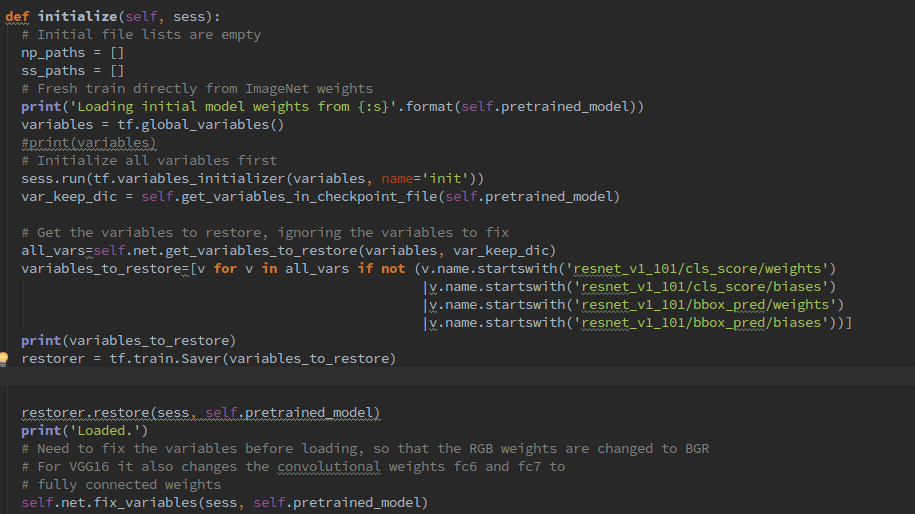
对要加载的文件进行选择,然后就可训练自己的数据了
tensorflow faster rann的更多相关文章
- tensorflow faster rcnn 代码分析一 demo.py
os.environ["CUDA_VISIBLE_DEVICES"]=2 # 设置使用的GPU tfconfig=tf.ConfigProto(allow_soft_placeme ...
- Tensorflow faster rcnn系列一
注意:本文主要是学习用,发现了一个在faster rcnn训练流程写的比较详细的博客. 大部分内容来自以下博客连接:https://blog.csdn.net/weixin_37203756/arti ...
- python3 + Tensorflow + Faster R-CNN训练自己的数据
之前实现过faster rcnn, 但是因为各种原因,有需要实现一次,而且发现许多博客都不全面.现在发现了一个比较全面的博客.自己根据这篇博客实现的也比较顺利.在此记录一下(照搬). 原博客:http ...
- Faster_Rcnn在windows下运行踩坑总结
Faster_Rcnn在windows下运行踩坑总结 20190524 今天又是元气满满的一天! 1.代码下载 2.编译 3.下载数据集 4.下载pre-train Model 5.运行train ...
- TensorFlow_Faster_RCNN中demo.py的运行(CPU Only)
GitHub项目地址,https://github.com/endernewton/tf-faster-rcnnTensorflow Faster RCNN for Object Detection. ...
- Technology Document Guide of TensorRT
Technology Document Guide of TensorRT Abstract 本示例支持指南概述了GitHub和产品包中包含的所有受支持的TensorRT 7.2.1示例.Tensor ...
- 新人如何运行Faster RCNN的tensorflow代码
0.目的 刚刚学习faster rcnn目标检测算法,在尝试跑通github上面Xinlei Chen的tensorflow版本的faster rcnn代码时候遇到很多问题(我真是太菜),代码地址如下 ...
- Tensorflow版Faster RCNN源码解析(TFFRCNN) (2)推断(测试)过程不使用RPN时代码运行流程
本blog为github上CharlesShang/TFFRCNN版源码解析系列代码笔记第二篇 推断(测试)过程不使用RPN时代码运行流程 作者:Jiang Wu 原文见:https://hom ...
- TensorFlow Object Detection API中的Faster R-CNN /SSD模型参数调整
关于TensorFlow Object Detection API配置,可以参考之前的文章https://becominghuman.ai/tensorflow-object-detection-ap ...
随机推荐
- PID 通俗解释
PID 控制原理3 个故事:看完您就明白了.1.: PID 的故事小明接到这样一个任务:有一个水缸点漏水(而且漏水的速度还不一定固定不变),要求水面高度维持在某个位置,一旦发现水面高度低于要求位置,就 ...
- Linux:文件系统层次结构标准(Filesystem Hierarchy Standard)
Linux FHS_2.3标准文档:http://refspecs.linuxfoundation.org/FHS_3.0/fhs-3.0.pdf
- 三小时学会Kubernetes:容器编排详细指南
三小时学会Kubernetes:容器编排详细指南 如果谁都可以在三个小时内学会Kubernetes,银行为何要为这么简单的东西付一大笔钱? 如果你心存疑虑,我建议你不妨跟着我试一试!在完成本文的学习后 ...
- docker学习5--docker数据卷(volume)
https://blog.csdn.net/dream_broken/article/details/52314993 1.什么是数据卷volume 为了了解什么是Docker Volume,首先我们 ...
- hdu5306 Explosion
题目链接 题意 有n个房间,每个房间里面有若干把钥匙,每把钥匙可以打开对应的一扇门.如果手中没有钥匙,就要随机轰炸一个房间来打开这个房间.如果有钥匙,就要去打开这些房间.问期望轰炸次数是多少. 思路 ...
- [ZROJ110][假如战争今天爆发]
题面 思路 先假设我们已经知道了操作顺序,考虑如何求出时间.用f[i][j]表示前i个物品,第i个加工完了第j台机器所需要的最少的时间.转移的时候就是f[i][j] = max(f[i-1][j],f ...
- 测试利器 Postman
一.安装 官网:https://www.getpostman.com/ Postman是一个Chrome的一个插件工具,我们可以通过Chrome的应用商店进行进行搜索并安装,安装完成会在桌面上显示一个 ...
- Luogu P3966 [TJOI2013]单词
题目链接 \(Click\) \(Here\) 本题\(AC\)自动机写法的正解之一是\(Fail\)树上跑\(DP\). \(AC\)自动机是\(Trie\)树和\(Fail\)树共存的结构,前者可 ...
- (进制转换 栈)P1143 进制转换 洛谷
题目描述 请你编一程序实现两种不同进制之间的数据转换. 输入输出格式 输入格式: 共三行,第一行是一个正整数,表示需要转换的数的进制n(2≤n≤16),第二行是一个n进制数,若n>10n> ...
- Storm 消息分发策略
1.Shuffle Grouping:随机分组,随机派发stream里面的tuple,保证每个bolt接收到的tuple数目相同.2.Fields Grouping:按字段分组,比如按userid来分 ...