
Apache Traffic Server
1. ats 安装
参考:https://docs.trafficserver.apache.org/en/latest/getting-started/index.en.html#installation
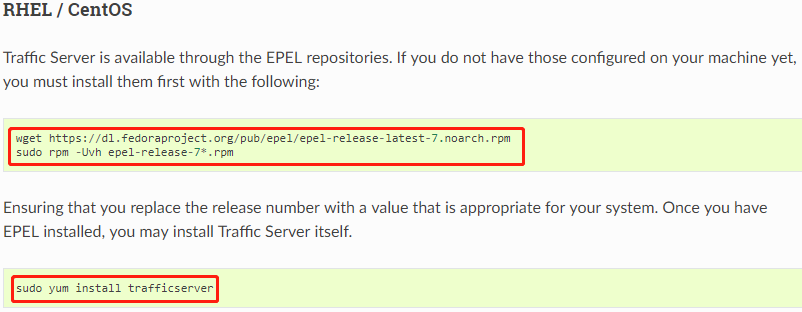
可执行文件目录:/usr/bin/
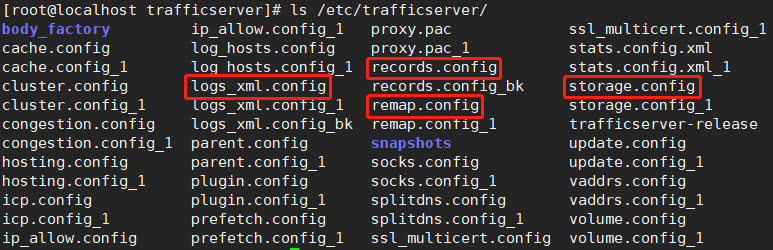
配置文件目录:/etc/trafficserver/
日志文件目录:/var/log/trafficserver/
ats 的启动、重启、停止
 [root@localhost ~]# ls /usr/bin/ | grep traffic

 traffic_cop

 traffic_crashlog

 traffic_ctl

 traffic_layout

 traffic_line

 traffic_logcat

 traffic_logstats

 traffic_manager

 traffic_sac

 trafficserver

 traffic_server

 traffic_via

 [root@localhost ~]# trafficserver start  # 启动

 Starting Apache Traffic Server:                            [  确定  ]

 [root@localhost ~]# trafficserver restart  # 重启

 Stopping traffic_cop:                                      [  确定  ]

 Stopping traffic_manager:                                  [  确定  ]

 Stopping traffic_server:                                   [  确定  ]

 Starting Apache Traffic Server:                            [  确定  ]

 [root@localhost ~]# netstat -tlnp | grep traffic

 tcp               0.0.0.0:            0.0.0.0:*               LISTEN      /traffic_manage

 tcp               127.0.0.1:          0.0.0.0:*               LISTEN      /traffic_manage

 tcp               127.0.0.1:          0.0.0.0:*               LISTEN      /traffic_server

 [root@localhost ~]# trafficserver stop  # 停止

 Stopping traffic_cop:                                      [  确定  ]

 Stopping traffic_manager:                                  [  确定  ]

 Stopping traffic_server:                                   [  确定  ]
2. ats 的配置文件
records.config 是 key-value 格式的配置文件,负责大部分全局的选项设置,即主配置文件。
storage.config 用于指定磁盘存储。
remap.config 定义映射规则,用于请求的重写(rewrite),反向代理即在此配置。
logs_xml.config 日志配置文件。
3. ats 的反向代理配置
在代理服务器 192.168.233.134 作如下配置
vim /etc/trafficserver/records.config
 ##############################################################################

 # Enable / disable HTTP caching. Useful for testing, but also as an

 # overridable (per remap) config

 ##############################################################################

 CONFIG proxy.config.http.cache.http INT 1

 ##############################################################################

 # Specify server addresses and ports to bind for HTTP and HTTPS. Docs:

 #    https://docs.trafficserver.apache.org/records.config#proxy-config-http-server-ports

 ##############################################################################

 CONFIG proxy.config.http.server_ports STRING 80  # 默认端口为 8080

 ##############################################################################

 # These settings control remapping, and if the proxy allows (open) forward proxy or not. Docs:

 #    https://docs.trafficserver.apache.org/records.config#url-remap-rules

 #    https://docs.trafficserver.apache.org/en/latest/reference/configuration/remap.config.en.html

 ##############################################################################

 CONFIG proxy.config.url_remap.remap_required INT 1

     # https://docs.trafficserver.apache.org/records.config#proxy-config-url-remap-pristine-host-hdr

 CONFIG proxy.config.url_remap.pristine_host_hdr INT 1

     # https://docs.trafficserver.apache.org/records.config#reverse-proxy

 CONFIG proxy.config.reverse_proxy.enabled INT 1
vim /etc/trafficserver/remap.config
regex_map http://(.*)/ http://192.168.233.130:8000/
vim /etc/trafficserver/storage.config
/var/cache/trafficserver 256M
在 192.168.233.130:8000 开启一个 python 程序,代码如下
 import tornado.ioloop

 import tornado.web

 class MainHandler(tornado.web.RequestHandler):

     def get(self):

         self.write("<h1>Hello, world</h1>")

 def make_app():

     return tornado.web.Application([

         (r"/", MainHandler),

     ])

 if __name__ == "__main__":

     app = make_app()

     app.listen(8000)

     tornado.ioloop.IOLoop.current().start()
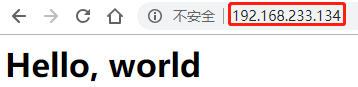
在客户端 192.168.233.1 访问 192.168.233.134
Apache Traffic Server的更多相关文章
- Apache Traffic Server服务搭建
一.简介 Apache Traffic Server(ATS或TS)是一个高性能的.模块化的HTTP代理和缓存服务器,与 Nginx 和 Squid 类似.它通过将频繁访问的信息缓存在网络的边缘来改善 ...
- Apache Traffic Server 5.3.1公布
本文来源于我在InfoQ中文站翻译的文章,原文地址是:www.infoq.com/cn/news/2015/07/traffic-server-5.3.1-release 近日,Apache软件基金会 ...
- 安装ATS(apache traffic server)正向代理
一 traffic server简介 Traffic Server是一种高性能Web代理缓存,可通过在网络边缘缓存频繁访问的信息来提高网络效率和性能.这使内容在物理上更接近最终用户,同时实现更快的交付 ...
- Apache Traffic Server(ats)
零.前言1.官网 http://trafficserver.apache.org/2.国内社区 https://blog.zymlinux.net3.简洁明了的配置:http://blog.csdn. ...
- apache traffic server安装
wget http://mirrors.hust.edu.cn/apache/trafficserver/trafficserver-7.1.1.tar.bz2 tar -jxvf trafficse ...
- ATS (apache traffic server) http_ui 设置与使用
参考官方FAQ进行设置: https://cwiki.apache.org/confluence/display/TS/FAQ#FAQ-http_ui 这里也有一篇: https://blog.zym ...
- Using Apache Web Server with Jboss AS 7
In real-world projects, it's common to find Apache web server as a front door to your application se ...
- tomcat集群学习记录1--初识apache http server
起因 平时开发的时候我都是用eclipse把代码部署到本地tomcat的,当然只会去跑1台tomcat啦... 偶尔有时候解决问题需要去公司测试环境找日志.连上公司测试环境以后发现竟然有2台weblo ...
- Apache http Server 2.4 安装与配置
前言 Apache官网从2.2之后,不再提供windows的msi或exe安装版本,现在Apache http Server有两个分支2.2及2.4 注意事项 如果之前有安装2.2的版本,请先卸载 A ...
随机推荐
- 反射 内省 BeanUtil 综合使用
package com.zsphp.domain; public class User { private String userId; private String userName; privat ...
- 常见26种NLP任务的练手项目
经常有人问我:老大让我完成xxx,我不会,他也不会,但是很着急.这个任务怎么实现啊?这个任务需要什么技术啊?这种情况我遇到有100+次了,而且很多时候问得问题跟具体需要的技术简直是驴唇不对马嘴.所以今 ...
- 前三次OO作业小结
I used to be enamored of object-oriented programming. I'm now finding myself leaning toward believin ...
- TestLink环境搭建及用例导入
以下是笔者亲身实践,精心挑选出来的比较好的博文: CentOS7下TestLink环境的部署 https://blog.csdn.net/fxsok244969309/article/details/ ...
- idea Invalid bound statement (not found):
一次 诡异的 idea Invalid bound statement (not found): 配置文件: mybatis.mapper-locations=classpath:mapper/*.x ...
- 【python】python中的enumerate()函数【笔记】
结合实例来理解比较好,网上找了一下这个enumerate用法,自己也记录一下加深印象 看一下相关链接: 链接1:http://www.cnblogs.com/danielStudy/p/6576040 ...
- boost的named_mutex的一些坑
最近遇到一个问题,程序在a用户下运行后,然后注销windows,登陆b用户,发现程序奔溃,抓了下堆栈,发现了boost的named_mutex一些细节,记录下 #include <boost/i ...
- Open SuSE虚拟机分辨率不能自适应的解决办法
装了一个比较老版本的open SuSE(12.3),即使编译安装VMtools之后分辨率依然不能自适应. 解决办法是手工运行下vmware-user-suid-wrapper这个命令即可解决.而且运行 ...
- python练习题_04
import os def fetch(data): # print('\033[1;43m这是查询功能\033[0m') # print('\033[1;43m用户数据是\033[0m',data) ...
- codeblock 恢复默认字体设置
默认字体为:Courier New 我使用的codeblock版本为:17 .12. 今天我想调整一下codeblock的代码驱的字体,根据设置:settings->Editor->F ...