
【转】Controllers and Routers in ASP.NET MVC 3
Controllers and Routers in ASP.NET MVC 3


4.79 (23 votes)
Rate:
vote 1vote 2vote 3vote 4vote 5
A deeper look into the two pillars of ASP.NET MVC – Routers and Controllers.
Introduction
ASP.NET MVC provides a new way of creating web applications which is more extensible and testable. We discussed about ASP.NET MVC in Introduction to ASP.NET MVC 3. Here, we will have a deeper look into the two pillars of ASP.NET MVC – Routers and Controllers.
Routers
One of the main objectives of ASP.NET MVC is Search Engine Optimization (SEO). Search Engines work mainly using URLs. Defining a meaningful and more understandable URL is very important to make our application more search engine friendly.
Routing is the way of constructing meaningful URLs for a web request. As you have already seen, our MVC application URLs are not represented by extensions like .aspx. Instead, the URLs consist of the Controller name and Action name.
Let us first understand how the default routing works. Open the Global.ascx file, and we can see theApplication_Start() and RegisterRoute() methods.
 Collapse | Copy Code
public static void RegisterRoutes(RouteCollection routes)

{

    routes.IgnoreRoute("{resource}.axd/{*pathInfo}");

    routes.MapRoute(

            "Default", // Route name

            "{controller}/{action}/{id}", // URL with parameters

            new { controller = "Home", action = "Index", id = UrlParameter.Optional }

            // Parameter defaults

    );

}
Look at the statement where we map the routing. Our URL formation uses the pattern “{controller}/{action}/{id}", where id is an optional parameter.
new { controller = "Home", action = "Index", id = UrlParameter.Optional } specifies that in case the URL does not specify a Controller, use the Home Controller. Also, in the absence of an Action, it uses the Index action, and the last parameter is Optional.
Routing data inside a Controller
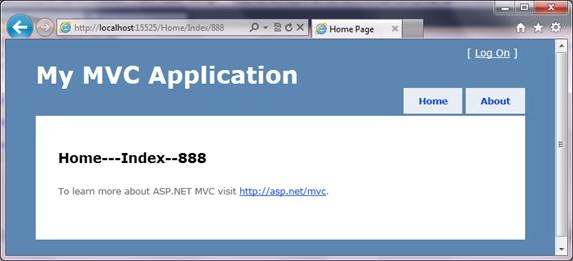
We can access routing data inside a Controller using the RouteData object.
Collapse | Copy Code
public ActionResult Index()

{

    ViewBag.Message = string.Format("{0}---{1}--{2}",

        RouteData.Values["Controller"],

        RouteData.Values["action"],

        RouteData.Values["id"]

        );

    return View();

}
Controllers
Now let us create a new Controller and see how we can route to the new Controller using a different routing pattern.
Add a new Controller using Add New Item -> Controller. It adds a new Controller with an Action as Index. For our sample application, we are using a different Action called Verify.
Collapse | Copy Code
public class SampleController : Controller

{

    //

    // GET: /Sample/

    public ActionResult Verify()

    {

        return View();

    }

}
As there are no Views corresponding to SampleController, let us return some text from our Action. For returning any text data from an Action, use the Content class.
Collapse | Copy Code
public ActionResult Verify()

{

    return Content("Hello From Sample Controller.");

}
Let us run the application. Modify the URL to /sample/verify.

But if we specify /Sample without any Action, we will receive a 404 error. As per the defined routing, if there is no Action specified, it should redirect to the Index action inside the specified Controller. Here, our SampleControllerdoesn’t have any Index action and throws an error.

Adding a new route
For fixing the above issue, let us define a new route called “sample”.
Collapse | Copy Code
public static void RegisterRoutes(RouteCollection routes)

{

    routes.IgnoreRoute("{resource}.axd/{*pathInfo}");

    routes.MapRoute(

                "sample",

                "Sample/{action}",

                new { controller = "Sample", action = "Verify" }

                );


   // 这个一定要放在Default前面,否则会找不到

    routes.MapRoute(

                "Default", // Route name

                "{controller}/{action}/{id}", // URL with parameters

                new { controller = "Home", action = "Index",

                      id = UrlParameter.Optional } // Parameter defaults

            );

}

Now we may need to pass some data to our new Controller from a URL, like the id parameter in the default routing. For that, define a new parameter in the routing.
Collapse | Copy Code
routes.MapRoute(

                "sample",

                "Sample/{username}",

                new { controller = "Sample", action = "Verify" }

                );
The value can be accessed either using the RouteData object or through a parameter to the Verify action.
Collapse | Copy Code
public ActionResult Verify(string username)

{

    return Content(username);

}
Note that the URL consists of only the Controller and the parameter.

Again, you will receive a 404 error when we omit the parameter value.

For solving this issue, we need to specify the default value for the username parameter either in the Route mapping or in the Controller.
In the route map, specify the parameter as optional.
Collapse | Copy Code
routes.MapRoute(

                "sample",

                "Sample/{username}",

                new { controller = "Sample", action = "Verify",

                      username=UrlParameter.Optional }

                );
Inside the Controller, specify the default value for the parameter.
Collapse | Copy Code
public ActionResult Verify(string username="all")

{

    return Content(username);

}
Conclusion
We had a quick discussion on how routing works in ASP.NET MVC and how we can customize the same. We will discuss more about Views, Styles, Action results, etc., in the next article.
【转】Controllers and Routers in ASP.NET MVC 3的更多相关文章
- ASP.NET MVC中Area的另一种用法
ASP.NET MVC中Area的另一种用法 [摘要]本文只是为一行代码而分享 context.MapRoute("API", "api/{controller}/{ac ...
- Post Complex JavaScript Objects to ASP.NET MVC Controllers
http://www.nickriggs.com/posts/post-complex-javascript-objects-to-asp-net-mvc-controllers/ Post ...
- ASP.NET MVC with Entity Framework and CSS一书翻译系列文章之第二章:利用模型类创建视图、控制器和数据库
在这一章中,我们将直接进入项目,并且为产品和分类添加一些基本的模型类.我们将在Entity Framework的代码优先模式下,利用这些模型类创建一个数据库.我们还将学习如何在代码中创建数据库上下文类 ...
- ASP.NET MVC with Entity Framework and CSS一书翻译系列文章之第一章:创建基本的MVC Web站点
在这一章中,我们将学习如何使用基架快速搭建和运行一个简单的Microsoft ASP.NET MVC Web站点.在我们马上投入学习和编码之前,我们首先了解一些有关ASP.NET MVC和Entity ...
- ASP.NET MVC with Entity Framework and CSS一书翻译系列文章之目录导航
ASP.NET MVC with Entity Framework and CSS是2016年出版的一本比较新的.关于ASP.NET MVC.EF以及CSS技术的图书,我将尝试着翻译本书以供日后查阅. ...
- ASP.NET MVC——模型绑定
这篇文章我们来讲讲模型绑定(Model Binding),其实在初步了解ASP.NET MVC之后,大家可能都会产生一个疑问,为什么URL片段最后会转换为例如int型或者其他类型的参数呢?这里就不得不 ...
- ASP.NET MVC 使用 Petapoco 微型ORM框架+NpgSql驱动连接 PostgreSQL数据库
前段时间在园子里看到了小蝶惊鸿 发布的有关绿色版的Linux.NET——“Jws.Mono”.由于我对.Net程序跑在Linux上非常感兴趣,自己也看了一些有关mono的资料,但是一直没有时间抽出时间 ...
- 你从未知道如此强大的ASP.NET MVC DefaultModelBinder
看到很多ASP.NET MVC项目还在从request.querystring或者formContext里面获取数据,这实在是非常落后的做法.也有的项目建了大量的自定义的modelbinder,以为很 ...
- ASP.NET MVC Model验证(一)
ASP.NET MVC Model验证(一) 前言 前面对于Model绑定部分作了大概的介绍,从这章开始就进入Model验证部分了,这个实际上是一个系列的Model的绑定往往都是伴随着验证的.也会在后 ...
随机推荐
- x01.Weiqi.10: 死活问题
估计得不错,点目后,仅一个方法:UpdateMeshes5() 就完美解决了梅花六.刀把五.斗笠四.盘角曲四等死活问题.先来看看效果图: 其代码如下: void UpdateMeshes5(bool ...
- 【Windows编程】系列第五篇:GDI图形绘制
上两篇我们学习了文本字符输出以及Unicode编写程序,知道如何用常见Win32输出文本字符串,这一篇我们来学习Windows编程中另一个非常重要的部分GDI图形绘图.Windows的GDI函数包含数 ...
- 手把手教你玩GDB
第一部分牛刀小试:启动GDB开始调试 1. 编译带调试信息的可执行程序:用gcc(g++)编译的时候带上-g选项即可 2. 启动GDB开始调试 (1)gdb program ...
- EF6 Create Different DataContext on runtime(运行时改变连接字符串)
引言 在使用EF时,有时我们需要在程序运行过程中动态更改EF的连接字符串,但不幸的时EF是否对 ConfigurationManager.RefreshSection("xxx" ...
- 旧文备份:CANopen协议PDO的几种传输方式
(于2007.1.22) 由于PDO所传输的数据内容是无协议的且分配的标识符范围较SDO靠前,因此,其效率和优先级都是较高的,通常用于实时过程数据的传输. PDO是生产/消费类型的通讯方式,数据只有一 ...
- 第15章 LinkedList类(暂无)
第15章 LinkedList类 LinkedList类是
- Struts2 Ajax校验
Ajax(Asynchronous javascript and xml):异步刷新技术 技术组成: CSS + xml +JavaScript +DOM Ajax核心对象: XMLHttpRequ ...
- sublime 插件
由于之前的代码可视化方案太复杂,分析时间太长,不实用,另一方面是而且工作以后业余时间大大减少,因此决定放弃原有路线,从工作中最迫切的需求着手,逐步构建一个实用的工具. 新的方法仍然依赖understa ...
- js小数点失精算法修正
在用js计算0.07*100时候竟然=7.000000000000001 关于js失精算法你都遇到哪些,让我们一起来细数一下吧 console.log(0.07*100); // 7.00000000 ...
- 回顾yii的学习进程 总结了一下的发展过程
如果看到这篇文章,我想说恭喜你 不用,你可以先放下学习yii了 我先学在把结论发给你们节省精力 yii2的学习教程:http://www.digpage.com/recent_update.html ...