
ET框架对MongoDB的使用
一:本地测试:
1:加载DB组件
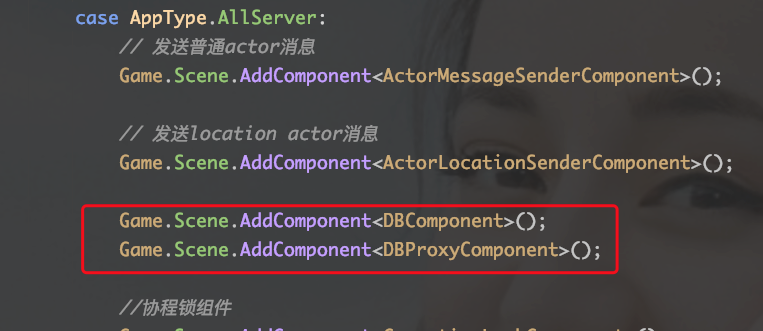
2:调整用户ID : C2G_LoginGateHandler中创建玩家时id调整。(每次重启服务端创建小人ID是一样的,插入数据库会覆盖掉上传插入的数据)

3:在C2G_EnterMapHandler.cs添加测试代码
            Player player = session.GetComponent<SessionPlayerComponent>().Player;

            // 在map服务器上创建战斗Unit,默认第一个Map服务器

            IPEndPoint mapAddress = StartConfigComponent.Instance.MapConfigs[0].GetComponent<InnerConfig>().IPEndPoint;

            Log.Info("向Map服务器发送创建玩家信息。Map Address :" + mapAddress.Address + "--" + mapAddress.Port);

            Session mapSession = Game.Scene.GetComponent<NetInnerComponent>().Get(mapAddress);

            M2G_CreateUnit createUnit = (M2G_CreateUnit)await mapSession.Call(new G2M_CreateUnit() { PlayerId = player.Id, GateSessionId = session.InstanceId });

            player.UnitId = createUnit.UnitId;

            response.UnitId = createUnit.UnitId;


//新加的代码,测试DB

            // /************ 数据库demo ************/

            //数据库操作对象

            DBProxyComponent dbProxy = Game.Scene.GetComponent<DBProxyComponent>();

            // //保存到数据库

            await dbProxy.Save(player);

            Log.Info("--保存成功---");

            //查询账号是否存在

            Player resultd = await dbProxy.Query<Player>(player.Id);

            Log.Info(MongoHelper.ToJson(resultd));

            //根据Account账号查找,可能有多个

            List<ComponentWithId> results = await dbProxy.Query<Player>(_account => _account.Account == player.Account);

            Log.Info(results.Count + "");

            if (results.Count > 0)

            {

                Log.Info(MongoHelper.ToJson(results[0]));

            }
4:配置DB

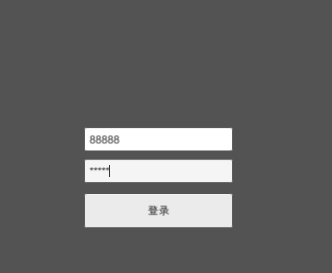
5:编译,运行


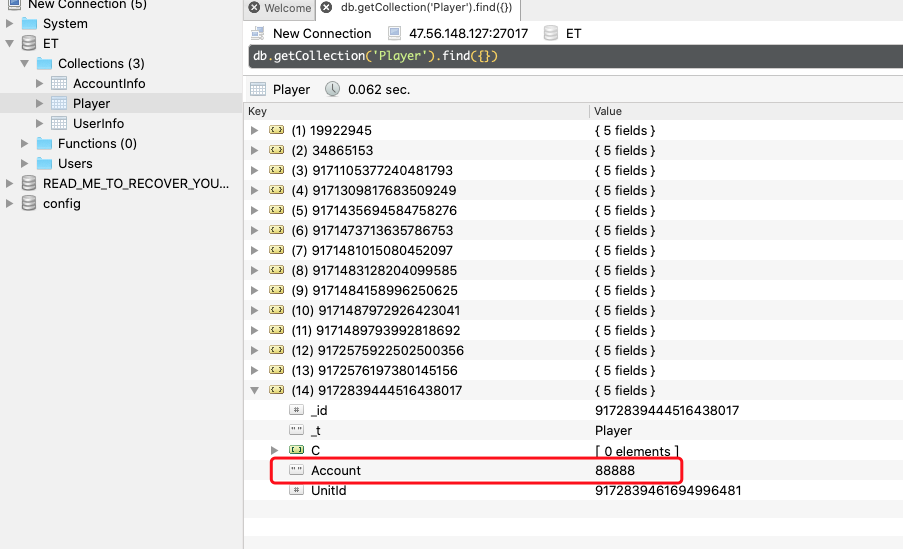
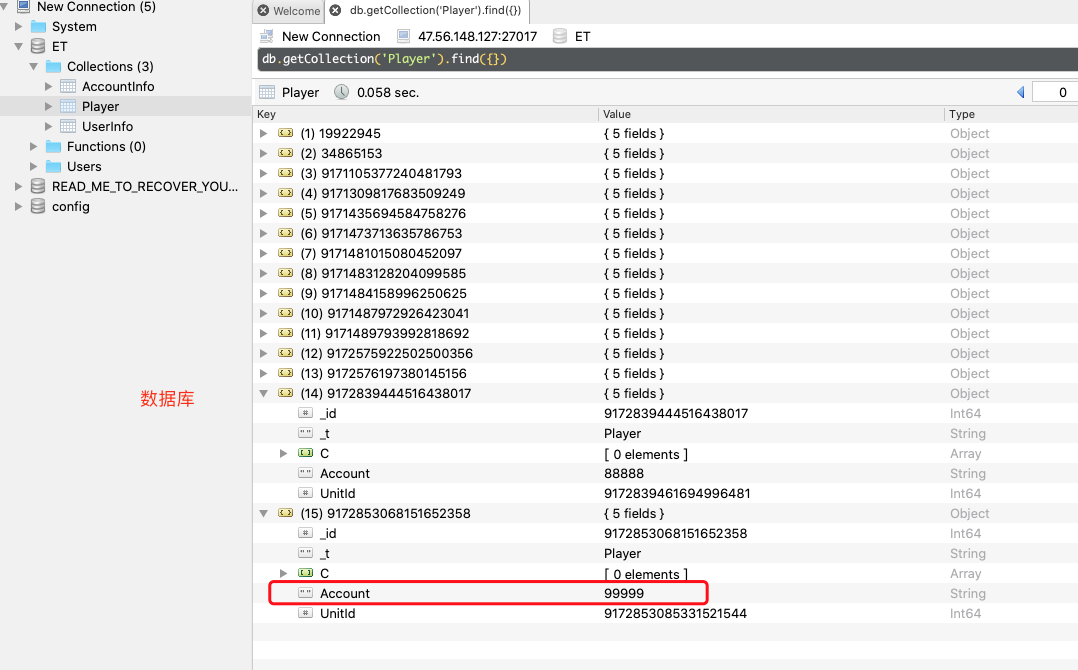
6:查看数据库
二:在分布式服务端使用(这里是ET5做法,ET6听说是哪个服务使用,就哪个服务直连DB)
1:启动一个DB服务器。加载相应组件。

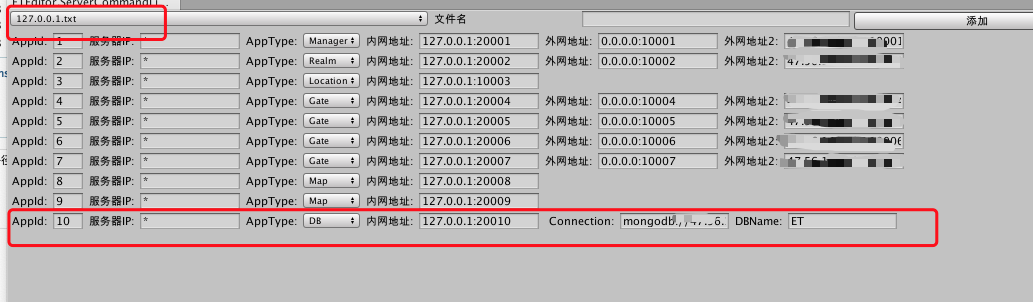
2:添加DB配置
3:DB使用方法修改
不能直接使用DB组件进行DB访问。需要使用DB时,向DB服务器发送相应请求,DB服务对数据库做相应操作。
using System;

using System.Collections.Generic;

using System.Net;

using ETModel;

using MongoDB.Bson;

using MongoDB.Bson.Serialization;

using MongoDB.Driver;

namespace ETHotfix

{

    [MessageHandler(AppType.Gate)]

    public class C2G_EnterMapHandler : AMRpcHandler<C2G_EnterMap, G2C_EnterMap>

    {

        protected override async ETTask Run(Session session, C2G_EnterMap request, G2C_EnterMap response, Action reply)

        {

            Log.Info("--create player--");

            Player player = session.GetComponent<SessionPlayerComponent>().Player;

            // 在map服务器上创建战斗Unit,默认第一个Map服务器

            IPEndPoint mapAddress = StartConfigComponent.Instance.MapConfigs[0].GetComponent<InnerConfig>().IPEndPoint;

            Log.Info("向Map服务器发送创建玩家信息。Map Address :" + mapAddress.Address + "--" + mapAddress.Port);

            Session mapSession = Game.Scene.GetComponent<NetInnerComponent>().Get(mapAddress);

            M2G_CreateUnit createUnit = (M2G_CreateUnit)await mapSession.Call(new G2M_CreateUnit() { PlayerId = player.Id, GateSessionId = session.InstanceId });

            player.UnitId = createUnit.UnitId;

            response.UnitId = createUnit.UnitId;

            // // /************ 数据库demo ************/

            // //数据库操作对象

            // DBProxyComponent dbProxy = Game.Scene.GetComponent<DBProxyComponent>();

            // // //保存到数据库

            // await dbProxy.Save(player);

            // Log.Info("--保存成功---");

            // //查询账号是否存在

            // Player resultd = await dbProxy.Query<Player>(player.Id);

            // Log.Info(MongoHelper.ToJson(resultd));

            //

            // //根据Account账号查找,可能有多个

            // List<ComponentWithId> results = await dbProxy.Query<Player>(_account => _account.Account == player.Account);

            // Log.Info(results.Count + "");

            // if (results.Count > 0)

            // {

            //     Log.Info(MongoHelper.ToJson(results[0]));

            // }

            /************ 数据库demo 分布式服务器中************/

            //获取DB服务器地址

            IPEndPoint dbAddress = StartConfigComponent.Instance.DBConfig.GetComponent<InnerConfig>().IPEndPoint;

            Log.Info("获取DB服务器地址 :" + dbAddress.Address + "--" + dbAddress.Port);

            Session dbSession = Game.Scene.GetComponent<NetInnerComponent>().Get(dbAddress);

            await dbSession.Call(new DBSaveRequest { Component = player});

            Log.Info("--保存成功---");

            DBQueryResponse dbQueryResponse = (DBQueryResponse)await dbSession.Call(new DBQueryRequest { CollectionName ="Player", Id = player.Id });

            Player result = (Player)dbQueryResponse.Component;

            Log.Info(MongoHelper.ToJson(result));

            //序列化查询json,来着  await dbProxy.Query<Player>(_account => _account.Account == player.Account); 函数中

            ExpressionFilterDefinition<Player> filter = new ExpressionFilterDefinition<Player>(_account => _account.Account == player.Account);

            IBsonSerializerRegistry serializerRegistry = BsonSerializer.SerializerRegistry;

            IBsonSerializer<Player> documentSerializer = serializerRegistry.GetSerializer<Player>();

            string json = filter.Render(documentSerializer, serializerRegistry).ToJson();

            DBQueryJsonResponse resultsList = (DBQueryJsonResponse)await dbSession.Call(new DBQueryJsonRequest { CollectionName ="Player",Json = json});

            List<ComponentWithId> list = resultsList.Components;

            Log.Info(list.Count + "---size");

            if (list.Count > 0)

            {

                Log.Info(MongoHelper.ToJson(list[0]));

            }

            reply();

        }

    }

}
4:编译,发布到Centos7虚拟机上。

5;运行客户端,测试


三:摸索过程。(由于没有找到相应文档,自以为是的操作过程),以下是错误示范,以下是错误示范,以下是错误示范
1:Gate服务中使用DB,就在Gate服务中添加DB组件:

2:修改配置,在Gate服务配置中添加DB.

3:DB服务还原到本地测试时的访问方式

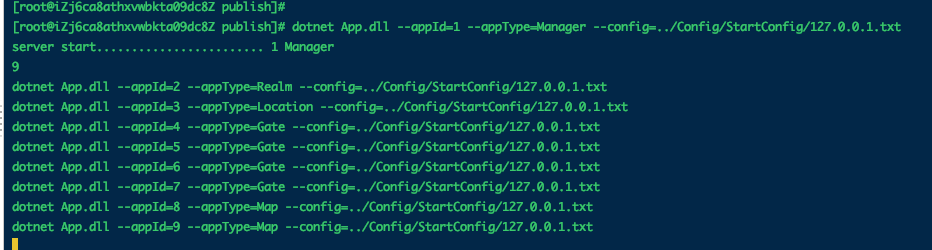
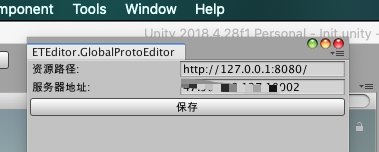
4:编译,发布,启动,配置文件也上传到相应位置
运行前端,发现报错。
ET框架对MongoDB的使用的更多相关文章
- Yii2框架与MongoDB拓展、Redis拓展的安装流程
@author 周煦辰 2016-03-21 这段时间新上了一个项目,使用的是Yii2框架.这里记录一下Yii2框架.Yii2-Mongo拓展.Yii2-Redis拓展等的安装流程.因为使用的系统是W ...
- 基于Django框架对MongoDB实现增删改查
在上一篇中,咱们已经实现了Scrapy框架爬取数据,并且存储到Mongodb数据库, 接下来呢,,,,,,,,,,,,, 咱们就要对这些数据进行操作. 目标:从Mongodb数据库取出数据,通过Dja ...
- php yii框架使用MongoDb
1.安装 运行 php composer.phar require --prefer-dist yiisoft/yii2-mongodb or add "yiisoft/yii2-mongo ...
- 使用Morphia框架操作mongodb
1. mac 下 安装mongodb sudo brew update sudo brew install mongodb sudo brew services mongodb start 2. ...
- 【Node.js】二、基于Express框架 + 连接MongoDB + 写后端接口
在上节,我们讲了如何搭建express环境,现在我们说说如何通过node.js写服务接口给前端调用 1. 首先通过MongoDB建好数据库与表格 例如,我的数据库名字为db_demo,数据库表格为go ...
- nodejs之使用express框架连接mongodb数据库
var express = require('express');var router = express.Router();var app = express();var MongoClient = ...
- TP框架连接mongodb报错及解决办法
mongodb版本3.4.7 1.认证错误:Failed to connect to: localhost:27017: Authentication failed on database 'test ...
- NODE 基于express 框架和mongoDB的cookie和session认证 和图片的上传和删除
源码地址 https://gitee.com/zyqwasd/mongdbSession 本项目的mongodb是本地的mongodb 开启方法可以百度一下 端口是默认的27017 页面效果 1. 注 ...
- Morphia - mongodb之ORM框架
一.简介 二.注解 1.@Entity 2.@Id3.@Indexed4.@Embedded5.@Transient和@Property6.@Reference 三.示例 四.参考资料 Morphia ...
- MongoDB从入门到实战之.NET Core使用MongoDB开发ToDoList系统(2)-Swagger框架集成
Swagger是什么? Swagger是一个规范且完整API文档管理框架,可以用于生成.描述和调用可视化的RESTful风格的 Web 服务.Swagger 的目标是对 REST API 定义一个标准 ...
随机推荐
- 深入理解Hadoop读书笔记-4
背景 公司的物流业务系统目前实现了使用storm集群进行过门事件的实时计算处理,但是还有一个需求,我们需要存储每个标签上传的每条明细数据,然后进行定期的标签报表统计,这个是目前的实时计算框架无法满足的 ...
- map标签是什么
<map>标签用于在HTML中定义一个 图像映射(image map),它允许你将图像划分为多个可点击的区域(称为"热点"),每个区域可以链接到不同的URL或执行不同的 ...
- 什么是 MCP,以及你为什么该关注它
MCP 现在真的火起来了.现在已经有成千上万个 MCP "服务器",而且虽然是 Anthropic 发明的,就在几天前 OpenAI 也采纳了它.服务器就像 AI 的 " ...
- Aspnet Core 10 Preview3已对最小API提供参数验证支持
前言 相信大家都或多或少用上了Minimal API,快速简洁,性能炸裂,是快速开发API端口的不二之选!但是呢目前正式版为止 最小API还并不内置支持对请求参数的内置验证支持,比如[Required ...
- python,循环中通过判断条件中止循环的方法(braek 语句)
直接对下方代码进行解析 for a in range(5): print(a) if a == 2: break 依次读取range内的数字,并答应出来.当读取出来的数字是2时,结束循环,执行后入下图 ...
- kettle介绍-Step之Return steps metrics
Return steps metrics转换步骤信息统计介绍 转换步骤信息统计步骤可以用于统计当前转换中的其它步骤信息,包括步骤执行后的输入行数.输入行数.读入行数.更新行数等.此步骤可以直接拖入转换 ...
- MySQL之profiling性能优化
如果需要优化一条SQL,想了解一条sql的每个阶段的耗时分布,则可以使用profiling来进行分析,能很方便的定位在哪个阶段.什么资源引起的性能问题. 一.开启profiling参数 此参数默认是关 ...
- EF ——left join
如何在EF中实现left join(左联接)查询_ var TestList = from p in context.PersonalInformation join d in context.Dep ...
- Java线程控制: sleep、yield、join深度解析
结论先行 sleep:主动让出CPU但保持锁,适合控制执行节奏和优化CPU占用 yield:建议让出CPU但无强制力,适用场景有限且效果不稳定 join:通过等待机制实现线程顺序控制,底层基于wait ...
- jetbrains这是作啥妖呢,用了好久都没有问题,现在这是咋了?
rider今天更新了下2025.1 数据库驱动下载不来: 插件不能正常访问: 清理下用户的配置目录: %UserProfile%\AppData\Local\JetBrains %UserProfil ...