
SOA架构商城二 框架搭建
1.创建父工程
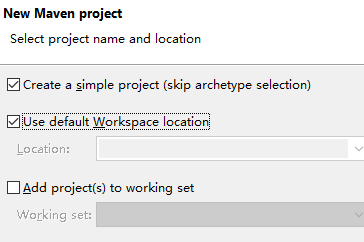
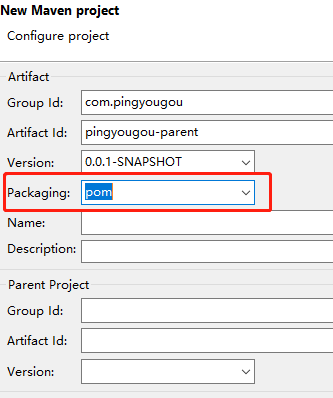
创建Maven工程pingyougou-parent,选择packaging类型为pom ,在pom.xml文件中添加锁定版本信息dependencyManagement与pluginManagement,以后的模块都继承此父工程。
pom.xml文件内容:
<project xmlns="http://maven.apache.org/POM/4.0.0" xmlns:xsi="http://www.w3.org/2001/XMLSchema-instance" xsi:schemaLocation="http://maven.apache.org/POM/4.0.0 http://maven.apache.org/xsd/maven-4.0.0.xsd">

  <modelVersion>4.0.</modelVersion>

  <groupId>com.pingyougou</groupId>

  <artifactId>pingyougou</artifactId>

  <version>0.0.-SNAPSHOT</version>

  <packaging>pom</packaging>

  <!-- 集中定义依赖版本号 -->

    <properties>

        <junit.version>4.12</junit.version>

        <!-- <spring.version>4.2..RELEASE</spring.version> -->

        <spring-boot.version>2.0..RELEASE</spring-boot.version>

        <pagehelper.version>4.0.</pagehelper.version>

        <servlet-api.version>2.5</servlet-api.version>

        <dubbo.version>2.6.</dubbo.version>

        <zookeeper.version>3.4.</zookeeper.version>

        <zkclient.version>0.1</zkclient.version>

        <mybatis.version>3.2.</mybatis.version>

        <mybatis.spring.version>1.2.</mybatis.spring.version>

        <mybatis.paginator.version>1.2.</mybatis.paginator.version>

        <mysql.version>5.1.</mysql.version>

        <druid.version>1.0.</druid.version>

        <commons-fileupload.version>1.3.</commons-fileupload.version>

        <freemarker.version>2.3.</freemarker.version>

        <activemq.version>5.11.</activemq.version>

        <security.version>3.2..RELEASE</security.version>

        <solrj.version>4.10.</solrj.version>

        <ik.version>2012_u6</ik.version>

    </properties>

        <dependencies>

    <!-- dubbo相关 -->

            <dependency>

                <groupId>com.alibaba</groupId>

                <artifactId>dubbo</artifactId>

                <version>${dubbo.version}</version>

            </dependency>

            <dependency>

                <groupId>org.apache.zookeeper</groupId>

                <artifactId>zookeeper</artifactId>

                <version>${zookeeper.version}</version>

            </dependency>

            <dependency>

                <groupId>com.github.sgroschupf</groupId>

                <artifactId>zkclient</artifactId>

                <version>${zkclient.version}</version>

            </dependency>

            <dependency>

                <groupId>junit</groupId>

                <artifactId>junit</artifactId>

                <version>4.9</version>

            </dependency>

            <dependency>

                <groupId>com.alibaba</groupId>

                <artifactId>fastjson</artifactId>

                <version>1.2.</version>

            </dependency>

            <dependency>

                <groupId>javassist</groupId>

                <artifactId>javassist</artifactId>

                <version>3.11..GA</version>

            </dependency>

            <dependency>

                <groupId>commons-codec</groupId>

                <artifactId>commons-codec</artifactId>

                <version>1.10</version>

            </dependency>

            <dependency>

                <groupId>javax.servlet</groupId>

                <artifactId>servlet-api</artifactId>

                <version>2.5</version>

                <scope>provided</scope>

            </dependency>

            <dependency>

                <groupId>com.github.pagehelper</groupId>

                <artifactId>pagehelper</artifactId>

                <version>${pagehelper.version}</version>

            </dependency>

              <!-- Mybatis -->

            <dependency>

                <groupId>org.mybatis</groupId>

                <artifactId>mybatis</artifactId>

                <version>${mybatis.version}</version>

            </dependency>

            <dependency>

                <groupId>org.mybatis</groupId>

                <artifactId>mybatis-spring</artifactId>

                <version>${mybatis.spring.version}</version>

            </dependency>

            <dependency>

                <groupId>com.github.miemiedev</groupId>

                <artifactId>mybatis-paginator</artifactId>

                <version>${mybatis.paginator.version}</version>

            </dependency>

            <!-- MySql -->

            <dependency>

                <groupId>mysql</groupId>

                <artifactId>mysql-connector-java</artifactId>

                <version>${mysql.version}</version>

            </dependency>

            <!-- 连接池 -->

            <dependency>

                <groupId>com.alibaba</groupId>

                <artifactId>druid</artifactId>

                <version>${druid.version}</version>

            </dependency>

            <!-- <dependency>

                <groupId>org.csource.fastdfs</groupId>

                <artifactId>fastdfs</artifactId>

                <version>1.2</version>

            </dependency> -->

            <!-- 文件上传组件 -->

            <dependency>

                <groupId>commons-fileupload</groupId>

                <artifactId>commons-fileupload</artifactId>

                <version>${commons-fileupload.version}</version>

            </dependency>

            <!-- 缓存 -->

            <!-- <dependency>

              <groupId>redis.clients</groupId>

              <artifactId>jedis</artifactId>

              <version>2.8.</version>

            </dependency>

            <dependency>

              <groupId>org.springframework.data</groupId>

              <artifactId>spring-data-redis</artifactId>

              <version>1.7..RELEASE</version>

            </dependency> -->

            <dependency>

                <groupId>org.freemarker</groupId>

                <artifactId>freemarker</artifactId>

                <version>${freemarker.version}</version>

            </dependency>

            <dependency>

                <groupId>org.apache.activemq</groupId>

                <artifactId>activemq-all</artifactId>

                <version>${activemq.version}</version>

            </dependency>

            <!-- 身份验证 -->

            <dependency>

                <groupId>org.springframework.security</groupId>

                <artifactId>spring-security-web</artifactId>

                <version>4.1..RELEASE</version>

            </dependency>

            <dependency>

                <groupId>org.springframework.security</groupId>

                <artifactId>spring-security-config</artifactId>

                <version>4.1..RELEASE</version>

            </dependency>

            <dependency>

                <groupId>com.github.penggle</groupId>

                <artifactId>kaptcha</artifactId>

                <version>2.3.</version>

                <exclusions>

                    <exclusion>

                        <groupId>javax.servlet</groupId>

                          <artifactId>javax.servlet-api</artifactId>

                    </exclusion>

                </exclusions>

            </dependency>

            <dependency>

                <groupId>org.springframework.security</groupId>

                <artifactId>spring-security-cas</artifactId>

                <version>4.1..RELEASE</version>

            </dependency>

            <dependency>

                <groupId>org.jasig.cas.client</groupId>

                <artifactId>cas-client-core</artifactId>

                <version>3.3.</version>

                <!-- 排除log4j包冲突 -->

                <exclusions>

                    <exclusion>

                        <groupId>org.slf4j</groupId>

                        <artifactId>log4j-over-slf4j</artifactId>

                    </exclusion>

                </exclusions>

            </dependency>

            <!-- solr客户端 -->

            <dependency>

                <groupId>org.apache.solr</groupId>

                <artifactId>solr-solrj</artifactId>

                <version>${solrj.version}</version>

            </dependency>

            <dependency>

                <groupId>com.janeluo</groupId>

                <artifactId>ikanalyzer</artifactId>

                <version>${ik.version}</version>

            </dependency>

              <dependency>

                  <groupId>org.apache.httpcomponents</groupId>

                  <artifactId>httpcore</artifactId>

                  <version>4.4.</version>

              </dependency>

              <dependency>

                  <groupId>org.apache.httpcomponents</groupId>

                  <artifactId>httpclient</artifactId>

                  <version>4.5.</version>

              </dependency>

              <dependency>

                  <groupId>dom4j</groupId>

                  <artifactId>dom4j</artifactId>

                  <version>1.6.</version>

              </dependency>

              <dependency>

                <groupId>xml-apis</groupId>

                <artifactId>xml-apis</artifactId>

                <version>1.4.</version>

            </dependency>

        </dependencies>

<modules>

    <module>pingyougou-pojo</module>

</modules>

</project>
2.创建通用实体类模块
创建通用实体类模块-pinyougou-pojo,在pingyougou-parent项目上右键选择 maven -> New Maven Module Project:

SOA架构商城二 框架搭建的更多相关文章
- SOA架构商城一
SOA架构: SOA是Service-Oriented Architecture的首字母简称,它是一种支持面向服务的架构样式.从服务.基于服务开发和服务的结果来看,面向服务是一种思考方式.其实SOA架 ...
- WebX框架学习笔记之二----框架搭建及请求的发起和处理
框架搭建 执行环境:windows.maven 执行步骤: 1.新建一个目录,例如:D:\workspace.注意在盘符目录下是无法执行成功的. 2.执行如下命令: mvn archetype:gen ...
- JAVAEE——宜立方商城01:电商行业的背景、商城系统架构、后台工程搭建、SSM框架整合
1. 学习计划 第一天: 1.电商行业的背景. 2.宜立方商城的系统架构 a) 功能介绍 b) 架构讲解 3.工程搭建-后台工程 a) 使用maven搭建工程 b) 使用maven的tomcat插件启 ...
- JAVAEE——宜立方商城02:服务中间件dubbo、工程改造为基于soa架构、商品列表实现
1. 学习计划 第二天:商品列表功能实现 1.服务中间件dubbo 2.工程改造为基于soa架构 3.商品列表查询功能实现. 2. 将工程改造为SOA架构 2.1. 分析 由于宜立方商城是基于soa的 ...
- 搭建一个BS 的简单SOA 架构(直接通过jquery 调用后台的 wcf 服务的架构)(第一天)
亲们!还在用传统的三层架构吗?你还在对SOA架构 不了解吗? 那就赶快来学习下一个 比较简单的SOA的架构吧!我会手把手的 教会你们怎么搭建这个 简单的SOA的架构. 其中用的技术点保证 WCF,a ...
- 学习MVC之租房网站(二)-框架搭建及准备工作
在上一篇<学习MVC之租房网站(一)-项目概况>中,确定了UI+Service的“双层”架构,并据此建立了项目 接下来要编写Common类库.配置AdminWeb和FrontWeb 一.编 ...
- [Visual Studio] SOA服务框架搭建
1.服务框架搭建 2.服务模板创建 3.Nuget引用 4.客户端调用 任务点: 1.分析SOA 2.修改SOA架构名称以及关键字 3.使用Nuget添加引用 4.选择服务模板进行创建 5.尝试调用 ...
- .Net Core3.0 WebApi 项目框架搭建 二:API 文档神器 Swagger
.Net Core3.0 WebApi 项目框架搭建:目录 为什么使用Swagger 随着互联网技术的发展,现在的网站架构基本都由原来的后端渲染,变成了:前端渲染.后端分离的形态,而且前端技术和后端技 ...
- 基于SOA分布式架构的dubbo框架基础学习篇
以需求用例为基,抽象接口,Case&Coding两条线并行,服务(M)&消费(VC)分离,单元.接口.功能.集成四层质量管理,自动化集成.测试.交付全程支持. 3个大阶段(需求分析阶段 ...
随机推荐
- YAML简介
YAML Ain’t Markup Language YAML 是一种简洁的非标记语言 YAML以数据为中心,使用空白,缩进,分行组织数据,从而使得表示更加简洁易读 基本规则: 1.大小写敏感 2. ...
- getIsDebuggable
/* * if set android:debuggable="true" in Manifest, return true. * if set android:debugga ...
- PHP缓存机制详解
一,PHP缓存机制详解 我们可以使用PHP自带的缓存机制来完成页面静态化,但是仅靠PHP自身的缓存机制并不能完美的解决页面静态化,往往需要和其他静态化技术(通常是伪静态技术)结合使用. output ...
- 【数据分析】Superset 之一 准备
https://segmentfault.com/a/1190000005083953 http://blog.csdn.net/bingoxubin/article/details/78583165 ...
- ConcurrentModificationException 详解
工作中碰到个ConcurrentModificationException.代码如下: List list = ...;for(Iterator iter = list.iterator(); ite ...
- Unity Shader 获取模型空间坐标
CGPROGRAM // Physically based Standard lighting model, and enable shadows on all light types #pragma ...
- Android5.x新特性之 Toolbar和Theme的使用
Toolbar 你还在为Android 的ActionBar的文字不能随意设置位置而烦恼么?你还在为ActionBar不能自定义添加自己的布局而烦恼么?现在告诉你一个好消息,当你看到这篇文章时,就不必 ...
- React Native汇错归纳(持续更新中……)
1.2017-10-25: 报错信息:“Cannot find entry file index.android.js in any of roots…..” 解决方法: 1.首先从虚拟机中找问题:看 ...
- React Native(五)——获取设备信息react-native-device-info
心酸史: 自从接触rn开始后,越来越多的引入第三方组件而开始的配置文件,让自己一再头疼: 明明是按照官方文档一步一步的配置,为什么别人可以做到的自己却屡屡出错,真是哭笑不得--从微信分享react-n ...
- 在linux下搭建ftp服务器【转】
1 安装 vsftpd yum install vsftpd 2 配置 vsftpd 打开 vsftpd 文件: vi /etc/vsftpd/vsftpd.conf 初次修改前建议备份该文件 2.1 ...