
[shiro] - 加入rememberMe功能
shiro不加入rememberMe没事,一加入就出错.
RememberMeAuthenticationToken :
public interface RememberMeAuthenticationToken extends AuthenticationToken {

    /**

     * Returns {@code true} if the submitting user wishes their identity (principal(s)) to be remembered

     * across sessions, {@code false} otherwise.

     *

     * @return {@code true} if the submitting user wishes their identity (principal(s)) to be remembered

     *         across sessions, {@code false} otherwise.

     */

    boolean isRememberMe();

}
该接口只有一个isRememberMe() 来判定是否选定了记住我选项.
UsernamePasswordToken : 该类实现了RememberMeAuthenticationToken
public class UsernamePasswordToken implements HostAuthenticationToken, RememberMeAuthenticationToken
/**

     * Whether or not 'rememberMe' should be enabled for the corresponding login attempt;

     * default is <code>false</code>

     */

    private boolean rememberMe = false;
默认参数false,
/**

     * Constructs a new UsernamePasswordToken encapsulating the username and password submitted, as well as if the user

     * wishes their identity to be remembered across sessions.

     * <p/>

     * <p>This is a convience constructor and maintains the password internally via a character

     * array, i.e. <tt>password.toCharArray();</tt>.  Note that storing a password as a String

     * in your code could have possible security implications as noted in the class JavaDoc.</p>

     *

     * @param username   the username submitted for authentication

     * @param password   the password string submitted for authentication

     * @param rememberMe if the user wishes their identity to be remembered across sessions

     * @since 0.9

     */

    public UsernamePasswordToken(final String username, final String password, final boolean rememberMe) {

        this(username, password != null ? password.toCharArray() : null, rememberMe, null);

    }
里面的可以传入rememberMe的一个构造器,最后一个null是host
/**

     * Simply returns {@link #getUsername() getUsername()}.

     *

     * @return the {@link #getUsername() username}.

     * @see org.apache.shiro.authc.AuthenticationToken#getPrincipal()

     */

    public Object getPrincipal() {

        return getUsername();

    }
/**

     * Returns the {@link #getPassword() password} char array.

     *

     * @return the {@link #getPassword() password} char array.

     * @see org.apache.shiro.authc.AuthenticationToken#getCredentials()

     */

    public Object getCredentials() {

        return getPassword();

    }
这些晦涩的getPricipal(), getCredentials()其实就是获取用户名,密码的Object表示
登录的一个方法 (控制层)
 @RequestMapping(value = "/login", method = RequestMethod.POST)

    public String login(Model model, User user,boolean rememberMe) {

        System.err.println("login");

        System.err.println("rememberMe:"+rememberMe);

//        UsernamePasswordToken token = new UsernamePasswordToken(user.getName(),user.getPassword());

        System.err.println("rememberMe:"+rememberMe);

        UsernamePasswordToken token = new UsernamePasswordToken(user.getName(),user.getPassword(), rememberMe);

        Subject subject = SecurityUtils.getSubject();

        try {

            subject.login(token);

        } catch (AuthenticationException e) {

//            e.printStackTrace();

            System.err.println("login异常");

        }

        Session session = subject.getSession();

        session.setAttribute("subject",subject);

        return "redirect:/admin/";//该路径应该为后台的首页页面,为login之后的redirect路径

    }
可以看出来调用了构造器UsernamePasswordToken,传入三个参数,分别是前端form过来的name,password,rememberMe,
但是会报异常.
2019-01-17 15:51:10,281 - Authentication failed for token submission [org.apache.shiro.authc.UsernamePasswordToken - null,
rememberMe=false (0:0:0:0:0:0:0:1)].  Possible unexpected error? (Typical or expected login exceptions should extend from AuthenticationException).
这表示身份验证失败了,但是报错之后又查询数据库还是会通过登录.这就奇怪了.
如果只是传入name,password,没有错.
将身份验证信息方法改为数据库里的用户名(写死)
/*获取身份验证信息*/

    @Override

    protected AuthenticationInfo doGetAuthenticationInfo(AuthenticationToken token) throws AuthenticationException {

        // 获取账号密码

//        Object userName = token.getPrincipal();

//        String userName = token.getPrincipal().toString();

        // 获取数据库中的密码

        User user = userService.getByName("zhang3");

        String passwordInDB = user.getPassword();

        String salt = user.getSalt();

        // 认证信息里存放账号密码, getName() 是当前Realm的继承方法,通常返回当前类名 :databaseRealm

        // 盐也放进去

        // 这样通过applicationContext-shiro.xml里配置的 HashedCredentialsMatcher 进行自动校验

        SimpleAuthenticationInfo a = new SimpleAuthenticationInfo("zhang3", passwordInDB, ByteSource.Util.bytes(salt),

                getName());

        return a;

    }
竟然登录成功了.
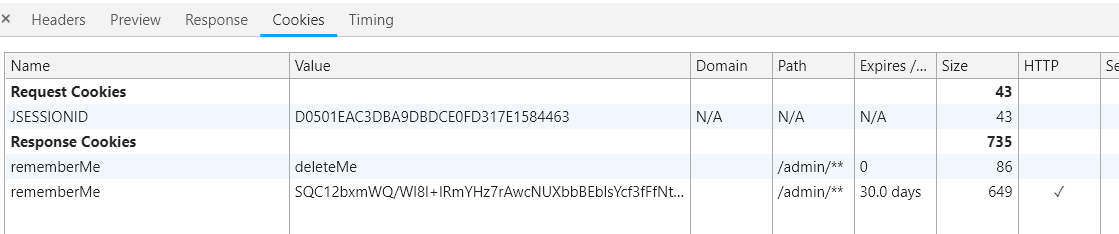
可以看到时间也是设置的30天.
/**

     * cookie对象,会话Cookie模板,默认为:JSESSIONID

     * @return

     */

    @Bean

    public SimpleCookie rememberMeCookie(){

        SimpleCookie simpleCookie = new SimpleCookie("rememberMe");

        simpleCookie.setHttpOnly(true);

        simpleCookie.setPath("/admin/**");

        simpleCookie.setMaxAge(60*60*24*30);//一个月cookie保留时间

        return simpleCookie;

    }
继续测试

现在是没有rememberMe这个session的,因为还没登录.
当不选择记住我时,

当选择了记住我时,除了有上面这个,还有,

也就是说rememberMe功能实现了,那么获取名称当时为什么会报空指针异常?
将数据改回来,肯定是依旧报错,但是用户名不能写死,那是不是当UsernamePasswordToken转换为AuthenticationToken出错的呢?
在AuthenticationToken中,不存在对rememberMe的参数判定和其它方法,那么能不能直接对
/*

 * Licensed to the Apache Software Foundation (ASF) under one

 * or more contributor license agreements.  See the NOTICE file

 * distributed with this work for additional information

 * regarding copyright ownership.  The ASF licenses this file

 * to you under the Apache License, Version 2.0 (the

 * "License"); you may not use this file except in compliance

 * with the License.  You may obtain a copy of the License at

 *

 *     http://www.apache.org/licenses/LICENSE-2.0

 *

 * Unless required by applicable law or agreed to in writing,

 * software distributed under the License is distributed on an

 * "AS IS" BASIS, WITHOUT WARRANTIES OR CONDITIONS OF ANY

 * KIND, either express or implied.  See the License for the

 * specific language governing permissions and limitations

 * under the License.

 */

package org.apache.shiro.authc;

import java.io.Serializable;

/**

 * <p>An <tt>AuthenticationToken</tt> is a consolidation of an account's principals and supporting

 * credentials submitted by a user during an authentication attempt.

 * <p/>

 * <p>The token is submitted to an {@link Authenticator Authenticator} via the

 * {@link Authenticator#authenticate(AuthenticationToken) authenticate(token)} method.  The

 * Authenticator then executes the authentication/log-in process.

 * <p/>

 * <p>Common implementations of an <tt>AuthenticationToken</tt> would have username/password

 * pairs, X.509 Certificate, PGP key, or anything else you can think of.  The token can be

 * anything needed by an {@link Authenticator} to authenticate properly.

 * <p/>

 * <p>Because applications represent user data and credentials in different ways, implementations

 * of this interface are application-specific.  You are free to acquire a user's principals and

 * credentials however you wish (e.g. web form, Swing form, fingerprint identification, etc) and

 * then submit them to the Shiro framework in the form of an implementation of this

 * interface.

 * <p/>

 * <p>If your application's authentication process is  username/password based

 * (like most), instead of implementing this interface yourself, take a look at the

 * {@link UsernamePasswordToken UsernamePasswordToken} class, as it is probably sufficient for your needs.

 * <p/>

 * <p>RememberMe services are enabled for a token if they implement a sub-interface of this one, called

 * {@link RememberMeAuthenticationToken RememberMeAuthenticationToken}.  Implement that interfac if you need

 * RememberMe services (the <tt>UsernamePasswordToken</tt> already implements this interface).

 * <p/>

 * <p>If you are familiar with JAAS, an <tt>AuthenticationToken</tt> replaces the concept of a

 * {@link javax.security.auth.callback.Callback}, and  defines meaningful behavior

 * (<tt>Callback</tt> is just a marker interface, and of little use).  We

 * also think the name <em>AuthenticationToken</em> more accurately reflects its true purpose

 * in a login framework, whereas <em>Callback</em> is less obvious.

 *

 * @see RememberMeAuthenticationToken

 * @see HostAuthenticationToken

 * @see UsernamePasswordToken

 * @since 0.1

 */

public interface AuthenticationToken extends Serializable {

    /**

     * Returns the account identity submitted during the authentication process.

     * <p/>

     * <p>Most application authentications are username/password based and have this

     * object represent a username.  If this is the case for your application,

     * take a look at the {@link UsernamePasswordToken UsernamePasswordToken}, as it is probably

     * sufficient for your use.

     * <p/>

     * <p>Ultimately, the object returned is application specific and can represent

     * any account identity (user id, X.509 certificate, etc).

     *

     * @return the account identity submitted during the authentication process.

     * @see UsernamePasswordToken

     */

    Object getPrincipal();

    /**

     * Returns the credentials submitted by the user during the authentication process that verifies

     * the submitted {@link #getPrincipal() account identity}.

     * <p/>

     * <p>Most application authentications are username/password based and have this object

     * represent a submitted password.  If this is the case for your application,

     * take a look at the {@link UsernamePasswordToken UsernamePasswordToken}, as it is probably

     * sufficient for your use.

     * <p/>

     * <p>Ultimately, the credentials Object returned is application specific and can represent

     * any credential mechanism.

     *

     * @return the credential submitted by the user during the authentication process.

     */

    Object getCredentials();

}
再次测试中,可以获取name,but...还是空指针异常.
但是奇怪的是,一直有rememberMe 30day的cookie存在...
可以看到
public class UsernamePasswordToken implements HostAuthenticationToken, RememberMeAuthenticationToken {
public interface HostAuthenticationToken extends AuthenticationToken {
也就是说明了为什么可以将UsernamePasswordToken类型的token传入到AuthenticationToken的参数中了
最终决定采用捕获异常来处理.奇葩的是能获取名称的同时会报null异常:
zhang3

Creating a new SqlSession

SqlSession [org.apache.ibatis.session.defaults.DefaultSqlSession@2b18608c] was not registered for synchronization because synchronization is not active

JDBC Connection [HikariProxyConnection@584114076 wrapping com.mysql.cj.jdbc.ConnectionImpl@6f6a65e9] will not be managed by Spring

==>  Preparing: select 'false' as QUERYID, id, name, password, salt from user WHERE ( name = ? )

==> Parameters: zhang3(String)

<==    Columns: QUERYID, id, name, password, salt

<==        Row: false, 1, zhang3, a7d59dfc5332749cb801f86a24f5f590, e5ykFiNwShfCXvBRPr3wXg==

<==      Total: 1

Closing non transactional SqlSession [org.apache.ibatis.session.defaults.DefaultSqlSession@2b18608c]
同样,获取不到的时候:
null

Creating a new SqlSession

SqlSession [org.apache.ibatis.session.defaults.DefaultSqlSession@63fcf8ac] was not registered for synchronization because synchronization is not active

2019-01-17 16:58:43,509 - HikariPool-1 - Starting...

2019-01-17 16:58:43,605 - HikariPool-1 - Start completed.

JDBC Connection [HikariProxyConnection@801024502 wrapping com.mysql.cj.jdbc.ConnectionImpl@59fec4c6] will not be managed by Spring

==>  Preparing: select 'false' as QUERYID, id, name, password, salt from user WHERE ( name = ? )

==> Parameters: li4(String)

<==    Columns: QUERYID, id, name, password, salt

<==        Row: false, 2, li4, 43e28304197b9216e45ab1ce8dac831b, jPz19y7arvYIGhuUjsb6sQ==

<==      Total: 1

Closing non transactional SqlSession [org.apache.ibatis.session.defaults.DefaultSqlSession@63fcf8ac]
但最终会去数据库查找.
最后得出结论,当用户退出时,数据还会存在缓存,没清理干净.
比如这次我用户名输入li,而输出了上次的li4
Creating a new SqlSession

SqlSession [org.apache.ibatis.session.defaults.DefaultSqlSession@63a12f67] was not registered for synchronization because synchronization is not active

li4

JDBC Connection [HikariProxyConnection@1738454987 wrapping com.mysql.cj.jdbc.ConnectionImpl@59fec4c6] will not be managed by Spring

==>  Preparing: select 'false' as QUERYID, id, name, password, salt from user WHERE ( name = ? )

==> Parameters: li(String)

<==      Total: 0

Closing non transactional SqlSession [org.apache.ibatis.session.defaults.DefaultSqlSession@63a12f67]

li

login异常
重登录:(数据库不存在的123)
2019-01-17 17:05:08,820 - Initializing Servlet 'dispatcherServlet'

2019-01-17 17:05:08,826 - Completed initialization in 6 ms

exception:userName->null

Creating a new SqlSession

SqlSession [org.apache.ibatis.session.defaults.DefaultSqlSession@684cb0ac] was not registered for synchronization because synchronization is not active

2019-01-17 17:05:11,200 - HikariPool-1 - Starting...

2019-01-17 17:05:11,384 - HikariPool-1 - Start completed.

JDBC Connection [HikariProxyConnection@650094086 wrapping com.mysql.cj.jdbc.ConnectionImpl@2755b849] will not be managed by Spring

==>  Preparing: select 'false' as QUERYID, id, name, password, salt from user WHERE ( name = ? )

==> Parameters: 123(String)

<==      Total: 0

Closing non transactional SqlSession [org.apache.ibatis.session.defaults.DefaultSqlSession@684cb0ac]

exception:userName->123

login异常
不管怎样,能正常使用,可能也是登出用户时存在的问题.
Creating a new SqlSession

SqlSession [org.apache.ibatis.session.defaults.DefaultSqlSession@49fd93ed] was not registered for synchronization because synchronization is not active

exception:userName->14221

JDBC Connection [HikariProxyConnection@1195013282 wrapping com.mysql.cj.jdbc.ConnectionImpl@2755b849] will not be managed by Spring

==>  Preparing: select 'false' as QUERYID, id, name, password, salt from user WHERE ( name = ? )

==> Parameters: zhang3(String)

<==    Columns: QUERYID, id, name, password, salt

<==        Row: false, 1, zhang3, a7d59dfc5332749cb801f86a24f5f590, e5ykFiNwShfCXvBRPr3wXg==

<==      Total: 1

Closing non transactional SqlSession [org.apache.ibatis.session.defaults.DefaultSqlSession@49fd93ed]
14221是错误的用户名,
而之后的zhang3是存在的,但是不进入exception了.
看到一个比较像的问题的博客
todo
在springboot中还有一个权限的扩展包: security
        <!--security-->

        <dependency>

            <groupId>org.springframework.boot</groupId>

            <artifactId>spring-boot-starter-security</artifactId>

        </dependency>

        <!--security-config-->

        <dependency>

            <groupId>org.springframework.security</groupId>

            <artifactId>spring-security-config</artifactId>

            <version>4.1.5.RELEASE</version>

        </dependency>
[shiro] - 加入rememberMe功能的更多相关文章
- Shiro的 rememberMe 功能使用指导(为什么rememberMe设置了没作用?)
UsernamePasswordToken token = new UsernamePasswordToken(loginForm.getUsername(),loginForm.getPasswor ...
- Remember-Me功能
Remember-Me功能 目录 1.1概述 1.2基于简单加密token的方法 1.3基于持久化token的方法 1.4Remember-Me相关接口和实现类 1.4.1TokenBasedReme ...
- Spring Security(12)——Remember-Me功能
目录 1.1 概述 1.2 基于简单加密token的方法 1.3 基于持久化token的方法 1.4 Remember-Me相关接口和实现类 1.4.1 Toke ...
- Spring Security教程(七):RememberMe功能
在之前的教程中一笔带过式的讲了下RememberMe记住密码的功能,那篇的Remember功能是最简易的配置,其功能和安全性都不强.这里就配置下security中RememberMe的各种方式. 一. ...
- springsecurity remember-me 功能
本文基于spring-security-web-4.1.2.RELEASE. 要实现rememberMe,有两种方案. 1.基于简单加密token的方法 首先需要在配置文件中加入<remembe ...
- SpringBoot学习:整合shiro自动登录功能(rememberMe记住我功能)
首先在shiro配置类中注入rememberMe管理器 /** * cookie对象; * rememberMeCookie()方法是设置Cookie的生成模版,比如cookie的name,cooki ...
- SpringBoot学习:整合shiro(rememberMe记住我功能)
项目下载地址:http://download.csdn.NET/detail/aqsunkai/9805821 首先在shiro配置类中注入rememberMe管理器 /** * cookie对象; ...
- SpringBoot学习:整合shiro(验证码功能和登录次数限制功能)
项目下载地址:http://download.csdn.NET/detail/aqsunkai/9805821 (一)验证码 首先login.jsp里增加了获取验证码图片的标签: <body s ...
- shiro的三大功能
1.提供的功能
随机推荐
- MYSQL中的CASE WHEN END AS
SELECT id,`NAME`,province,city, phone, CASE sex WHEN 'M' THEN '男' WHEN 'F' THEN '女'END AS sexFROM `p ...
- 分享一个自定义的 console 类,让你不再纠结JS中的调试代码的兼容
问题的产生 在写JS的过程中,为了调试我们常常会写很多 console.log.console.info.console.group.console.warn.console.error代码来查看JS ...
- ssm后台开发及发布
本文详细讲解一下后台的创建及发布过程,包括踩过的坑 1:首先创建war包形式的maven工程 File>new>Maven project>Create a simple proje ...
- 设置pip的默认源
Python在导入第三方模块的时候用设置豆瓣源的方法提高效率,每次设置很麻烦,所以通过下面方法设置默认源,这样就可以直接pip install package,而不用指定源了. [global] ti ...
- [LeetCode] 102. Binary Tree Level Order Traversal_Medium tag: BFS
Given a binary tree, return the level order traversal of its nodes' values. (ie, from left to right, ...
- [lr & ps] 色彩空间管理
色彩空间 • 定义 色彩空间,Color Space,又称作色域.在色彩学中,人们建立了许多色彩模型,以一维.二维.三维甚至四维空间坐标来表示某一色彩,这种坐标系统所能定义的色彩范围即色彩空间.我们经 ...
- Android弹性滑动的三种实现方式
引言 上一篇文章我们介绍了实现弹性滑动的三种方式,但仅仅是给出了代码片段和方法理论.今天我们结合一个具体的例子来谈一下如何使用这三种方法来实现弹性滑动.今天我们的例子是仿IOS的下拉操作,我们知道An ...
- Javascript--普通函数调用-涨工资计算函数
<!DOCTYPE html> <html lang="en"> <head> <meta charset="UTF-8&quo ...
- STA分析(六) cross talk and noise
在深亚微米技术(deep submicron)中,关于crosstalk和noise对design的signal integrate的影响越来越大.主要表现在glitch和对delay的影响. 1)m ...
- Makefile小结
Makefile最基本的规则:target....:prerequisites..... command 或:target....:prerequisites.....;command target: ...