
jap_spring
jar包
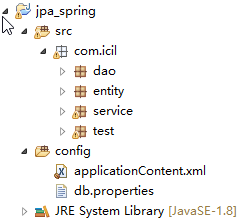
applicationContent.xml
<?xml version="1.0" encoding="UTF-8"?>

<beans xmlns="http://www.springframework.org/schema/beans"

    xmlns:xsi="http://www.w3.org/2001/XMLSchema-instance"

    xmlns:context="http://www.springframework.org/schema/context"

    xmlns:tx="http://www.springframework.org/schema/tx"

    xsi:schemaLocation="http://www.springframework.org/schema/beans http://www.springframework.org/schema/beans/spring-beans.xsd

        http://www.springframework.org/schema/context http://www.springframework.org/schema/context/spring-context-4.0.xsd

        http://www.springframework.org/schema/tx http://www.springframework.org/schema/tx/spring-tx-4.0.xsd">

    <!-- 配置自动扫描的包 -->

    <context:component-scan base-package="com.icil"></context:component-scan>

    <!-- 配置 C3P0 数据源 -->

    <context:property-placeholder location="classpath:db.properties"/>

    <bean id="dataSource"

        class="com.mchange.v2.c3p0.ComboPooledDataSource">

        <property name="user" value="${jdbc.user}"></property>

        <property name="password" value="${jdbc.password}"></property>

        <property name="driverClass" value="${jdbc.driverClass}"></property>

        <property name="jdbcUrl" value="${jdbc.jdbcUrl}"></property>

        <!-- 配置其他属性 -->

    </bean>

    <!-- 配置 EntityManagerFactory -->

    <bean id="entityManagerFactory"

        class="org.springframework.orm.jpa.LocalContainerEntityManagerFactoryBean">

        <property name="dataSource" ref="dataSource"></property>

        <!-- 配置 JPA 提供商的适配器. 可以通过内部 bean 的方式来配置 -->

        <property name="jpaVendorAdapter">

            <bean class="org.springframework.orm.jpa.vendor.HibernateJpaVendorAdapter"></bean>

        </property>

        <!-- 配置实体类所在的包 -->

        <property name="packagesToScan" value="com.icil.entity"></property>

        <!-- 配置 JPA 的基本属性. 例如 JPA 实现产品的属性 -->

        <property name="jpaProperties">

            <props>

                <prop key="hibernate.show_sql">true</prop>

                <prop key="hibernate.format_sql">true</prop>

                <prop key="hibernate.hbm2ddl.auto">update</prop>

            </props>

        </property>

    </bean>

    <!-- 配置 JPA 使用的事务管理器 -->

    <bean id="transactionManager"

        class="org.springframework.orm.jpa.JpaTransactionManager">

        <property name="entityManagerFactory" ref="entityManagerFactory"></property>

    </bean>

    <!-- 配置支持基于注解是事务配置 -->

    <tx:annotation-driven transaction-manager="transactionManager"/>

</beans>
db.properties
jdbc.user=root

jdbc.password=2323

jdbc.driverClass=com.mysql.jdbc.Driver

jdbc.jdbcUrl=jdbc:mysql:///jpa
enntity user
package com.icil.entity;

import javax.persistence.Column;

import javax.persistence.Entity;

import javax.persistence.GeneratedValue;

import javax.persistence.Id;

import javax.persistence.Table;

@Table(name="tb_user")

@Entity

public class User {

    private Integer id;

    private String lastName;

    private String email;

    private int age;

    public User() {

        super();

    }

    public User(Integer id, String lastName, String email, int age) {

        super();

        this.id = id;

        this.lastName = lastName;

        this.email = email;

        this.age = age;

    }

    @GeneratedValue

    @Id

    public Integer getId() {

        return id;

    }

    public void setId(Integer id) {

        this.id = id;

    }

    @Column(name="last_name")

    public String getLastName() {

        return lastName;

    }

    public void setLastName(String lastName) {

        this.lastName = lastName;

    }

    public String getEmail() {

        return email;

    }

    public void setEmail(String email) {

        this.email = email;

    }

    public int getAge() {

        return age;

    }

    public void setAge(int age) {

        this.age = age;

    }

}
Dao
package com.icil.dao;

import javax.persistence.EntityManager;

import javax.persistence.PersistenceContext;

import org.springframework.stereotype.Repository;

import com.icil.entity.User;

@Repository

public class UserDaoImpl implements UserDao {

    //获取一个与当前事务关联的EntityManager 对象,

    //并且通过@persistenceContent 注释标记成员变量

    @PersistenceContext

    private EntityManager  entityManager;

    @Override

    public void insert(User user) {

        entityManager.persist(user);

    }

}
unity test
package com.icil.test;

import org.junit.Test;

import org.springframework.context.ApplicationContext;

import org.springframework.context.support.ClassPathXmlApplicationContext;

import com.icil.entity.User;

import com.icil.service.UserService;

import com.mchange.v2.c3p0.ComboPooledDataSource;

public class jpaTest {

    private  ApplicationContext applicationContext=null;

      {

        applicationContext=    new  ClassPathXmlApplicationContext("applicationContent.xml");

        UserService userService = applicationContext.getBean(UserService.class);

    }

    @Test

    public void test1(){

        ComboPooledDataSource bean = applicationContext.getBean(ComboPooledDataSource.class);

        System.out.println(bean.getJdbcUrl());

    }

    //测试UserService

    @Test

    public void test2(){

        UserService userService = applicationContext.getBean(UserService.class);

        User user1 = new User(null, "AA", "aa@123.com", 21);

        User user2 = new User(null, "BB", "bb@123.com", 22);

        userService.insert(user1, user2);

    }

}
整合maven 的pom 文件
jap_spring的更多相关文章
随机推荐
- poj2253 最短路
题意:青蛙跳石头,给出石头的坐标,然后要确定一条路径,使路径上的最大跨度最小,其实也是一道最短路问题,只要将更新条件从总距离最短改为最大跨度最小就行,即从某点到当前点路径上的最大跨度如果小于当前点原本 ...
- (转)C++初始化与赋值
来源:http://www.cnblogs.com/chio/archive/2008/10/06/1305145.html 先来个区别说明:赋值操作是在两个已经存在的对象间进行的,而初始化是要创建一 ...
- drill 集成开源s3 存储minio
drill 支持s3数据的查询,同时新版的通过简单配置就可以实现minio 的集成 测试使用docker 运行drill 参考 https://www.cnblogs.com/rongfenglian ...
- [连载]Java程序设计(03)---任务驱动方式:寻找高富帅和屌丝
版权声明:本文为博主原创文章,请在转载时说明出处. https://blog.csdn.net/jackfrued/article/details/26163877 任务:相同在上一家公司.公司还须要 ...
- JVM(下)
持久代:不会被 gc 给轻易回收的,创建后一直存在,持久代在堆内存里面,但是不归 java 程序使用.持久代是 动态 load 的那些 class,局部变量,去 gc 其实也 gc 不了啥 1.8 之 ...
- vue-cli 引入阿里巴巴字体图标:注意点
vue-cli 引入阿里巴巴字体图标:注意点 下载的 iconfont.css 文件中: .iconfont { font-family:"iconfont" !important ...
- docker 知识点
docker 教程:http://www.runoob.com/docker/docker-tutorial.html docker 仓库地址:https://store.docker.com/ do ...
- Spring本质-AOP
一.我们在做系统设计的时候,一个非常重要的工作就是把一个大系统做分解, 按业务功能分解成一个个低耦合.高内聚的模块,就像这样: 但是分解以后就会发现有些很有趣的东西, 这些东西是通用的,或者是跨越多个 ...
- vqmod for opencart插件制作进阶与技巧
FROM: http://www.sdtclass.com/4799.html 15年的时候,我写过一篇文章<略谈 vqmod for opencart 插件制作过程>,也不知道被哪些人抄 ...
- c#数据类型 与sql的对应关系 以及 取值范围
Short Name .NET Class Type Width Range (bits) SQL Datatype (Closest Match) Constraint to use (if nee ...