
V-rep中的加速度计与陀螺仪
加速度计(Accelerometer)
VREP的模型浏览器components→sensors中可以找到加速度计的模型,用于测量物体沿着世界坐标系三个坐标轴的加速度值。

VREP中没有直接测量加速度的函数,可以间接地通过测量已知质量物体上的力来计算加速度。加速度计的结构如下图所示,其中动态物体Accelerometer_mass的质量为1g,通过函数读取力传感器测量的力的大小,可以计算出物体Accelerometer_mass的加速度。
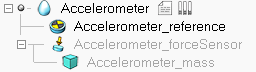
加速度计Accelerometer的脚本代码如下:
-- Check the end of the script for some explanations!

if (sim_call_type==sim_childscriptcall_initialization) then

    modelBase=simGetObjectAssociatedWithScript(sim_handle_self)

    massObject=simGetObjectHandle('Accelerometer_mass')

    sensor=simGetObjectHandle('Accelerometer_forceSensor')

    result,mass=simGetObjectFloatParameter(massObject,sim_shapefloatparam_mass)

    ui=simGetUIHandle('Accelerometer_UI')

    simSetUIButtonLabel(ui,,simGetObjectName(modelBase))

    accelCommunicationTube=simTubeOpen(,'accelerometerData'..simGetNameSuffix(nil),)

end

if (sim_call_type==sim_childscriptcall_cleanup) then

end

if (sim_call_type==sim_childscriptcall_sensing) then

    result,force=simReadForceSensor(sensor)

    if (result>) then

        accel={force[]/mass,force[]/mass,force[]/mass}

        simTubeWrite(accelCommunicationTube,simPackFloatTable(accel))

        simSetUIButtonLabel(ui,,string.format("X-Accel: %.4f",accel[]))

        simSetUIButtonLabel(ui,,string.format("Y-Accel: %.4f",accel[]))

        simSetUIButtonLabel(ui,,string.format("Z-Accel: %.4f",accel[]))

    else

        simSetUIButtonLabel(ui,,"X-Accel: -")

        simSetUIButtonLabel(ui,,"Y-Accel: -")

        simSetUIButtonLabel(ui,,"Z-Accel: -")

    end

    -- To read data from this accelerometer in another script, use following code:

    --

    -- accelCommunicationTube=simTubeOpen(0,'accelerometerData'..simGetNameSuffix(nil),1) -- put this in the initialization phase

    -- data=simTubeRead(accelCommunicationTube)

    -- if (data) then

    --     acceleration=simUnpackFloatTable(data)

    -- end

    --

    -- If the script in which you read the acceleration has a different suffix than the accelerometer suffix,

    -- then you will have to slightly adjust the code, e.g.:

    -- accelCommunicationTube=simTubeOpen(0,'accelerometerData#') -- if the accelerometer script has no suffix

    -- or

    -- accelCommunicationTube=simTubeOpen(0,'accelerometerData#0') -- if the accelerometer script has a suffix 0

    -- or

    -- accelCommunicationTube=simTubeOpen(0,'accelerometerData#1') -- if the accelerometer script has a suffix 1

    -- etc.

    --

    --

    -- You can of course also use global variables (not elegant and not scalable), e.g.:

    -- In the accelerometer script:

    -- simSetFloatSignal('accelerometerX',accel[1])

    -- simSetFloatSignal('accelerometerY',accel[2])

    -- simSetFloatSignal('accelerometerZ',accel[3])

    --

    -- And in the script that needs the data:

    -- xAccel=simGetFloatSignal('accelerometerX')

    -- yAccel=simGetFloatSignal('accelerometerY')

    -- zAccel=simGetFloatSignal('accelerometerZ')

    --

    -- In addition to that, there are many other ways to have 2 scripts exchange data. Check the documentation for more details

end
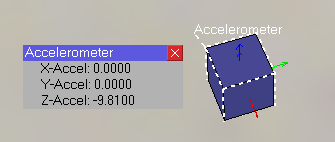
拖入一个加速度计到空场景中,开始仿真,可以看到Z轴方向加速度为-9.81m/s2(重力加速度沿着Z轴负方向):
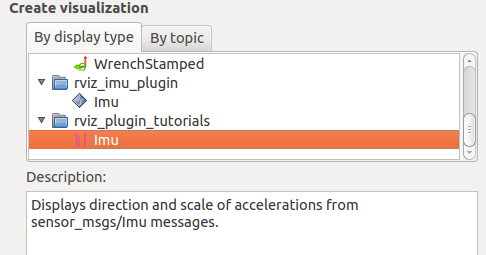
在rviz中可以添加Imu类型的数据显示加速度(rviz_plugin_tutorials中的Imu类型只能显示加速度的大小和方向)
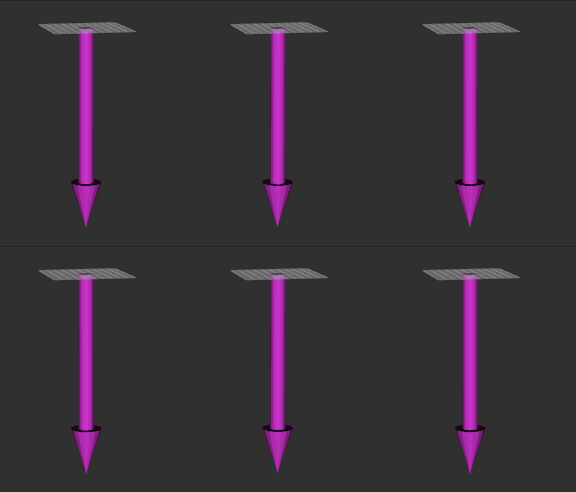
 将加速度计安装在一个缓慢移动的小车上,rviz中显示的加速度如下图所示:
陀螺仪(GyroSensor)
VREP中陀螺仪可以测量运动物体绝对的角速度

陀螺仪模型的代码如下:
-- Check the end of the script for some explanations!

if (sim_call_type==sim_childscriptcall_initialization) then

    modelBase=simGetObjectAssociatedWithScript(sim_handle_self)

    ref=simGetObjectHandle('GyroSensor_reference')

    ui=simGetUIHandle('GyroSensor_UI')

    simSetUIButtonLabel(ui,,simGetObjectName(modelBase))

    gyroCommunicationTube=simTubeOpen(,'gyroData'..simGetNameSuffix(nil),)

    oldTransformationMatrix=simGetObjectMatrix(ref,-)

    lastTime=simGetSimulationTime()

end

if (sim_call_type==sim_childscriptcall_cleanup) then

end

if (sim_call_type==sim_childscriptcall_sensing) then

    local transformationMatrix=simGetObjectMatrix(ref,-)

    local oldInverse=simGetInvertedMatrix(oldTransformationMatrix)

    local m=simMultiplyMatrices(oldInverse,transformationMatrix)

    local euler=simGetEulerAnglesFromMatrix(m) -- Retrieves the Euler angles from a transformation matrix

    local currentTime=simGetSimulationTime()

    local gyroData={,,}

    local dt=currentTime-lastTime

    if (dt~=) then

        gyroData[]=euler[]/dt

        gyroData[]=euler[]/dt

        gyroData[]=euler[]/dt

    end

    simTubeWrite(gyroCommunicationTube,simPackFloatTable(gyroData))

    simSetUIButtonLabel(ui,,string.format("X-Gyro: %.4f",gyroData[]))

    simSetUIButtonLabel(ui,,string.format("Y-Gyro: %.4f",gyroData[]))

    simSetUIButtonLabel(ui,,string.format("Z-Gyro: %.4f",gyroData[]))

    oldTransformationMatrix=simCopyMatrix(transformationMatrix)

    lastTime=currentTime

    -- To read data from this gyro sensor in another script, use following code:

    --

    -- gyroCommunicationTube=simTubeOpen(0,'gyroData'..simGetNameSuffix(nil),1) -- put this in the initialization phase

    -- data=simTubeRead(gyroCommunicationTube)

    -- if (data) then

    --     angularVariations=simUnpackFloatTable(data)

    -- end

    --

    -- If the script in which you read the gyro sensor has a different suffix than the gyro suffix,

    -- then you will have to slightly adjust the code, e.g.:

    -- gyroCommunicationTube=simTubeOpen(0,'gyroData#') -- if the gyro script has no suffix

    -- or

    -- gyroCommunicationTube=simTubeOpen(0,'gyroData#0') -- if the gyro script has a suffix 0

    -- or

    -- gyroCommunicationTube=simTubeOpen(0,'gyroData#1') -- if the gyro script has a suffix 1

    -- etc.

    --

    --

    -- You can of course also use global variables (not elegant and not scalable), e.g.:

    -- In the gyro script:

    -- simSetFloatSignal('gyroX',angularVariation[1])

    -- simSetFloatSignal('gyroY',angularVariation[2])

    -- simSetFloatSignal('gyroZ',angularVariation[3])

    --

    -- And in the script that needs the data:

    -- angularVariationX=simGetFloatSignal('gyroX')

    -- angularVariationY=simGetFloatSignal('gyroY')

    -- angularVariationZ=simGetFloatSignal('gyroZ')

    --

    -- In addition to that, there are many other ways to have 2 scripts exchange data. Check the documentation for more details

end
VREP中两个entity之间进行通信(交换数据)有多种方式,具体可以参考:Means of communication in and around V-REP. 在VREP的陀螺仪模型中用到了tube通信方式。Tubes are bidirectional communication lines similar to pipes. The tube denomination was selected in order to avoid confusion with pipes, since tubes cannot be used to communicate with the outside world. Tubes are a very convenient and easy means to connecting two entities and exchanging information in a sequential way. They are often used between a child script and a server-like threaded communication child script (e.g. where the latter could handle socket or serial port communication).
Tube通信相关的函数如下:
-- Opens a tube for communication within V-REP. Messages written on one side can be read on the other side in the same order as they were written.
-- Tubes opened via a script will automatically close upon simulation end.
number tubeHandle = simTubeOpen(number dataHeader, string dataName, number readBufferSize)
-- Sends a data packet into a communication tube previously opened with simTubeOpen
number result = simTubeWrite(number tubeHandle, string data)

-- Receives a data packet from a communication tube previously opened with simTubeOpen.
string data = simTubeRead(number tubeHandle, boolean blockingOperation=false)
VREP中欧拉角$\alpha$、$\beta$、$\gamma$描述了刚体相对于世界坐标系的姿态:$$Q=R_x(\alpha)\cdot R_y(\beta)\cdot R_z(\gamma)$$其中$R_x$、$R_y$、$R_z$分别代表绕X、Y、Z轴的旋转。在V-rep中物体姿态以X-Y-Z欧拉角的方式确定(以指定的参考系为初始姿态,然后按X-Y-Z的顺序依次绕自身的坐标轴旋转Alpha,Beta,Gamma角度后得到)。
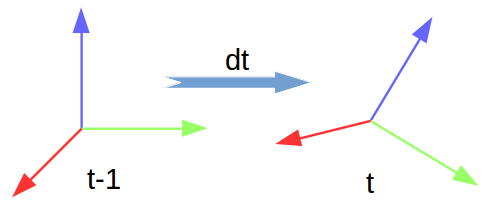
脚本中计算角速度的方法如下:假设$t-1$时刻物体姿态为$_{t-1}^{0}R$,在$dt$时间段内以恒定的角速度旋转到姿态$_{t}^{0}R$,则有$_{t}^{0}R=_{t-1}^{0}R\cdot R(\alpha,\beta,\gamma)$,于是可以求出相对变换矩阵为:$_{t-1}^{0}R^{-1} \cdot _{t}^{0}R$。注意:若绕静坐标系(世界坐标系)旋转,则左乘;若是绕动坐标系旋转(自身坐标系),则右乘 。
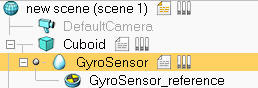
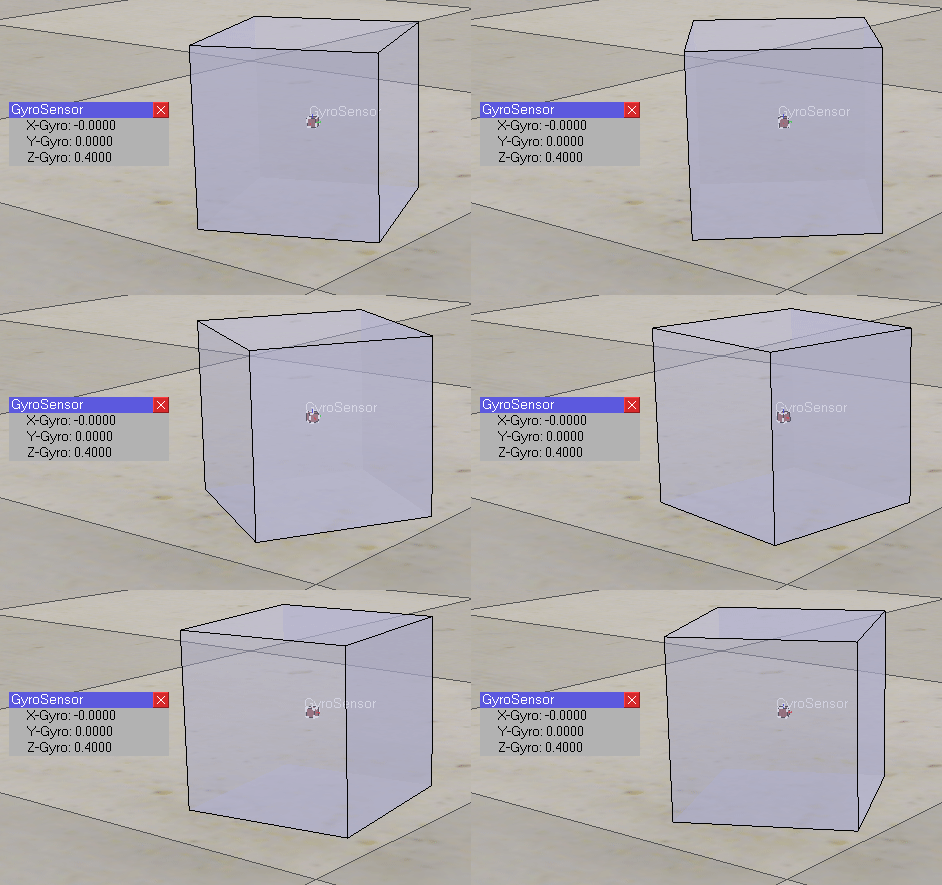
下面测试一个简单的场景:创建一个旋转的立方体,将GyroSensor拖到其下方成为子对象。那么立方体旋转时会带着陀螺仪一起旋转,进而可以测出物体旋转的角速度。
立方体的代码如下,代码会让立方体的$\gamma$角每50ms增加0.02弧度,即绕Z轴旋转角速度为0.4rad/s
if (sim_call_type==sim_childscriptcall_initialization) then

    -- Put some initialization code here

    handle=simGetObjectHandle('Cuboid')

    gyroCommunicationTube=simTubeOpen(,'gyroData'..simGetNameSuffix(nil),)

end

if (sim_call_type==sim_childscriptcall_actuation) then

    -- Put your main ACTUATION code here

    local pos=simGetObjectOrientation(handle,-)

    pos[]=pos[]+0.02

    simSetObjectOrientation(handle,-,pos)

end

if (sim_call_type==sim_childscriptcall_sensing) then

    -- Put your main SENSING code here

    data=simTubeRead(gyroCommunicationTube)

    if (data) then

        angularVariations=simUnpackFloatTable(data)

        simAddStatusbarMessage(string.format("alpha:%.1f  beta:%.1f  yaw:%.1f", angularVariations[],angularVariations[],angularVariations[]))

    end

end
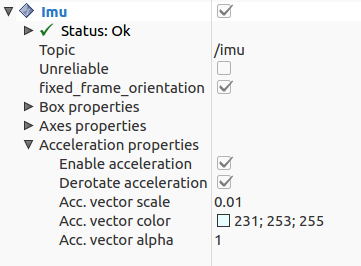
可以将加速度计和陀螺仪组合起来使用,比如将获得的数据封装成ROS中的sensor_msgs/Imu消息发送出去。在rviz中添加rviz_imu_plugin下的IMU类型信进行显示(可以显示代表物体姿态的Box、坐标轴,以及显示加速度):
将加速度计、陀螺仪安装到下面的移动机器人上,输出IMU信息(下图中白色轴代表加速度信息):
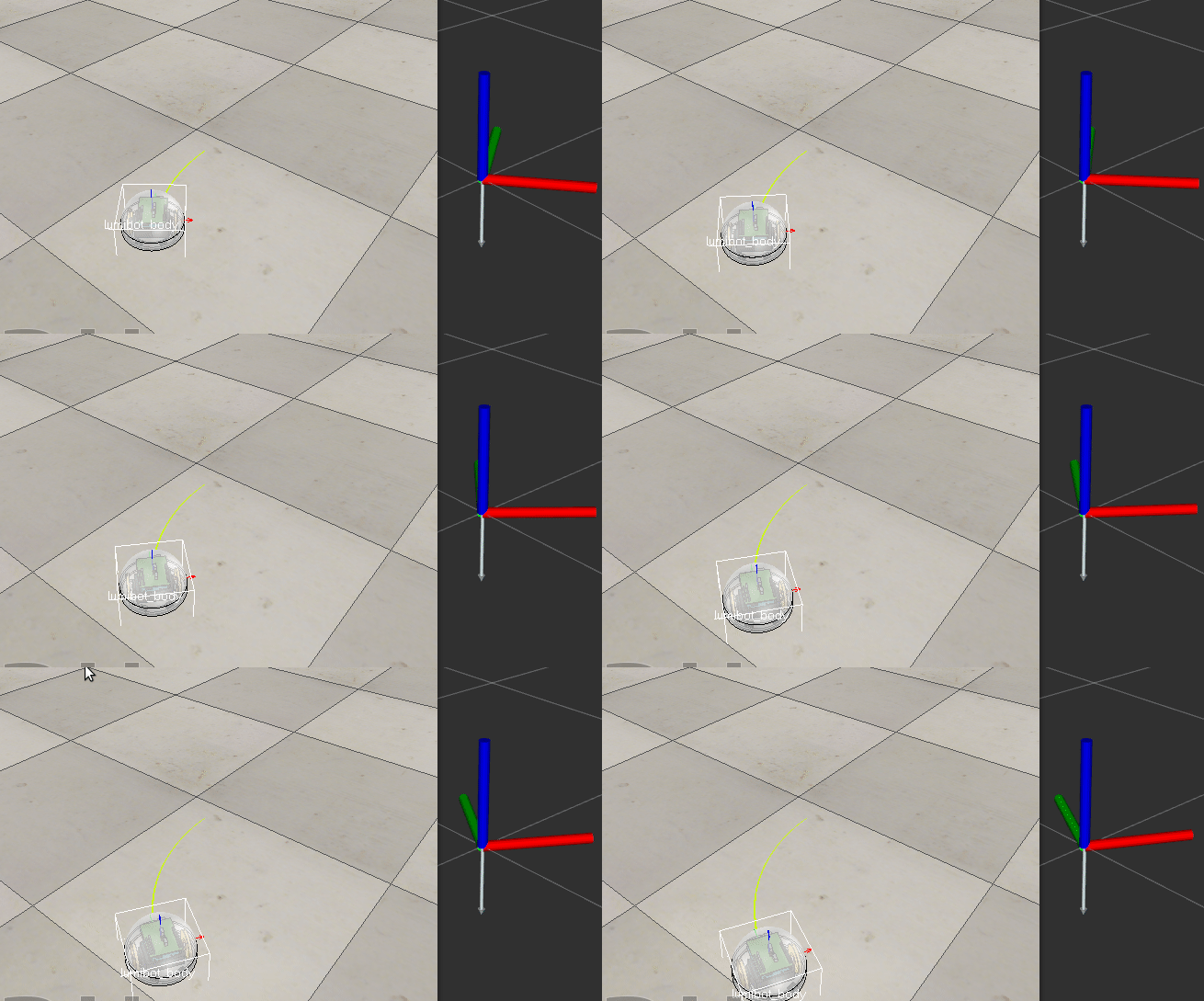
VREP中发布ROS IMU消息的代码如下:
if (sim_call_type==sim_childscriptcall_initialization) then

    -- Put some initialization code here

    pub = simExtRosInterface_advertise('/imu', 'sensor_msgs/Imu')

    simExtRosInterface_publisherTreatUInt8ArrayAsString(pub)

    Imu_data={}

    gyroCommunicationTube=simTubeOpen(,'gyroData'..simGetNameSuffix(nil),)

    accelCommunicationTube=simTubeOpen(,'accelerometerData'..simGetNameSuffix(nil),)

    handle = simGetObjectHandle('lumibot_body')

end

if (sim_call_type==sim_childscriptcall_actuation) then

end

if (sim_call_type==sim_childscriptcall_sensing) then

    -- Put your main SENSING code here

    quaternion = simGetObjectQuaternion(handle, -)

    accele_data=simTubeRead(accelCommunicationTube)

    gyro_data=simTubeRead(gyroCommunicationTube)

    if (accele_data and gyro_data) then

        acceleration=simUnpackFloatTable(accele_data)

        angularVariations=simUnpackFloatTable(gyro_data)

        Imu_data['orientation'] = {x=quaternion[],y=quaternion[],z=quaternion[],w=quaternion[]}

        Imu_data['header']={seq=,stamp=simExtRosInterface_getTime(), frame_id="sensor_frame"}

        Imu_data['linear_acceleration']= {x=acceleration[],y=acceleration[],z=acceleration[]}

        Imu_data['angular_velocity'] = {x=angularVariations[],y=angularVariations[],z=angularVariations[]}

        simExtRosInterface_publish(pub, Imu_data)

    end

end

if (sim_call_type==sim_childscriptcall_cleanup) then

    -- Put some restoration code here

    simExtRosInterface_shutdownPublisher(pub)

end
参考:
Means of communication in and around V-REP
V-rep中的加速度计与陀螺仪的更多相关文章
- Oracle基础学习(二)v$session中Command的数字含义
v$session中Command的数字含义. 1 CREATE TABLE 2 INSERT 3 SELECT 4 CREATE CLUSTER 5 ALTER CLUSTER 6 UPDATE 7 ...
- MPU6050可以读取器件ID值,但读出的加速度计和陀螺仪的数据均为零
今天在调试MPU6050时发现,MPU6050可以正常读取器件ID,但读取的加速度计和陀螺仪的数据均为零. 经过排查发现,MPU6050第20脚的电容没用焊接,C6可以使用10uF的电容.
- 使用 Windows 10 中的加速度计(Accelerometer,重力传感器)
在做 UWP 应用开发的时候还有什么理由可以用到加速度计呢?场景很多啦,比如做游戏,做类似 Surface Hub 那种一边旋转,一边所有内容跟着一起转的效果. Windows 10 UWP 中的加速 ...
- v$open_cursor中的相同record
之前在查看v$open_cursor的时候,发现很多相同的record. 让我很疑惑, sid saddr sql_id 都相同,我就想 这不是一个cursor吗? 那为什么在open_cursor中 ...
- v$session中server为none与shared值解析
查询V$SESSION,你会看到SERVER可能会有DEDICATED| SHARED| PSEUDO| NONE 四种值,如果SERVER字段的值除了DEDICATED,还有NONE,则说明当前实例 ...
- 从V$SQL_PLAN中FORMAT执行计划
10G版本 select sql_id from v$sqlarea where sql_text like'%xxx%'; select * from v$sql_plan where sql_i ...
- JAVA中String对象的比较
JAVA中String对象的比较 1.首先介绍三个String对象比较的方法:(1)equals:比较两个String对象的值是否相等.例如: String str1 = "hello qu ...
- 关于v$datafile中system表空间的status值始终为system
http://docs.oracle.com/cd/B19306_01/server.102/b14237/dynviews_1076.htm#REFRN30050 http://blog.itpub ...
- 使用MPU6050陀螺仪自制Arduino数字量角器
MPU6050惯性单元是一个3轴加速度计和一个3轴陀螺仪组合的单元.它还包含温度传感器和DCM,可执行复杂的任务. MPU6050通常用于制作无人机和其他远程控制机器人,如自平衡机器人.在本篇文章中, ...
随机推荐
- Kubernetes中StatefulSet介绍
StatefulSet 是Kubernetes1.9版本中稳定的特性,本文使用的环境为 Kubernetes 1.11.如何搭建环境可以参考kubeadm安装kubernetes V1.11.1 集群 ...
- 微信二维码扫描无法下载APK文件的解决办法
- golang的配置文件操作:viper
参考: 1.http://blog.51cto.com/13599072/2072753 2.https://studygolang.com/articles/14453 3.https://www. ...
- JAVA NIO non-blocking模式实现高并发服务器(转)
原文链接:JAVA NIO non-blocking模式实现高并发服务器 Java自1.4以后,加入了新IO特性,NIO. 号称new IO. NIO带来了non-blocking特性. 这篇文章主要 ...
- OpenGL和D3D11中的深度模版测试
在OpenGL和D3D11的管线中,像素shader之后的操作就是深度模版测试,深度模版测试是以sample为单位进行的,就是一个像素上可以有多个采样点,每个采样点都有深度信息.深度模版测试对 ...
- 如何在CentOS 7.2上创建NFS的Share,然后让Client可以访问
讲得详细清楚明白的好文. Setting Up an NFS Server and Client on CentOS 7.2 https://www.howtoforge.com/tutorial/s ...
- Longest Palindromic Substring leetcode java
题目: Given a string S, find the longest palindromic substring in S. You may assume that the maximum l ...
- Vue背景图打包之后访问路径错误
问题背景:项目里面有用到背景图片,开发模式下正常,打包之后发现报404错误.查看发现是背景图片引用路径出错. 解决方法: .map { width: %; height: 397px; backgro ...
- Python 通过打码平台实现验证码
在爬虫时,经常遇到登录需要验证码的情况,简单的验证码可以自己解决,复制的验证码需要借助机器学习,有一定的难度.还有一个简单的方案就是采用付费的打码平台. 比如R若快(http://www.ruokua ...
- JAVA的Split小技巧
在日常的开发中截取字符串必不可少,但是在JAVA中的Split截取有点特点的地方是 例如: String str=1,2,3,; 那么 str.split(&q ...