
Spring(十七):Spring AOP(一):简介
背景:
需求:
给一个计算器计算函数执行前后添加日志。
实现:
1)直接在函数中修改代码;
IArithmeticCalculator.java接口类
package com.dx.spring.beans.aop;

public interface IArithmeticCalculator {

    // Addition, subtraction, multiplication, and division

    int add(int i, int j);

    int sub(int i, int j);

    int multi(int i, int j);

    int div(int i, int j);

}
实现类中添加日志:
package com.dx.spring.beans.aop;

public class ArithmeticCalculatorImpl implements IArithmeticCalculator {

    @Override

    public int add(int i, int j) {

        System.out.println("method add before");

        int result = i + j;

        System.out.println("method add after");

        return result;

    }

    @Override

    public int sub(int i, int j) {

        System.out.println("method sub before");

        int result = i - j;

        System.out.println("method sub after");

        return result;

    }

    @Override

    public int multi(int i, int j) {

        System.out.println("method multi before");

        int result = i * j;

        System.out.println("method multi after");

        return result;

    }

    @Override

    public int div(int i, int j) {

        System.out.println("method div before");

        int result = i / j;

        System.out.println("method div after");

        return result;

    }

}
2)Java动态代理,实现参考《Java中动态代理方式:》;
ArithmeticCalculatorImpl.Java实现:
package com.dx.spring.beans.aop;

public class ArithmeticCalculatorImpl implements IArithmeticCalculator {

    @Override

    public int add(int i, int j) {

        int result = i + j;

        return result;

    }

    @Override

    public int sub(int i, int j) {

        int result = i - j;

        return result;

    }

    @Override

    public int multi(int i, int j) {

        int result = i * j;

        return result;

    }

    @Override

    public int div(int i, int j) {

        int result = i / j;

        return result;

    }

}
ProxyFactory.java动态代理工厂:
package com.dx.spring.beans.aop;

import java.lang.reflect.InvocationHandler;

import java.lang.reflect.Method;

import java.lang.reflect.Proxy;

public class ProxyFactory {

    private Object target=null;

    public ProxyFactory(Object target) {

        this.target = target;

    }

     /**

     * 给目标对象生成代理对象

     */

    public Object getProxyInstance() {

        ClassLoader classLoader = target.getClass().getClassLoader();

        Class<?>[] interfaces = target.getClass().getInterfaces();

        InvocationHandler invocationHandler = new InvocationHandler() {

            public Object invoke(Object proxy, Method method, Object[] args) throws Throwable {

                before(method);

                // 执行目标对象方法

                Object returnValue = method.invoke(target, args);

                after(method);

                return returnValue;

            }

        };

        return Proxy.newProxyInstance(classLoader, interfaces, invocationHandler);

    }

    private void before(Method method) {

        System.out.println("before " + method);

    }

    private void after(Method method) {

        System.out.println("after " + method);

    }

}
调用测试Client.java:
package com.dx.spring.beans.aop;

public class Client {

    public static void main(String[] args) {

        IArithmeticCalculator arithmeticCalculator = new ArithmeticCalculatorImpl();

        // int result=arithmeticCalculator.add(1, 2);

        // System.out.println(result);

        IArithmeticCalculator arithmeticCalculatorProxyFactory = (IArithmeticCalculator) new ProxyFactory(arithmeticCalculator).getProxyInstance();

        int result = arithmeticCalculatorProxyFactory.add(1, 2);

        System.out.println(result);

    }

}
3)Spring AOP实现。
下边会举例,这里暂时不举例。
AOP:
AOP简介:
1)AOP(Aspect-Oriented Programming,面向切面编程):是一种新的方法论,是对传统OOP(Object-Oriented Programming,面向对象编程)的补充。
2)AOP的主要编程对象是切面(aspect),而切面模块化横切关注点。
3)在应用AOP编程时,任然需要定义公共功能,但可以明确的定义这个功能在哪里,以什么方式应用,并且不必修改受影响的类。这样一来横切关注点就被模块化到特殊的对象(切面)里。
4)AOP的好处:
---- 每个事物逻辑位于一个位置,代码不分散,便于维护和升级;
---- 业务模块更简洁,只包含核心业务代码。
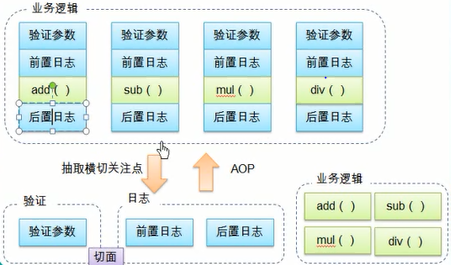
AOP术语:
1)切面(aspect):横切关注点(跨越应用程序多个模块的功能)被模块化的特殊对象;
2)通知(advice):切面必须要完成的工作;
3)目标(target):被通知的对象;
4)连接点(Joinpoint):程序执行的某个特定位置:如类某个方法调用前、调用后、方法抛出异常后等。
连接点由两个信息确定:方法表示的程序执行点、相对点表示的方位。
例如:ArithmethicCalculator#add()方法执行前的连接点执行点为ArithmethicCalculator#add();方位为该方法执行前的位置。
5)切点(pointcut):每个类都拥有多个连接点:例如ArithmethicCalculator的所有方法实际上都是连接点,即连接点是程序类中客观存在的事务。
AOP通过切点位置到特定的连接点。类比:连接点相当于数据库中的记录,切点相当于查询条件。切点和连接点不是一对一的关系,一个切点匹配多个连接点,切点通过org.springframework.aop.Pointcut接口进行描述,它使用类和方法作为连接点的查询条件。
Spring AOP
1)AspectJ:java社区里最完整最流行的AOP框架。在Spring2.0以上版本中,可以使用AspectJ注解或基于XML配置的AOP。
备注:先学习基于AspectJ注解的方式,接着再学习基于XML配置。
2) 在Spring中启动AspectJ注解支持:
- 要在Spring应用中使用AspectJ注解,必须在ClassPath下包含AspectJ类库:aopalliance.jar、aspectj.wearver.jar和spring-aspects.jar;
- 将aop schema添加到<beans>根元素中;
- 要在Spring IOC容器中启用AspectJ注解支持,只要在Bean配置文件中定义一个空的xml元素<aop:aspectj-auotproxy>;
- 当Spring IOC容器侦测到Bean配置文件中的<aop:aspectj-autoproxy>元素是,会自动为与aspectj切面匹配的bean创建代理。
Spring AOP实现需求:
第一步:导入spring aop依赖包&额外依赖包(aopalliance.jar、asm.jar、aspectjrt.jar、aspectjweaver.jar);
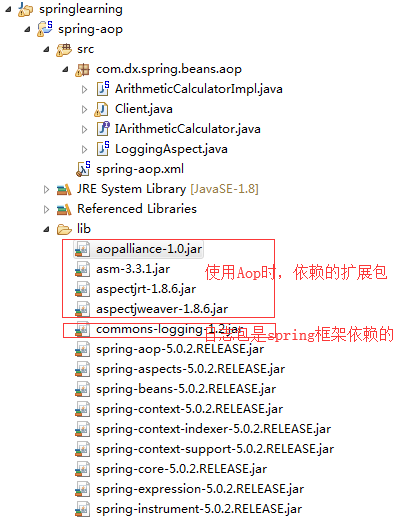
Aop额外依赖包:aopalliance.jar、asm.jar、aspectjrt.jar、aspectjweaver.jar下载:链接:https://pan.baidu.com/s/1SjYtrfrUwPIZXikr4guXkg 密码:lowr
第二步:添加spring-aop.xml
<?xml version="1.0" encoding="UTF-8"?>

<beans xmlns="http://www.springframework.org/schema/beans"

    xmlns:xsi="http://www.w3.org/2001/XMLSchema-instance" xmlns:aop="http://www.springframework.org/schema/aop"

    xmlns:context="http://www.springframework.org/schema/context"

    xsi:schemaLocation="http://www.springframework.org/schema/beans http://www.springframework.org/schema/beans/spring-beans.xsd

        http://www.springframework.org/schema/context http://www.springframework.org/schema/context/spring-context-4.3.xsd

        http://www.springframework.org/schema/aop http://www.springframework.org/schema/aop/spring-aop-4.3.xsd">

    <!-- 配置自动扫描的包 -->

    <context:component-scan base-package="com.dx.spring.beans.aop"></context:component-scan>

    <!-- 配置是AspectJ注解起作用 :自动为匹配的类生成代理对象 -->

    <aop:aspectj-autoproxy></aop:aspectj-autoproxy>

</beans>
第三步:添加Spring组件
IArithmeticCalculator.java组件接口
package com.dx.spring.beans.aop;

/**

 * Description:Addition, subtraction, multiplication, and division

 */

public interface IArithmeticCalculator {

    int add(int i, int j);

    int sub(int i, int j);

    int multi(int i, int j);

    int div(int i, int j);

}
ArithmeticCalculatorImpl.java组件
package com.dx.spring.beans.aop;

import org.springframework.stereotype.Component;

@Component("arithmeticCalculator")

public class ArithmeticCalculatorImpl implements IArithmeticCalculator {

    @Override

    public int add(int i, int j) {

        int result = i + j;

        return result;

    }

    @Override

    public int sub(int i, int j) {

        int result = i - j;

        return result;

    }

    @Override

    public int multi(int i, int j) {

        int result = i * j;

        return result;

    }

    @Override

    public int div(int i, int j) {

        int result = i / j;

        return result;

    }

}
第四步:给Spring组件添加LoggingAspect切面类:
LoggingAspect.java切面类
package com.dx.spring.beans.aop;

import org.aspectj.lang.annotation.Aspect;

import org.aspectj.lang.annotation.Before;

import org.springframework.stereotype.Component;

//把这个类声明为一个切面:需要把该类放入到IOC容器中、再声明为一个切面。

@Aspect

@Component

public class LoggingAspect {

    // 声明该方法为一个前置通知:在目标方法开始之前执行

    @Before("execution(public int com.dx.spring.beans.aop.IArithmeticCalculator.add(int, int))")

    public void beforeMethod() {

        System.out.println("before ");

    }

}
第五步:添加测试类Client.java&测试
package com.dx.spring.beans.aop;

import org.springframework.context.ApplicationContext;

import org.springframework.context.support.ClassPathXmlApplicationContext;

public class Client {

    public static void main(String[] args) {

        // 1:创建Spring的IOC容器;

        ApplicationContext ctx = new ClassPathXmlApplicationContext("spring-aop.xml");

        // 2.从IOC容器中获取Bean的实例

        IArithmeticCalculator arithmeticCalculator = (IArithmeticCalculator) ctx.getBean("arithmeticCalculator");

        // 3.使用Bean

        int result = arithmeticCalculator.add(1, 3);

        System.out.println(result);

    }

}
测试结果:
before
4
Spring AOP合并切入点表达式:
示例:
上边的LoggingAspect.java中的配置仅仅适用于接口IArithm*eticCalculator.java的add方法,如果想通过一个配置适用IArithmeticCalculator.java接口的四个方法,可以使用“*”占位符混匹方式。
第一步:修改LoggingAspect.java接口
package com.dx.spring.beans.aop;

import org.aspectj.lang.annotation.Aspect;

import org.aspectj.lang.annotation.Before;

import org.springframework.stereotype.Component;

//把这个类声明为一个切面:需要把该类放入到IOC容器中、再声明为一个切面。

@Aspect

@Component

public class LoggingAspect {

    // 声明该方法为一个前置通知:在目标方法开始之前执行

    @Before("execution(public int com.dx.spring.beans.aop.IArithmeticCalculator.*(int, int))")

    public void beforeMethod() {

        System.out.println("before ");

    }

}
第二步:修改Client.java&测试
        // 1:创建Spring的IOC容器;

        ApplicationContext ctx = new ClassPathXmlApplicationContext("spring-aop.xml");

        // 2.从IOC容器中获取Bean的实例

        IArithmeticCalculator arithmeticCalculator = (IArithmeticCalculator) ctx.getBean("arithmeticCalculator");

        // 3.使用Bean

        int result = arithmeticCalculator.add(1, 3);

        System.out.println(result);

        result = arithmeticCalculator.add(4, 2);

        System.out.println(result);
测试结果:
before
4
before
6
利用方法签名编写AspectJ切入点表达式:
最经典的切入点表达式是根据方法的签名来匹配各种方法:
- --- execution(* com.dx.spring.beans.aop.IArithmeticCalculator.*.(..)):匹配IArithmeticCalculator中声明的所有方。第一个"*"代表任意修饰符及任意返回值;第二个"*"代表任意方法;其中".."匹配任意数量的参数。若目标类与接口与该切面在同一个包中,可以省略报名。
- --- execution(public * IArithmeticCalculator.*.(..)):匹配IArithmeticCalculator接口的所有公有方法。
- --- execution(public double IArithmeticCalculator.*.(..)):匹配IArithmeticCalculator接口中返回double类型数据的方法。
- --- execution(public double IArithmeticCalculator.*.(double,..)):匹配IArithmeticCalculator接口中返回double类型数据且第一个参数参数为double类型的(".."匹配任意数量任意类型的参数)方法。
- --- execution(public double IArithmeticCalculator.*.(double,..)):匹配IArithmeticCalculator接口中返回double类型数据且有两个类型为double类型的参数的方法。
Spring AOP让通知访问当前连接点的细节:
通知方法支持接收参数,其中就允许接收JoinPoint,通过JointPoint参数对象,可以获取函数名称,和参数。
第一步:修改LoggingAspect.java类:
package com.dx.spring.beans.aop;

import java.util.List;

import java.util.Arrays;

import org.aspectj.lang.JoinPoint;

import org.aspectj.lang.annotation.Aspect;

import org.aspectj.lang.annotation.Before;

import org.springframework.stereotype.Component;

//把这个类声明为一个切面:需要把该类放入到IOC容器中、再声明为一个切面。

@Aspect

@Component

public class LoggingAspect {

    // 声明该方法为一个前置通知:在目标方法开始之前执行

    @Before("execution(public int com.dx.spring.beans.aop.IArithmeticCalculator.*(int, int))")

    public void beforeMethod(JoinPoint joinpoint) {

        String methodName = joinpoint.getSignature().getName();

        List<Object> args = Arrays.asList(joinpoint.getArgs());

        System.out.println("before method " + methodName + " with " + args);

    }

}
第二步:测试打印结果
before method add with [1, 3]
4
before method add with [4, 2]
6
Spring(十七):Spring AOP(一):简介的更多相关文章
- 学习 Spring (十七) Spring 对 AspectJ 的支持 (完结)
Spring入门篇 学习笔记 @AspectJ 的风格类似纯 java 注解的普通 java 类 Spring 可以使用 AspectJ 来做切入点解析 AOP 的运行时仍旧是纯的 Spring AO ...
- Spring 框架的 AOP 简介
Spring 框架的 AOP Spring 框架的一个关键组件是面向方面的编程(AOP)(也称为面向切面编程)框架. 面向方面的编程需要把程序逻辑分解成不同的部分称为所谓的关注点. 跨一个应用程序的多 ...
- Spring 系列: Spring 框架简介 -7个部分
Spring 系列: Spring 框架简介 Spring AOP 和 IOC 容器入门 在这由三部分组成的介绍 Spring 框架的系列文章的第一期中,将开始学习如何用 Spring 技术构建轻量级 ...
- Spring学习(二)——Spring中的AOP的初步理解[转]
[前面的话] Spring对我太重要了,做个关于web相关的项目都要使用Spring,每次去看Spring相关的知识,总是感觉一知半解,没有很好的系统去学习一下,现在抽点时间学习一下Spring. ...
- Spring 系列: Spring 框架简介(转载)
Spring 系列: Spring 框架简介 http://www.ibm.com/developerworks/cn/java/wa-spring1/ Spring AOP 和 IOC 容器入门 在 ...
- Spring 依赖的Jar包简介
Spring 依赖的Jar包简介 Spring的依赖关系 依赖关系分组 JAR文件 说 明 ant ant.jar, ant-junit.jar, ant-launcher.jar Spring采用A ...
- Spring学习(二)——Spring中的AOP的初步理解
[前面的话] Spring对我太重要了,做个关于web相关的项目都要使用Spring,每次去看Spring相关的知识,总是感觉一知半解,没有很好的系统去学习一下,现在抽点时间学习一下Spring.不知 ...
- Spring 3.0 AOP (一)AOP 术语
关于AOP.之前我已写过一个系列的随笔: <自己实现简单的AOP>,它的关注点在于实现.实现语言是C#,实现方式为 自定义实现 RealProxy 抽象类.重写Invoke方法,以便进行方 ...
- Spring系列之AOP实现的两种方式
AOP常用的实现方式有两种,一种是采用声明的方式来实现(基于XML),一种是采用注解的方式来实现(基于AspectJ). 首先复习下AOP中一些比较重要的概念: Joinpoint(连接点):程序执行 ...
- [Spring框架]Spring AOP基础入门总结二:Spring基于AspectJ的AOP的开发.
前言: 在上一篇中: [Spring框架]Spring AOP基础入门总结一. 中 我们已经知道了一个Spring AOP程序是如何开发的, 在这里呢我们将基于AspectJ来进行AOP 的总结和学习 ...
随机推荐
- Reveal逆向工程:分析任意iOS应用的UI界面
在iOS逆向工程中,Reveal扮演着重要角色,一般情况下,Reveal在iOS开发过程中可以分析UI界面的状态,同样也可以应用于分析其他任意的App.特别是对于初学者来说,去了解其他优秀App的界面 ...
- CAP原则(CAP定理)、BASE理论
CAP原则又称CAP定理,指的是在一个分布式系统中, Consistency(一致性). Availability(可用性).Partition tolerance(分区容错性),三者不可得兼. CA ...
- nexus-maven- repository-index.zip手动下载与设置
问题描述: 在启动eclipse的时候,在maven控制台经常会看到更新nexus-maven-repository-index.zip,用 eclipse更新速度会很慢,甚至有不能完成下载的情况: ...
- Context Switching on the Cortex-M3
http://coactionos.com/embedded%20design%20tips/2013/10/09/Tips-Context-Switching-on-the-Cortex-M3/ T ...
- MSDN WinUSB Example
The WinUSB user-mode library uses device interface classes to communicate with the kernel-mode USB s ...
- stat,fstate,lstat函数
#include <sys/stat.h> int stat (const char *restrict pathname,struct stat* restrict buf) int f ...
- XCODE调试时不显示变量值/指针地址的解决方案
转:http://blog.csdn.net/samuelltk/article/details/41250151
- spring 5.0.1.RELEASE官方任然不支持velocity(平台升级)
官方说明: Dear Spring community, It is my pleasure to announce that Spring Framework 5.0.1 is available ...
- asp.net mvc5 安装
原文地址 http://docs.nuget.org/docs/start-here/using-the-package-manager-console 工具-->NuGet程序包管理器--&g ...
- SQLite中的事务操作
关于SQLite事务可以解决一些问题,比如你要插入两个数据,可以将两个数据作为同一个事务进行插入,这样如果第二个数据错误了,便自动执行回滚操作,第一个数据也不会插入成功,保证了数据的同步! 一.实际的 ...