
ajax 上传文件,监听进度(progress)
前端代码 github
<body class="m-2">

  <label for="a" class="btn btn-primary">点击上传</label>

  <input id='a' name="file" type="file" accept="image/png, image/jpeg, video/*" style="display:none;" multiple='multiple'>

  <script>

    async function main() {

      const l = console.log

      let fileEle = document.querySelector('#a')

      fileEle.onchange = e => {

        let files = fileEle.files

        if(files.length === 0) return false;

        let data = new FormData()

        for(const file of files){

          data.append('files', file)

        }

        let xhr = new XMLHttpRequest()

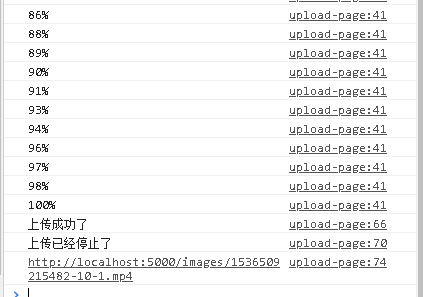
        xhr.upload.addEventListener('progress', e => {

          if (e.lengthComputable) {

            var percentage = Math.round((e.loaded * 100) / e.total);

            l(`${percentage}%`)

          }

        })

        xhr.open('post', 'http://localhost:5000/upload')

        xhr.responseType = 'json'

        xhr.send(data)

        xhr.upload.addEventListener('loadstart', e => {

          l('上传开始')

        })

        xhr.upload.addEventListener('error', e => {

          l('上传失败')

        })

        xhr.upload.addEventListener('abort', e => {

          l('上传终止')

        })

        xhr.upload.addEventListener('timeout', e => {

          l('由于预设时间到期,上传终止')

        })

        xhr.upload.addEventListener('load', e => {

          l('上传成功了')

        })

        xhr.upload.addEventListener('loadend', e => {

          l('上传已经停止了')

        })

        xhr.onload = () => {

          l(...xhr.response.imgsSrc);

        }

      }

    }

    main();

  </script>

</body>

</html>
后台代码片段
  @Post('upload')

  @UseInterceptors(FilesInterceptor('files'))

  uploadfile(@UploadedFiles() files, @Body() body) {

    if (!files || files.length === 0) {

      throw new HttpException('参数错误', HttpStatus.FORBIDDEN)

    }

    let imagesSrc = []

    for (const file of files) {

      const imgName = `${Date.now()}-${file.originalname}`

      const writeImage = createWriteStream(join(__dirname, '..', 'upload', imgName))

      writeImage.write(file.buffer)

      imagesSrc.push( `http://localhost:5000/images/${imgName}` )

    }

    return {

      imgsSrc: imagesSrc

    }

  }
ajax 上传文件,监听进度(progress)的更多相关文章
- ajax 上传文件,显示进度条,进度条100%,进度条隐藏,出现卡顿就隐藏进度条,显示正在加载,再显示上传完成
<form id="uploadForm" method="post" enctype="multipart/form-data"&g ...
- Ajax上传文件进度条显示
要实现进度条的显示,就要知道两个参数,上传的大小和总文件的大小 html5提供了一个上传过程事件,在上传过程中不断触发,然后用已上传的大 小/总大小,计算上传的百分比,然后用这个百分比控制div框的显 ...
- ajax上传文件显示进度
下面要做一个ajax上传文件显示进度的操作,文末有演示地址 这里先上代码: 1.前端代码 upload.html <!DOCTYPE html> <html lang="e ...
- ajax上传文件及进度显示
之前在博文:原生ajax写法就提及过ajax2.0与1.0的差别是多了FormData和利用FormData文件上传(当然还有跨域,但不是本文的重点). 那么具体怎么样实现ajax上传文件呢? 一般来 ...
- HTML5 jQuery+FormData 异步上传文件,带进度条
<!DOCTYPE html> <html> <head> <meta charset="UTF-8"> <link href ...
- atitit.ajax上传文件的实现原理 与设计
atitit.ajax上传文件的实现原理 与设计 1. 上传文件的三大难题 1 1.1. 本地预览 1 1.2. 无刷新 1 1.3. 进度显示 1 2. 传统的html4 + ajax 是无法直 ...
- Spring Boot上传文件(带进度条)
Spring Boot 上传文件(带进度条)# 配置文件 spring: freemarker: template-loader-path: classpath:/static/ ##Spring B ...
- IE8/9 JQuery.Ajax 上传文件无效
IE8/9 JQuery.Ajax 上传文件有两个限制: 使用 JQuery.Ajax 无法上传文件(因为无法使用 FormData,FormData 是 HTML5 的一个特性,IE8/9 不支持) ...
- springMVC+jsp+ajax上传文件
工作中遇到的小问题,做个笔记 实现springMVC + jsp + ajax 上传文件 HTML <body> <form id="myform" method ...
- 伪ajax上传文件
伪ajax上传文件 最近在折腾伪ajax异步上传文件. 网上搜索了一下,发现大部分方法的input file控件都局限于form中,如果是在form外的呢? 必须动态生成一个临时form和临时if ...
随机推荐
- javaScript系列 [01]-javaScript函数基础
[01]-javaScript函数基础 1.1 函数的创建和结构 函数的定义:函数是JavaScript的基础模块单元,包含一组语句,用于代码复用.信息隐蔽和组合调用. 函数的创建:在javaScri ...
- CSS魔法堂:稍稍深入伪类选择器
前言 过去零零星星地了解和使用:link.::after和content等伪类.伪元素选择器,最近看书时发现这方面有所欠缺,于是决定稍微深入学习一下,以下为伪类部分的整理. 伪类 伪类选择器实质上 ...
- phpt5支付宝登陆支付接口解析
先看效果图 下面的源码来源网络,自己对照修改. 放入一个插件库中,方便管理 创建支付类 1.发起支付 public function init() { $order_id = $_REQUEST['o ...
- iOS 获取IP
#import <ifaddrs.h> //获取IP #import <arpa/inet.h> //只能获取WIFI下的IP地址 + (NSString *)getIPAdd ...
- dotnet ef
dotnet ef migrations add <Name-of-Migration> dotnet ef database update
- Ubuntu18.04下可以完美运行Quake3 Arena
安装 其实很早就知道Linux下面可以跑Quake3, 但是一直没有付诸行动, 在硬盘上躺了很多年的Quake III Arena, 和Brood一起从来不舍得删, 昨天终于想起来试试. 安装很简单, ...
- (原)ubuntu上编译PANet/Detectron.pytorch时-std=c99的错误
转载请注明出处: https://www.cnblogs.com/darkknightzh/p/10494787.html 在ubuntu上编译PANet/Detectron.pytorch时,总提示 ...
- C#语法——泛型的多种应用 C#语法——await与async的正确打开方式 C#线程安全使用(五) C#语法——元组类型 好好耕耘 redis和memcached的区别
C#语法——泛型的多种应用 本篇文章主要介绍泛型的应用. 泛型是.NET Framework 2.0 版类库就已经提供的语法,主要用于提高代码的可重用性.类型安全性和效率. 泛型的定义 下面定义了 ...
- Vue Resource root options not used?
I specify a root options in my Vue-Resource in my main.js file, but when I do the request, it does n ...
- MySQL架构总览->查询执行流程->SQL解析顺序
Reference: https://www.cnblogs.com/annsshadow/p/5037667.html 前言: 一直是想知道一条SQL语句是怎么被执行的,它执行的顺序是怎样的,然后 ...