
【Linux】-NO.86.Linux.6.C.1.001-【CentOS 7 Install GCC】-
1.0.0 Summary
Tittle:【Linux】-NO.86.Linux.6.C.1.001-【CentOS 7 Install GCC】-
Style:Java
Series:Log4j
Since:2017-04-24
End:2017-05-07
Total Hours:30+
Degree Of Diffculty:5
Degree Of Mastery:5
Practical Level:5
Desired Goal:5
Archieve Goal:3
Gerneral Evaluation:3
Writer:kingdelee
Related Links:
http://www.cnblogs.com/kingdelee/
http://blog.csdn.net/hanzheng260561728/article/details/75125891
http://www.linuxidc.com/Linux/2017-12/149506.htm
https://www.cnblogs.com/davygeek/p/8018628.html
http://www.linuxidc.com/Linux/2017-12/149506.htm
http://www.codeweblog.com/%E7%AC%94%E8%AE%B0-centos%E4%B8%8A%E6%BA%90%E7%A0%81%E5%AE%89%E8%A3%85gcc-4-8-2/
1.Question
tar (child): lbzip2: Cannot exec: No such file or directory

tar (child): Error is not recoverable: exiting now

tar: Child returned status 2

tar: Error is not recoverable: exiting now
2.Dispose
yum -y install bzip2
If have no web:
tar zxvf bzip2-1.0.6.tar.gz

cd bzip2-1.0.6/

#为编译做准备,创建libbz2.so动态链接库(这一步很重要,安装python的时候如果没有这一步,python安装不上bz2模块):

make -f Makefile-libbz2_so

make && make install
3. GCC安装报错,需要以下几个组件
https://gcc.gnu.org/gcc-7/
http://mirrors.concertpass.com/gcc/releases/gcc-7.3.0/
configure: error: Building GCC requires GMP 4.2+, MPFR 2.4.0+ and MPC 0.8.0+.

Try the --with-gmp, --with-mpfr and/or --with-mpc options to specify

their locations.  Source code for these libraries can be found at

their respective hosting sites as well as at

ftp://gcc.gnu.org/pub/gcc/infrastructure/.  See also

http://gcc.gnu.org/install/prerequisites.html for additional info.  If

you obtained GMP, MPFR and/or MPC from a vendor distribution package,

make sure that you have installed both the libraries and the header

files.  They may be located in separate packages.
3.1 安装 GMP
https://gmplib.org/
https://gmplib.org/download/gmp/gmp-6.1.2.tar.lz
因为上面是lz的,所以还要下载安装lz解压工具

http://ftp.yzu.edu.tw/nongnu/lzip/lzip-1.19.tar.gz

然后安装(下同)

./configure

make

make install
安装gmp:

./configure

报 m4未安装:

checking for suitable m4... configure: error: No usable m4 in $PATH or /usr/5bin (see config.log for reasons).

解决 安装m4:

http://ftp.gnu.org/gnu/m4/

http://ftp.gnu.org/gnu/m4/m4-1.4.18.tar.gz

对m4

./configure

make

make install

对 gmp:

./configure

终于成功,继续 make;
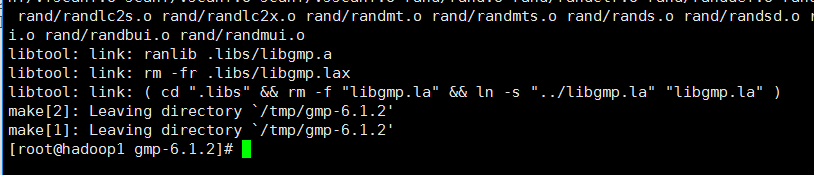
make install
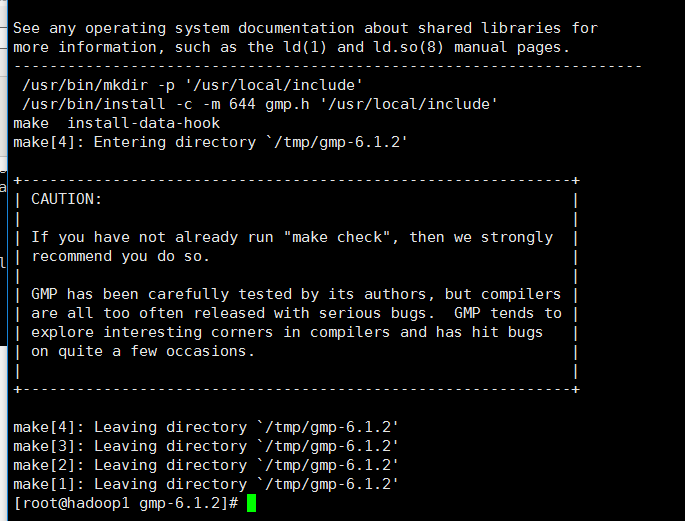
3.2 安装 MPFR
http://www.mpfr.org/mpfr-current/#download
http://www.mpfr.org/mpfr-current/mpfr-4.0.0.tar.gz
安装(cmm下同: ./configure;make;make install)
3.3 安装 MPC
http://ftp.gnu.org/gnu/mpc/
http://ftp.gnu.org/gnu/mpc/mpc-1.1.0.tar.gz
cmm
3.3 安装 isl
checking for isl 0.15 or later... no

required isl version is 0.15 or later

The following languages will be built: c,c++,fortran,lto,objc

*** This configuration is not supported in the following subdirectories:

     gnattools gotools target-libada target-libhsail-rt target-libgo target-libffi target-liboffloadmic

    (Any other directories should still work fine.)

checking for default BUILD_CONFIG... bootstrap-debug

checking for --enable-vtable-verify... no

/usr/bin/ld: cannot find crt1.o: No such file or directory

/usr/bin/ld: cannot find crti.o: No such file or directory

/usr/bin/ld: cannot find -lc

/usr/bin/ld: cannot find crtn.o: No such file or directory

collect2: error: ld returned 1 exit status

configure: error: I suspect your system does not have 32-bit development libraries (libc and headers). If you have them, rerun configure with --enable-multilib. If you do not have them, and want to build a 64-bit-only compiler, rerun configure with --disable-multilib.
ftp://gcc.gnu.org/pub/gcc/infrastructure/
ftp://gcc.gnu.org/pub/gcc/infrastructure/isl-0.18.tar.bz2
tar -xjf isl-0.18.tar.bz2
CMM
4.重回安装 GCC
在/home/lee/download/gcc-7.3.0新建一个build,在此目录下执行:
../configure --prefix=/usr/local/gcc-7.3.0 --enable-checking=release --enable-languages=c,c++,go --disable-multilib
export LD_LIBRARY_PATH=$LD_LIBRARY_PATH:/usr/local/lib
make 4j
make install
期间耗时1个多小时+
5.配置
vim /etc/profile
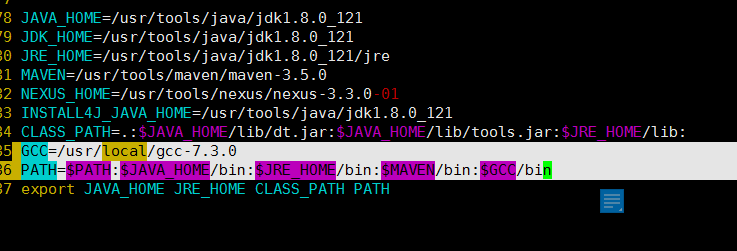
source /etc/profile
6.
配置libstdc++.so.6
在 build 文件夹里找到 libstdc++.so.* :
find . -name "libstdc++.so.*" | xargs ls -al复制到 /usr/lib64 目录下:
sudo cp libstdc++.so.6.0.20 /usr/lib64

sudo ldconfig
[root@hadoop1 bin]# find / -name gcc
/home/lee/download/gcc-7.3.0/gcc
/home/lee/download/gcc-7.3.0/build/gcc
/usr/bin/gcc
/usr/lib/gcc
/usr/libexec/gcc
/usr/local/gcc-7.3.0/libexec/gcc
/usr/local/gcc-7.3.0/lib/gcc
/usr/local/gcc-7.3.0/bin/gcc
/usr/bin
mv gcc gcc.bak
mv g++ g++.bak
ln -s /usr/local/gcc-7.3.0/bin/gcc gcc
ln -s /usr/local/gcc-7.3.0/bin/g++ g++
gcc --version
g++ -version
【Linux】-NO.86.Linux.6.C.1.001-【CentOS 7 Install GCC】-的更多相关文章
- 【Tomcat】Tomcat Connector的三种运行模式【bio、nio、apr】
Tomcat Connector(Tomcat连接器)有bio.nio.apr三种运行模式 bio bio(blocking I/O,阻塞式I/O操作),表示Tomcat使用的是传统的Java I/O ...
- 【转】windows和linux中搭建python集成开发环境IDE
本系列分为两篇: 1.[转]windows和linux中搭建python集成开发环境IDE 2.[转]linux和windows下安装python集成开发环境及其python包 3.windows和l ...
- 【转发】RedHat Enterprise Linux 6.4 使用 Centos 6 的yum源问题
作为一名新手,学习Linux已经一个月了,其间遇到了不少问题,而今天笔者遇到的问题是 #yum install pam-devel #This system is not registered to ...
- 【Linux】-NO.8.Linux.4.Command.1.001-【Common Command】-
1.0.0 Summary Tittle:[Linux]-NO.8.Linux.4.Command.1.001-[Common Command]- Style:Linux Series:Command ...
- 【Linux】-NO.9.Linux.5.Nexus.1.001-【CentOS 7 Install Nexus 3.3】-
1.0.0 Summary Tittle:[Linux]-NO.9.Linux.5.Nexus.1.001-[CentOS 7 Install Nexus 3.3]- Style:Linux Seri ...
- 【Linux】-NO.5.Linux.1.CentOS.1.001-【CentOS7 Foundation Configuration】-
1.0.0 Summary Tittle:[Linux]-NO.5.Linux.1.CentOS.1.001-[CentOS7 Foundation Configuration]- Style:Lin ...
- 【Linux】-NO.6.Linux.2.JDK.1.001-【CentOS 7 Install JDK 8u121】-
1.0.0 Summary Tittle:[Linux]-NO.6.Linux.2.JDK.1.001-[CentOS 7 Install JDK 8u121]- Style:Linux Series ...
- 【Linux】-NO.7.Linux.3.Maven.1.001-【CentOS 7 Install Maven 3.5】-
1.0.0 Summary Tittle:[Linux]-NO.7.Linux.3.Maven.1.001-[CentOS 7 Install Maven 3.5]- Style:Linux Seri ...
- 【原创】linux命令-Axel命令 - linux多线程下载 - 费元星 - 未来星开发团队
[费元星版权Q:9715234] Axel 是 Linux 下一个不错的HTTP/FTP高速下载工具.支持多线程下载.断点续[费元星版权Q:9715234]传,且可以从多个地址或者从一个地址的多个连接 ...
随机推荐
- 解决Eclipse中“诡异”的错误:找不到或无法加载主类
记录下来遇到的(问题,解决方法),是更有效的解决问题的方式.(原谅我领悟的太晚与懒,从此用更有意义的方法,做一个更有意义的人) 因为遇到了多次,参考同一个方法,原文连接:https://blog.cs ...
- eclipse is missing required source folder src/test/java
原因:maven的bug,不兼容eclipse 解决方法:右击工程,选择run-->maven-->build重新构建工程,就解决了.
- [Linux]linux下取消用户名和密码直接登录
假定目前只有root用户,则有如下两种方式可直接登录系统: 方式一: 1. passwd -d root 2. 修改/lib/systemd/system/serial-getty\@.service ...
- [mvc] 过滤器filter一览
1.mvc的过滤器种类
- [原创]电路仿真设计multisim 14安装,破解,汉化教程
硬件工程师开发产品.利用multisim 等辅助软件进行设计仿真可以有效提高开发效率,减少设计弯路. 本文博乐就带大家一起进行multisim 14安装破解汉化. 首先下载multisim 14安装文 ...
- php 实现一致性hash 算法 memcache
散列表的应用 涉及到数据查找比对,首先考虑到使用HashSet.HashSet最大的好处就是实现查找时间复杂度为O(1).使用HashSet需要解决一个重要问题:冲突问题.对比研究了网上一些字符串哈希 ...
- windows 下安装 mongodb 时间太久,卡在那里不动
1.mongodb官网下载:http://www.mongodb.org/downloads 2.双击程序安装,会出现如下,卡着不动,时间太久,也取消不了 3.是因为安装时默认勾选 compass 图 ...
- python接口自动化测试(c测试环境的准备)
接口测试的方式有很多,比如可以用工具(jmeter,postman)之类,也可以自己写代码进行接口测试,工具的使用相对来说都比较简单,重点是要搞清楚项目接口的协议是什么,然后有针对性的进行选择,甚至当 ...
- 30、git 使用
Git 一. 目标 (一) Git的操作 二. Git和SVN的区别 (一) SVN优缺点 1. 优点: (1) 管理方便,逻辑明确 (2) 易于管理,集中式服务器更能保证安全性 (3) 代码一致性非 ...
- 怎么用js实现jq的removeClass方法
1.addClass:为指定的dom元素添加样式. 2.removeClass:删除指定dom元素的样式. 3.toggleClass:如果存在(不存在),就删除(添加)一个样式. 4.hasClas ...