
centos7搭建elasticsearch
Elasticsearch:负责日志检索和分析,它的特点有:分布式,零配置,自动发现,索引自动分片,索引副本机制,restful风格接口,多数据源,自动搜索负载等
Logstash:对日志进行收集、过滤,并将其存储供以后使用(如,搜索日志)
Kibana:为日志分析提供友好的Web界面,可以帮助汇总、分析和搜索重要数据日志
客户端软件:
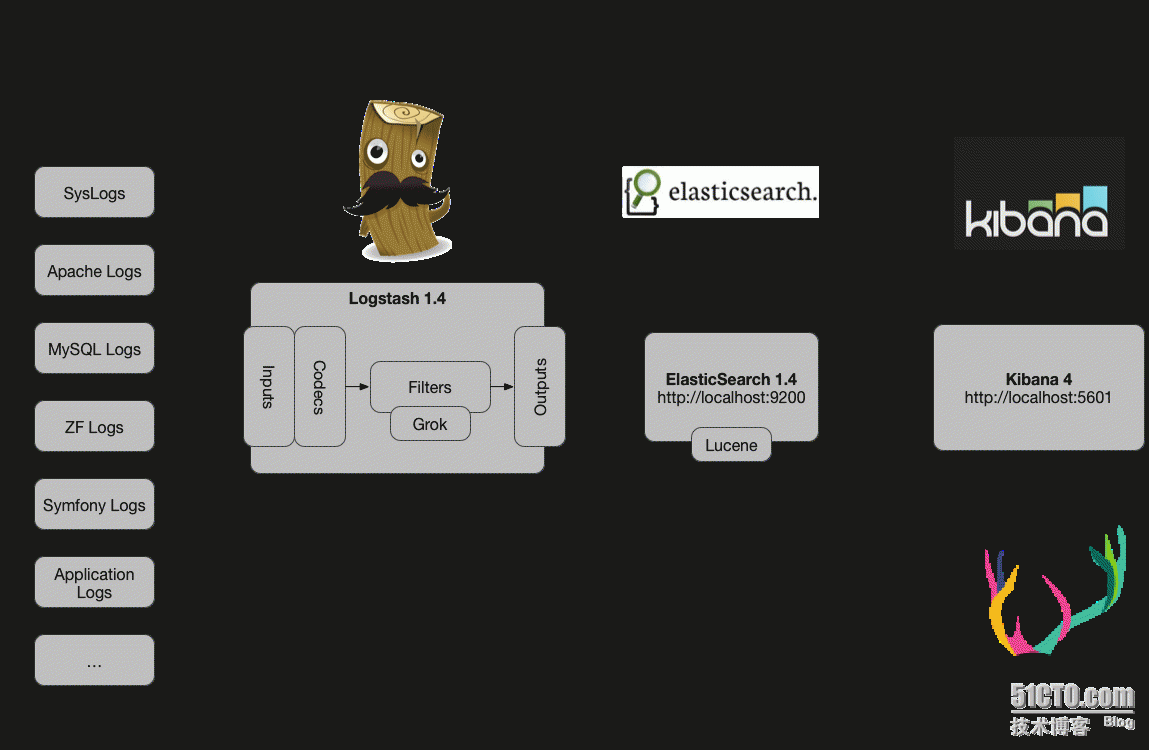
在需要收集日志的所有服务上部署logstash,作为logstash agent(logstash shipper)用于监控并过滤收集日志,将过滤后的内容发送到logstash indexer,logstash indexer将日志收集在一起交给全文搜索服务ElasticSearch,可以用ElasticSearch进行自定义搜索,然后通过Kibana来结合自定义搜索进行页面展示。
借用网络上别人家的图
下载地址
cd /home
mkdir elk
cd elk
wget https://artifacts.elastic.co/downloads/elasticsearch/elasticsearch-6.2.4.zip
unzip elasticsearch-6.2.4.zip
mv elasticsearch-6.2.4 elasticsearch
特别注意:elasticsearch5.0以上版本不支持root用户启动,现在增加一个用户
在增加用户之前,需要下载log4j 我安装的过程报了下面的错误 所以安装log4j
yum install -y unzip zip
yum install -y log4j* ###安装log4j包
OpenJDK -Bit Server VM warning: Cannot open file logs/gc.log due to Permission denied

-- ::, main ERROR Unable to invoke factory method in class org.apache.logging.log4j.core.appender.RollingFileAppender for element RollingFile: java.lang.IllegalStateException:

No factory method found for class org.apache.logging.log4j.core.appender.RollingFileAppender java.lang.IllegalStateException:

-- ::, main ERROR RollingFileManager (/home/elk/elasticsearch/logs/elasticsearch_deprecation.log) java.io.FileNotFoundException:/home/elk/elasticsearch/logs/elasticsearch_deprecation.log (Permission denied) java.io.FileNotFoundException:
#groupadd esuser
#useradd -g esuser esuser
将data和logs目录的属主和属组改为esuser
#chown esuser.esuser /home/elk/elasticsearch -R 把目录/elasticsearch及其下的所有文件和子目录的属主改成esuser,属组改成esuser 第二个是属于哪个组。
标红的地方也要注意,要给绝对路径的用户
[root@insure elk]# sudo chown -R esuser.root /home/elk/elasticsearch

[root@insure elk]# ls -ltr

total

drwxr-xr-x  esuser root       Apr    elasticsearch

-rw-r--r--  root   root  May    logstash-6.2..zip

-rw-r--r--  root   root   Oct  : kibana-6.2.-linux-x86_64.tar.gz

drwxr-xr-x  root   root       Dec  : back

[root@insure elk]# sudo chown -R esuser.esuser /home/elk/elasticsearch

[root@insure elk]# ls -ltr

total

drwxr-xr-x  esuser esuser       Apr    elasticsearch
启动elasticsearch &或者-d 可以后台启动
[esuser@insure elasticsearch]$ ./bin/elasticsearch

[--27T10::,][INFO ][o.e.n.Node               ] [] initializing ...

[--27T10::,][INFO ][o.e.e.NodeEnvironment    ] [LGHRC-d] using [] data paths, mounts [[/ (rootfs)]], net usable_space [.6gb], net total_space [492gb], types [rootfs]

[--27T10::,][INFO ][o.e.e.NodeEnvironment    ] [LGHRC-d] heap size [.8mb], compressed ordinary object pointers [true]

[--27T10::,][INFO ][o.e.n.Node               ] node name [LGHRC-d] derived from node ID [LGHRC-dHRqCXmCwcXI6XSg]; set [node.name] to override

[--27T10::,][INFO ][o.e.n.Node               ] version[6.2.], pid[], build[ccec39f/--12T20::.497551Z], OS[Linux/3.10.-693.2..el7.x86_64/amd64], JVM[Oracle Corporation/OpenJDK -Bit Server VM/1.8.0_181/25.181-b13]

[--27T10::,][INFO ][o.e.n.Node               ] JVM arguments [-Xms1g, -Xmx1g, -XX:+UseConcMarkSweepGC, -XX:CMSInitiatingOccupancyFraction=, -XX:+UseCMSInitiatingOccupancyOnly, -XX:+AlwaysPreTouch, -Xss1m, -Djava.awt.headless=true, -Dfile.encoding=UTF-, -Djna.nosys=true, -XX:-OmitStackTraceInFastThrow, -Dio.netty.noUnsafe=true, -Dio.netty.noKeySetOptimization=true, -Dio.netty.recycler.maxCapacityPerThread=, -Dlog4j.shutdownHookEnabled=false, -Dlog4j2.disable.jmx=true, -Djava.io.tmpdir=/tmp/elasticsearch.O9wXX03d, -XX:+HeapDumpOnOutOfMemoryError, -XX:+PrintGCDetails, -XX:+PrintGCDateStamps, -XX:+PrintTenuringDistribution, -XX:+PrintGCApplicationStoppedTime, -Xloggc:logs/gc.log, -XX:+UseGCLogFileRotation, -XX:NumberOfGCLogFiles=, -XX:GCLogFileSize=64m, -Des.path.home=/home/elk/elasticsearch, -Des.path.conf=/home/elk/elasticsearch/config]

[--27T10::,][INFO ][o.e.p.PluginsService     ] [LGHRC-d] loaded module [aggs-matrix-stats]

[--27T10::,][INFO ][o.e.p.PluginsService     ] [LGHRC-d] loaded module [analysis-common]

[--27T10::,][INFO ][o.e.p.PluginsService     ] [LGHRC-d] loaded module [ingest-common]

[--27T10::,][INFO ][o.e.p.PluginsService     ] [LGHRC-d] loaded module [lang-expression]

[--27T10::,][INFO ][o.e.p.PluginsService     ] [LGHRC-d] loaded module [lang-mustache]

[--27T10::,][INFO ][o.e.p.PluginsService     ] [LGHRC-d] loaded module [lang-painless]

[--27T10::,][INFO ][o.e.p.PluginsService     ] [LGHRC-d] loaded module [mapper-extras]

[--27T10::,][INFO ][o.e.p.PluginsService     ] [LGHRC-d] loaded module [parent-join]

[--27T10::,][INFO ][o.e.p.PluginsService     ] [LGHRC-d] loaded module [percolator]

[--27T10::,][INFO ][o.e.p.PluginsService     ] [LGHRC-d] loaded module [rank-eval]

[--27T10::,][INFO ][o.e.p.PluginsService     ] [LGHRC-d] loaded module [reindex]

[--27T10::,][INFO ][o.e.p.PluginsService     ] [LGHRC-d] loaded module [repository-url]

[--27T10::,][INFO ][o.e.p.PluginsService     ] [LGHRC-d] loaded module [transport-netty4]

[--27T10::,][INFO ][o.e.p.PluginsService     ] [LGHRC-d] loaded module [tribe]

[--27T10::,][INFO ][o.e.p.PluginsService     ] [LGHRC-d] no plugins loaded

[--27T10::,][INFO ][o.e.d.DiscoveryModule    ] [LGHRC-d] using discovery type [zen]

[--27T10::,][INFO ][o.e.n.Node               ] initialized

[--27T10::,][INFO ][o.e.n.Node               ] [LGHRC-d] starting ...

[--27T10::,][INFO ][o.e.t.TransportService   ] [LGHRC-d] publish_address {127.0.0.1:}, bound_addresses {127.0.0.1:}

[--27T10::,][INFO ][o.e.c.s.MasterService    ] [LGHRC-d] zen-disco-elected-as-master ([] nodes joined), reason: new_master {LGHRC-d}{LGHRC-dHRqCXmCwcXI6XSg}{0rZYMLjHT9Wib9xZBG18Fg}{127.0.0.1}{127.0.0.1:}

[--27T10::,][INFO ][o.e.c.s.ClusterApplierService] [LGHRC-d] new_master {LGHRC-d}{LGHRC-dHRqCXmCwcXI6XSg}{0rZYMLjHT9Wib9xZBG18Fg}{127.0.0.1}{127.0.0.1:}, reason: apply cluster state (from master [master {LGHRC-d}{LGHRC-dHRqCXmCwcXI6XSg}{0rZYMLjHT9Wib9xZBG18Fg}{127.0.0.1}{127.0.0.1:} committed version [] source [zen-disco-elected-as-master ([] nodes joined)]])

[--27T10::,][INFO ][o.e.h.n.Netty4HttpServerTransport] [LGHRC-d] publish_address {127.0.0.1:}, bound_addresses {127.0.0.1:}

[--27T10::,][INFO ][o.e.n.Node               ] [LGHRC-d] started

[--27T10::,][INFO ][o.e.g.GatewayService     ] [LGHRC-d] recovered [] indices into cluster_state
验证
[root@insure elasticsearch]# curl 127.0.0.1:9200
{
"name" : "LGHRC-d",
"cluster_name" : "elasticsearch",
"cluster_uuid" : "NuqE84ouT463APhJLg21uA",
"version" : {
"number" : "6.2.4",
"build_hash" : "ccec39f",
"build_date" : "2018-04-12T20:37:28.497551Z",
"build_snapshot" : false,
"lucene_version" : "7.2.1",
"minimum_wire_compatibility_version" : "5.6.0",
"minimum_index_compatibility_version" : "5.0.0"
},
"tagline" : "You Know, for Search"
}
如果要在外网的浏览器访问
修改config/elasticsearch.yml
#network.host: 192.168.0.1 改为network.host: 47.96.14.108 这个是物理的IP
如果是阿里云服务器,一般外网访问都会做IP映射,那么这个IP就要改成可以全部访问的地址
可以改为 network.host: 0.0.0.0
[esuser@insure bin]$ jps

 Jps

 Elasticsearch

[esuser@insure bin]$ kill - 1595
[esuser@insure bin]$ ./elasticsearch &
浏览器访问
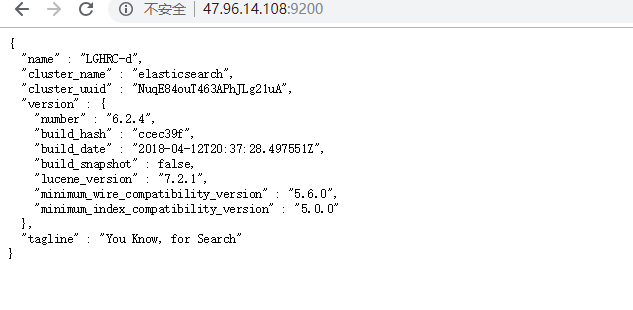
到此elasticsearch 搜索引擎搭建成功
可能会遇到的问题
[]: max virtual memory areas vm.max_map_count [] is too low, increase to at least []
解决办法
在/etc/sysctl.conf文件最后添加一行
vm.max_map_count=262144
执行命令 sysctl -p
下一节我们搭建kibana
centos7搭建elasticsearch的更多相关文章
- CentOS7搭建elasticsearch集群
准备三个节点,系统版本为CentOS7.3. 11.0.10.18 es01 11.0.10.19 es02 11.0.10.20 es03 1.安装java环境 # yum install -y j ...
- centos7搭建ELK Cluster集群日志分析平台(一):Elasticsearch
应用场景: ELK实际上是三个工具的集合,ElasticSearch + Logstash + Kibana,这三个工具组合形成了一套实用.易用的监控架构, 很多公司利用它来搭建可视化的海量日志分析平 ...
- centos7搭建ELK Cluster集群日志分析平台(三):Kibana
续 centos7搭建ELK Cluster集群日志分析平台(一) 续 centos7搭建ELK Cluster集群日志分析平台(二) 已经安装好elasticsearch 5.4集群和logst ...
- centos7搭建ELK Cluster集群日志分析平台(二):Logstash
续 centos7搭建ELK Cluster集群日志分析平台(一) 已经安装完Elasticsearch 5.4 集群. 安装Logstash步骤 . 安装Java 8 官方说明:需要安装Java ...
- centos7搭建ELK Cluster集群日志分析平台
应用场景:ELK实际上是三个工具的集合,ElasticSearch + Logstash + Kibana,这三个工具组合形成了一套实用.易用的监控架构, 很多公司利用它来搭建可视化的海量日志分析平台 ...
- Elasticsearch使用系列-Docker搭建Elasticsearch集群
Elasticsearch使用系列-ES简介和环境搭建 Elasticsearch使用系列-ES增删查改基本操作+ik分词 Elasticsearch使用系列-基本查询和聚合查询+sql插件 Elas ...
- centos7 搭建GlusterFS
centos7 搭建GlusterFS 转载http://zhaijunming5.blog.51cto.com/10668883/1704535 实验需求:4台机器安装GlusterFS组成一个集群 ...
- ELK初学搭建(elasticsearch)
ELK初学搭建(elasticsearch) elasticsearch logstash kibana ELK初学搭建 elasticsearch 1.环境准备 centos6.8_64 mini ...
- Centos7搭建FTP服务器
从网上搜索了好多搭建Centos7搭建服务器的教程都没有成功唯独这个,利用Windows资源管理器连接测试成功. 一.通过yum安装vsftpd yum install -y vsftpd 二.修改v ...
随机推荐
- Spring基于XML方式的使用
一.IoC配置 IoC的配置是通过Spring的xml文件的bean标签进行的. 1.bean标签介绍 bean标签一般是在xml文件进行配置的,xml文件一般样式如下: <?xml versi ...
- Apache SkyWalking的架构设计【译文】
Apache SkyWalking提供了一个功能强大并且很轻量级的后端.在此,将介绍为什么采用以下方式来设计它,以及它又是如何工作的. 架构图 对于APM而言,agent或SDKs仅是如何使用libs ...
- 让js中的函数只有一次有效调用的三种常用方法
1.通过闭包来实现. <script> window.onload = function () { function once(fn) { var result; return funct ...
- 【工具相关】Web--nodejs的安装
一,从官网下载nodejs.org. https://nodejs.org/en/ 二,按照步骤一步一步安装就好.
- JavaScript异步和单线程
一,同步和异步的区别: 同步会阻塞代码执行,而异步不会.(比如alert是同步,setTimeout是异步) 二,前端使用异步的场景: 1,定时任务:setTimeout,setInterval 2, ...
- 【转】pam_mysql - MySQL error (Can't connect to local MySQL server through socket
转自:http://350201.blog.51cto.com/340201/1034672 参照 http://wjw7702.blog.51cto.com/5210820/936244博 主做的p ...
- 【Java入门提高篇】Day21 Java容器类详解(四)ArrayList源码分析
今天要介绍的是List接口中最常用的实现类——ArrayList,本篇的源码分析基于JDK8,如果有不一致的地方,可先切换到JDK8后再进行操作. 本篇的内容主要包括这几块: 1.源码结构介绍 2.源 ...
- maven(八),阿里云国内镜像,提高jar包下载速度
镜像 maven默认会从中央仓库下载jar包,这个仓库在国外,而且全世界的人都会从这里下载,所以下载速度肯定是非常慢的.镜像就相当于是中央仓库的一个副本,内容和中央仓库完全一样,目前有不少国内镜像,其 ...
- JMeter—定时器(八)
参考<全栈性能测试修炼宝典JMeter实战>第六章 JMeter 元件详解中第三节定时器 JMeter中的定时器一般用来设置延迟与同步.定时器的执行优先级高于取样器,在同一作用域下有多个定 ...
- 【PAT】B1056 组合数的和(15 分)
就看着代码量一直到没什么好说的了 #include<stdio.h> int main(){ int N,K;scanf("%d",&N); int sum=0 ...