
python之requests模块快速上手
安装
pip3 install requests
使用
发送请求
import requests

r = requests.get('http://www.baidu.com')
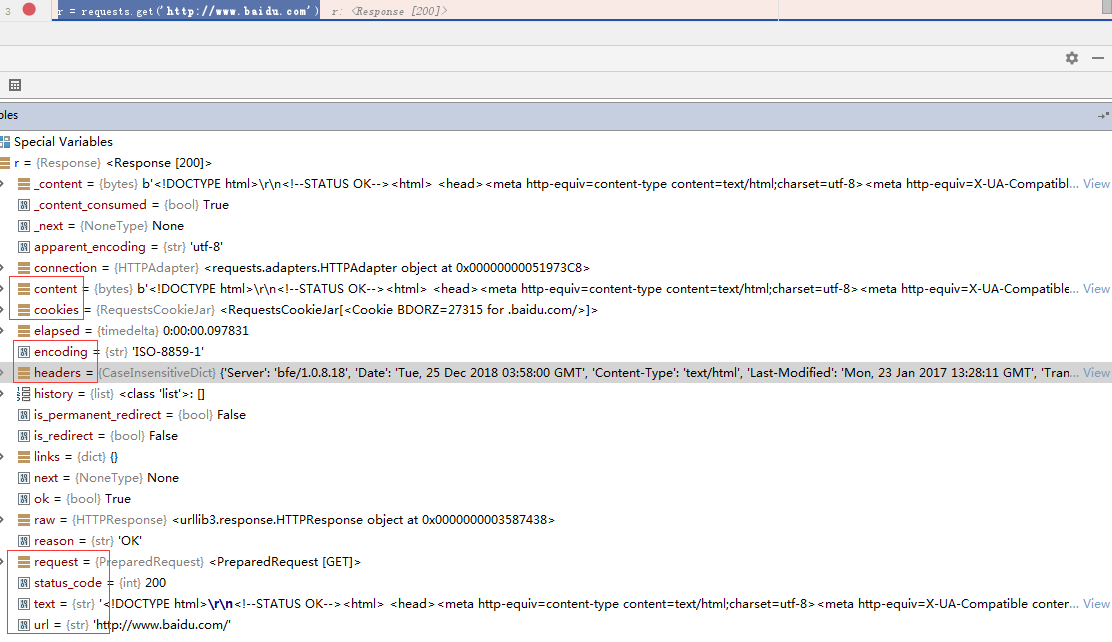
还可以如下方式发送不同类型请求:
r = requests.post('http://httpbin.org/post', data = {'key':'value'})

r = requests.put('http://httpbin.org/put', data = {'key':'value'})

r = requests.delete('http://httpbin.org/delete')

r = requests.head('http://httpbin.org/get')

r = requests.options('http://httpbin.org/get')
传递URL参数
import requests

# 传递字典

payload = {'key1': 'value1', 'key2': 'value2'}

r = requests.get("http://httpbin.org/get", params=payload)

print(r.url)  # http://httpbin.org/get?key1=value1&key2=value2

# 传递字典套列表

payload = {'key1': 'value1', 'key2': ['value2', 'value3']}

r = requests.get('http://httpbin.org/get', params=payload)

print(r.url)  # http://httpbin.org/get?key1=value1&key2=value2&key2=value3
响应文本内容
import requests

r = requests.get('https://www.baidu.com')

print(r.encoding)  # ISO-8859-1 查看编码

r.encoding = 'utf8'  # 设置编码

print(r.text)
二进制响应内容
import requests

r = requests.get('https://assets.readthedocs.org/sustainability/jetbrains/pycharm3-fs8.png')

file_name = r.url.rsplit('/', maxsplit=1)[1]

with open(file_name, 'wb') as img_file:

    img_file.write(r.content)
JSON响应内容
import requests

# 如果响应内容是 JSON 格式,就可以直接通过r.json()将 json 数据转换为字典

r = requests.get('https://api.github.com/events')

print(r.json())
定制请求头
import requests

url = 'https://api.github.com/some/endpoint'

headers = {'user-agent': 'my-app/0.0.1'}

r = requests.get(url, headers=headers)
复杂POST请求
import requests

# 传递字典

payload = {'key1': 'value1', 'key2': 'value2'}

r = requests.post("http://httpbin.org/post", data=payload)

'''

  {

    "key2": "value2",

    "key1": "value1"

  }

'''

# 传递元组

payload = (('key1', 'value1'), ('key1', 'value2'))

r = requests.post('http://httpbin.org/post', data=payload)

'''

  {

    "key1": [

      "value1",

      "value2"

    ]

  }

'''

# 传递 JSON

import json

url = 'http://127.0.0.1:5000/'

payload = {'some': 'data'}

r = requests.post(url, data=json.dumps(payload))

# 此处除了可以自行对 dict 进行编码,你还可以使用 json 参数直接传递,然后它就会被自动编码

r = requests.post(url, json=payload)
POST一个多部分编码(Multipart-Encoded)的文件
import requests

# 上传文件

url = 'http://httpbin.org/post'

files = {'file': open('report.xls', 'rb')}

r = requests.post(url, files=files)

# 显式地设置文件名,文件类型和请求头

url = 'http://httpbin.org/post'

files = {'file': ('report.xls', open('report.xls', 'rb'), 'application/vnd.ms-excel', {'Expires': ''})}

r = requests.post(url, files=files)

# 发送作为文件来接收的字符串

url = 'http://httpbin.org/post'

files = {'file': ('report.csv', 'some,data,to,send\nanother,row,to,send\n')}

r = requests.post(url, files=files)
响应状态码
import requests

r = requests.get('http://www.baidu.com')

# 为方便引用,Requests 还附带了一个内置的状态码查询对象:

print(r.status_code == requests.codes.ok)

# 如果发送了一个错误请求(一个 4XX 客户端错误,或者 5XX 服务器错误响应),我们可以通过 Response.raise_for_status() 来抛出异常

bad_r = requests.get('http://httpbin.org/status/500')

print(bad_r.status_code)  #

bad_r.raise_for_status()  # requests.exceptions.HTTPError: 500 Server Error
响应头
import requests

r = requests.get('http://www.baidu.com')

# 以查看以一个 Python 字典形式展示的服务器响应头:

print(r.headers)

'''

{

    'Server': 'bfe/1.0.8.18',

    'Date': 'Tue, 25 Dec 2018 06:41:43 GMT',

    'Content-Type': 'text/html',

    'Last-Modified': 'Mon, 23 Jan 2017 13:28:11 GMT',

    'Transfer-Encoding': 'chunked',

    'Connection': 'Keep-Alive',

    'Cache-Control': 'private, no-cache, no-store, proxy-revalidate, no-transform',

    'Pragma': 'no-cache',

    'Set-Cookie': 'BDORZ=27315; max-age=86400; domain=.baidu.com; path=/',

    'Content-Encoding': 'gzip'

}

'''

# HTTP 头部是大小写不敏感的。因此,我们可以使用任意大小写形式来访问这些响应头字段

print(r.headers['Content-Type'])  # text/html

print(r.headers.get('content-type'))  # text/html
Cookie
import requests

# 如果某个响应中包含一些 cookie,你可以快速访问它们

url = 'http://example.com/some/cookie/setting/url'

r = requests.get(url)

print(r.cookies['example_cookie_name'])

# 要想发送你的cookies到服务器,可以使用 cookies 参数

url = 'http://httpbin.org/cookies'

cookies = dict(cookies_are='working')

r = requests.get(url, cookies=cookies)

# Cookie 的返回对象为 RequestsCookieJar,它的行为和字典类似,但接口更为完整,适合跨域名跨路径使用。你还可以把 Cookie Jar 传到 Requests 中

jar = requests.cookies.RequestsCookieJar()

jar.set('tasty_cookie', 'yum', domain='httpbin.org', path='/cookies')

jar.set('gross_cookie', 'blech', domain='httpbin.org', path='/elsewhere')

url = 'http://httpbin.org/cookies'

r = requests.get(url, cookies=jar)
重定向与请求历史
import requests

# 默认情况下,除了 HEAD, Requests 会自动处理所有重定向。

# 可以使用响应对象的 history 方法来追踪重定向。

# Response.history 是一个 Response 对象的列表,为了完成请求而创建了这些对象。这个对象列表按照从最老到最近的请求进行排序。

# 例如,Github 将所有的 HTTP 请求重定向到 HTTPS:

r = requests.get('http://github.com')

print(r.url)  # https://github.com/

print(r.history[0].url)  # http://github.com/

# 如果你使用的是 GET、OPTIONS、POST、PUT、PATCH 或者 DELETE,那么你可以通过 allow_redirects 参数禁用重定向处理:

r = requests.get('http://github.com', allow_redirects=False)

print(r.url)  # http://github.com/

print(r.history)  # []

# 如果你使用了 HEAD,你也可以启用重定向:

r = requests.head('http://github.com', allow_redirects=True)
超时
import requests

# 可以告诉 requests 在经过以 timeout 参数设定的秒数时间之后停止等待响应:

requests.get('http://github.com', timeout=0.001)

'''

Traceback (most recent call last):

  File "<stdin>", line 1, in <module>

requests.exceptions.Timeout: HTTPConnectionPool(host='github.com', port=80): Request timed out. (timeout=0.001)

'''
错误与异常
遇到网络问题(如:DNS 查询失败、拒绝连接等)时,Requests 会抛出一个 ConnectionError 异常。
如果 HTTP 请求返回了不成功的状态码, Response.raise_for_status() 会抛出一个 HTTPError 异常。
若请求超时,则抛出一个 Timeout 异常。
若请求超过了设定的最大重定向次数,则会抛出一个 TooManyRedirects 异常。
所有 Requests 显式抛出的异常都继承自 requests.exceptions.RequestException 。
更多
参考:http://docs.python-requests.org/zh_CN/latest/index.html
示例
requests和bs4爬取汽车之家文章和图片
from gevent import monkey

monkey.patch_all()

import gevent

import requests

import bs4

def save_detail(title, url_txt):

    article_detail_text = requests.get(url_txt).text

    detail_soup = bs4.BeautifulSoup(article_detail_text, features="html.parser")

    div_content = detail_soup.find(name='div', id='articleContent')

    p_img_list = div_content.find_all(name='p', attrs={'align': 'center'})

    for p_img in p_img_list:

        if p_img.find(name='img') != None and p_img.find(name='img').attrs != None:

            src = 'https:' + p_img.find(name='img').attrs.get('src')

            filename = src.rsplit('/', maxsplit=1)[1]

            img_resp = requests.get(src)

            with open('images/%s' % filename, 'wb') as f:

                f.write(img_resp.content)

    line_arr = []

    if (div_content != None):

        print(div_content.text)

        for line in div_content.find_all(name='p', align=False, recursive=False):

            line_arr.append(line.text)

        content = '\r\n'.join(line_arr)

        f = open('auto_home_articles/%s.txt' % title.replace('/', ' '), 'w+', encoding="utf-8")

        f.write(content)

        f.close()

def get_list_url():

    response = requests.get('https://www.autohome.com.cn/news/')

    response.encoding = 'gbk'

    list_soup = bs4.BeautifulSoup(response.text, features="html.parser")

    # 获取最大页数

    ul_page = list_soup.find(name='div', id='channelPage', class_='page')

    max_page_num = int(ul_page.find(class_='page-item-next').find_previous(name='a').text)

    list_url_template = 'https://www.autohome.com.cn/news/%s/#liststart'

    return [list_url_template % i for i in range(1, max_page_num + 1)]

def start_save(list_url):

    list_page_resp = requests.get(list_url)

    list_page_resp.encoding = 'gbk'

    list_page_soup = bs4.BeautifulSoup(list_page_resp.text, features="html.parser")

    div = list_page_soup.find(name='div', id='auto-channel-lazyload-article')

    article_ul = div.find_all(name='ul', attrs={'class': 'article'})

    detail_url_list = []

    for article_list in article_ul:

        article_group = article_list.find_all(name='a')

        for article_item in article_group:

            title = article_item.find(name='h3').text

            url = article_item.attrs.get('href').replace('//', 'http://')

            detail_url_list.append((title, url,))

    gevent.joinall([gevent.spawn(save_detail, detail_url[0], detail_url[1]) for detail_url in detail_url_list])

[start_save(list_url) for list_url in iter(get_list_url())]
python之requests模块快速上手的更多相关文章
- Python爬虫---requests库快速上手
一.requests库简介 requests是Python的一个HTTP相关的库 requests安装: pip install requests 二.GET请求 import requests # ...
- Python爬虫之使用Fiddler+Postman+Python的requests模块爬取各国国旗
介绍 本篇博客将会介绍一个Python爬虫,用来爬取各个国家的国旗,主要的目标是为了展示如何在Python的requests模块中使用POST方法来爬取网页内容. 为了知道POST方法所需要传 ...
- Python之requests模块-hook
requests提供了hook机制,让我们能够在请求得到响应之后去做一些自定义的操作,比如打印某些信息.修改响应内容等.具体用法见下面的例子: import requests # 钩子函数1 def ...
- Python之requests模块-cookie
cookie并不陌生,与session一样,能够让http请求前后保持状态.与session不同之处,在于cookie数据仅保存于客户端.requests也提供了相应到方法去处理cookie. 在py ...
- Python之requests模块-session
http协议本身是无状态的,为了让请求之间保持状态,有了session和cookie机制.requests也提供了相应的方法去操纵它们. requests中的session对象能够让我们跨http请求 ...
- Python之requests模块-request api
requests所有功能都能通过"requests/api.py"中的方法访问.它们分别是: requests.request(method, url, **kwargs) req ...
- Python使用requests模块访问HTTPS网站报错`certificate verify failed`
使用requests模块访问HTTPS网站报错: SNIMissingWarning: An HTTPS request has been made, but the SNI (Subject Nam ...
- 使用Python的requests模块编写请求脚本
requests模块可用来编写请求脚本. 比如,使用requests的post函数可以模拟post请求: resp = requests.post(url, data = content) url即为 ...
- python基础-requests模块、异常处理、Django部署、内置函数、网络编程
网络编程 urllib的request模块可以非常方便地抓取URL内容,也就是发送一个GET请求到指定的页面,然后返回HTTP的响应. 校验返回值,进行接口测试: 编码:把一个Python对象编码转 ...
随机推荐
- Linux中安装mongodb
1,使用二进制包安装Mongodb 使用wget https://fastdl.mongodb.org/linux/mongodb-linux-x86_64-3.6.0.tgz 下载编译好的二进制包( ...
- 安全工具-Arachni
Arachni是一个多功能.模块化.高性能的Ruby框架,旨在帮助渗透测试人员和管理员评估web应用程序的安全性.同时Arachni开源免费,可安装在windows.linux以及mac系统上,并且可 ...
- 怎样通过 DLNA 将电脑上的媒体投射到智能电视上
DLNA 是一种网络设备间共享媒体的解决方案.从 Windows 7 开始就支持 DLNA,现在一些国产智能电视也已经支持 DLNA 了,这就为我们在电脑和电视之间方便地共享多媒体提供了条件. 工具/ ...
- 数据仓库:Mysql大量数据快速导出
背景 写这篇文章主要是介绍一下我做数据仓库ETL同步的过程中遇到的一些有意思的内容和提升程序运行效率的过程. 关系型数据库: 项目初期:游戏的运营数据比较轻量,相关的运营数据是通过Java后台程序聚合 ...
- 【转】JAVA反射与注解
转载自:https://www.daidingkang.cc/2017/07/18/java-reflection-annotations/ 前言 现在在我们构建自己或公司的项目中,或多或少都会依赖几 ...
- hdoj:2071
Max Num Time Limit: 1000/1000 MS (Java/Others) Memory Limit: 32768/32768 K (Java/Others)Total Sub ...
- DOTween-Ease缓动函数
Ease.InQuad 不知道Quad代表什么意思 Ease.InQuart 有1/4的时间是没有缓动. Ease.InQuint, 是1/5时间没有缓动. Ease.InExpo 一直很平缓, ...
- 基于ARM9和嵌入式Linux系统的多功能综合通信控制系统的框架
基于ARM9硬件平台和嵌入式Linux系统的多功能综合通信控制系统的框架设计及各模块的功能.系统采用符合POSIX.1标准的C语言编写,实现了对下位机传送数据帧的采集.分析和存储,并能根据上位机的配置 ...
- Sublime Text 3 3143 注册码和遇到的PyV8无法下载问题
packagecontrol官网:https://packagecontrol.io/installation sublime安装之后,安装Package Control管理插件. sublime3 ...
- centos7上修改lv逻辑卷的大小
author:headsen chen date: 2019-03-18 15:24:22 1,查看 [root@localhost mnt]# df -h Filesystem Size Used ...