
Android Studio 配置 androidAnnotations框架详细步骤
第一步:打开app的build.gradle文件
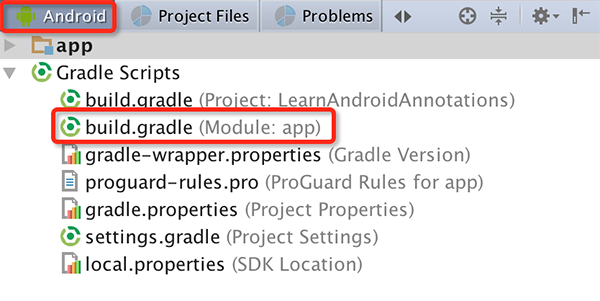
第二步:添加下面红色的部分
apply plugin: 'com.android.application'

android {

    compileSdkVersion 22

    buildToolsVersion "23.0.2"

    defaultConfig {

        applicationId "com.cbt.learnandroidannotations"

        minSdkVersion 14

        targetSdkVersion 22

        versionCode 1

        versionName "1.0"

    }

    buildTypes {

        release {

            minifyEnabled false

            proguardFiles getDefaultProguardFile('proguard-android.txt'), 'proguard-rules.pro'

        }

    }

}

dependencies {

    compile fileTree(dir: 'libs', include: ['*.jar'])

    testCompile 'junit:junit:4.12'

    compile 'com.android.support:appcompat-v7:22.2.1'

    compile 'com.github.rey5137:material:1.1.0'

    compile 'de.greenrobot:eventbus:2.4.0'

    compile 'net.steamcrafted:load-toast:1.0.6'

}

buildscript {

    repositories {

        mavenCentral()

    }

    dependencies {

        // replace with the current version of the Android plugin

        classpath 'com.android.tools.build:gradle:1.1.0'

        // the latest version of the android-apt plugin

        classpath 'com.neenbedankt.gradle.plugins:android-apt:1.4'

    }

}

repositories {

    mavenCentral()

    mavenLocal()

}

apply plugin: 'android-apt'

def AAVersion = '3.3.1'

dependencies {

    apt "org.androidannotations:androidannotations:$AAVersion"

    compile "org.androidannotations:androidannotations-api:$AAVersion"

}

apt {

    arguments {

        androidManifestFile variant.outputs[0].processResources.manifestFile

    }

}
第三步:AndroidManifest.xml中每个使用androidAnnotations的Activity名字都要添加_
<activity android:name=".MainActivity_">
    <intent-filter>
        <action android:name="android.intent.action.MAIN"/>
        <category android:name="android.intent.category.LAUNCHER"/>
    </intent-filter>
</activity>
<activity android:name=".LoginActivity_"/>
第四步:修改完之后重新build一下项目即可
Android Studio 配置 androidAnnotations框架详细步骤的更多相关文章
- android studio配置AndroidAnnotations
现在很多人都使用Android studio开发工具代替eclipse了,当然的 在eclipse使用的好的一些开发框架也会对应的在android studio上面使用. 参考文档:http://bl ...
- Android Studio配置 AndroidAnnotations——Hi_博客 Android App 开发笔记
以前用Eclicps 用习惯了现在 想学学 用Android Studio 两天的钻研终于 在我电脑上装了一个Android Studio 并完成了AndroidAnnotations 的配置. An ...
- android studio 配置 Lombok 插件 -具体步骤
1.前言 idea 用惯了 Lombok 插件了,好用的很,可是开发安卓 却没有,即便在 android studio 安装了插件,但是仍然无法使用 因为需要配置 2.解决 (1)进入设置,找到插件设 ...
- 或许是介绍Android Studio使用Git最详细的文章
欢迎访问我的个人博客转发请注明出处:http://www.wensibo.top/2017/03/12/GitOnAS/ 前言 本文较长,图片很多很多,流量党慎入 使用Git已经有一段时间了,但是之前 ...
- Android Studio配置SVN 以及使用代码管理
一.Android Studio配置SVN Android Studio关联配置SVN非常easy,在Settings里面.找到Version Control->Subversion.在这个页面 ...
- Android零基础入门第13节:Android Studio配置优化,打造开发利器
原文:Android零基础入门第13节:Android Studio配置优化,打造开发利器 是不是很多同学已经有烦恼出现了?电脑配置已经很高了,但是每次运行Android程序的时候就很卡,而且每次安装 ...
- Android Studio 配置SVN实现代码管理
Refference From:http://iaiai.iteye.com/blog/2267346 一.Android Studio配置SVN Android Studio关联配置SVN很简单,在 ...
- Android Studio配置使用git
一.准备 如果没有安装git,那么先要到到Git官网下载git,然后按照提示一步一步安装即可,这个没有什么难度,不过要记得安装的目录. 二.Android Studio配置git File->S ...
- 【Flutter 1-2】在 Windows 10下安装Flutter+Dart+Android Studio 配置Flutter开发环境
在 Windows 10下安装Flutter+Dart+Android Studio 配置Flutter开发环境 文章首发地址 配置环境变量 由于部分网站被墙的原因,我们需要先配置Flutter国内镜 ...
随机推荐
- model.form使用,配合form的钩子
一次model.form的使用记录,配合form钩子的过程 在写信息采集功能的时候,需要添加资产信息,使用modelform组件减少工作量 官网介绍:版本1.9.https://docs.django ...
- js代码技巧
1.js 中不常用的处理方法 //取整 parseInt(a,10); //Before Math.floor(a); //Before a>>0; //Before ~~a; //Aft ...
- javascript:控制台详解
javascript工具——浏览器控制台详解 大神这篇博客是写在2011年,主要介绍 “Firefox” 浏览器插件 “Firebug” 的操作,如今主流浏览器对控制台都已经提供了很好的支持.我自己 ...
- Linux命令:mapfile
mapfile [-n 计数] [-O 起始序号] [-s 计数] [-t] [-u fd] [-C 回调] [-c 量子] [数组] 两个作用: 一是给index数组读取标准输入来赋值:二是文件描述 ...
- Linux下修改Tomcat默认端口
假设tomcat所在目录为/usr/local/apache-tomcat/ 1.打开tomcat配置文件#vi /usr/local/apache-tomcat/conf/server.xml 2. ...
- toString() 数组转字符串
var monthNames = ['Jan', 'Feb', 'Mar', 'Apr']; var myVar = monthNames.toString(); // assigns "J ...
- ubuntu开启远程shell,开启上传下载
需要先安装openshell-server 具体命令如下: 1.先更新下源 sudo apt-get update 2.安装openshell-server sudo apt-get install ...
- as3:sprite作为容器使用时,最好不要指定width,height
除 TextField 和 Video 对象以外,没有内容的显示对象(如一个空的 Sprite)的高度为 0,即使您尝试将 height 设置为其它值,也是这样. 如果您设置了 height 属性,则 ...
- 452. Minimum Number of Arrows to Burst Balloons扎气球的个数最少
[抄题]: There are a number of spherical balloons spread in two-dimensional space. For each balloon, pr ...
- echart.js在vue中使用
以前可能写过,懒得去翻了,再写一次 1,安装echarts 导入到页面 import echarts from 'echarts'; 2.在生命周期里面做初始化 data(){ return{ t ...