
Spring MVC学习笔记——SiteMesh的使用(转)
转自 SiteMesh的使用
SiteMesh的介绍就不多说了,主要是用来统一页面风格,减少重复编码的。
它定义了一个过滤器,然后把页面都加上统一的头部和底部。
需要先在WEB-INF/lib下引入sitemesh的jar包:http://wiki.sitemesh.org/display/sitemesh/Download 。这里使用2.4版本。
过滤器定义:
在web.xml中
    <filter>

        <filter-name>sitemesh</filter-name>

        <filter-class>com.opensymphony.module.sitemesh.filter.PageFilter</filter-class>

    </filter>

    <filter-mapping>

        <filter-name>sitemesh</filter-name>

        <url-pattern>/*</url-pattern>

    </filter-mapping>
decorators.xml文件:
WEB-INF下新建decorators.xml文件:
<?xml version="1.0" encoding="utf-8"?>

<decorators defaultdir="/WEB-INF/layouts/">

    <!-- 此处用来定义不需要过滤的页面 -->

    <excludes>

        <pattern>/static/*</pattern>

    </excludes>

    <!-- 用来定义装饰器要过滤的页面 -->

    <decorator name="default" page="default.jsp">

        <pattern>/*</pattern>

    </decorator>

</decorators>
不用过滤/static/目录下的文件,然后指定了装饰器:/WEB-INF/layouts/default.jsp。
我用的是Spring MVC,目录结构大致:
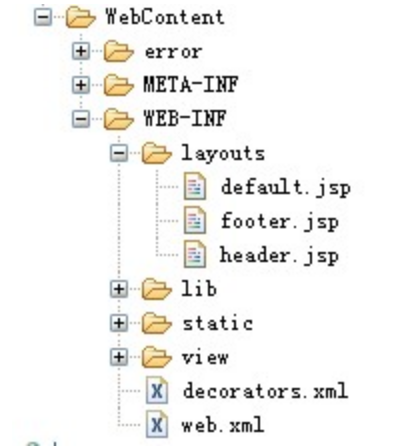
default.jsp:
<%@ page contentType="text/html;charset=UTF-8"%>

<%@ taglib prefix="sitemesh" uri="http://www.opensymphony.com/sitemesh/decorator" %>

<%@ taglib prefix="c" uri="http://java.sun.com/jsp/jstl/core"%>

<c:set var="ctx" value="${pageContext.request.contextPath}" />

<!DOCTYPE html>

<html>

<head>

<title>QuickStart示例:<sitemesh:title/></title>

<meta http-equiv="Content-Type" content="text/html;charset=utf-8" />

<meta http-equiv="Cache-Control" content="no-store" />

<meta http-equiv="Pragma" content="no-cache" />

<meta http-equiv="Expires" content="0" />

<link type="image/x-icon" href="${ctx}/static/images/favicon.ico" rel="shortcut icon">

<link href="${ctx}/sc/bootstrap/2.3.0/css/bootstrap.min.css" type="text/css" rel="stylesheet" />

<link href="${ctx}/sc/jquery-validation/1.11.0/validate.css" type="text/css" rel="stylesheet" />

<link href="${ctx}/css/base/default.css" type="text/css" rel="stylesheet" />

<script src="${ctx}/sc/jquery/jquery-1.9.1.min.js" type="text/javascript"></script>

<script src="${ctx}/sc/jquery-validation/1.11.0/jquery.validate.min.js" type="text/javascript"></script>

<script src="${ctx}/sc/jquery-validation/1.11.0/messages_bs_zh.js" type="text/javascript"></script>

<sitemesh:head/>

</head>

<body>

    <div class="container">

        <%@ include file="/WEB-INF/layouts/header.jsp"%>

        <div id="content">

            <sitemesh:body/>

    </div>

        <%@ include file="/WEB-INF/layouts/footer.jsp"%>

    </div>

    <script src="${ctx}/sc/bootstrap/2.3.0/js/bootstrap.min.js" type="text/javascript"></script>

</body>

</html>
首先引入了SiteMesh标签。
<sitemesh:title/> 会自动替换为被过滤页面的title。
<sitemesh:head/> 会把被过滤页面head里面的东西(除了title)放在这个地方。
<sitemesh:body/> 被过滤的页面body里面的内容放在这里。
在content的上下引入了header和footer。
我们在头部引入了js和css,就可以重用了。
使用:
使用的过程中,几乎感受不到SiteMesh的存在。例如下面的页面:
<%@ page language="java" contentType="text/html; charset=utf-8"

    pageEncoding="utf-8"%>

<!DOCTYPE html PUBLIC "-//W3C//DTD HTML 4.01 Transitional//EN" "http://www.w3.org/TR/html4/loose.dtd">

<html>

<!-- 第一个被装饰(目标)页面  -->

<head>

<meta http-equiv="Content-Type" content="text/html; charset=utf-8">

<title>被装饰(目标)页面title</title>

<script type="text/javascript" src="/js/hello.js"></script>

</head>

<body>

    <h4>被装饰(目标)页面body标签内内容。</h4>

    <h3>使用SiteMesh的好处?</h3>

    <ul>

        <li>被装饰(目标)页面和装饰页面完全分离。</li>

        <li>做到真正的页面复用,一个装饰页面装饰多个被装饰(目标)页面。</li>

        <li>更容易实现统一的网站风格。</li>

        <li>还有。。。</li>

    </ul>

</body>

</html>
这就是一个普通的页面,但是被SiteMesh装饰之后,就会自动去掉<html> <body> <head>等元素,然后把相应的东西放在模板对应位置上。
我们来看一下,被SiteMesh装饰过的页面源代码:
<!DOCTYPE html>

<html>

<head>

<title>QuickStart示例:被装饰(目标)页面title</title>

<meta http-equiv="Content-Type" content="text/html;charset=utf-8" />

<meta http-equiv="Cache-Control" content="no-store" />

<meta http-equiv="Pragma" content="no-cache" />

<meta http-equiv="Expires" content="0" />

<link type="image/x-icon" href="/SpringMVC/static/images/favicon.ico" rel="shortcut icon">

<link href="/SpringMVC/sc/bootstrap/2.3.0/css/bootstrap.min.css" type="text/css" rel="stylesheet" />

<link href="/SpringMVC/sc/jquery-validation/1.11.0/validate.css" type="text/css" rel="stylesheet" />

<link href="/SpringMVC/css/base/default.css" type="text/css" rel="stylesheet" />

<script src="/SpringMVC/sc/jquery/jquery-1.9.1.min.js" type="text/javascript"></script>

<script src="/SpringMVC/sc/jquery-validation/1.11.0/jquery.validate.min.js" type="text/javascript"></script>

<script src="/SpringMVC/sc/jquery-validation/1.11.0/messages_bs_zh.js" type="text/javascript"></script>

<meta http-equiv="Content-Type" content="text/html; charset=utf-8">

<script type="text/javascript" src="/js/hello.js"></script>

</head>

<body>

    <div class="container">

<div id="header">

</div>

        <div id="content">

    <h4>被装饰(目标)页面body标签内内容。</h4>

    <h3>使用SiteMesh的好处?</h3>

    <ul>

        <li>被装饰(目标)页面和装饰页面完全分离。</li>

        <li>做到真正的页面复用,一个装饰页面装饰多个被装饰(目标)页面。</li>

        <li>更容易实现统一的网站风格。</li>

        <li>还有。。。</li>

    </ul>

        </div>

<div id="footer">

    Copyright © 2005-2012 <a href="">spring.org.cn</a>

</div>

    </div>

    <script src="/SpringMVC/sc/bootstrap/2.3.0/js/bootstrap.min.js" type="text/javascript"></script>

</body>

</html>
SiteMesh查看文档 使用sitemesh建立复合视图 - 2.装饰器
SiteMesh中有一个decorator标签,可以轻松解决页面布局的问题
之前解决页面重复布局的时候,使用的是<include>标签,但是需要在每个页面都用他引入其他JSP文件,
而使用decorator标签只需要在配置文件decorators.xml进行相应的配置再加上一个装饰器(其实就是一个JSP页面)即可。
在web.xml文件中加入过滤器定义
	<!-- 过滤器定义 -->

	<filter>

		<filter-name>sitemesh</filter-name>

		<filter-class>com.opensymphony.sitemesh.webapp.SiteMeshFilter</filter-class>

	</filter>

	<filter-mapping>

		<filter-name>sitemesh</filter-name>

		<url-pattern>/*</url-pattern>

	</filter-mapping>
加入的配置文件decorators.xml

<?xml version="1.0" encoding="UTF-8"?>

<decorators defaultdir="/WEB-INF/decorators">

    <!-- 此处用来定义不需要过滤的页面 -->

    <excludes>

        <pattern>/exclude.jsp</pattern>

        <pattern>/exclude/*</pattern>

    </excludes>

	<!-- 用来定义装饰器要过滤的页面 -->

    <decorator name="main" page="main.jsp">

        <pattern>/*</pattern>

    </decorator>

</decorators>
在WebContent/WEB-INF/目录下创建/decorators目录,在这个目录下写main.jsp文件

<%@ page language="java" contentType="text/html; charset=UTF-8"

    pageEncoding="UTF-8"%>

<%@ taglib uri="http://www.opensymphony.com/sitemesh/decorator" prefix="decorator" %>

<%@taglib prefix="c" uri="http://java.sun.com/jsp/jstl/core" %>

<!DOCTYPE html PUBLIC "-//W3C//DTD HTML 4.01 Transitional//EN" "http://www.w3.org/TR/html4/loose.dtd">

<html>

	<head>

		<meta http-equiv="Content-Type" content="text/html; charset=UTF-8">

		<link rel="stylesheet" type="text/css" href="<%=request.getContextPath()%>/css/main.css"/>

		<title>欢迎使用用户管理系统<decorator:title default="欢迎使用用户管理系统"/></title>

		<decorator:head/>							<!-- 取出被装饰页面的head标签中的内容(除了head标签本身) -->

	</head>

	<body>

		<h1><decorator:title/></h1>		<!-- 取出被装饰页面的title标签中的内容 -->

		<c:if test="${not empty loginUser}">

			<a href="<%=request.getContextPath() %>/user/add">用户添加</a>

			<a href="<%=request.getContextPath() %>/user/users">用户列表</a>

			<a href="<%=request.getContextPath() %>/logout">退出系统</a>

			当前用户:${loginUser.nickname }

		</c:if>

		<hr/>

		<decorator:body/>							<!-- 取出被装饰页面的body标签中的内容 -->

		<div align="center" style="width:100%;border-top:1px solid; float:left;margin-top:10px;">

			CopyRight@2012-2015<br/>

			用户管理系统

		</div>

	</body>

</html>
Spring MVC学习笔记——SiteMesh的使用(转)的更多相关文章
- Spring MVC 学习笔记一 HelloWorld
Spring MVC 学习笔记一 HelloWorld Spring MVC 的使用可以按照以下步骤进行(使用Eclipse): 加入JAR包 在web.xml中配置DispatcherServlet ...
- Spring MVC 学习笔记12 —— SpringMVC+Hibernate开发(1)依赖包搭建
Spring MVC 学习笔记12 -- SpringMVC+Hibernate开发(1)依赖包搭建 用Hibernate帮助建立SpringMVC与数据库之间的联系,通过配置DAO层,Service ...
- Spring MVC 学习笔记11 —— 后端返回json格式数据
Spring MVC 学习笔记11 -- 后端返回json格式数据 我们常常听说json数据,首先,什么是json数据,总结起来,有以下几点: 1. JSON的全称是"JavaScript ...
- Spring MVC 学习笔记10 —— 实现简单的用户管理(4.3)用户登录显示全局异常信息
</pre>Spring MVC 学习笔记10 -- 实现简单的用户管理(4.3)用户登录--显示全局异常信息<p></p><p></p>& ...
- Spring MVC 学习笔记9 —— 实现简单的用户管理(4)用户登录显示局部异常信息
Spring MVC 学习笔记9 -- 实现简单的用户管理(4.2)用户登录--显示局部异常信息 第二部分:显示局部异常信息,而不是500错误页 1. 写一个方法,把UserException传进来. ...
- Spring MVC 学习笔记8 —— 实现简单的用户管理(4)用户登录
Spring MVC 学习笔记8 -- 实现简单的用户管理(4)用户登录 增删改查,login 1. login.jsp,写在外面,及跟WEB-INF同一级目录,如:ls Webcontent; &g ...
- Spring MVC 学习笔记2 - 利用Spring Tool Suite创建一个web 项目
Spring MVC 学习笔记2 - 利用Spring Tool Suite创建一个web 项目 Spring Tool Suite 是一个带有全套的Spring相关支持功能的Eclipse插件包. ...
- Spring MVC 学习笔记1 - First Helloworld by Eclipse【& - java web 开发Tips集锦】
Spring MVC 学习笔记1 - First Helloworld by Eclipse reference:http://www.gontu.org 1. 下载 Spring freamwork ...
- Spring MVC 学习笔记(整理)
SpringMVC学习 1.概述 Spring MVC是一种基于Java实现MVC设计模式的请求驱动类型的轻量级Web框架,即使用了MVC架构模式的思想,将web层进行解耦,基于请求-响应模型帮助我们 ...
随机推荐
- (九)Maven坐标详解
Maven的一个核心的作用就是管理项目的依赖,引入我们所需的各种jar包等.为了能自动化的解析任何一个Java构件,Maven必须将这些Jar包或者其他资源进行唯一标识,这是管理项目的依赖的基础,也就 ...
- Mac电脑如何读取Android手机上的文件
问题 一般Android手机用usb数据线连接到windows操作系统的电脑上后,会自动将手机存储卡以移动存储的方式显示在电脑里. 但是如果操作系统是Mac的,就没有这个存储设备.问题来了,Mac电脑 ...
- mkdir,rmdir,cp,rm,mv,cat,touch用法
一.mkdir新建目录 1.进入tmp目录,查看该目录下面的子目录 [root@localhost ~]# cd /tmp[root@localhost tmp]# lshsperfdata_root ...
- 卡巴斯基2017激活教程_卡巴斯基2017用授权文件KEY激活的方法
原创:天诺时空 更新时间:2016-11-09 2016年9月7日,卡巴斯基2017版全新上市,卡巴斯基依旧为大家奉上满足您所有需求的安全软件产品,为不同年龄层.不同人群给予全方位保护,同时延续卡 ...
- TCP连接建立和终止小结
TCP连接建立(三次握手) 如图: 请求端发送一个SYN到服务器的相应端口,以及初始序号ISN 服务器发送包含服务器的初始序号的SYN作为应答,同时确认序号设置为客户的ISN+1 客户将确认序号设置为 ...
- EL表达式
跳转传到: : 相当于(接值放值): --------------------------- --------------------------------- ------------------- ...
- 前端自动化测试 —— TDD环境配置(React+TypeScript)
欢迎讨论与指导:) 前言 TDD -- Test-Drive Development是测试驱动开发的意思,是敏捷开发中的一项核心实践和技术,也是一种测试方法论.TDD的原理是在开发功能代码之前,先编写 ...
- virtualBox安装Centos7之后
之前用vmware装虚拟机的时候,直接配置好网卡就可以ping通,可以用ssh登录,然后配置yum源,万事大吉. 但是virtualBox配置却有不同,需要按下面的方法配置: 选中虚拟机->设置 ...
- maven/gradle 打包后自动上传到nexus仓库
前提: nexus的相关repository必须设置允许redeploy,参考下图: maven项目: pom.xml中增加以下节点: <distributionManagement> & ...
- BootStrap学习笔记,优缺点总结
本篇约定Bootstrap简写为BT BT的受欢迎程度是大家有目共睹的,用它可以快速的搭建出网站.很早就接触过这个框架,其中的栅格系统,css模块化以及js插件做的相当不错,由于工作中较少使用也一 ...