
idea创建maven SSM项目
maven配置
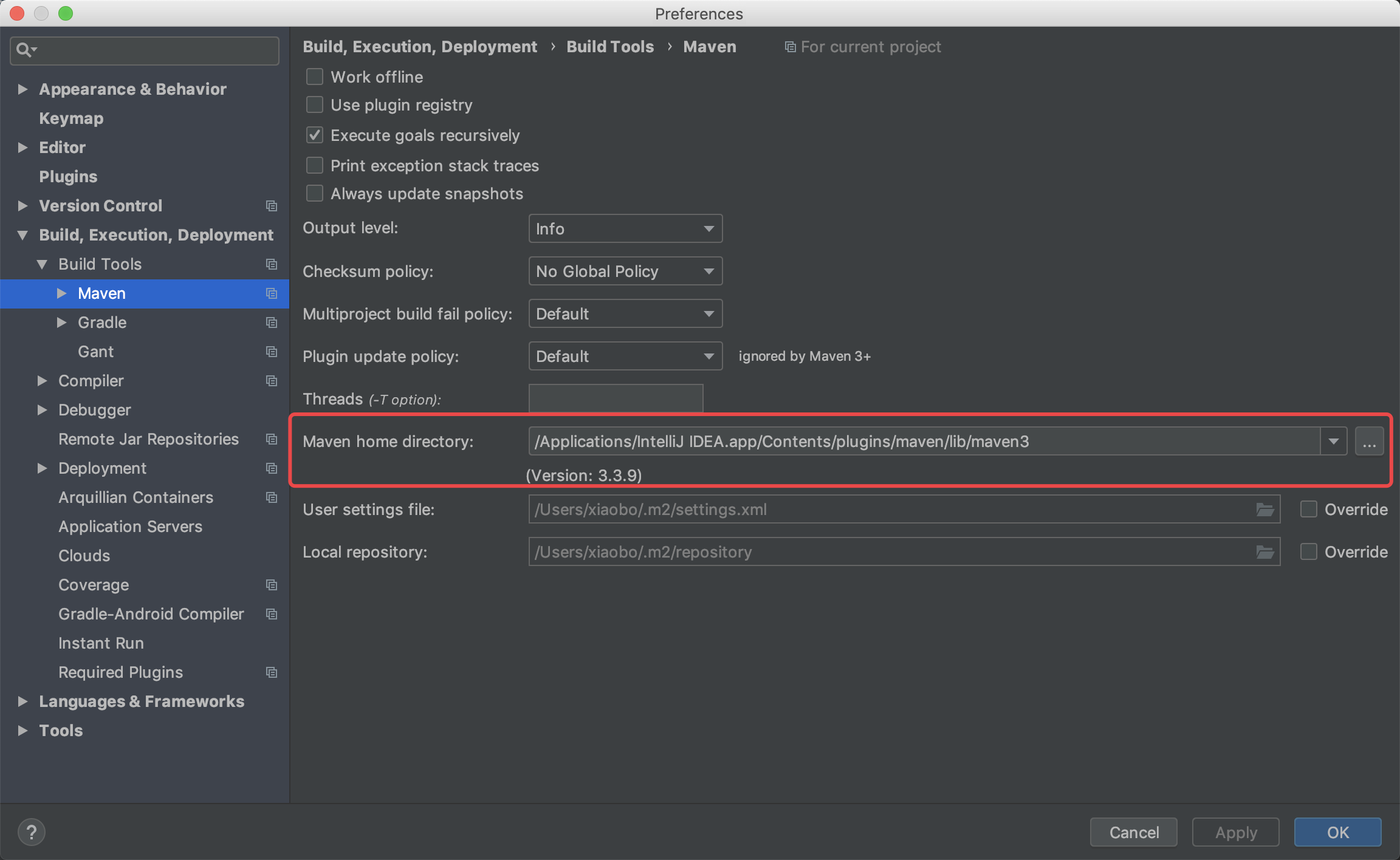
➜ ~ cd /Applications/IntelliJ\ IDEA.app/Contents/plugins/maven/lib/maven3/conf
➜ conf vim settings.xml
➜  conf cat settings.xml

<?xml version="1.0" encoding="UTF-8"?>

<!--

Licensed to the Apache Software Foundation (ASF) under one

or more contributor license agreements.  See the NOTICE file

distributed with this work for additional information

regarding copyright ownership.  The ASF licenses this file

to you under the Apache License, Version 2.0 (the

"License"); you may not use this file except in compliance

with the License.  You may obtain a copy of the License at

    http://www.apache.org/licenses/LICENSE-2.0

Unless required by applicable law or agreed to in writing,

software distributed under the License is distributed on an

"AS IS" BASIS, WITHOUT WARRANTIES OR CONDITIONS OF ANY

KIND, either express or implied.  See the License for the

specific language governing permissions and limitations

under the License.

-->

<!--

 | This is the configuration file for Maven. It can be specified at two levels:

 |

 |  1. User Level. This settings.xml file provides configuration for a single user,

 |                 and is normally provided in ${user.home}/.m2/settings.xml.

 |

 |                 NOTE: This location can be overridden with the CLI option:

 |

 |                 -s /path/to/user/settings.xml

 |

 |  2. Global Level. This settings.xml file provides configuration for all Maven

 |                 users on a machine (assuming they're all using the same Maven

 |                 installation). It's normally provided in

 |                 ${maven.home}/conf/settings.xml.

 |

 |                 NOTE: This location can be overridden with the CLI option:

 |

 |                 -gs /path/to/global/settings.xml

 |

 | The sections in this sample file are intended to give you a running start at

 | getting the most out of your Maven installation. Where appropriate, the default

 | values (values used when the setting is not specified) are provided.

 |

 |-->

<settings xmlns="http://maven.apache.org/SETTINGS/1.0.0"

          xmlns:xsi="http://www.w3.org/2001/XMLSchema-instance"

          xsi:schemaLocation="http://maven.apache.org/SETTINGS/1.0.0 http://maven.apache.org/xsd/settings-1.0.0.xsd">

  <!-- localRepository

   | The path to the local repository maven will use to store artifacts.

   |

   | Default: ${user.home}/.m2/repository

  <localRepository>/path/to/local/repo</localRepository>

  -->

  <!-- interactiveMode

   | This will determine whether maven prompts you when it needs input. If set to false,

   | maven will use a sensible default value, perhaps based on some other setting, for

   | the parameter in question.

   |

   | Default: true

  <interactiveMode>true</interactiveMode>

  -->

  <!-- offline

   | Determines whether maven should attempt to connect to the network when executing a build.

   | This will have an effect on artifact downloads, artifact deployment, and others.

   |

   | Default: false

  <offline>false</offline>

  -->

  <!-- pluginGroups

   | This is a list of additional group identifiers that will be searched when resolving plugins by their prefix, i.e.

   | when invoking a command line like "mvn prefix:goal". Maven will automatically add the group identifiers

   | "org.apache.maven.plugins" and "org.codehaus.mojo" if these are not already contained in the list.

   |-->

  <pluginGroups>

    <!-- pluginGroup

     | Specifies a further group identifier to use for plugin lookup.

    <pluginGroup>com.your.plugins</pluginGroup>

    -->

  </pluginGroups>

  <!-- proxies

   | This is a list of proxies which can be used on this machine to connect to the network.

   | Unless otherwise specified (by system property or command-line switch), the first proxy

   | specification in this list marked as active will be used.

   |-->

  <proxies>

    <!-- proxy

     | Specification for one proxy, to be used in connecting to the network.

     |

    <proxy>

      <id>optional</id>

      <active>true</active>

      <protocol>http</protocol>

      <username>proxyuser</username>

      <password>proxypass</password>

      <host>proxy.host.net</host>

      <port>80</port>

      <nonProxyHosts>local.net|some.host.com</nonProxyHosts>

    </proxy>

    -->

  </proxies>

  <!-- servers

   | This is a list of authentication profiles, keyed by the server-id used within the system.

   | Authentication profiles can be used whenever maven must make a connection to a remote server.

   |-->

  <servers>

    <!-- server

     | Specifies the authentication information to use when connecting to a particular server, identified by

     | a unique name within the system (referred to by the 'id' attribute below).

     |

     | NOTE: You should either specify username/password OR privateKey/passphrase, since these pairings are

     |       used together.

     |

    <server>

      <id>deploymentRepo</id>

      <username>repouser</username>

      <password>repopwd</password>

    </server>

    -->

    <!-- Another sample, using keys to authenticate.

    <server>

      <id>siteServer</id>

      <privateKey>/path/to/private/key</privateKey>

      <passphrase>optional; leave empty if not used.</passphrase>

    </server>

    -->

  </servers>

  <!-- mirrors

   | This is a list of mirrors to be used in downloading artifacts from remote repositories.

   |

   | It works like this: a POM may declare a repository to use in resolving certain artifacts.

   | However, this repository may have problems with heavy traffic at times, so people have mirrored

   | it to several places.

   |

   | That repository definition will have a unique id, so we can create a mirror reference for that

   | repository, to be used as an alternate download site. The mirror site will be the preferred

   | server for that repository.

   |-->

<mirrors>

        <!-- 阿里云仓库 -->

        <mirror>

            <id>alimaven</id>

            <mirrorOf>central</mirrorOf>

            <name>aliyun maven</name>

            <url>http://maven.aliyun.com/nexus/content/repositories/central/</url>

        </mirror>

        <!-- 中央仓库1 -->

        <mirror>

            <id>repo1</id>

            <mirrorOf>central</mirrorOf>

            <name>Human Readable Name for this Mirror.</name>

            <url>http://repo1.maven.org/maven2/</url>

        </mirror>

        <!-- 中央仓库2 -->

        <mirror>

            <id>repo2</id>

            <mirrorOf>central</mirrorOf>

            <name>Human Readable Name for this Mirror.</name>

            <url>http://repo2.maven.org/maven2/</url>

        </mirror>

</mirrors>

  <!-- profiles

   | This is a list of profiles which can be activated in a variety of ways, and which can modify

   | the build process. Profiles provided in the settings.xml are intended to provide local machine-

   | specific paths and repository locations which allow the build to work in the local environment.

   |

   | For example, if you have an integration testing plugin - like cactus - that needs to know where

   | your Tomcat instance is installed, you can provide a variable here such that the variable is

   | dereferenced during the build process to configure the cactus plugin.

   |

   | As noted above, profiles can be activated in a variety of ways. One way - the activeProfiles

   | section of this document (settings.xml) - will be discussed later. Another way essentially

   | relies on the detection of a system property, either matching a particular value for the property,

   | or merely testing its existence. Profiles can also be activated by JDK version prefix, where a

   | value of '1.4' might activate a profile when the build is executed on a JDK version of '1.4.2_07'.

   | Finally, the list of active profiles can be specified directly from the command line.

   |

   | NOTE: For profiles defined in the settings.xml, you are restricted to specifying only artifact

   |       repositories, plugin repositories, and free-form properties to be used as configuration

   |       variables for plugins in the POM.

   |

   |-->

  <profiles>

    <!-- profile

     | Specifies a set of introductions to the build process, to be activated using one or more of the

     | mechanisms described above. For inheritance purposes, and to activate profiles via <activatedProfiles/>

     | or the command line, profiles have to have an ID that is unique.

     |

     | An encouraged best practice for profile identification is to use a consistent naming convention

     | for profiles, such as 'env-dev', 'env-test', 'env-production', 'user-jdcasey', 'user-brett', etc.

     | This will make it more intuitive to understand what the set of introduced profiles is attempting

     | to accomplish, particularly when you only have a list of profile id's for debug.

     |

     | This profile example uses the JDK version to trigger activation, and provides a JDK-specific repo.

    <profile>

      <id>jdk-1.4</id>

      <activation>

        <jdk>1.4</jdk>

      </activation>

      <repositories>

        <repository>

          <id>jdk14</id>

          <name>Repository for JDK 1.4 builds</name>

          <url>http://www.myhost.com/maven/jdk14</url>

          <layout>default</layout>

          <snapshotPolicy>always</snapshotPolicy>

        </repository>

      </repositories>

    </profile>

    -->

    <!--

     | Here is another profile, activated by the system property 'target-env' with a value of 'dev',

     | which provides a specific path to the Tomcat instance. To use this, your plugin configuration

     | might hypothetically look like:

     |

     | ...

     | <plugin>

     |   <groupId>org.myco.myplugins</groupId>

     |   <artifactId>myplugin</artifactId>

     |

     |   <configuration>

     |     <tomcatLocation>${tomcatPath}</tomcatLocation>

     |   </configuration>

     | </plugin>

     | ...

     |

     | NOTE: If you just wanted to inject this configuration whenever someone set 'target-env' to

     |       anything, you could just leave off the <value/> inside the activation-property.

     |

    <profile>

      <id>env-dev</id>

      <activation>

        <property>

          <name>target-env</name>

          <value>dev</value>

        </property>

      </activation>

      <properties>

        <tomcatPath>/path/to/tomcat/instance</tomcatPath>

      </properties>

    </profile>

    -->

  </profiles>

  <!-- activeProfiles

   | List of profiles that are active for all builds.

   |

  <activeProfiles>

    <activeProfile>alwaysActiveProfile</activeProfile>

    <activeProfile>anotherAlwaysActiveProfile</activeProfile>

  </activeProfiles>

  -->

</settings>
pom
<?xml version="1.0" encoding="UTF-8"?>

<project xmlns="http://maven.apache.org/POM/4.0.0" xmlns:xsi="http://www.w3.org/2001/XMLSchema-instance"

         xsi:schemaLocation="http://maven.apache.org/POM/4.0.0 http://maven.apache.org/xsd/maven-4.0.0.xsd">

  <modelVersion>4.0.0</modelVersion>

  <groupId>cn.nemtech</groupId>

  <artifactId>paySystem</artifactId>

  <version>1.0-SNAPSHOT</version>

  <packaging>war</packaging>

  <name>springmvc-mybatis paySystem Maven Webapp</name>

  <url>http://maven.apache.org</url>

  <properties>

    <spring.version>5.0.4.RELEASE</spring.version>

    <javax.servlet.version>4.0.0</javax.servlet.version>

    <jstl.version>1.2</jstl.version>

    <mybatis.version>3.4.6</mybatis.version>

    <mysql.connector.java.version>8.0.9-rc</mysql.connector.java.version>

    <druid.version>1.1.9</druid.version>

    <mybatis.spring.version>1.3.2</mybatis.spring.version>

    <slf4j.version>1.7.25</slf4j.version>

    <log4j.version>1.2.17</log4j.version>

    <spring.redis.version>1.6.0.RELEASE</spring.redis.version>

    <jedis.version>2.7.2</jedis.version>

    <commons.version>2.4.2</commons.version>

  </properties>

  <dependencies>

    <!--spring start -->

    <dependency>

      <groupId>org.springframework</groupId>

      <artifactId>spring-core</artifactId>

      <version>${spring.version}</version>

    </dependency>

    <dependency>

      <groupId>org.springframework</groupId>

      <artifactId>spring-beans</artifactId>

      <version>${spring.version}</version>

    </dependency>

    <dependency>

      <groupId>org.springframework</groupId>

      <artifactId>spring-context</artifactId>

      <version>${spring.version}</version>

    </dependency>

    <dependency>

      <groupId>org.springframework</groupId>

      <artifactId>spring-context-support</artifactId>

      <version>${spring.version}</version>

    </dependency>

    <dependency>

      <groupId>org.springframework</groupId>

      <artifactId>spring-aop</artifactId>

      <version>${spring.version}</version>

    </dependency>

    <dependency>

      <groupId>org.springframework</groupId>

      <artifactId>spring-aspects</artifactId>

      <version>${spring.version}</version>

    </dependency>

    <dependency>

      <groupId>org.springframework</groupId>

      <artifactId>spring-expression</artifactId>

      <version>${spring.version}</version>

    </dependency>

    <dependency>

      <groupId>org.springframework</groupId>

      <artifactId>spring-tx</artifactId>

      <version>${spring.version}</version>

    </dependency>

    <dependency>

      <groupId>org.springframework</groupId>

      <artifactId>spring-test</artifactId>

      <version>${spring.version}</version>

    </dependency>

    <dependency>

      <groupId>org.springframework</groupId>

      <artifactId>spring-web</artifactId>

      <version>${spring.version}</version>

    </dependency>

    <!--spring end -->

    <!--springmvc start -->

    <dependency>

      <groupId>jstl</groupId>

      <artifactId>jstl</artifactId>

      <version>${jstl.version}</version>

    </dependency>

    <dependency>

      <groupId>javax.servlet</groupId>

      <artifactId>javax.servlet-api</artifactId>

      <version>${javax.servlet.version}</version>

    </dependency>

    <dependency>

      <groupId>org.springframework</groupId>

      <artifactId>spring-webmvc</artifactId>

      <version>${spring.version}</version>

    </dependency>

    <!--springmvc end -->

    <!--mybatis start -->

    <dependency>

      <groupId>mysql</groupId>

      <artifactId>mysql-connector-java</artifactId>

      <version>${mysql.connector.java.version}</version>

      <scope>runtime</scope>

    </dependency>

    <dependency>

      <groupId>com.alibaba</groupId>

      <artifactId>druid</artifactId>

      <version>${druid.version}</version>

    </dependency>

    <dependency>

      <groupId>org.springframework</groupId>

      <artifactId>spring-jdbc</artifactId>

      <version>${spring.version}</version>

    </dependency>

    <dependency>

      <groupId>org.mybatis</groupId>

      <artifactId>mybatis</artifactId>

      <version>${mybatis.version}</version>

    </dependency>

    <dependency>

      <groupId>org.mybatis</groupId>

      <artifactId>mybatis-spring</artifactId>

      <version>${mybatis.spring.version}</version>

    </dependency>

    <!--mybatis end -->

    <!-- junit -->

    <dependency>

      <groupId>junit</groupId>

      <artifactId>junit</artifactId>

      <version>4.12</version>

    </dependency>

    <dependency>

      <groupId>log4j</groupId>

      <artifactId>log4j</artifactId>

      <version>${log4j.version}</version>

    </dependency>

    <dependency>

      <groupId>org.slf4j</groupId>

      <artifactId>slf4j-api</artifactId>

      <version>${slf4j.version}</version>

    </dependency>

    <dependency>

      <groupId>org.slf4j</groupId>

      <artifactId>slf4j-log4j12</artifactId>

      <version>${slf4j.version}</version>

    </dependency>

    <dependency>

      <groupId>com.github.pagehelper</groupId>

      <artifactId>pagehelper</artifactId>

      <version>5.1.4</version>

    </dependency>

    <dependency>

      <groupId>com.fasterxml.jackson.core</groupId>

      <artifactId>jackson-core</artifactId>

      <version>2.9.5</version>

    </dependency>

    <dependency>

      <groupId>com.fasterxml.jackson.core</groupId>

      <artifactId>jackson-annotations</artifactId>

      <version>2.9.5</version>

    </dependency>

    <dependency>

      <groupId>com.fasterxml.jackson.core</groupId>

      <artifactId>jackson-databind</artifactId>

      <version>2.9.5</version>

    </dependency>

    <dependency>

      <groupId>org.hibernate.validator</groupId>

      <artifactId>hibernate-validator</artifactId>

      <version>6.0.10.Final</version>

    </dependency>

    <!-- 集成redis -->

    <dependency>

      <groupId>org.springframework.data</groupId>

      <artifactId>spring-data-redis</artifactId>

      <version>${spring.redis.version}</version>

    </dependency>

    <dependency>

      <groupId>org.apache.commons</groupId>

      <artifactId>commons-pool2</artifactId>

      <version>${commons.version}</version>

    </dependency>

    <dependency>

      <groupId>redis.clients</groupId>

      <artifactId>jedis</artifactId>

      <version>${jedis.version}</version>

    </dependency>

    <!-- active mq start -->

    <dependency>

      <groupId>org.springframework</groupId>

      <artifactId>spring-jms</artifactId>

      <version>${spring.version}</version>

    </dependency>

    <dependency>

      <groupId>org.apache.activemq</groupId>

      <artifactId>activemq-all</artifactId>

      <version>5.11.2</version>

      <exclusions>

        <exclusion>

          <artifactId>spring-context</artifactId>

          <groupId>org.springframework</groupId>

        </exclusion>

        <exclusion>

          <groupId>org.apache.geronimo.specs</groupId>

          <artifactId>geronimo-jms_1.1_spec</artifactId>

        </exclusion>

      </exclusions>

    </dependency>

    <dependency>

      <groupId>javax.jms</groupId>

      <artifactId>javax.jms-api</artifactId>

      <version>2.0.1</version>

    </dependency>

    <!-- active mq end -->

  </dependencies>

  <build>

    <finalName>paySystem</finalName>

  </build>

</project>
src/main/resources/applicationContext.xml
<?xml version="1.0" encoding="UTF-8"?>

<beans xmlns="http://www.springframework.org/schema/beans"

       xmlns:xsi="http://www.w3.org/2001/XMLSchema-instance"

       xmlns:context="http://www.springframework.org/schema/context"

       xmlns:tx="http://www.springframework.org/schema/tx"

       xsi:schemaLocation="http://www.springframework.org/schema/beans

           http://www.springframework.org/schema/beans/spring-beans-2.5.xsd

           http://www.springframework.org/schema/tx

           http://www.springframework.org/schema/tx/spring-tx.xsd

           http://www.springframework.org/schema/context

           http://www.springframework.org/schema/context/spring-context-2.5.xsd">

    <context:component-scan base-package="cn.nemtech"/>

</beans>
idea创建maven SSM项目的更多相关文章
- java web开发入门十(idea创建maven SSM项目)基于intellig idea
一.搭建项目骨架 二.配置pom.xml <?xml version="1.0" encoding="UTF-8"?> <project xm ...
- java web开发入门十二(idea创建maven SSM项目需要解决的问题)基于intellig idea(2019-11-09 11:23)
一.spring mvc action返回string带双引号问题 解决方法: 在springmvc.xml中添加字符串解析器 <!-- 注册string和json解析适配器 --> &l ...
- eclipse 创建maven web项目
参考:http://www.cnblogs.com/hongwz/p/5456616.html eclipse 创建maven web项目
- eclipse创建maven web项目
eclipse创建maven web项目: 1.安装eclipse maven插件 2.新建maven project选择webapp模板. 3.改造为maven文档结构. 4.添加项目的JAVAEE ...
- IDEA 创建Maven Web项目(图文版)
前言:IDEA作为一款广泛使用的开发工具,无论是后台人员,还是前段工作者,都能在它上面发现它的魅力. IDEA提供了诸多项目模板,今天就以创建Maven Web项目作为示例,和大家一起分享: 第一步: ...
- Eclipse创建Maven Web项目 + 测试覆盖率 + 常见问题(2015.07.14——湛耀)
Eclipse创建Maven web项目: 到此,并没有创建好,接下来一步步解决问题: 问题:无法创建src/main/java目录 解决: 右键项目选择[properties] 点击[OK] 问题: ...
- Java Web 入门(一)使用 Intellij IDEA 14.1.5 创建 Maven Web项目
1.基础配置 1.1 安装 JDK1.7,配置系统变量:JAVA_HOME 和 Path 1.2 安装 Tomcat 7.0 1.3 安装 Intellij IDEA 14.1.5 1.4 Mave ...
- Intellij IDEA创建Maven Web项目
1前言 在创建项目中,IDEA提供了非常多项目模板,比方Spring MVC模板,能够直接创建一个基于Maven的Spring MVC的demo,各种配置都已经设定好了,直接编译部署就能够使用. 最開 ...
- 在eclipse中创建maven webapp项目时弹出错误-解决办法
在eclipse中创建maven webapp项目时报错: Could not resolve archetype org.apache.maven.archetypes:maven-archetyp ...
随机推荐
- Spring IOC基础使用
先下载.导入核心jar包 编写Book类和CollectionUse类 package MyPackageOne; public class Book { private String title; ...
- 一个封装不错的 TcpClient 类
using System;using System.Net;using System.Net.Sockets;using System.Text;using System.Threading; nam ...
- 通过pip安装python web
提示 No module named 'utils' 我就pip install utils 提示 No module named 'db' 然后我就 pip install db 报错 No mod ...
- 防止APACHE解析漏洞
一.PHP端,规范代码,加强尾缀验证 二.Apache端,在httpd.conf中加上如下代码: <Files~"\.(p|P)(h|H)(p|P)."> Deny f ...
- sqlmap简单使用
就以实验吧上那个简单的sql注入题为例吧,不过那道题确实经典,把sqlmap的整个使用过程都展现了一遍,先奉上那道题的地址:http://ctf5.shiyanbar.com/web/index_3. ...
- Node_初步了解(2)
1. windown下 npm 升级: npm install npm -g 2. Node.js事件驱动模型:设计模型——观察者模型. 3. node.js全局变量:global 4. node.j ...
- JSON序列——保存修改数据
JSON序列——保存修改数据 procedure TForm1.Button6Click(Sender: TObject); begin var delta: TynJsonDelta := TynJ ...
- .Net转Java.06.字符串的split的区别
在Java遇到了将类似“1|2|3|4”的字符串分隔为数组的功能 这种问题能难倒有着十多年开发经验的的.NET码农? // Java代码 String s="1|2|3"; Str ...
- 通过IntelliJ IDEA和Maven命令查看某个jar包是怎么引入的
发现打包的时候引入的jar包有几百个,如果想知道某个jar包是如何引入的,可以 看Maven Projects,点开某个Module的Dependencies 一层一层展开就可以了 可以直接输入名称高 ...
- iOS:类似于网易云音乐的刷新条目显示弹框
一.介绍 在app中使用刷新控件或者第三方刷新库是最常见的功能,在请求服务器时,获取数据的过程是处于不可见状态的,那么通过这个刷新状态可以给用户以直观的感受,这是增强用户体验的一个相当好的方法.我个人 ...