
编写计算器程序学习JS责任链模式
设计模式中的责任链模式能够很好的处理程序过程的逻辑判断,提高程序可读性。
责任链模式的核心在于责任链上的元素判断能够处理该数据,不能处理的话直接交给它的后继者。
计算器的基本样式:
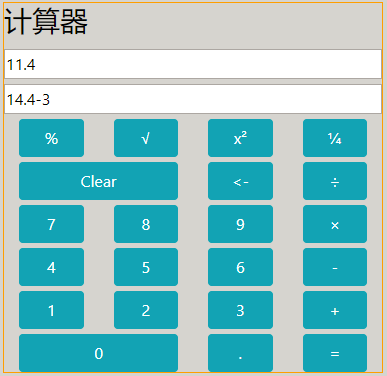
通过div+css定义计算器的样式,并在每个按钮上绑定事件响应按钮输入。
- 输入的元素为数字、小数点、加减乘除运算符时,都是直接显示。
- 输入为清除所有、清除上一次时直接清除。
- 输入为等号、百分比、开根号、乘方、分之一时,开始计算。
同时在输入框下面显示上次运算的公式。
1.定义责任元素的基类
包括变量next指向他的后继者,方法setNext设置它的后继者,方法handleRequest处理请求。
InputHandler = function () {

    this.next = null;

    this.setNext = function(handler) {

        this.next = handler;

    };

    this.handleRequest = function(currentInput,allInput) {

    }

}
2.定义责任元素
定义每个责任链元素应该处理的范围
<!-- 处理数字键 -->

NumberHandler = function (){this.NumberKeyArray = ["0","1","2","3","4","5","6","7","8","9"];}

NumberHandler.prototype = new InputHandler();

NumberHandler.prototype.handleRequest = function(currentInput,allInput) {

    var isNumber = $.inArray(currentInput,this.NumberKeyArray);

    if(isNumber!=-1){

        var temp = allInput+currentInput;

        return temp;

    }else{

        if(this.next){

            return this.next.handleRequest(currentInput,allInput);

        }

    }

}

<!-- 定义以下责任元素分别用来处理不同的输入键 -->

<!-- 处理操作符 -->

OperatorHandler = function () {this.OperatorArray=["+","-","/","*"];}

<!-- 清空所有 -->

ClearAllHandler = function (){}

<!-- 清除最后一次输入 -->

ClearLatestKeyHandler = function (){}

<!-- 直接计算 -->

ImmediateComputeHandler = function () {this.ImmediateComputeKeyArray=["x²","¼","%","√","="];}

<!-- 小数点 -->

PointHandler = function () {}
3.组成责任链
var numberHandler = new NumberHandler();

var operatorHandler = new OperatorHandler();

var clearAllHandler = new ClearAllHandler();

var clearLatestKeyHandler = new ClearLatestKeyHandler();

var immediateComputeHandler = new ImmediateComputeHandler();

var pointHandler = new PointHandler();

numberHandler.setNext(operatorHandler);

operatorHandler.setNext(clearAllHandler);

clearAllHandler.setNext(clearLatestKeyHandler);

clearLatestKeyHandler.setNext(immediateComputeHandler);

immediateComputeHandler.setNext(pointHandler);
4. 责任链调用处理
var currentInput = this.title;

var allInput=$("#result").val();

var temp=numberHandler.handleRequest(currentInput,allInput);

$("#result").val(temp);
5.完整代码
<html>

<head>

	<title>Web版本计算器</title>

	<link rel="stylesheet" href="./css/bootstrap.css"/>

	<script type="text/javascript" src="./js/jquery-3.3.1.js"></script>

	<style type="text/css">

		body {

			background-color:LightGrey;

			Color:black;

		}

		.display-border {

			border-style:solid;

			border-width:1px;

			border-color:Orange

		}

		.calculator-row {

			margin-top:5px;

		}

		.calculator-btn {

			width:100%;

		}

	</style>

	<script type="text/javascript">

		$(function(){

			var numberHandler = new NumberHandler();

			var operatorHandler = new OperatorHandler();

			var clearAllHandler = new ClearAllHandler();

			var clearLatestKeyHandler = new ClearLatestKeyHandler();

			var immediateComputeHandler = new ImmediateComputeHandler();

			var pointHandler = new PointHandler();

			numberHandler.setNext(operatorHandler);

			operatorHandler.setNext(clearAllHandler);

			clearAllHandler.setNext(clearLatestKeyHandler);

			clearLatestKeyHandler.setNext(immediateComputeHandler);

			immediateComputeHandler.setNext(pointHandler);

			$(".calculator-btn").click(function(){

				var currentInput = this.title;

				var allInput=$("#result").val();

				var temp=numberHandler.handleRequest(currentInput,allInput);

				$("#result").val(temp);

				var index1=temp.indexOf("+");

				var index2=temp.indexOf("-");

				var index3=temp.indexOf("*");

				var index4=temp.indexOf("/");

				if(index1==-1&index2==-1&index3==-1&index4==-1){

					$("#computeItem").val(allInput);

				}

			});

		});

		InputHandler = function () {

			this.next = null;

			this.setNext = function(handler) {

				this.next = handler;

			};

			this.handleRequest = function(currentInput,allInput) {

			}

		}

		<!-- 处理数字键 -->

		NumberHandler = function (){this.NumberKeyArray = ["0","1","2","3","4","5","6","7","8","9"];}

		NumberHandler.prototype = new InputHandler();

		NumberHandler.prototype.handleRequest = function(currentInput,allInput) {

			var isNumber = $.inArray(currentInput,this.NumberKeyArray);

			if(isNumber!=-1){

				var temp = allInput+currentInput;

				return temp;

			}else{

				if(this.next){

					return this.next.handleRequest(currentInput,allInput);

				}

			}

		}

		<!-- 处理操作符 -->

		OperatorHandler = function () {this.OperatorArray=["+","-","/","*"];}

		OperatorHandler.prototype = new InputHandler();

		OperatorHandler.prototype.handleRequest = function(currentInput,allInput) {

			var isOperator=$.inArray(currentInput,this.OperatorArray);

			if(isOperator!=-1){

				var temp="";

				if(allInput.length!=0){

					var lastChar = allInput.substr(allInput.length-1,1);

					var tempIsOperator = $.inArray(lastChar,this.OperatorArray);

					if(tempIsOperator==-1){

						temp=allInput+currentInput;

					}else{

						temp=allInput;

					}

				}

				return temp;

			}else{

				if(this.next){

					return this.next.handleRequest(currentInput,allInput);

				}

			}

		}

		<!-- 清空所有 -->

		ClearAllHandler = function (){}

		ClearAllHandler.prototype = new InputHandler();

		ClearAllHandler.prototype.handleRequest = function(currentInput,allInput) {

			if(currentInput=="C"){

				var temp = "";

				return temp;

			}else{

				if(this.next){

					return this.next.handleRequest(currentInput,allInput);

				}

			}

		}

		<!-- 清除最后一次输入 -->

		ClearLatestKeyHandler = function (){}

		ClearLatestKeyHandler.prototype = new InputHandler();

		ClearLatestKeyHandler.prototype.handleRequest = function(currentInput,allInput) {

			if(currentInput=="<-"){

				var temp="";

				if(allInput.length > 0){

					temp=allInput.substr(0,allInput.length-1);

				}

				return temp;

			}else{

				if(this.next){

					return this.next.handleRequest(currentInput,allInput);

				}

			}

		}

		<!-- 直接计算 -->

		ImmediateComputeHandler = function () {this.ImmediateComputeKeyArray=["x²","¼","%","√","="];}

		ImmediateComputeHandler.prototype = new InputHandler();

		ImmediateComputeHandler.prototype.handleRequest = function(currentInput,allInput) {

			if(allInput.length<=1){

				return allInput;

			}

			var isCompute=$.inArray(currentInput,this.ImmediateComputeKeyArray);

			if(isCompute!=-1){

				var result=computeResult(allInput)

				switch(isCompute){

					case 0:

						result=result*result;

						break;

					case 1:

						if(result!=0){

							result=1/result;

						}

						break;

					case 2:

						result=readonly/100;

						break;

					case 3:

						if(result<0){

							result=0;

						}else{

							result=Math.sqrt(result);

						}

						break;

				}

				return result+"";

			}else{

				if(this.next){

					return this.next.handleRequest(currentInput,allInput);

				}

			}

		}

		<!-- 小数点 -->

		PointHandler = function () {}

		PointHandler.prototype = new InputHandler();

		PointHandler.prototype.handleRequest = function(currentInput,allInput) {

			if(currentInput=="."){

				var temp=allInput;

				if(allInput.length!=0){

					var containPoint = allInput.indexOf(".");

					if(containPoint==-1){

						temp=allInput+currentInput;

					}

				}

				return temp;

			}else{

				if(this.next){

					return this.next.handleRequest(currentInput,allInput);

				}

			}

		}

		function computeResult(allInput){

			var computeItemArray=getComputeItemArray(allInput);

			computeItemArray =computeCore(computeItemArray,"*");

			if(computeItemArray.length!=1){

				computeItemArray =computeCore(computeItemArray,"/");

			}

			if(computeItemArray.length!=1){

				computeItemArray =computeCore(computeItemArray,"+");

			}

			if(computeItemArray.length!=1){

				computeItemArray =computeCore(computeItemArray,"-");

			}

			return parseFloat(computeItemArray[0]);

		}

		function computeCore(computeItemArray,operator){

			var opIndex=$.inArray(operator,computeItemArray);

			while(opIndex!=-1){

				var num1 = parseFloat(computeItemArray[opIndex-1]);

				var num2 = parseFloat(computeItemArray[opIndex+1]);

				var result;

				switch(operator){

					case "+":

						result=num1+num2;

						break;

					case "-":

						result=num1-num2;

						break;

					case "*":

						result=num1*num2;

						result=Math.round(result*100)/100;

						break;

					case "/":

						result=num1/num2;

						result=Math.round(result*100)/100;

						break;

				}

				computeItemArray.splice(opIndex-1,3,result+"");

				opIndex=$.inArray(operator,computeItemArray);

			}

			return computeItemArray;

		}

		function getComputeItemArray(allInput){

			var computeItemArray =[];

			var totalLength=allInput.length;

			var operatorArray=["+","-","/","*"];

			var i=0;

			while(i<totalLength){

				var j=i;

				for(;j<totalLength;j++){

					var tempChar=allInput[j];

					var isOperator=$.inArray(tempChar,operatorArray);

					if(isOperator!=-1){

						break;

					}

				}

				var tempStr="";

				if(i==j){

					tempStr= allInput.substr(i,1);

					i=j+1;

				}else{

					tempStr= allInput.substring(i,j);

					i=j;

				}

				computeItemArray.push(tempStr);

			}

			var lastItem=computeItemArray[computeItemArray.length-1];

			var isOperator=$.inArray(lastItem,operatorArray);

			if(isOperator!=-1){

				computeItemArray.pop();

			}

			return computeItemArray;

		}

	</script>

</head>

<body>

	<div class="container">

		<div class="row">

			<div class="col-4 offset-4 display-border" style="margin-top:50px;">

				<div class="row">

					<h3>计算器</h3>

				</div>

				<div class="row calculator-row">

					<input id="result" type="text" class="w-100" readonly="readonly"></input>

				</div>

				<div class="row calculator-row">

					<input id="computeItem" type="text" class="w-100" readonly="readonly"></input>

				</div>

				<div class="row calculator-row">

					<div class="col">

						<button id="percent" type="button" class="btn btn-info calculator-btn" data-toggle="tooltip" data-placement="top" title="%" >%</button>

					</div>

					<div class="col">

						<button id="" type="button" class="btn btn-info calculator-btn"  data-toggle="tooltip" data-placement="top" title="√">√</button>

					</div>

					<div class="col">

						<button type="button" class="btn btn-info calculator-btn"  data-toggle="tooltip" data-placement="top" title="x²">x²</button>

					</div>

					<div class="col">

						<button type="button" class="btn btn-info calculator-btn" data-toggle="tooltip" data-placement="top" title="¼">¼</button>

					</div>

				</div>

				<div class="row calculator-row">

					<div class="col-6">

						<button type="button" class="btn btn-info calculator-btn" data-toggle="tooltip" data-placement="top" title="C">Clear</button>

					</div>

					<div class="col-3">

						<button type="button" class="btn btn-info calculator-btn" data-toggle="tooltip" data-placement="top" title="<-"><-</button>

					</div>

					<div class="col-3">

						<button type="button" class="btn btn-info calculator-btn" data-toggle="tooltip" data-placement="top" title="/">÷</button>

					</div>

				</div>

				<div class="row calculator-row">

					<div class="col">

						<button type="button" class="btn btn-info calculator-btn" data-toggle="tooltip" data-placement="top" title="7">7</button>

					</div>

					<div class="col">

						<button type="button" class="btn btn-info calculator-btn" data-toggle="tooltip" data-placement="top" title="8">8</button>

					</div>

					<div class="col">

						<button type="button" class="btn btn-info calculator-btn" data-toggle="tooltip" data-placement="top" title="9">9</button>

					</div>

					<div class="col">

						<button type="button" class="btn btn-info calculator-btn" data-toggle="tooltip" data-placement="top" title="*">×</button>

					</div>

				</div>

				<div class="row calculator-row">

					<div class="col">

						<button type="button" class="btn btn-info calculator-btn" data-toggle="tooltip" data-placement="top" title="4">4</button>

					</div>

					<div class="col">

						<button type="button" class="btn btn-info calculator-btn" data-toggle="tooltip" data-placement="top" title="5">5</button>

					</div>

					<div class="col">

						<button type="button" class="btn btn-info calculator-btn" data-toggle="tooltip" data-placement="top" title="6">6</button>

					</div>

					<div class="col">

						<button type="button" class="btn btn-info calculator-btn" data-toggle="tooltip" data-placement="top" title="-">-</button>

					</div>

				</div>

				<div class="row calculator-row">

					<div class="col">

						<button type="button" class="btn btn-info calculator-btn" data-toggle="tooltip" data-placement="top" title="1">1</button>

					</div>

					<div class="col">

						<button type="button" class="btn btn-info calculator-btn" data-toggle="tooltip" data-placement="top" title="2">2</button>

					</div>

					<div class="col">

						<button type="button" class="btn btn-info calculator-btn" data-toggle="tooltip" data-placement="top" title="3">3</button>

					</div>

					<div class="col">

						<button type="button" class="btn btn-info calculator-btn" data-toggle="tooltip" data-placement="top" title="+">+</button>

					</div>

				</div>

				<div class="row calculator-row">

					<div class="col-6">

						<button type="button" class="btn btn-info calculator-btn" data-toggle="tooltip" data-placement="top" title="0">0</button>

					</div>

					<div class="col-3">

						<button type="button" class="btn btn-info calculator-btn" data-toggle="tooltip" data-placement="top" title=".">.</button>

					</div>

					<div class="col-3">

						<button type="button" class="btn btn-info calculator-btn" data-toggle="tooltip" data-placement="top" title="=">=</button>

					</div>

				</div>

			</div>

		</div>

	</div>

</body>

</html>
编写计算器程序学习JS责任链模式的更多相关文章
- 学习笔记——责任链模式ChainOfResponsibility
责任链模式,主要是通过自己记录一个后继者来判断当前的处理情况.Handler中,再增加一个方法用于设置后继对象,如SetHandler(Handler obj). 然后Handler类以其子类的处理方 ...
- 设计模式学习之责任链模式(Chain of Responsibility,行为型模式)(22)
参考:http://www.cnblogs.com/zhili/p/ChainOfResponsibity.html 一.引言 在现实生活中,有很多请求并不是一个人说了就算的,例如面试时的工资,低于1 ...
- Java设计模式学习记录-责任链模式
前言 已经把五个创建型设计模式和七个结构型设计模式介绍完了,从这篇开始要介绍行为型设计模式了,第一个要介绍的行为型设计模式就是责任链模式(又称职责链模式). 责任链模式 概念介绍 责任链模式是为了避免 ...
- Java-马士兵设计模式学习笔记-责任链模式-FilterChain功能
一.目标 增加filterchain功能 二.代码 1.Filter.java public interface Filter { public String doFilter(String str) ...
- Java-马士兵设计模式学习笔记-责任链模式-模拟处理Reques Response
一.目标 1.用Filter模拟处理Request.Response 2.思路细节技巧: (1)Filter的doFilter方法改为doFilter(Request,Resopnse,FilterC ...
- Java-马士兵设计模式学习笔记-责任链模式-处理数据
一.目标 数据提交前做各种处理 二.代码 1.MsgProcessor.java public class MsgProcessor { private List<Filter> filt ...
- java23种设计模式之十:责任链模式
最近在学习netty中发现其中用到了责任链模式,然后结合自己在写代码中遇到了大量写if...else的情况,决定学习一下责任链模式. 一.什么样的场景下会选择用责任链模式 我们在进行业务逻辑判断时,需 ...
- Design Pattern Chain of Reponsibility 责任链模式
本程序实现一个责任链模式查询人名的资料. 開始都是查询第一个人,问其是否有某人的资料,假设有就返回结果,假设没有第一个人就会询问第二个人,第二个人的行为和第一个人的行为一致的,然后一致传递下去,直到找 ...
- ASP.NET MVC 学习笔记-2.Razor语法 ASP.NET MVC 学习笔记-1.ASP.NET MVC 基础 反射的具体应用 策略模式的具体应用 责任链模式的具体应用 ServiceStack.Redis订阅发布服务的调用 C#读取XML文件的基类实现
ASP.NET MVC 学习笔记-2.Razor语法 1. 表达式 表达式必须跟在“@”符号之后, 2. 代码块 代码块必须位于“@{}”中,并且每行代码必须以“: ...
随机推荐
- 地址栏的路由输入不匹配时候,设置默认跳转页面(redirect)
如果输入正确的路由,就会显示正确的页面. 如果输入错误的路由 ,则可以配置跳转到指定的页面. { redirect:"/', path:"*" ; }
- 学以致用二十四-----shell脚本中的列表及space
1.接触列表的概念是在pyhon中,殊不知在shell中也是有列表的. 如: 结果 列表的下标和python中一样,也是以0开头 注意 list 和list2 的区别 一个是用括号括起来,一个是用 ...
- Android studio提速配置
1. C:\Program Files\Android\Android Studio\bin studio64.exe.vmoptions 2.创建 gradle.properties 配置文件
- Re:uxul
Re: Unbelieveable eXperience of University Life
- USART of STM32
/*************************************************************************** * 文件名:USART.h * * 编写人:离 ...
- SQL Server CTE 递归查询全解 -- 转 学习
在TSQL脚本中,也能实现递归查询,SQL Server提供CTE(Common Table Expression),只需要编写少量的代码,就能实现递归查询,本文详细介绍CTE递归调用的特性和使用示例 ...
- Go语言数据类型
目录 基本数据类型说明 整型 浮点型 字符 字符类型本质探讨 布尔型 字符串 指针 值类型与引用类型 基本数据类型默认值 基本数据类型相互转换 注意事项 其他基本类型转string类型 string类 ...
- jQuery的JS库在本地运行项目时提示无法加载
最近公司有个项目在我本地运行时引用本地的jquery.js,浏览器提示无法加载 <script src="/js/newperson/jquery-1.11.3.min.js" ...
- JavaScript基础-第2章
目标 常用数据类型 基本语法 变量的定义与赋值 数据类型与转换 逻辑控制语句 条件语句 循环语句 函数定义 基本语法 变量 变量名以字母或下划线("_")开头 变量可以包含数字.从 ...
- Java学习笔记30(集合框架四:List接口)
List接口继承自Collection接口 具有重要的三大特点: 1.有序集合:存入和取出的顺序一致 2.此接口的用户可以对列表中每个元素插入位置精确的控制:可以通过索引操作 3.可以存储重复元素 L ...