
centos7.4 64位安装 google-chrome 与 chromedriver 运行 Python selenium 项目
centos7.4 实例

利用 yum 命令安装 google-chrome 超级简单(安装最新版):
yum install https://dl.google.com/linux/direct/google-chrome-stable_current_x86_64.rpm
chromedriver 也下载最新版就好,和Mac 版本一样,我依旧选择这个最新版本:
http://chromedriver.storage.googleapis.com/index.html?path=70.0.3538.16/

Python3.7 之前安装过:
Centos7 环境下 Python2.7 换成 Python3.7 运行 scrapy 应用所遇到的问题记录
然后配置一下,就能跑起来 selenium 项目了,当然该 pip install xxx 安装模块就缺什么安装什么了
# 设置 webdriver 参数

        options = webdriver.ChromeOptions()

        # 设置谷歌浏览器的一些选项

        #  proxy 代理 options 选项

        options.add_argument(r'--proxy--server=http:\\' + ip)

        uas = get_uas()

        # 设置user-agent

        options.add_argument('user-agent=' + choice(uas))

        # 以 headless 方案运行

        options.add_argument('--headless')

        options.add_argument('--no-sandbox')

        # options.add_argument('--disable-dev-shm-usage')

        # 禁用图片访问

        # prefs = {"profile.managed_default_content_settings.images": 2}

        # options.add_experimental_option("prefs", prefs)
如果不配置 # 以 headless 方案运行
会抛出下面异常
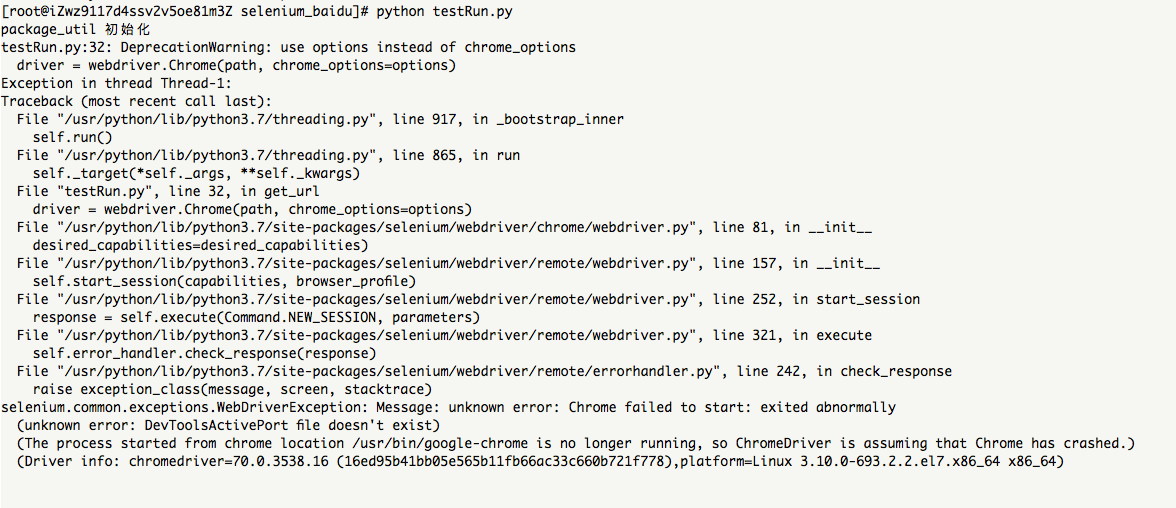
[root@iZwz9117d4ssv2v5oe81m3Z selenium_baidu]# python testRun.py

package_util 初始化

testRun.py:: DeprecationWarning: use options instead of chrome_options

  driver = webdriver.Chrome(path, chrome_options=options)

Exception in thread Thread-:

Traceback (most recent call last):

  File "/usr/python/lib/python3.7/threading.py", line , in _bootstrap_inner

    self.run()

  File "/usr/python/lib/python3.7/threading.py", line , in run

    self._target(*self._args, **self._kwargs)

  File "testRun.py", line , in get_url

    driver = webdriver.Chrome(path, chrome_options=options)

  File "/usr/python/lib/python3.7/site-packages/selenium/webdriver/chrome/webdriver.py", line , in __init__

    desired_capabilities=desired_capabilities)

  File "/usr/python/lib/python3.7/site-packages/selenium/webdriver/remote/webdriver.py", line , in __init__

    self.start_session(capabilities, browser_profile)

  File "/usr/python/lib/python3.7/site-packages/selenium/webdriver/remote/webdriver.py", line , in start_session

    response = self.execute(Command.NEW_SESSION, parameters)

  File "/usr/python/lib/python3.7/site-packages/selenium/webdriver/remote/webdriver.py", line , in execute

    self.error_handler.check_response(response)

  File "/usr/python/lib/python3.7/site-packages/selenium/webdriver/remote/errorhandler.py", line , in check_response

    raise exception_class(message, screen, stacktrace)

selenium.common.exceptions.WebDriverException: Message: unknown error: Chrome failed to start: exited abnormally

  (unknown error: DevToolsActivePort file doesn't exist)

  (The process started from chrome location /usr/bin/google-chrome is no longer running, so ChromeDriver is assuming that Chrome has crashed.)

  (Driver info: chromedriver=70.0.3538.16 (16ed95b41bb05e565b11fb66ac33c660b721f778),platform=Linux 3.10.-693.2..el7.x86_64 x86_64)
selenium 代码正确运行:

centos7.4 64位安装 google-chrome 与 chromedriver 运行 Python selenium 项目的更多相关文章
- centos7.3 64位 安装git
1.安装编译git时需要的包 # yum install curl-devel expat-devel gettext-devel openssl-devel zlib-devel # yum ins ...
- centos7.2 64位安装java
1. wget http://download.oracle.com/otn-pub/java/jdk/8u131-b11/d54c1d3a095b4ff2b6607d096fa80163/jdk- ...
- centos7.4 64位安装 git
参考博客:Linux Jenkins配置Git 1. git --version 查看有没有安装 过 git,没有则 继续 2. git 压缩包下载地址:https://mirrors.edge.ke ...
- centos7.4 64位安装 redis-4.0.0
1. 下载 redis 包 链接:https://pan.baidu.com/s/1g1UE_GTreXoD9uOXB7G3HA 提取码:ug8p 2. 安装gcc.ruby .rubygems等环 ...
- Ubuntu 14.04 LTS下安装Google Chrome浏览器
在Ubuntu 14.04下安装Google Chrome浏览器非常简单,只要到Chrome的网站下载Deb安装包并进行安装即可.当然你也可以使用APT软件包管理器来安装Google Chrome浏览 ...
- 在ubuntu下安装google chrome
由于手上有两台电脑,再加上我那个选择困难症加上纠结劲.所以果断把其中一台电脑只装linux系统,另一台电脑只装windows了.免得我老纠结!于是linux便选择了ubuntu. 由于浏览器一直用的是 ...
- ubuntu14.04 64位 安装eclipse
ubuntu14.04 64位 安装eclipse 1 在官网上下载eclipse http://www.eclipse.org/downloads/下载eclipse-jee-luna-SR1-li ...
- Windows 7 64位安装cURL
安装cURL. 1, 下载64位的SSL版cURL,网址: http://curl.download.nextag.com/download/curl-7.21.7-win64-ssl-sspi.zi ...
- ubuntu 14.04 64位安装iNodeClient
ubuntu 14.04 64位安装iNodeClieng(华三校园客服端) http://pan.baidu.com/s/12dpxk ubuntu 14.04 64bit Install H3C ...
随机推荐
- 在table表格中实现圆角效果
在table中设置border-radius发现不起作用,网上查找了一番,原因是border-collapse:collapse和border-radius不兼容. 设计图效果 代码实现效果: < ...
- 『OpenCV3』滤波器实现及使用滤波器降噪
一.滤波器实现 我们实现这样一个基于拉普拉斯算子的滤波器核心,并使用它进行滤波,这可以做到锐化图像的效果, 0 -1 0 -1 5 -1 0 -1 0 首先我们完全手动的进行滤波,依赖指针操作, vo ...
- hdu6133 Army Formations 线段树合并
给你一棵有n个节点的二叉树,每个节点有一个权值,对于一棵子树u,将u的子树中的节点权值从大到小排序,令sz[u]为子树u的大小, 则ans[u] = 1 * a[1] + 2 * a[2] + ... ...
- 模型-视图-控制器模式(MVC模式,10种常见体系架构模式之一)
一.简介: 架构模式是一个通用的.可重用的解决方案,用于在给定上下文中的软件体系结构中经常出现的问题.架构模式与软件设计模式类似,但具有更广泛的范围. 模型-视图-控制器模式,也称为MVC模式.是软件 ...
- 打造springboot高性能服务器(spring reactor的使用)
推荐:https://www.cnblogs.com/ivaneye/p/5731432.htmlpom依赖: <dependency> <groupId>org.spring ...
- 使用nginx实现负载均衡的配置
#user nobody; worker_processes 1; #error_log logs/error.log; #error_log logs/error.log notice; #erro ...
- eclipse快捷键大全(转载自CSDN)
Ctrl+1 快速修复(最经典的快捷键,就不用多说了) Ctrl+D: 删除当前行 Ctrl+Alt+↓ 复制当前行到下一行(复制增加) Ctrl+Alt+↑ 复制当前行到上一行(复制增加) Alt+ ...
- sql 中取整,四舍五入取整,向下取整,向上取整。
SELECT round(52.45, 0) AS round4, round(52.54, 0) AS round5, round(52.45, 1) AS round41, round(52.54 ...
- SQL-45 将titles_test表名修改为titles_2017。
题目描述 将titles_test表名修改为titles_2017.CREATE TABLE IF NOT EXISTS titles_test (id int(11) not null primar ...
- nginx 开启高效文件传输模式
(1) sendfile 参数用于开启文件的高效传输模式,该参数实际上是激活了 sendfile() 功能,sendfile() 是作用于两个文件描述符之间的数据拷贝函数,这个拷贝操作是在内核之中的, ...