
Angular07 路由的工作流程、路由参数、子路由、利用路由加载模块、模块懒加载???
1 Angular路由的工作流程
用户在浏览器输入一个URL -> Angular将获取到这个URL并将其解析成一个UrlTree实例 -> Angular会到路由配置中去寻找并激活与UrlTree实例匹配的配置项 -> 为配置项指定的组件创建实例 -> 将创建的实例组件渲染到<router-outlet>所在位置
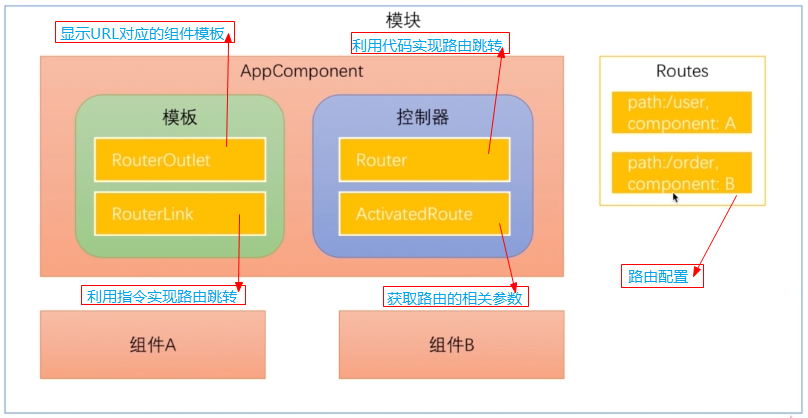
2 Angular路由的几个核心概念
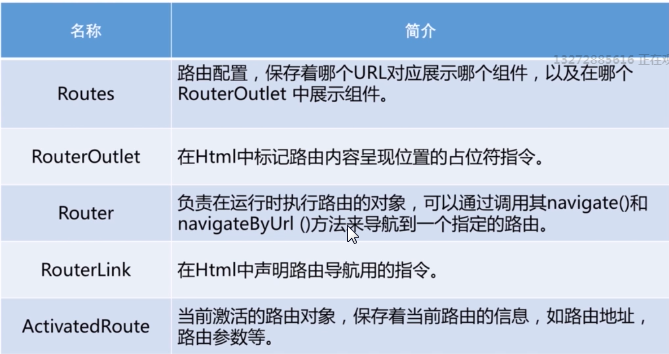
2.1 路由配置
就是一个Routes类型的数组
// 路由配置

const routeConfig: Routes = [ // 创建路由根模块需要用到的路由配置

  {path: '', component: HomeComponent},

  {path: 'stock', component: StockComponent}

];
路由想要正常工作还需要创建一个路由根模块,并将其添加到相应的模块中去
import {BrowserModule} from '@angular/platform-browser';

import {NgModule} from '@angular/core';

import {AppComponent} from './app.component';

import {FormsModule} from '@angular/forms';

import {HttpModule} from '@angular/http';

import { TestComponentComponent } from './test-component/test-component.component';

import {MyModuleModule} from './module/my-module/my-module.module';

import { HomeComponent } from './home/home.component';

import { StockComponent } from './stock/stock.component';

import {RouterModule, Routes} from '@angular/router';

// 路由配置

const routeConfig: Routes = [ // 创建路由根模块需要用到的路由配置

  {path: '', component: HomeComponent},

  {path: 'stock', component: StockComponent}

];

@NgModule({

  declarations: [ // 声明在该模块中有哪些东西(组件、指令、管道)

    AppComponent, TestComponentComponent, HomeComponent, StockComponent

  ],

  imports: [ // 声明该模块需要正常运转时需要用到哪些模块(即:该模块依赖哪些其它模块)

    BrowserModule,

    FormsModule,

    HttpModule,

    MyModuleModule,

    RouterModule.forRoot(routeConfig) // 创建路由根模块,并导入到主模块中

  ],

  providers: [], // 声明模块中的服务

  bootstrap: [AppComponent] // 声明该模块的主组件

})

export class AppModule {

}
注意:详细写法请参见《揭秘angular2》P302
2.2 RouterOutlet指令
在组件的模板中开辟一块位置来显示URL对应的组件
2.3 通过代码实现路由跳转
在控制器类中调用Router对象的相关方法来实现路由跳转
import {Component} from '@angular/core';

import {Router} from '@angular/router'; // 导入需要的东西

@Component({

  selector: 'app-root',  // 使用组件时的标签

  templateUrl: './app.component.html', // 使用组件时的模板

  styleUrls: ['./app.component.css']  // css

})

export class AppComponent { // 控制器

  constructor(private router: Router) {

  }

  toStock() { // 该事件触发时就跳转到指定的组件

    this.router.navigate(['/stock']);

  }

}
2.4 使用指令实现路由跳转
<div>

  Hello Boy

</div>

<hr />

<!--利用指令进行路由跳转-->

<a [routerLink]="['/']">主页面</a>

<!--<a [routerLink]="['/stock']">股票信息页面</a>-->

<!--触发单击事件后,在控制类中相应方法中利用代码实现路由跳转-->

<input type="button" value="股票信息页面" (click)="toStock()" />

<!--添加RouterOuter指令-->

<router-outlet></router-outlet>
2.5 利用ActivatedRoute服务获取路由的相关参数【请参见《揭秘angular2》P316】
2.5.1 获取Path参数
传入Path参数的方式1

传入Path参数的方式2

获取Path参数的方式
import {Component, OnInit, OnDestroy} from '@angular/core';

import {ActivatedRoute, Params} from '@angular/router';

@Component({

  selector: 'app-stock',

  templateUrl: './stock.component.html',

  styleUrls: ['./stock.component.css']

})

export class StockComponent implements OnInit {

  public stockId: number;

  public limit: number;

  private sub: any;

  private sub2: any;

  constructor(private data: ActivatedRoute) {

  }

  ngOnInit() {

    // 利用快照的方式读取路由参数(有bug,不推荐使用)

    // this.stockId = this.data.snapshot.params['id'];

    // 利用订阅的方式读取参数(推荐使用)

    this.sub = this.data.params.subscribe((params: Params) => {

      this.stockId = params['id'];

    });

    this.sub2 = this.data.queryParams.subscribe((params: Params) => {

      this.limit = parseInt(params['limit']);

      if (this.limit >= 100) {

        console.log('已达到上线值');

      }

      console.log(this.limit);

    });

  }

  ngOnDestroy() {

    this.sub.unsubscribe();

  }

}
2.5.2 获取Query参数
传入Query参数的方式1

传入Query参宿的方式2

获取Query参数的方式
import {Component, OnInit, OnDestroy} from '@angular/core';

import {ActivatedRoute, Params} from '@angular/router';

@Component({

  selector: 'app-stock',

  templateUrl: './stock.component.html',

  styleUrls: ['./stock.component.css']

})

export class StockComponent implements OnInit {

  public stockId: number;

  public limit: number;

  private sub: any;

  private sub2: any;

  constructor(private data: ActivatedRoute) {

  }

  ngOnInit() {

    // 利用快照的方式读取Path路由参数(有bug,不推荐使用)

    // this.stockId = this.data.snapshot.params['id'];

    // 利用订阅的方式读取Path参数(推荐使用)

    this.sub = this.data.params.subscribe((params: Params) => {

      this.stockId = params['id'];

    });

    // 获取Query参数

    this.sub2 = this.data.queryParams.subscribe((params: Params) => {

      this.limit = parseInt(params['limit']);

      if (this.limit >= 100) {

        console.log('已达到上线值');

      }

      console.log(this.limit);

    });

  }

  ngOnDestroy() {

    this.sub.unsubscribe();

  }

}
注意:Query参数都是字符串类型的
3 子路由
3.1 子路由配置
import {BrowserModule} from '@angular/platform-browser';

import {NgModule} from '@angular/core';

import {AppComponent} from './app.component';

import {FormsModule} from '@angular/forms';

import {HttpModule} from '@angular/http';

import { TestComponentComponent } from './test-component/test-component.component';

import {MyModuleModule} from './module/my-module/my-module.module';

import { HomeComponent } from './home/home.component';

import { StockComponent } from './stock/stock.component';

import {RouterModule, Routes} from '@angular/router';

import {UserInfoComponent} from "./user/user-info/user-info.component";

import { Error404Component } from './error404/error404.component';

import { BuyerComponent } from './buyer/buyer.component';

import { SellerComponent } from './seller/seller.component';

// 路由配置

const routeConfig: Routes = [ // 创建路由根模块需要用到的路由配置

  {path: '', component: HomeComponent},

  {path: 'stock', component: StockComponent,

    children: [ // 配置子路由

      {path: 'buyer', component: BuyerComponent},

      {path: 'seller', component: SellerComponent}

    ]

  },

  {path: '**', component: Error404Component}

];

@NgModule({

  declarations: [ // 声明在该模块中有哪些东西(组件、指令、管道)

    AppComponent, TestComponentComponent, HomeComponent, StockComponent, Error404Component, BuyerComponent, SellerComponent

  ],

  imports: [ // 声明该模块需要正常运转时需要用到哪些模块(即:该模块依赖哪些其它模块)

    BrowserModule,

    FormsModule,

    HttpModule,

    MyModuleModule,

    RouterModule.forRoot(routeConfig) // 创建路由根模块,并导入到主模块中

  ],

  providers: [], // 声明模块中的服务

  bootstrap: [AppComponent] // 声明该模块的主组件

})

export class AppModule {

}
3.2 子路由组件的路由跳转
<p>

  这是股票信息页面,注意:自路由的路径前面需要加一个点

</p>

<a [routerLink]="['./seller']">卖家信息列表</a>

<a [routerLink]="['./buyer']">买家信息列表</a>

<router-outlet></router-outlet>
4 附属路由
一个组件可以同时有多个路由,但是只能有一个主路由,其他的都是辅助路由
4.1 自路由配置
import {BrowserModule} from '@angular/platform-browser';

import {NgModule} from '@angular/core';

import {AppComponent} from './app.component';

import {FormsModule} from '@angular/forms';

import {HttpModule} from '@angular/http';

import {TestComponentComponent} from './test-component/test-component.component';

import {MyModuleModule} from './module/my-module/my-module.module';

import {HomeComponent} from './home/home.component';

import {StockComponent} from './stock/stock.component';

import {RouterModule, Routes} from '@angular/router';

import {UserInfoComponent} from "./user/user-info/user-info.component";

import {Error404Component} from './error404/error404.component';

import {BuyerComponent} from './buyer/buyer.component';

import {SellerComponent} from './seller/seller.component';

import {ConsultComponent} from './consult/consult.component';

// 路由配置

const routeConfig: Routes = [ // 创建路由根模块需要用到的路由配置

  {path: 'home', component: HomeComponent},

  {

    path: 'stock', component: StockComponent,

    children: [ // 配置子路由

      {path: 'buyer', component: BuyerComponent},

      {path: 'seller', component: SellerComponent}

    ]

  },

  {path: 'consult', component: ConsultComponent, outlet: 'aux'}, // 子路由配置

  {path: '**', component: Error404Component}

];

@NgModule({

  declarations: [ // 声明在该模块中有哪些东西(组件、指令、管道)

    AppComponent,

    TestComponentComponent,

    HomeComponent,

    StockComponent,

    Error404Component,

    BuyerComponent,

    SellerComponent,

    ConsultComponent

  ],

  imports: [ // 声明该模块需要正常运转时需要用到哪些模块(即:该模块依赖哪些其它模块)

    BrowserModule,

    FormsModule,

    HttpModule,

    MyModuleModule,

    RouterModule.forRoot(routeConfig) // 创建路由根模块,并导入到主模块中

  ],

  providers: [], // 声明模块中的服务

  bootstrap: [AppComponent] // 声明该模块的主组件

})

export class AppModule {

}
4.2 子路由的跳转与关闭
<div>

  Hello Boy

</div>

<hr />

<div>

  <a [routerLink]="['/home']">主页面</a>

  <input type="button" value="股票页面" (click)="toStock()" />

  <!--子路由跳转的时候同时设置主路由的跳转-->

  <a [routerLink]="[{outlets:{primary: ['home'], aux:['consult']}}]">咨询页面</a>

  <!--关闭子路由-->

  <a [routerLink]="[{outlets:{aux:null}}]">结束咨询</a>

</div>

<!--主路由-->

<router-outlet></router-outlet>

<!--辅助路由-->

<router-outlet name="aux"></router-outlet>
5 路由加载模块
5.1 需求
在实际开发中常常是每个模块中每个路由前面部分都必须保持一致,例如:客户模块中所有的路由必须都是以 /client 开头
5.2 实现方法
为每个模块都设置一个模块级别的主组件,其余组件都是该组件的子组件;在子模块中为子模块的主组件设定子路由实现
5.3 代码实现
5.3.1 创建多个模块
模块创建后为每个模块都创建一个模块路由文件
import { NgModule } from '@angular/core';

import { CommonModule } from '@angular/common';

import { Test01Component } from './test01/test01.component';

import { CoreModule } from '../core/core.module';

import { TestHomeComponent } from './test-home/test-home.component';

import { SharedModule } from '../shared/shared.module';

import { TestRoutingModule } from './test-routing.module';

import { Test02Component } from './test02/test02.component';

import { Test03Component } from './test03/test03.component';

import { TestDemoComponent } from './test-demo/test-demo.component';

import { HttpModule } from '@angular/http';

@NgModule({

  imports: [

    SharedModule,

    TestRoutingModule

  ],

  declarations: [

    TestHomeComponent,

    Test01Component,

    Test02Component,

    Test03Component,

    TestDemoComponent

  ],

  exports: [

    Test01Component

  ]

})

export class TestModule { }
测试模块
import { NgModule } from '@angular/core';

import { RouterModule, Routes } from '@angular/router';

import { CommonModule } from '@angular/common';

import { TestHomeComponent } from './test-home/test-home.component';

import { Test01Component } from './test01/test01.component';

import { Test02Component } from './test02/test02.component';

import { Test03Component } from './test03/test03.component';

import { TestDemoComponent } from './test-demo/test-demo.component';

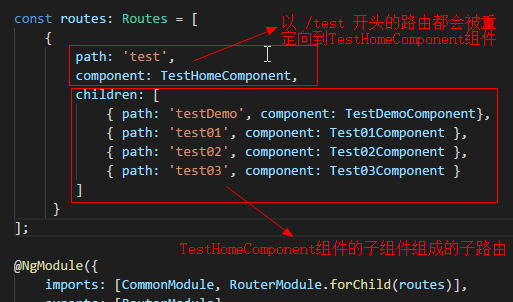
const routes: Routes = [

    {

        path: 'test',

        component: TestHomeComponent,

        children: [

            { path: 'testDemo', component: TestDemoComponent},

            { path: 'test01', component: Test01Component },

            { path: 'test02', component: Test02Component },

            { path: 'test03', component: Test03Component }

        ]

     }

];

@NgModule({

    imports: [CommonModule, RouterModule.forChild(routes)],

    exports: [RouterModule]

})

export class TestRoutingModule {}
测试模块的路由文件
坑01:子模块的路由文件中加载路由信息是用的forChild,主模块中加载路由文件才用forRoot
5.3.2 在主模块中导入测试子模块
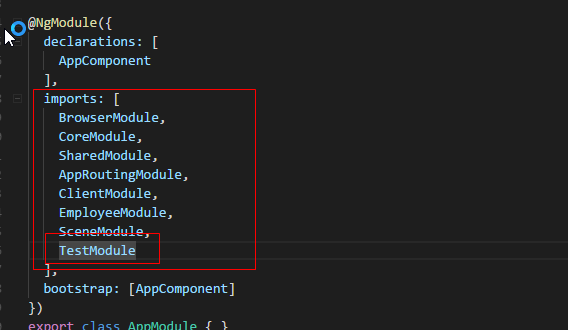
由于我这种写法不是利用路由进行模块懒加载的,所以必须在主模块中将子模块进行引入
import { BrowserModule } from '@angular/platform-browser';

import { NgModule } from '@angular/core';

import { AppComponent } from './app.component';

import { TestModule } from './test/test.module';

import { CoreModule } from './core/core.module';

import { SharedModule } from './shared/shared.module';

import { AppRoutingModule } from './app-routing.module';

import { ClientModule } from './client/client.module';

import { EmployeeModule } from './employee/employee.module';

import { SceneModule } from './scene/scene.module';

@NgModule({

  declarations: [

    AppComponent

  ],

  imports: [

    BrowserModule,

    CoreModule,

    SharedModule,

    AppRoutingModule,

    ClientModule,

    EmployeeModule,

    SceneModule,

    TestModule

  ],

  bootstrap: [AppComponent]

})

export class AppModule { }
主模块
5.3.3 创建主路由
在主模块的路由文件中利用重定向来实现各个子模块的重定向
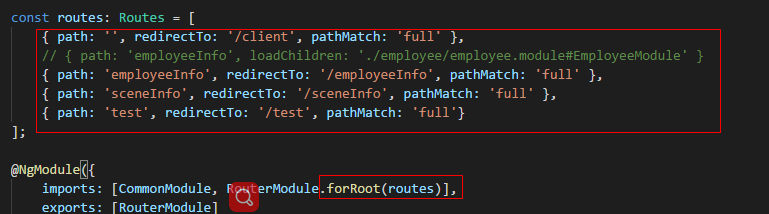
import { NgModule } from '@angular/core';

import { RouterModule, Routes } from '@angular/router';

import { CommonModule } from '@angular/common';

const routes: Routes = [

    { path: '', redirectTo: '/client', pathMatch: 'full' },

    // { path: 'employeeInfo', loadChildren: './employee/employee.module#EmployeeModule' }

    { path: 'employeeInfo', redirectTo: '/employeeInfo', pathMatch: 'full' },

    { path: 'sceneInfo', redirectTo: '/sceneInfo', pathMatch: 'full' },

    { path: 'test', redirectTo: '/test', pathMatch: 'full'}

];

@NgModule({

    imports: [CommonModule, RouterModule.forRoot(routes)],

    exports: [RouterModule]

})

export class AppRoutingModule {}
主模块的路由文件
技巧01:路由文件必须导入到模块中去
6 模块懒加载???
待更新......
2018-3-12 09:14:21
Angular07 路由的工作流程、路由参数、子路由、利用路由加载模块、模块懒加载???的更多相关文章
- vue路由懒加载及组件懒加载
一.为什么要使用路由懒加载 为给客户更好的客户体验,首屏组件加载速度更快一些,解决白屏问题. 二.定义 懒加载简单来说就是延迟加载或按需加载,即在需要的时候的时候进行加载. 三.使用 常用的懒加载方式 ...
- angular配置懒加载路由的思路
前言 本人记性不好,对于别人很容易记住的事情,我愣是记不住,所以还是靠烂笔头来帮我长长记性. 参考文章:https://blog.csdn.net/xif3681/article/details/84 ...
- Vue-Router学习第二弹动态路由\懒加载\嵌套路由
在我们做项目时肯定会有出现动态路由: 举个栗子: 一个品种的商品页面会有同类不同样的商品就要在路由的后面加一个id: Vue的路由id是这样添加的: 两种动态路由 一种是params参数添加: 首先现 ...
- Webpack实现路由懒加载的三种方式
原文指路:https://blog.csdn.net/qq_37540004/article/details/78727063 第一种: 引入方式(正常引入): const router = new ...
- Vue 路由&组件懒加载(按需加载)
当打包构建应用时,Javascript 包会变得非常大,影响页面加载速度.使用Vue路由懒加载和组件懒加载可以提升页面加载速度,减少白屏时间,提升用户体验. 用法有如下三种:(路由懒加载与组件懒加载用 ...
- vue2实现路由懒加载
一.什么是懒加载 顾名思义,懒加载就是随用随加载,什么时候需要就什么时候加载. 二.为什么需要懒加载 在单页应用中,如果没有使用懒加载,webpack打包后的文件会很大,这时进入首页时的加载时间会很长 ...
- Vue总结第五天:vue-router (使用模块化(创建Vue组件)机制编程)、router-link 标签的属性、路由代码跳转、懒加载、路由嵌套(子路由)、路由传递数据、导航守卫)
Vue总结第五天:vue-router ✿ 路由(器)目录: □ vue中路由作用 □ vue-router基本使用 □ vue-router嵌套路由 □ vue-router参数传递 □ ...
- Vue常规后台系统,路由懒加载实现基于菜单数据并解耦
路由依赖菜单 场景:文件名与路由组件名完全一致(随便大小写均可) 菜单使用一套,路由又存在一套,这样就很不舒服,于是做了如下处理: 尝试不用懒加载发现有难度,使用懒加载就很轻松了 data.js ex ...
- vue路由(一个包含重定向、嵌套路由、懒加载的main.js如下)and 路由跳转传参的query和params的异同
import Vue from 'vue'import VueRouter from 'vue-router'import App from './App'Vue.use(VueRouter)cons ...
随机推荐
- Executor中的类
Executor框架 其中ThreadPoolExecutor非常重要,通过这个类自定义线程池 public ThreadPoolExecutor(int corePoolSize, //线程池里面的 ...
- Effective java -- 6 方法
第三十八条:检查参数的有效性 第三十九条:必要时进行保护性拷贝 public class Period { private final Date start; private final Date e ...
- render总结
vue渲染组件的顺序是: 执行render函数-->没有render参数解析template参数内容-->没有template参数将el内html当做template解析 其中解析temp ...
- 第二篇 javascript一维数组和二维数组及方法
一.数组 什么是数组 程序=数据+算法 数组就是一种很常见的保存批量数据的数据结构 一.定义数组 var arr1=[]; //定义了一个不包含元素的数组 ,,]; //定义了一个包含三个元素的数组 ...
- 关于使用unigui、webxone、mysql的几个问题
一.webxone的问题:1.目前稳定可用的版本好像是v2510:2.设计webxone应用时,窗口的“position”属性只能设置为poDesigned,而且不能动态改变窗口尺寸,否则在浏览器中显 ...
- Symbol Table(符号表)
一.定义 符号表是一种存储键值对的数据结构并且支持两种操作:将新的键值对插入符号表中(insert):根据给定的键值查找对应的值(search). 二.API 1.无序符号表 几个设计决策: A.泛型 ...
- 查询速度优化用not EXISTS 代替 not in
1,not in 速度奇慢,要用 not EXISTS ,速度奇快! 大表效果尤其明显 sql中exists,not exists的用法 exists()后面的子查询被称做相关子查询,他是不返回列表的 ...
- 恢复delete删除的数据
SELECT * FROM tablename AS OF TIMESTAMP TO_TIMESTAMP('2010-12-15 11:10:17', 'YYYY-MM-DD HH:MI:SS')
- git忽略文件和目录
******************************************************** http://jingxuan.io/progit/2-Git%E5%9F%BA%E7 ...
- JS字符串转换成数字
方法主要有三种 转换函数.强制类型转换.利用js变量弱类型转换. 1. 转换函数: js提供了parseInt()和parseFloat()两个转换函数.前者把值转换成整数,后者把值转换成浮点数.只有 ...