
vue+element-ui实现cookie登录
//效果
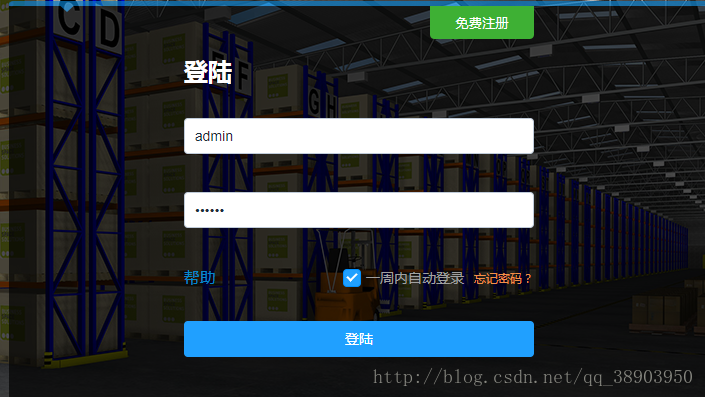
//login.vue

<template>

    <div>

        <el-form :model="ruleForm" :rules="rules" ref="ruleForm" class="demo-ruleForm loginFrom">

        <h1 style="font-size: 1.5rem;color: #fff;font-weight: bold;padding: 1rem 0;">登陆</h1>

        <el-form-item>

            <el-input placeholder="账号" v-model="ruleForm.userName"></el-input>

        </el-form-item>

        <el-form-item>

            <el-input type="password" v-model="ruleForm.password" placeholder="密码"></el-input>

        </el-form-item>

        <div style="padding: 1rem 0 2rem 0;" class="clear">

            <span class="lf" style="color:#0489cc;">帮助</span>

            <div class="rt">

                <el-checkbox v-model="checked" style="color:#a0a0a0;">一周内自动登录</el-checkbox>

                <span @click="clearCookie" style="cursor: pointer;color: #f19149;font-size: 0.75rem;margin-left: 5px;">忘记密码?</span>

            </div>

        </div>

        <el-button type="primary" @click="submitForm('ruleForm')" style="width: 100%;">登陆</el-button>

    </el-form>

    <el-form :model="ruleForm" :rules="rules" ref="ruleForm" class="demo-ruleForm loginFrom">

        <h1 style="font-size: 1.5rem;color: #fff;font-weight: bold;padding: 1rem 0;">登陆</h1>

        <el-form-item>

            <el-input placeholder="账号" v-model="ruleForm.userName"></el-input>

        </el-form-item>

        <el-form-item>

            <el-input type="password" v-model="ruleForm.password" placeholder="密码"></el-input>

        </el-form-item>

        <div style="padding: 1rem 0 2rem 0;" class="clear">

            <span class="lf" style="color:#0489cc;">帮助</span>

            <div class="rt">

                <el-checkbox v-model="checked" style="color:#a0a0a0;">一周内自动登录</el-checkbox>

                <span @click="clearCookie" style="cursor: pointer;color: #f19149;font-size: 0.75rem;margin-left: 5px;">忘记密码?</span>

            </div>

        </div>

        <el-button type="primary" @click="submitForm('ruleForm')" style="width: 100%;">登陆</el-button>

    </el-form>

    </div>

</template>

<script>

export default {

  data() {

    return {

      ruleForm: {

        userName: "", //用户名

        password: "" //密码

      }

    };

  },

  methods: {

    //点击登录调用方法

    submitForm(formName) {

      //保存的账号

      var name = this.ruleForm.userName;

      //保存的密码

      var pass = this.ruleForm.password;

      if (name == "" || name == null) {

        alert("请输入正确的用户名");

        return;

      } else if (pass == "" || pass == null) {

        alert("请输入正确的密码");

        return;

      }

      //判断复选框是否被勾选 勾选则调用配置cookie方法

      if ((this.checked = true)) {

        //传入账号名,密码,和保存天数3个参数

        this.setCookie(name, pass, 7);

      }

      //接口

      var url = "myserver/user/login";

      this.$http.post(url, this.ruleForm, { emulateJSON: true }).then(res => {

        if (res.body == "fail") {

          alert("用户名或密码错误,请重新输入");

          this.ruleForm.userName = "";

          this.ruleForm.password = "";

          return;

        } else {

          alert("登陆成功");

          this.$router.push("/index");

        }

      });

    },

    //设置cookie

    setCookie(c_name, c_pwd, exdays) {

      var exdate = new Date(); //获取时间

      exdate.setTime(exdate.getTime() + 24 * 60 * 60 * 1000 * exdays); //保存的天数

      //字符串拼接cookie

      window.document.cookie =

        "userName" + "=" + c_name + ";path=/;expires=" + exdate.toGMTString();

      window.document.cookie =

        "userPwd" + "=" + c_pwd + ";path=/;expires=" + exdate.toGMTString();

    },

    //读取cookie

    getCookie: function() {

      if (document.cookie.length > 0) {

        var arr = document.cookie.split("; "); //这里显示的格式需要切割一下自己可输出看下

        for (var i = 0; i < arr.length; i++) {

          var arr2 = arr[i].split("="); //再次切割

          //判断查找相对应的值

          if (arr2[0] == "userName") {

            this.ruleForm.userName = arr2[1]; //保存到保存数据的地方

          } else if (arr2[0] == "userPwd") {

            this.ruleForm.password = arr2[1];

          }

        }

      }

    },

    //清除cookie

    clearCookie: function() {

      this.setCookie("", "", -1); //修改2值都为空,天数为负1天就好了

    }

  },

  //页面加载调用获取cookie值

  mounted() {

    this.getCookie();

  }

};

</script>

<style></style>
vue+element-ui实现cookie登录的更多相关文章
- 基于vue(element ui) + ssm + shiro 的权限框架
zhcc 基于vue(element ui) + ssm + shiro 的权限框架 引言 心声 现在的Java世界,各种资源很丰富,不得不说,从分布式,服务化,orm,再到前端控制,权限等等玲琅满目 ...
- 分享一个自搭的框架,使用Spring boot+Vue+Element UI
废弃,新的:https://www.cnblogs.com/hackyo/p/10453243.html 特点:前后端分离,可遵循restful 框架:后端使用Spring boot,整合了aop.a ...
- Vue + Element UI 实现权限管理系统
Vue + Element UI 实现权限管理系统 前端篇(一):搭建开发环境 https://www.cnblogs.com/xifengxiaoma/p/9533018.html
- vue + element ui 实现实现动态渲染表格
前言:之前需要做一个页面,能够通过表名动态渲染出不同的表格,这里记录一下.转载请注明出处:https://www.cnblogs.com/yuxiaole/p/9786326.html 网站地址:我的 ...
- vue + element ui 表格自定义表头,提供线上demo
前言:工作中用到 vue+element ui 的前端框架,需要使用自定义表头,需要使用 re.转载请注明出处:https://www.cnblogs.com/yuxiaole/p/9710826.h ...
- vue+element ui 的上传文件使用组件
前言:工作中用到 vue+element ui 的前端框架,使用到上传文件,则想着封装为组件,达到复用,可扩展.转载请注明出处:https://www.cnblogs.com/yuxiaole/p/9 ...
- vue+element ui 的表格列使用组件
前言:工作中用到 vue+element ui 的前端框架,有这个场景:很多表格的列有许多一样的,所以考虑将列封装为组件.转载请注明出处:https://www.cnblogs.com/yuxiaol ...
- vue+element ui 的tab 动态增减,切换时提示用户是否切换
前言:工作中用到 vue+element ui 的前端框架,动态添加 Tab,删除 Tab,切换 Tab 时提示用户是否切换等,发现 element ui 有一个 bug,这里记录一下如何实现.转载 ...
- 基于 vue+element ui 的cdn网站(多页面,都是各种demo)
前言:这个网站持续更新中...,有网上预览,github上也有源码,喜欢记得star哦,欢迎留言讨论. 网站地址:我的个人vue+element ui demo网站 github地址:yuleGH g ...
- vue + element ui 阻止表单输入框回车刷新页面
问题 在 vue+element ui 中只有一个输入框(el-input)的情况下,回车会提交表单. 解决方案 在 el-form 上加上 @submit.native.prevent 这个则会阻止 ...
随机推荐
- MySql数据查询的逻辑蕴含条件问题
SQL语言中没有蕴含逻辑运算.但是,可以利用谓词演算将一个逻辑蕴含的谓词等价转换为:p->q ≡┐p∨q. 我们通过一个具体的题目来分析:(具体的表和数据详见文章:Mysql数据库中的EXIST ...
- ssh动态转发小记
ssh,一般常用来做远程登录管理,也就是连上远程机器,得到一个shell,然后交互式地在上面敲命令-看结果-再敲命令. 偶尔也会用在脚本里,做些自动化批处理上传下载的操作,但本质上也是用shell来执 ...
- 31、NGS 常用分析软件
转载:http://www.zilhua.com/2081.html 参考资料:http://bioinfo.mc.vanderbilt.edu/NGS/software.htm 1. Mapping ...
- Python及R安装包版本查看方法
R包查询 查询已安装的所有的包:library() 或installed.packages()(括号内为空,区别以上两项) 查询具体包的信息: help(package="pheatmap& ...
- 【NLP】中文分词:原理及分词算法
一.中文分词 词是最小的能够独立活动的有意义的语言成分,英文单词之间是以空格作为自然分界符的,而汉语是以字为基本的书写单位,词语之间没有明显的区分标记,因此,中文词语分析是中文信息处理的基础与关键. ...
- Entity Framework Code-First(9.4):DataAnnotations - Required Attribute
Required attribute can be applied to a property of a domain class. EF Code-First will create a NOT N ...
- Spring入门第二十四课
Spring对JDBC的支持 直接看代码: db.properties jdbc.user=root jdbc.password=logan123 jdbc.driverClass=com.mysql ...
- java中的几种架构对象(PO,VO,DAO,BO,POJO)
java中的几种对象(PO,VO,DAO,BO,POJO) 一.PO :(persistant object ),持久对象 可以看成是与数据库中的表相映射的java对象.使用Hibernate来生 ...
- 7.27实习培训日志-Oracle SQL(三)
Oracle SQL(三) 视图 特性 简单视图 复杂视图 关联的表数量 1个 1个或多个 查询中包含函数 否 是 查询中包含分组数据 否 是 允许对视图进行DML操作 是 否 CREATE [OR ...
- 第四周作业-视频学习、教材作业wireshark
教材总结与作业 总结 网络嗅探技术定义:网络嗅探(sniff)是一种黑客常用的窃听技术,(1)利用计算机的网络接口截获目的地为其他计算机的数据报文,(2)监听数据流中所包含的用户账户密码或私密通信等. ...