
ASP.NET设置母版页
母版页允许开发人员创建具有指定的可编辑区域的站点级模板。随后,此模板可应用到网站中的 ASP.NET 页面上。这些 ASP.NET 页面只需为母版页中指定的可编辑区域提供相应内容 – 在使用母版页的所有 ASP.NET 页面中,母版页中的所有其它标记都相同。此模型允许开发人员定义并集中实现站点级页面布局。 因此,开发人员可以方便地为所有页面创建一致的外观,并进行轻松的更新。
简而言之:在一个网站上会有很多页面,并且有可能有的页面都有相同的部分,这样的话我们就可以将相同的部分制作成一个母版页,在多个页面进行调用,节省了代码的重复使用和开发效率。
开发过程:
新建两个html文件HtmlPage1.html,HtmlPage2.html,一个web窗体WebForm.aspx,一个web窗体用户控件WebUserControl1.ascx
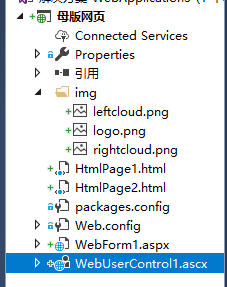
第一种方式,利用纯html制作
1.首先我们先用静态html制作一个母版页,再利用iframe来显示母版页
HtmlPage1.html为母版页
<!DOCTYPE html>

<html>

<head>

    <meta charset="utf-8" />

    <title></title>

    <style>

        body{

            margin:0px;

        }

        #top{

            width:%;

            height:100px;

            background-color:#6f5e5e;

        }

        .left{

          float:left;

         margin-top:12px;

         margin-left:25px;

        }

        .logo{

            margin-left:auto;

            margin-right:auto;

            margin-top:25px;

        }

        img{

           vertical-align:middle;

        }

        .right{

          float:right;

        }

    </style>

</head>

<body>

 <div id="top">

  <img src="img/leftcloud.png" class="left" />

     <img src="img/logo.png" class="logo" />

     <img src="img/rightcloud.png" class="right" />

 </div>

</body>

</html>
HtmlPage2.html来调用
<!DOCTYPE html>

<html>

<head>

    <meta charset="utf-8" />

    <title></title>

</head>

<body style="margin:0px">

    <iframe src="HtmlPage1.html" width="100%" height="100px"></iframe>

    //利用iframe框架标签来显示

</body>

</html>
第二种方式利用ASP.NET制作
分别利用iframe框架标签和调用web用户控件来显示
用web用户控件制作母版页,因为测试所以代码跟HtmlPage1.html基本一样
web窗体用户控件WebUserControl1.ascx代码
<%@ Control Language="C#" AutoEventWireup="true" CodeBehind="WebUserControl1.ascx.cs" Inherits="WebApplication3.WebUserControl1" %>

<style>

        body{

            margin:0px;

        }

        #top{

            width:%;

            height:100px;

            background-color:#6f5e5e;

        }

        .left{

          float:left;

         margin-top:12px;

         margin-left:25px;

        }

        .logo{

            margin-left:auto;

            margin-right:auto;

            margin-top:25px;

        }

        img{

           vertical-align:middle;

        }

        .right{

          float:right;

        }

    </style>

 <div id="top">

  <img src="img/leftcloud.png" class="left" />

     <img src="img/logo.png" class="logo" />

     <img src="img/rightcloud.png" class="right" />

 </div>
web窗体WebForm1.aspx调用代码
 <%@ Page Language="C#" AutoEventWireup="true" CodeBehind="WebForm1.aspx.cs" Inherits="WebApplication3.WebForm1" %>

 <%@ Register Src="~/WebUserControl1.ascx" TagPrefix="uc1" TagName="WebUserControl1" %>

 <!DOCTYPE html>

 <html xmlns="http://www.w3.org/1999/xhtml">

 <head runat="server">

 <meta http-equiv="Content-Type" content="text/html; charset=utf-8"/>

     <title></title>

 </head>

 <body style="margin:0px">

      <!--两种方式嵌入不需要改变的网页显示部分-->

     <iframe src="HtmlPage1.html" width="100%" height="100px"></iframe> <!--iframe 框架标签-->

     <form id="form1" runat="server">

         <uc1:WebUserControl1 runat="server" id="WebUserControl1" />

         <!--web窗体用户控件-->

     </form>

 </body>

 </html>
asp调用web窗体用户控件很简单,你着需要从解决方案那里把用户控件拖到代码区就行了,厉害吧
ASP.NET设置母版页的更多相关文章
- pages 元素(ASP.NET 设置架构)web.config 详解
pages 元素(ASP.NET 设置架构) buffer="[True|False]" enableEventValidation="[True|False] ...
- 【配置】检测到在集成的托管管道模式下不适用的ASP.NET设置的解决方法(非简单设置为【经典】模式)。
× 检测到在集成的托管管道模式下不适用的ASP.NET设置的解决方法(非简单设置为[经典]模式). 我们将ASP.NET程序从IIS6移植到IIS7,可能运行提示以下错误: HTTP 错误 5 ...
- 检测到在集成的托管管道模式下不适用的ASP.NET设置的解决方法(转)
我们将ASP.NET程序从IIS6移植到IIS7,可能运行提示以下错误: HTTP 错误 500.23 - Internal Server Error 检测到在集成的托管管道模式下不适用的 ASP.N ...
- HTTP 错误 500.23 - Internal Server Error 检测到在集成的托管管道模式下不适用的 ASP.NET 设置。
检测到在集成的托管管道模式下不适用的ASP.NET设置的解决方法(非简单设置为[经典]模式). - CatcherX 2014-03-11 11:03 27628人阅读 评论(2) 收藏 举报 分类 ...
- ASP.NET 之 检测到在集成的托管管道模式下不适用的ASP.NET设置
将ASP.NET程序从IIS6移植到IIS7后,调试运行可能提示以下错误: HTTP 错误 500.23 - Internal Server Error 检测到在集成的托管管道模式下不适用的 ASP. ...
- asp.net C#母版页和内容页事件排版载入顺序生命周期
asp.net C#母版页和内容页事件排版载入顺序生命周期 关于ASP页面Page_Load发生在事件之前而导致的问题已经喜闻乐见,对于问题的解释也非常全面.可是怎样解决这个问题则较少有人说明,我就再 ...
- 2014-07-31 ASP.NET的母版页使用
今天是在吾索实习的第17天.我在这天主要负责系统的骨架的搭建.首当其冲,要用的知识点就是ASP.NET母版页的使用了. ASP.NET的母版页有两种:一种是MasterPage,最常用也是最普通的母版 ...
- (转)检测到在集成的托管管道模式下不适用的ASP.NET设置的解决方法(转)
我们将ASP.NET程序从IIS6移植到IIS7,可能运行提示以下错误: HTTP 错误 500.23 - Internal Server Error 检测到在集成的托管管道模式下不适用的 ASP.N ...
- roleManager 元素(ASP.NET 设置架构),我是因为SSL弱密码(转)
为角色管理配置应用程序. 此元素是 .NET Framework 2.0 版中的新元素. configuration 元素(常规设置架构) system.web 元素(ASP.NET 设置架构) ...
随机推荐
- Ubuntu wubi.exe 安装到Windows 正在下载ubuntu-11.04-desktop-i386.iso
下载一个Ubuntu的iso镜像,用虚拟光驱加载后,点击 wubi.exe->安装到Windows 设置好后,进入安装,又自动开始下载iso镜像了,提示:正在下载ubuntu-11.04-des ...
- 分割字符串(C++)
方案1: 利用"IO流"的概念,即C++中的stream,我们都用过C++中std::iostream中的std::istream与std::ostream 如果你接触过网络编程( ...
- Python文件操作,异常语法
1.文件 2.异常 1.文件的输入输出 #1.打开文件 open 函数open(file,[option])#file 是要打开的文件#option是可选择的参数,常见有 mode 等#2.文件的打 ...
- Hdu 5862 Counting Intersections(有n条线段,每一条线段都是平行于x轴或者y轴,问有多少个交点+树状数组区间求和单点跟新)
传送门:Hdu 5862 Counting Intersections 题意:有n条线段,每一条线段都是平行于x轴或者y轴,问有多少个交点 分析: 基本的操作流程是:先将所有的线段按照横树坐标x按小的 ...
- Pycharm在线/手动离线安装第三方库-以scapy为例(本地离线添加已经安装的第三方库通过添加Path实现)
在线安装运行Pycharm,打开需要添加scapy文件的项目,以TestScapy为例 点击工具栏的File选项,选中Settings,单击打开 ...
- asp.net AD 域验证
1.获取环境变量 string strAuthUser = request.ServerVariables["AUTH_USER"] 以上这行代码是用来获取当前用户的登录名 2.I ...
- iPhone10.3.X越狱后SSH连接不上的问题(已解决)
iPhone10.3.X越狱后SSH连接不上的问题 G0blin RC2,iPhone5s10.3.3 Jailbreak 最近研究了好几天,试了好多的方法. ssh 访问越狱iPhone的两种方式 ...
- Tcpdump 的详细用法
1.抓取回环网口的包:tcpdump -i lo 2.防止包截断:tcpdump -s0 3.以数字显示主机及端口:tcpdump -n 第一种是关于类型的关键字,主要包括host,net,port, ...
- 一行CMD命令kill(杀)掉你的进程
查看进程 pi@raspberry:~ $ ps -ef | grep python3 UID PID PPID C STIME TTY TIME CMD pi 4678 4666 0 11:57 p ...
- my08_mysqldump+binlog server备份
备份策略描述 ******************************************* mysqldump备份适用于小数据量的备份,比如100G以下的数据量,就可以使用逻辑备份 举例两个 ...