
springmvc----demo---login---bai
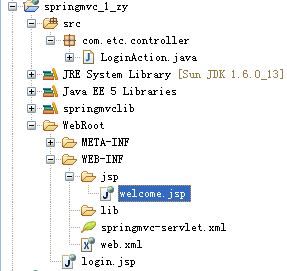
web.xml配置:

<?xml version="1.0" encoding="UTF-8"?>

<web-app version="2.5" xmlns="http://java.sun.com/xml/ns/javaee"

	xmlns:xsi="http://www.w3.org/2001/XMLSchema-instance"

	xsi:schemaLocation="http://java.sun.com/xml/ns/javaee

	http://java.sun.com/xml/ns/javaee/web-app_2_5.xsd">

	<servlet>

		<servlet-name>springmvc</servlet-name>

		<servlet-class>org.springframework.web.servlet.DispatcherServlet</servlet-class>

	</servlet>

	<servlet-mapping>

		<servlet-name>springmvc</servlet-name>

		<url-pattern>*.html</url-pattern>

	</servlet-mapping>

	<welcome-file-list>

		<welcome-file>index.jsp</welcome-file>

	</welcome-file-list>

</web-app>

========================================================================

springmvc-servlet.xml配置:

<?xml version="1.0" encoding="UTF-8"?>

<beans

	xmlns="http://www.springframework.org/schema/beans"

	xmlns:xsi="http://www.w3.org/2001/XMLSchema-instance"

	xmlns:p="http://www.springframework.org/schema/p"

	xmlns:context="http://www.springframework.org/schema/context"

	xsi:schemaLocation="http://www.springframework.org/schema/beans http://www.springframework.org/schema/beans/spring-beans-3.0.xsd

	http://www.springframework.org/schema/context http://www.springframework.org/schema/context/spring-context-3.0.xsd">

	<context:component-scan base-package="com.etc.controller">

	</context:component-scan>

	<bean id="viewResolver" class="org.springframework.web.servlet.view.UrlBasedViewResolver" >

		<property name="prefix" value="/WEB-INF/jsp/"/>

		<property name="suffix" value=".jsp"/>

		<property name="viewClass" value="org.springframework.web.servlet.view.JstlView"/>

	</bean>

</beans>

==========================================================================

login.jsp:

<%@ page language="java" import="java.util.*" pageEncoding="UTF-8"%>

<%

String path = request.getContextPath();

String basePath = request.getScheme()+"://"+request.getServerName()+":"+request.getServerPort()+path+"/";

%>

<!DOCTYPE HTML PUBLIC "-//W3C//DTD HTML 4.01 Transitional//EN">

<html>

  <head>

    <base href="<%=basePath%>">

    <title>My JSP 'index.jsp' starting page</title>

	<meta http-equiv="pragma" content="no-cache">

	<meta http-equiv="cache-control" content="no-cache">

	<meta http-equiv="expires" content="0">

	<meta http-equiv="keywords" content="keyword1,keyword2,keyword3">

	<meta http-equiv="description" content="This is my page">

	<!--

	<link rel="stylesheet" type="text/css" href="styles.css">

	-->

  </head>

  <body>

  ${msg }

        <form action="login.html" method="post">

    用户名: <input name="username" /> <br/>

  密码:   <input name="password" type="password"/><br/>

     <input type="submit" value="登录"/>

    </form>

  </body>

</html>

==========================================================================

LoginAction:

package com.etc.controller;

import java.util.HashMap;

import java.util.Map;

import org.springframework.stereotype.Controller;

import org.springframework.web.bind.annotation.RequestMapping;

import org.springframework.web.bind.annotation.RequestMethod;

import org.springframework.web.bind.annotation.RequestParam;

import org.springframework.web.servlet.ModelAndView;

@Controller

public class LoginAction

{

	@RequestMapping(value="/login",method=RequestMethod.POST)

	public ModelAndView login(@RequestParam(value="username",required=true)String username

			,@RequestParam(value="password",required=true)String password)

	{

		Map<String,String> model = new HashMap<String,String>();

		ModelAndView ma = null;

		//判断是否正确

		if("admin".equals(username)&&"123".equals(password))

		{

			model.put("username", username);

			ma = new ModelAndView("welcome", model);

		}

		else

		{

			model.put("msg", "用户名或密码错误!");

			ma = new ModelAndView("../../login", model);

		}

		return ma;

	}

}

==========================================================================

welcome.jsp:

<%@ page language="java" import="java.util.*" pageEncoding="UTF-8"%>

<%

String path = request.getContextPath();

String basePath = request.getScheme()+"://"+request.getServerName()+":"+request.getServerPort()+path+"/";

%>

<!DOCTYPE HTML PUBLIC "-//W3C//DTD HTML 4.01 Transitional//EN">

<html>

  <head>

    <base href="<%=basePath%>">

    <title>My JSP 'welcome.jsp' starting page</title>

	<meta http-equiv="pragma" content="no-cache">

	<meta http-equiv="cache-control" content="no-cache">

	<meta http-equiv="expires" content="0">

	<meta http-equiv="keywords" content="keyword1,keyword2,keyword3">

	<meta http-equiv="description" content="This is my page">

	<!--

	<link rel="stylesheet" type="text/css" href="styles.css">

	-->

  </head>

  <body>

    登录成功,欢迎${username }。

  </body>

</html>

==========================================================================
springmvc----demo---login---bai的更多相关文章
- 【Spring学习】SpringMVC demo搭建
前言:今天会通过IDEA建立一个SpringMVC的demo项目,在其中会涉及到一些基础模块和相关知识,然后结合这个具体的知识点,理解清楚SpringMVC的框架原理(以图的形式展示),顺藤摸瓜分析源 ...
- springMVC demo搭建
1.使用idea新建一个基于maven的web项目,参考 http://www.cnblogs.com/winkey4986/p/5279820.html 2.采取了比较偷懒的配置方法,只配置了一个D ...
- springmvc demo
[说明]今天上午稍稍偏了一下方向,看了看servlet的相关知识,下午做maven+spring+springMVC的整合,晚上成功实现了一个小demo(可以在jsp动态页面上获得通过地址栏输入的参数 ...
- SpringMVC demo 小例子,实现简单的登录和注册
1.创建一个动态的web工程 2.导入springMvc所需要的jar包(这里可以去网上找,资源有很多) 前两部就不详细描述了,后面才是正经代码~ 首先有一个web.xml文件,这个属于大配置文件,由 ...
- SpringMvc demo示例及源码详细分析
三层架构介绍 我们的开发架构一般都是基于两种形式,一种C/S架构,也就是客户端/服务器,另一种是B/S架构,也就是浏览器/服务器.在JavaEE开发中,几乎全部都是基于B/S架构的开发.那么在B/S架 ...
- IntelliJ IDEA springmvc demo
construction pom.xml <project xmlns="http://maven.apache.org/POM/4.0.0" xmlns:xsi=" ...
- 【SSH系列】深入浅出SpringMvc+入门Demo
Spring MVC框架是有一个MVC框架,通过实现Model-View-Controller模式来很好地将数据.业务与展现进行分离.从这样一个角度来说,Spring MVC和Struts.Strut ...
- 在Eclipse中使用Maven构建SpringMVC项目
环境搭建 安装JDK, Eclipse, Tomcat等 – 请参考网上常见攻略. 安装Maven: 下载需要的Maven 版本( http://maven.apache.org/download.c ...
- JAVA WEB快速入门之从编写一个基于SpringMVC框架的网站了解Maven、SpringMVC、SpringJDBC
接上篇<JAVA WEB快速入门之通过一个简单的Spring项目了解Spring的核心(AOP.IOC)>,了解了Spring的核心(AOP.IOC)后,我们再来学习与实践Maven.Sp ...
- 【Spring】SpringMVCの環境構築(簡)(Version3.1)
■Mavenでプロジェクトの新規 ■プロジェクトのイメージ ■必要なラブリア ■ソース ①pom.xml <?xml version="1.0" encoding=" ...
随机推荐
- jQuery颜色面板插件
/** * jQuery颜色面板插件 * * 使用方法:input框的id默认为inputObj,button框的id默认为btnObj,也可以自定义aaa,bbb * 1.初始化颜色面板:$.col ...
- 【转】ListView优化为何ViewHolder用static类
如果有人还不了解ViewHolder为什么可以起到优化作用,我这边再做下简单说明:Android的findViewById动作是比较耗时的,需要遍历布局的树形结构,才能找到相应的视图.所以如果想在这一 ...
- linux防火墙开关
对于普通Linux机器开关防火墙命令: 1重启后生效 chkconfig iptables off chkconfig iptables on 2即时生效 serivce iptables statu ...
- c# 判断一个ip通不通 能不能ping通
方法一: 已经证实能用的. using System; using System.Collections.Generic; using System.ComponentModel; using Sys ...
- CSS3中与文字相关的样式
1.给文字添加阴影:text-shadow属性(特别指出IE浏览器要IE10+的版本才支持) 语法如下: text-shadow:length length length color; 其中,第 ...
- jstl: <c:url> 标签
这个标签主要是用来重写 URL 地址.它的使用格式如下所示:<c:url value=”value” [context=”context”] [var=”varName”] [scope=”pa ...
- CC++中sizeof函数的用法
C/C++中sizeof()函数的用法 学习C/C++有时会遇到下面的情况: 已知 char *str1="absde"; char str2[]="absde" ...
- hive中order by,sort by, distribute by, cluster by的用法
1.order by hive中的order by 和传统sql中的order by 一样,对数据做全局排序,加上排序,会新启动一个job进行排序,会把所有数据放到同一个reduce中进行处理,不管数 ...
- AOP注解式拦截
1. 自己定义的拦截注解 package com.spring.aop; import java.lang.annotation.Documented; import java.lang.annota ...
- spring学习-4
bean的作用域 使用bean的scope属性来配置bean的作用域 scope="singleton":默认是单例模式即容器初始化创建bean实例,在整个容器的生命周期内只创建这 ...