
CoreData的学习
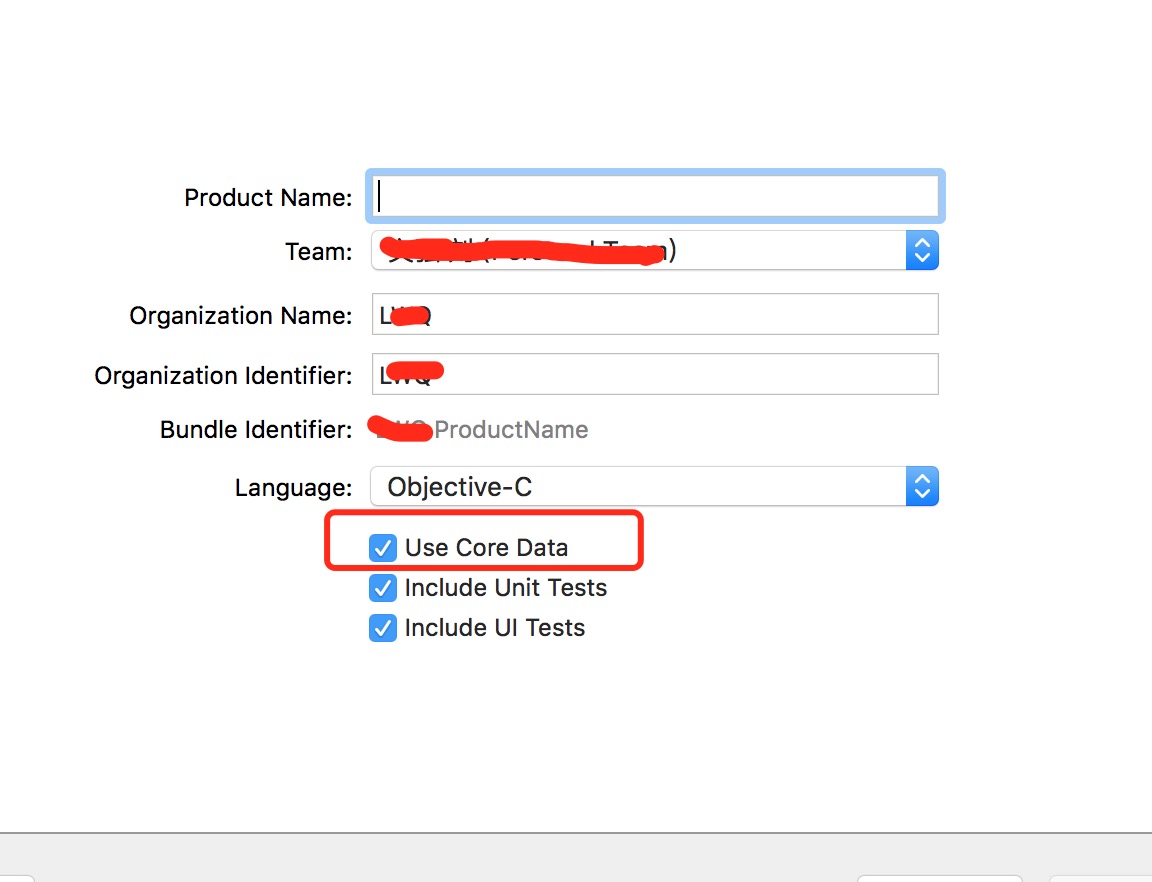
第一步:创建项目是勾选coredata,当然创建的时候没有勾选,之后还可以手动生产,
然后:创建数据库模型,及为其添加模型的属性。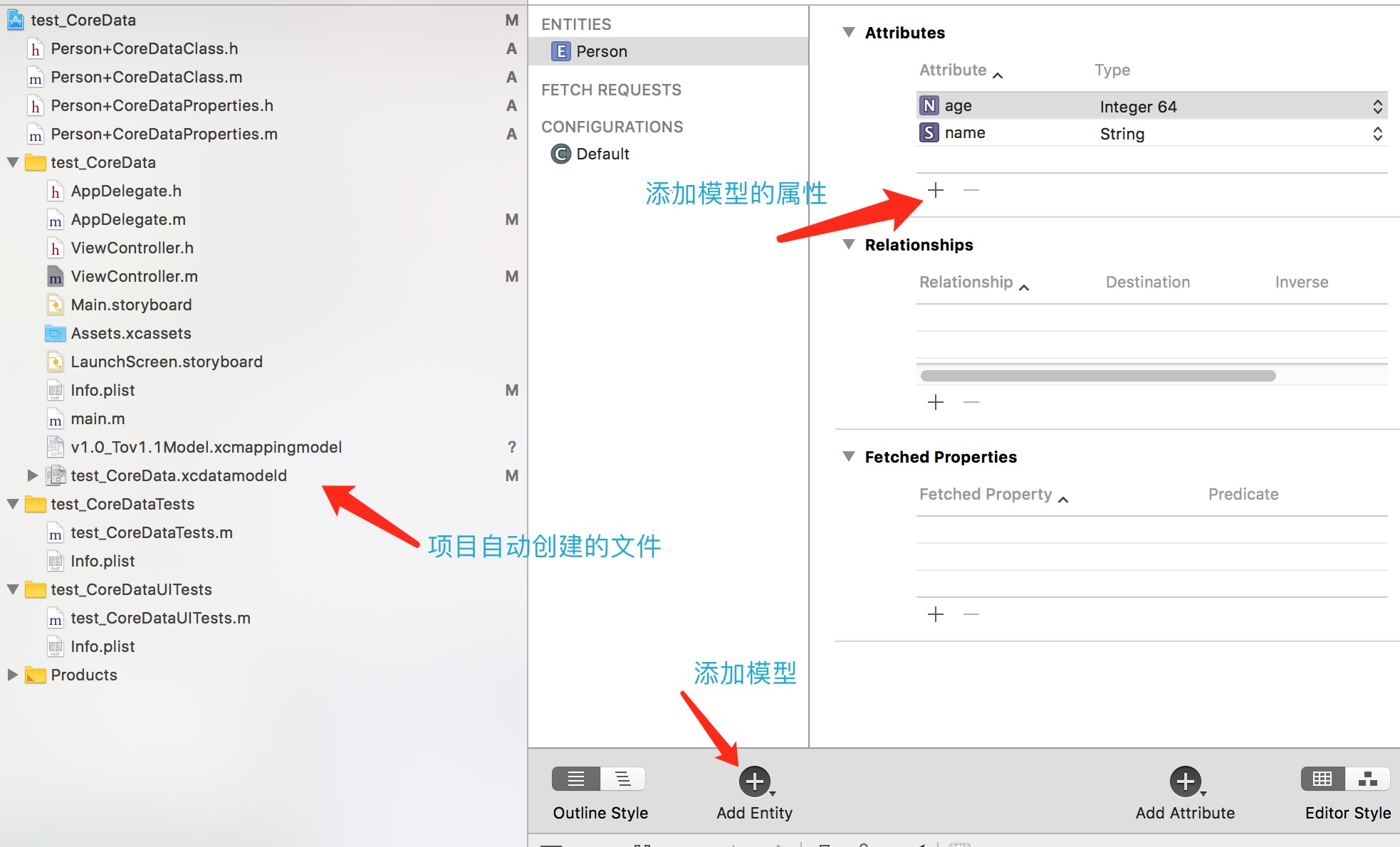
然后生成模型文件:
注意⚠️:首先设置为Manual/None 不然在编译的过程中也会自动生成模型文件 造成编译失败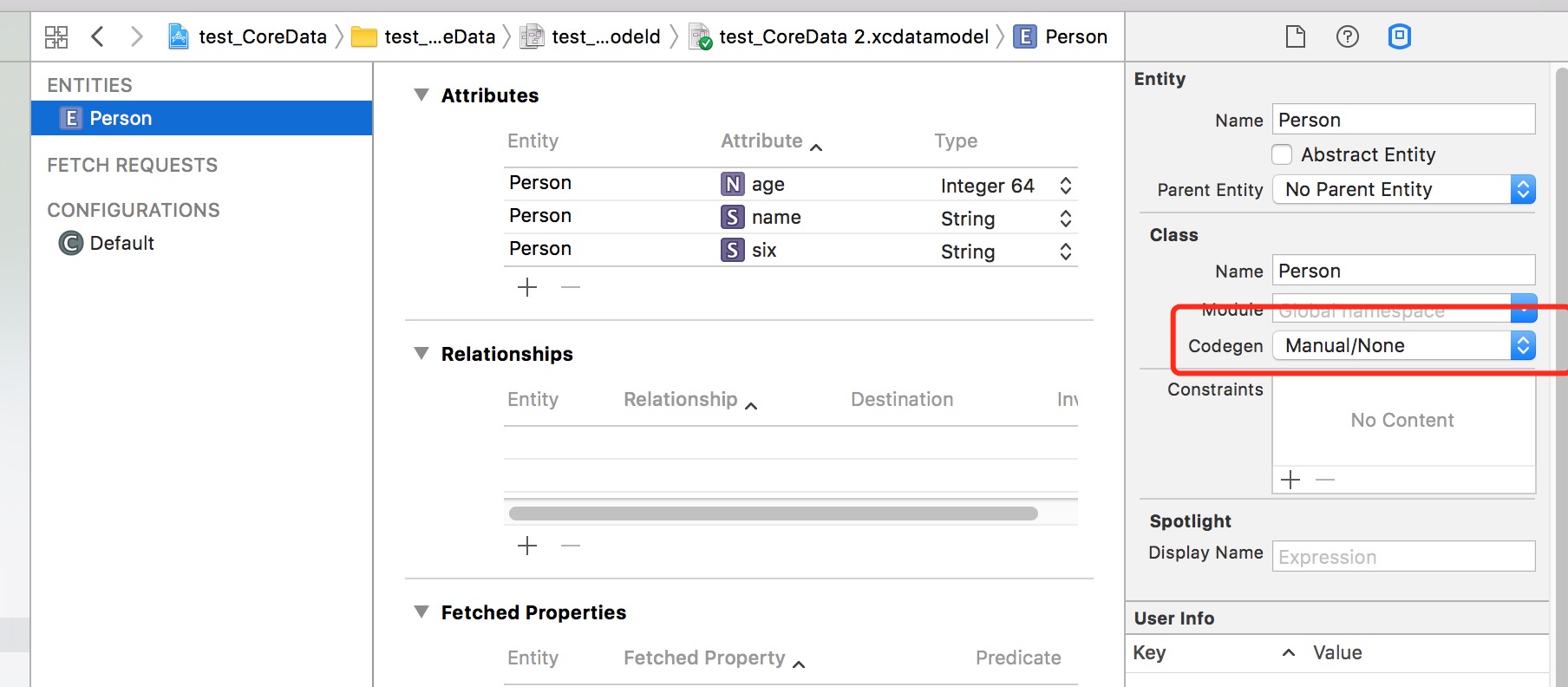
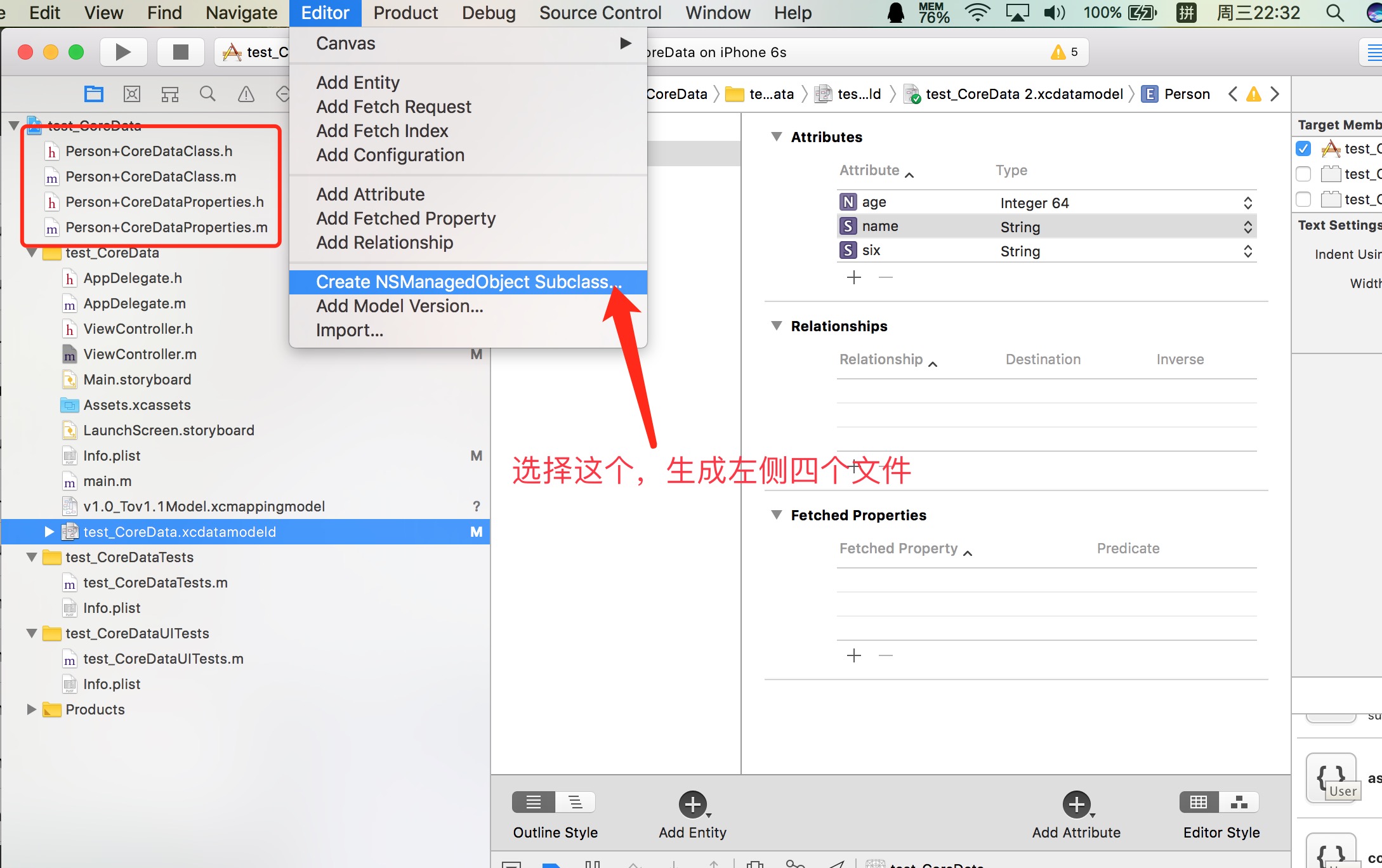
模型文件生成后,不用做修改,
生成模型文件后,就可以使用了。
现在就开始上代码:
#import "ViewController.h"

#import "AppDelegate.h"

#import "Person+CoreDataClass.h"

@interface ViewController ()<UITableViewDelegate,UITableViewDataSource>

@property (nonatomic, strong) UITableView * tableView;

@property (nonatomic, strong) NSMutableArray * dataSource;

@property (nonatomic, strong) AppDelegate * myAppdelegate;

@end

@implementation ViewController

- (void)viewDidLoad {

    [super viewDidLoad];

    self.view.backgroundColor = [UIColor whiteColor];

    // 初始化数据源数组

    self.dataSource = [NSMutableArray array];

    self.tableView = [[UITableView alloc]initWithFrame:self.view.bounds];

    self.tableView.delegate = self;

    self.tableView.dataSource = self;

    [self.view addSubview:self.tableView];

    self.tableView.rowHeight = ;

    UIButton *add = [UIButton buttonWithType:UIButtonTypeContactAdd];

    [add addTarget:self action:@selector(clickAdd) forControlEvents:UIControlEventTouchUpInside];

    UIBarButtonItem *rightitem = [[UIBarButtonItem alloc]initWithCustomView:add];

    self.navigationItem.rightBarButtonItem = rightitem;

    AppDelegate *delegate = (AppDelegate *)[UIApplication sharedApplication].delegate;

    _myAppdelegate = delegate ;

    NSManagedObjectContext *context  = _myAppdelegate.persistentContainer.viewContext;

    // 进入控制器时 查询数据库数据

    /**

     两种方式创建request

     */

//    NSFetchRequest *request = [NSFetchRequest fetchRequestWithEntityName:@"Person"];

    NSFetchRequest *request = [Person fetchRequest];

    /**

     数据排序

     */

    NSSortDescriptor *descriptor = [NSSortDescriptor sortDescriptorWithKey:@"age" ascending:YES];

    request.sortDescriptors = @[descriptor];

    /**

     刷选数据

     */

//    NSPredicate *predicate = [NSPredicate predicateWithFormat:@"age == 8"];

//    request.predicate = predicate;

    NSError *error = nil;

    NSArray *result = [context executeFetchRequest:request error:&error];

    for (Person * p in result) {

        NSLog(@"-查询结果:-----name:%@-------age:%lld",p.name,p.age);

    }

    [self.dataSource addObjectsFromArray:result];

    [self.tableView reloadData];

}

/**

 插入数据

 */

- (void)clickAdd

{

    NSManagedObjectContext *context  = _myAppdelegate.persistentContainer.viewContext;

    Person *person = [NSEntityDescription insertNewObjectForEntityForName:@"Person" inManagedObjectContext:context];

    person.name = @"jeck";

    NSInteger temp = random() %  + ;

    person.age = temp;

    [self.dataSource addObject:person];

    [self.tableView reloadData];

    [_myAppdelegate saveContext];

}

-(NSInteger)tableView:(UITableView *)tableView numberOfRowsInSection:(NSInteger)section

{

    return self.dataSource.count;

}

- (UITableViewCell *)tableView:(UITableView *)tableView cellForRowAtIndexPath:(NSIndexPath *)indexPath

{

    UITableViewCell *cell = [tableView dequeueReusableCellWithIdentifier:@"cell"];

    if (!cell) {

        cell = [[UITableViewCell alloc]initWithStyle:UITableViewCellStyleDefault reuseIdentifier:@"cell"];

    }

    Person *modle = self.dataSource[indexPath.row];

    cell.textLabel.text = [NSString stringWithFormat:@"%@----%lld",modle.name,modle.age];

    return cell;

}

- (BOOL)tableView:(UITableView *)tableView canEditRowAtIndexPath:(NSIndexPath *)indexPath

{

    return YES;

}

/**

 删除数据

 */

- (void)tableView:(UITableView *)tableView commitEditingStyle:(UITableViewCellEditingStyle)editingStyle forRowAtIndexPath:(NSIndexPath *)indexPath

{

    if (editingStyle == UITableViewCellEditingStyleDelete) {

        Person *p = self.dataSource[indexPath.row];

        [self.dataSource removeObject:p];

        [self.tableView deleteRowsAtIndexPaths:@[indexPath] withRowAnimation:UITableViewRowAnimationLeft];

        [_myAppdelegate.persistentContainer.viewContext deleteObject:p];

        [_myAppdelegate saveContext];

    }

}

/**

 点击修改数据

 */

- (void)tableView:(UITableView *)tableView didSelectRowAtIndexPath:(NSIndexPath *)indexPath

{

    Person *p = self.dataSource[indexPath.row];

    p.name = @"rose";

    [_myAppdelegate saveContext];

    [self.tableView reloadRowsAtIndexPaths:@[indexPath] withRowAnimation:UITableViewRowAnimationFade];

}

- (void)didReceiveMemoryWarning {

    [super didReceiveMemoryWarning];

    // Dispose of any resources that can be recreated.

}
简单说一下数据库的升级,模型版本的迁移:(能够使老版本的数据库正常使用)
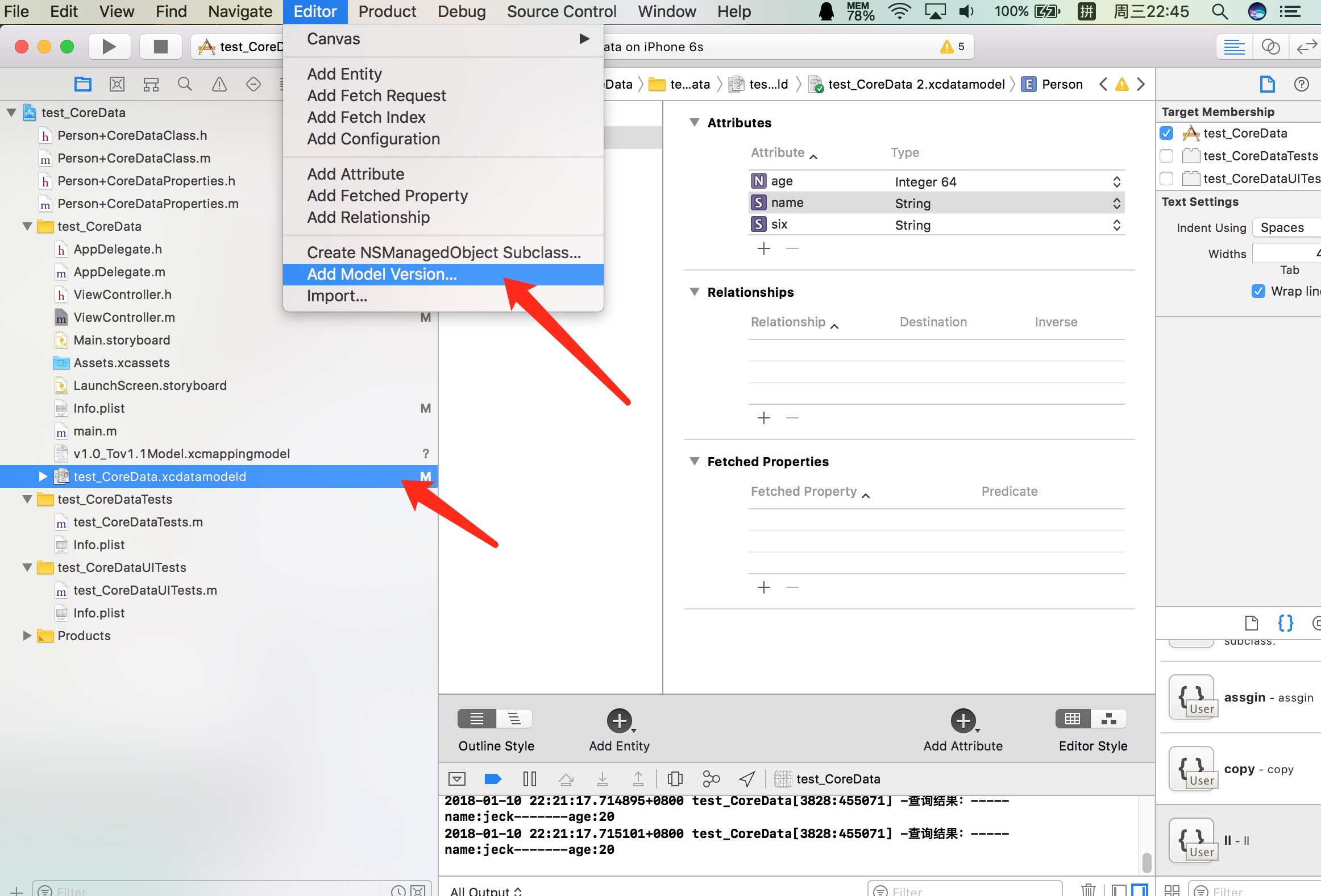
新生成的新数据库文件:
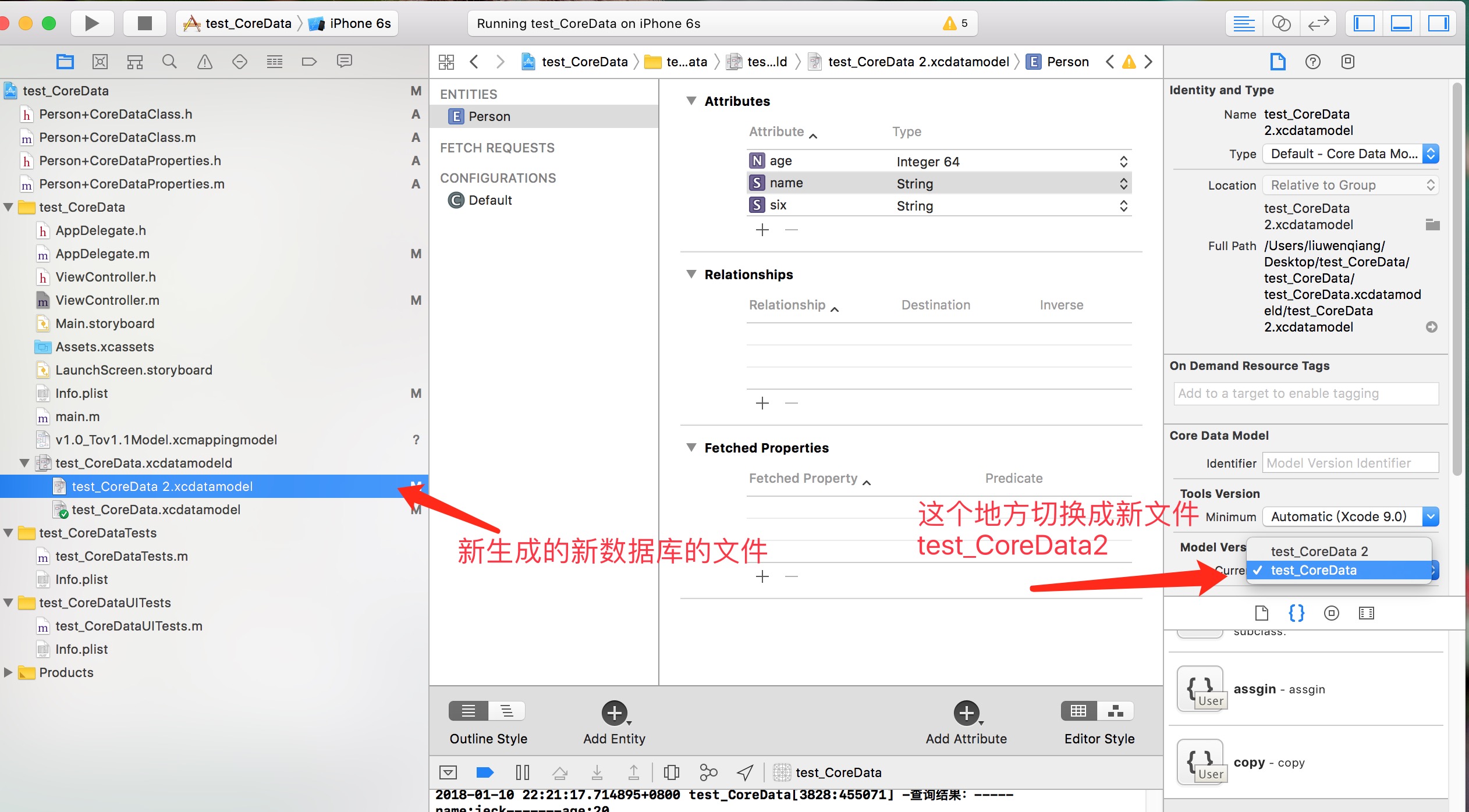
切换之后,文件上勾选的是test_coreDate2了,此时就可以向新的模型库里添加新增的模型属性了,
然后需要生成一个模型的映射文件:
command + N
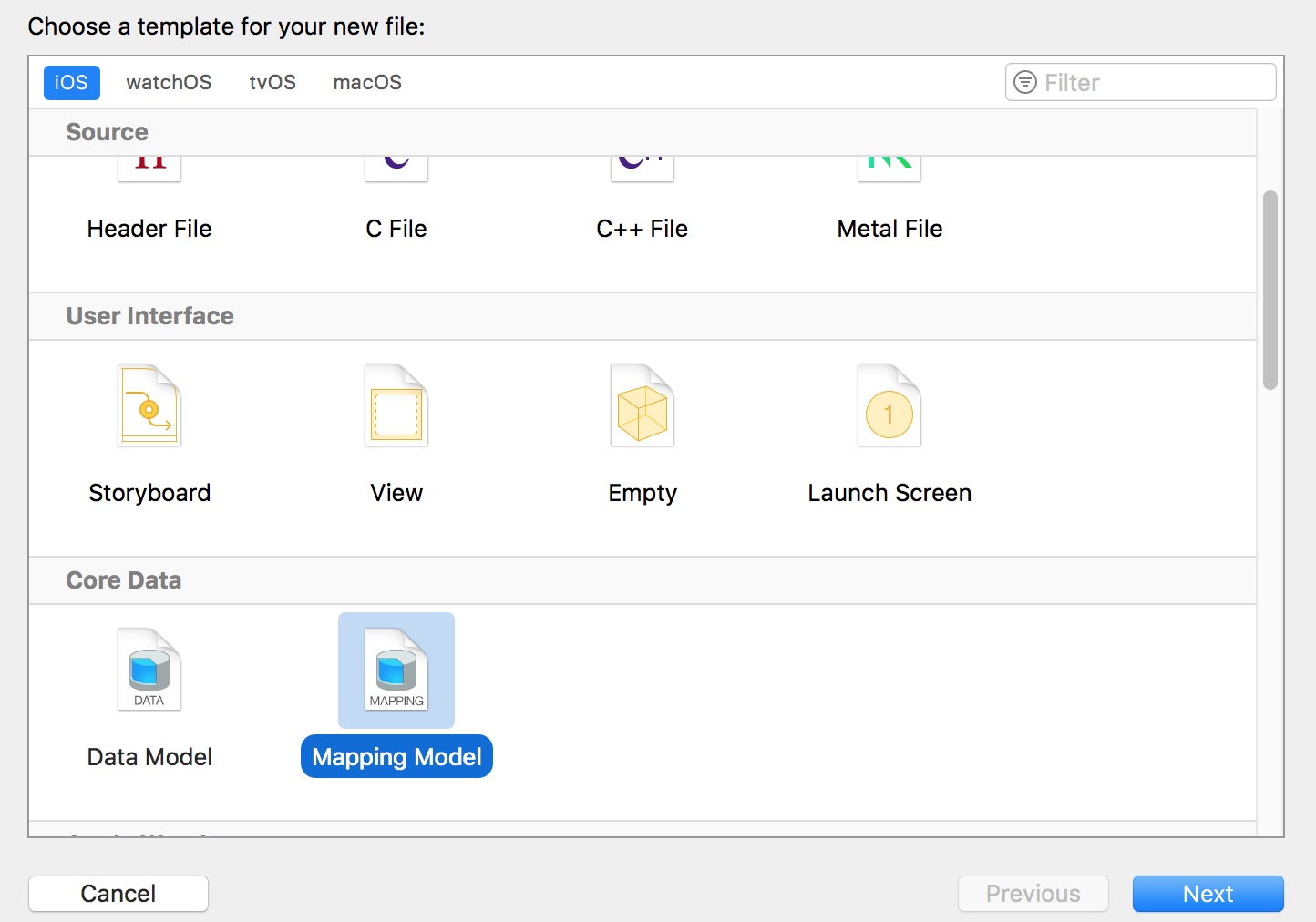
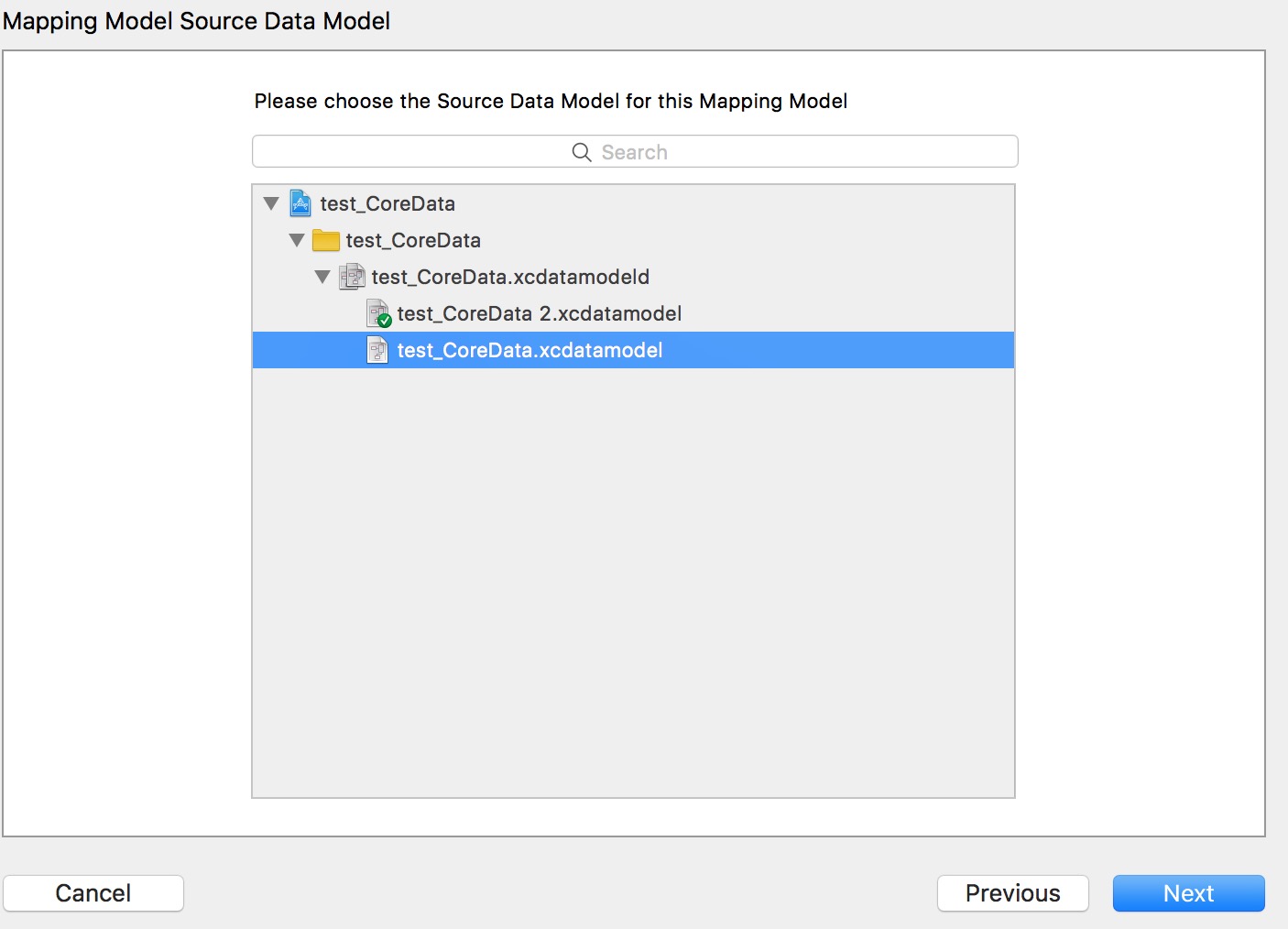
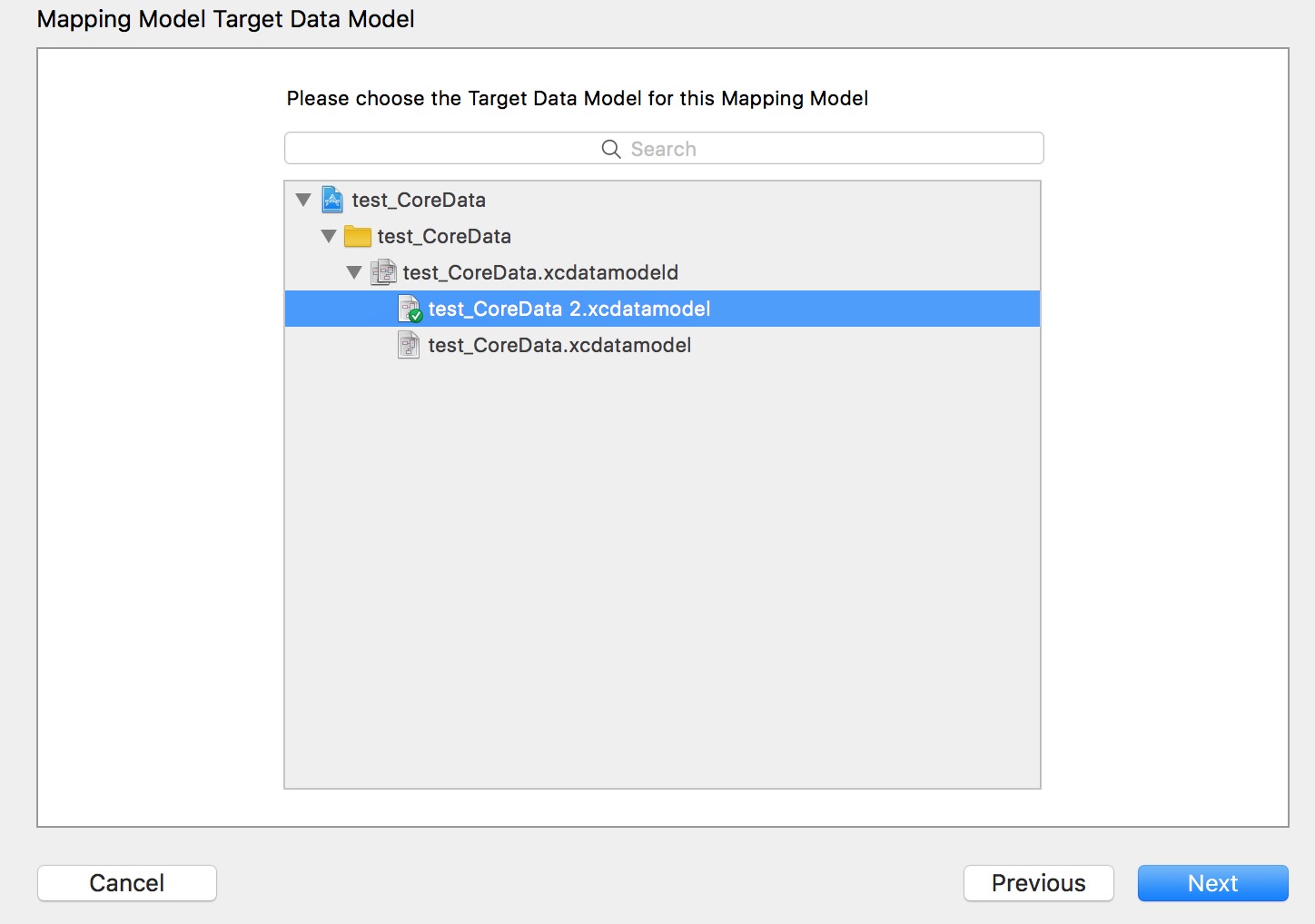
之后就会生成一个 v1.0_Tov1.1Model.xcmappingmodel 文件,前面的名字自己随意;
然后,就把旧的数据库的四个模型文件(Person+CoreDataClass.h ...m Person+CoreDataProperties.h ....m)删除,重新使用新的数据库test_CoreData2 创建模型文件。
看网上说的还需要修改Appdelegate中的代码,发现现在不用修改了。(想修改也找不到地方了,现在自动生成的代码和之前的不一样了)
在网上很多都是旧的,只发现这个比较新点http://blog.csdn.net/willluckysmile/article/details/76464249
CoreData的学习的更多相关文章
- iOS CoreData技术学习资源汇总
一.CoreData学习指引 1. 苹果官方:Core Data Programming Guide 什么是CoreData? 创建托管对象模型 初始化Core Data堆栈 提取对象 创建和修改自定 ...
- Core Data (一)备
序 恩,用Core Data也有一段时间了.大大小小的坑也都坑过了.重来没有认真的记录一次.这次需要好好的理一理Core Data.就当一次绝好的机会记录下来.也为了自己加深认识. 为什么要用Core ...
- masonry使用问题
2015年11月3日 coreData的学习练习中复习使用masonry自动布局 masonry自动布局发现问题: 两个控件的相对布局: 如果被参考对象用这个带anchor的属性,就会报这样一个错误: ...
- FireFox插件SQLite Manager的使用
最近几天开始高IOS数据库来着,一开始就CoreData的学习,结果高了一天没有一点进展. 没法,还是先老实代码着吧,不过用的火狐插件可视化数据库的操作也是不错的似乎. FireFox 插件:SQLi ...
- 【原】iOS学习之SQLite和CoreData数据库的比较
1. SQLite数据库 sqlite数据库操作的基本流程是, 创建数据库, 再通过定义一些字段来定义表格结构, 可以利用sql语句向表格中插入记录, 删除记录, 修改记录, 表格之间也可以建立联系. ...
- IOS学习:ios中的数据持久化初级(文件、xml、json、sqlite、CoreData)
IOS学习:ios中的数据持久化初级(文件.xml.json.sqlite.CoreData) 分类: ios开发学习2013-05-30 10:03 2316人阅读 评论(2) 收藏 举报 iOSX ...
- 学习在创建好的工程里面添加CoreData
在学习CoreData中, 在建工程后, 没有添加, 于是就参考网络文章进行更改. 这几天在学习做一个ios的小项目,项目中需要对数据进行基本的增删改查操作.于是就想用一把CoreData.但在创建项 ...
- CoreData学习-最好的一片文章
CoreData学习-最好的一片文章 分类: IOS重新上路2014-05-25 18:00 1937人阅读 评论(0) 收藏 举报 目录(?)[+] 写的很好的一篇教程,我什么时候能写出这么 ...
- CoreData的使用(IOS学习)
——杂言:最近开始学习IOS7的开发,下文是在已经建好的项目里加入CoreData的结构,并实现一个基于coredata的简单save,query. 1. 引入Core Data Framework. ...
随机推荐
- 随性练习:python字典实现文本合并
主要用到,字典.字符串分割和连接.文件等操作 例如:有以下两个txt文本,要合并成一个 代码: address_book1 = {} address_book2 = {} def read_addre ...
- Python IDLE快捷键汇总
Python IDLE快捷键汇总 在Options→configure IDLE→keys,查看现存的快捷键,也可以配置选择快捷 编辑状态时: Ctrl+Shift+space(默认与输入法冲突,修改 ...
- 2.3 Rust函数
2.3 函数 [root@itoracle src]# cargo new functions Created binary (application) `functions` package [ro ...
- Unity Screen Screen.currentResolution 当前分辨率
The current screen resolution (Read Only). 当前屏幕的分辨率.(只读) If the player is running in window mode, th ...
- stm32 独立看门狗学习
STM32F10xxx内置两个看门狗,提供了更高的安全性.时间的精确性和使用的灵活性.两个看门狗设备(独立看门狗和窗口看门狗)可用来检测和解决由软件错误引起的故障. 独立看门狗(IWDG)由专用的低速 ...
- C语言实现通用链表初步(三)----单元测试
前两节,我们已经完成了链表的一些操作,快来测试一下吧. 这里使用的单元测试工具名字叫"check". START_TEST(my_slist_1) { struct student ...
- 测试阿里云1核2g轻量级服务器的吞吐量
使用jmeter对部署的dbshop发起请求,单线程5000次请求 面板为宝塔界面 吞吐量大概在每秒48个请求左右.可以看出阿里云1核2g服务器其实并不能进行实战,只是新手练手而已. 阿里云另一种ec ...
- StringBuilder做函数参数
StringBuilder做函数参数: static void Main(string[] args) { StringBuilder sb = new StringBuilder(); Hello( ...
- 【转】带你正确的使用List的retainAll方法求交集
一. retainAll 方法 public boolean retainAll(Collection<?> c) { //调用自己的私有方法 return batchRemove(c, ...
- WinRAR(WinZip)压缩与解压实现(C#版Window平台)
本文的原理是借助Windows平台安装的WinRAR(WinZip)实现C#程序的调用(注:WinRAR压缩解压WinZip同样适用). 先来看WinRAR(WinZip)自身的支持调用命令: 压缩命 ...