
【GDI+】MFC画图- 消除锯齿(转)
原文转自 https://wenku.baidu.com/view/b5460979700abb68a982fbcf.html
在常规条件下,MFC画出来的图形、文字都是有锯齿的。如下图所示: 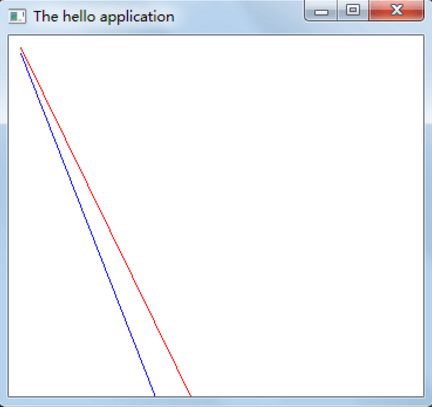
怎样才能画出不带锯齿的图形呢?要用到GDI+这个MFC库。下面将以案例的方式讲述如何通过MFC画出不带锯齿的图形。
一、建立一个简单的MFC应用
一个简单的MFC应用包含两个文件,Hello.h和Hello.cpp。建立的方法是在VS中建立一个空项目,然而添加头文件Hello.h和源文件Hello.cpp
//Hello.h

#include <afxwin.h>

class CMyApp : public CWinApp

{

public:

    virtual BOOL InitInstance();

};

class CMainWindow : public CFrameWnd

{

public:

    CMainWindow();

protected:

    afx_msg void OnPaint();

    DECLARE_MESSAGE_MAP()

};
// Hello.cpp

#include <afxwin.h>

#include "Hello.h"

CMyApp myApp;

BOOL CMyApp::InitInstance()

{

    m_pMainWnd  = new CMainWindow;

    m_pMainWnd->ShowWindow(m_nCmdShow);

    m_pMainWnd->UpdateWindow();

    return TRUE;

}

BEGIN_MESSAGE_MAP(CMainWindow, CFrameWnd)

    ON_WM_PAINT()

END_MESSAGE_MAP()

CMainWindow::CMainWindow()

{

    Create(NULL, _T("The Hello Application"));

}

void CMainWindow::OnPaint()

{

    CPaintDC dc(this);

    dc.MoveTo(, );

    dc.LineTo(, );

    dc.MoveTo(, );

    dc.LineTo(, );

}
下面开始编译程序。这里要注意的是,应该修改项目属性中【链接器】的设置,在【高级】选项卡中的【入口】选项中,填入WinMainCRTStartup。此外,要遭项目属性的【配置属性】选项卡中,修改【MFC的使用】项目,修改为【在共享DLL中使用MFC】。
这样就可以编辑并运行程序了。程序运行的效果如上图所示,所画的两条曲线是带有锯齿的。 要想得到反锯齿的、渲染细腻的线条,就要对上述程序做一些修改。
首先要修改头文件Hello.h,将GDI+的头文件引入,并在CMyApp中定义新的成员变量m_gdiplusToken,覆盖CMyApp继承而来的ExitInstance( )函数。具体如下
//Hello.h

#include <afxwin.h>

#include <Gdiplus.h> //引入头函数

#pragma comment(lib, "Gdiplus.lib")  // 引入链接库

class CMyApp : public CWinApp

{

public:

    virtual BOOL InitInstance();

    virtual int ExitInstance();

private:

    ULONG_PTR m_gdiplusToken;

};

class CMainWindow : public CFrameWnd

{

public:

    CMainWindow();

protected:

    afx_msg void OnPaint();

    DECLARE_MESSAGE_MAP()

};
下面需要在Hello.cpp中做出相应的调整。主要调整的是 CMyApp::InitInstance( ), CMyApp::ExitInstance( ) 和 CMainWindow::OnPaint( )
// Hello.cpp

#include <afxwin.h>

#include "Hello.h"

CMyApp myApp;

BOOL CMyApp::InitInstance()

{

    m_gdiplusToken = 0;

    Gdiplus::GdiplusStartupInput gpSI;

    Gdiplus::GdiplusStartup(&m_gdiplusToken, &gpSI, NULL);

    m_pMainWnd = new CMainWindow;

    m_pMainWnd->ShowWindow(m_nCmdShow);

    m_pMainWnd->UpdateWindow();

    return TRUE;

}

int CMyApp::ExitInstance()

{

    Gdiplus::GdiplusShutdown(m_gdiplusToken);

    return __super::ExitInstance();

}

BEGIN_MESSAGE_MAP(CMainWindow, CFrameWnd)

    ON_WM_PAINT()

END_MESSAGE_MAP()

CMainWindow::CMainWindow()

{

    Create(NULL, _T("The Hello Application"));

}

void CMainWindow::OnPaint()

{

    CPaintDC dc(this);

    Gdiplus::Graphics graphics(dc.m_hDC);

    Gdiplus::Pen red(Gdiplus::Color(255, 255, 0, 0), 1);

    Gdiplus::Pen blue(Gdiplus::Color(255, 0, 0, 255), 1);

    graphics.SetSmoothingMode(Gdiplus::SmoothingModeHighQuality);

    graphics.DrawLine(&red, 10, 10, 200, 400);

    graphics.DrawLine(&blue, 10, 15, 200, 500);

}
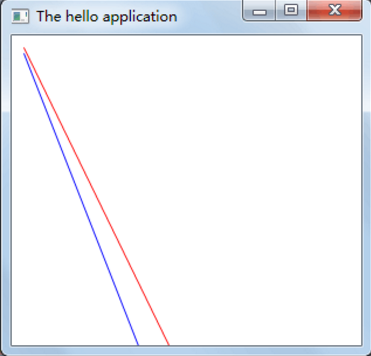
这样修改后的程序就能够画出反锯齿的曲线了。如下图所示
【GDI+】MFC画图- 消除锯齿(转)的更多相关文章
- C++MFC编程笔记day06 MFC向导、MFC画图类使用
MFC画图 MFC画图类包含画图设备类和画图对象类 1 画图设备类 CDC类-父类是CObject,封装的是一般的画图设备,比如:显示器, 打印机等. ...
- MFC画图总结-DIB图形绘制
參考文档: http://blog.csdn.net/hnust_xiehonghao/article/details/37652927 http://blog.sina.com.cn/s/blog_ ...
- 孙鑫MFC学习笔记4:MFC画图
1.画线方法 *1.捕获鼠标按下和弹起消息,获取两个点 *2.消息响应,画线 2.在CMainFrame类中的鼠标左键事件得不到响应的原因是CNameView覆盖了CMainFrame 3.注释宏 4 ...
- C#画图消除锯齿
using (Graphics g = this.CreateGraphics()) { g.SmoothingMode = SmoothingMode.HighQuality; //图片柔顺模式选择 ...
- C#-gdi画图,双缓冲画图,Paint事件的触发---ShinePans
在使用gdi技术画图时,有时会发现图形线条不够流畅,或者在改变窗口大小时会闪烁不断的现象.(Use DoubleBuffer to solve it!) ...
- GDI编程
图形设备接口(GDI)是一个可执行程序,它接受Windows应用程序的绘图请求(表现为GDI函数调用),并将它们传给相应的设备驱动程序,完成特定于硬件的输出,象打印机输出和屏幕输出.GDI负责Wind ...
- VC++学习之GDI概述
VC++学习之GDI概述 图形设备接口(GDI)是一个可执行程序,它接受Windows应用程序的绘图请求(表现为GDI函数调用),并将它们传给相应的设备驱动程序,完成特定于硬件的输出,象打印机输出和屏 ...
- MFC实现红黑砖块
MFC实现红黑砖块 题目 老题目了,给定w,h长宽的图,上面有颜色不同的瓷砖,黑和红,问从给的起点出发,只能走黑色瓷砖,能走多少块,可视化输出过程 思路 咋一看搜索水题,但是要用可视化,要用模板类,, ...
- GDI+ 和GDI
GDI:Graphics Device Interface,即图形设备接口,是Windows API的一个重要组成部分.它是Windows图形显示程序与实际物理设备之间的桥梁,GDI使得用户无需关心具 ...
随机推荐
- 文件/etc/passwd,/etc/shadow,/etc/group
文件/etc/passwd /etc/shadow /etc/group 计算资源的使用(并不是所有的人都可以用这台计算机的) 权限:访问资源的的能力. 用户:获取资源或者权限的凭证. 用户的容器:关 ...
- 1016-06-首页20-封装工具条---UITableView控件距离顶部的间距问题----cell选中时的背景颜色设置
一.设置UITableView里面的顶部 cell 距离顶部的间距的三种方式: 方法 1. 直接设置: self.tableView.contentInset = UIEdgeInsetsMake(H ...
- Educational Codeforces Round 43 E. Well played!(贪心)
E. Well played! time limit per test 1 second memory limit per test 256 megabytes input standard inpu ...
- python字典的整理信息
字典的增删改查大纲 增: dic={'age':18,'name':'liu','sex':'male'} dic['high'] = 185 #没有键值对,添加 dic['age'] = 16 #有 ...
- 4525: [Cerc2012]Kingdoms
4525: [Cerc2012]Kingdoms 题意 n个国家,两两之间可能存在欠债或者被欠债的关系,一个国家破产:其支出大于收入.问一个国家能否坚持到最后. 思路 很有意思的一道题. dp[s]表 ...
- 路由vue-router基础
目录 1. 基本例子 2. 动态路由匹配 3. 嵌套路由 4. 编程式导航 5. 命名路由 6. 命名视图 7. 重定向和别名 8. 向路由组件传递props 9. HTML5 History模式 官 ...
- Android如何实现毛玻璃效果之Android高级模糊技术
自从iOS系统引入了Blur效果,也就是所谓的毛玻璃.模糊化效果,磨砂效果,各大系统就开始竞相模仿,这是怎样的一个效果呢,我们先来看一下,如下面的图片: 效果我们知道了,如何在Android中实现呢, ...
- CSS3 3D圆形设计教程
http://www.htmleaf.com/ziliaoku/qianduanjiaocheng/201502061338.html
- 《Cracking the Coding Interview》——第13章:C和C++——题目2
2014-04-25 19:29 题目:对比一下哈希表和STL中的map的区别,哈希表如何实现?如果数据规模比较小,可以用什么来代替哈希表? 解法:哈希表可以理解为一堆桶,每个桶都有唯一的id,桶里可 ...
- 【志银】nginx_php_mysql_phpMyAdmin配置(Windows)
✄更新中... 更新日期:2018.11.22 ★版本说明+快捷下载(官网) nginx nginx-1.14.1 http://nginx.org/download/nginx-1.14.1. ...