
Nancy 学习-视图引擎 继续跨平台
前面一篇,讲解Nancy的基础,以及Nancy自宿主,现在开始学习视图引擎。
Nancy 目前支持两种 一个是SSVE 一个是Razor。下面我们一起学习。
The Super Simple View Engine
SSVE 全称就是 Super Simple View Engine ,翻译过来也就是 超级简单视图引擎。
我们在Nancy 不需单独引用,因为它是默认内置的。该引擎处理任何sshtml,html或htm文件。
模型可以是标准的类型,或ExpandoObject(或者实现 IDynamicMetaObjectProvider ,或者实现的IDictionary<string,object> 以访问其属性)。
SSVE是一个基于正则表达式的视图引擎,没有“执行代码”,所以你不能指定自己的代码来执行。内置的语法/命令,你可以使用如下所示。
Standard variable substitution
Replaces with the string representation of the parameter, or the model itself if a parameter is not specified. If the substitution can not be performed, for instance if you specify an invalid model property, it will be substituted with
[Err!]Syntax
@Model[.Parameters]
Example
Hello @Model.Name, your age is @Model.User.Age
Iterators
Enables you to iterate over models that are collection. Iterators cannot be nested
Syntax
@Each[.Parameters]

   [@Current[.Parameters]]

@EndEach
@Eachwill implicitly be associated with the model and for each iteration the@Currentwill represent the current item in the collection.@Currentcan be used multiple times in the iterator block, and is accessed in the same way as@Model.Example
@Each.Users

   Hello @Current.Name!

@EndEach
Conditionals
Parameters must be a boolean (see Implicit Conditionals below). Nesting of @If and @IfNot statements is not supported.
Syntax:
@If[Not].Parameters

   [contents]

@EndIf
Example
@IfNot.HasUsers

   No users found!

@EndIf
Implicit Conditionals
If the model has property that implements
ICollectionthen you can use an implicit conditional. The implicit conditional syntax is the same as a normal conditional, but theParameterspart can have aHas-prefix. The conditional will be true if the collection contains items, and false if it does not or if it is null.Syntax
Has[CollectionPropertyName]
Example
@If.HasUsers

   Users found!

@EndIf
The above example will expand to "Users found!" if the model has a collection called
Usersand it contains items; if the collection is empty then the text would not be displayed.HTML Encoding
Both the
@Modeland@Current keywords(with or without parameters) can have an optional!operator, after the@, to HTML encode the output.Syntax
@!Model[.Parameter]

@!Current[.Parameter]
Example
@!Model.Test

@Each

   @!Current.Test

@EndEach
Partials
Renders a partial view. A property of the current model can be specified to be used as the partial view's model, or it may be omitted to use the current view's model instead. The file extension of the view is optional.
Syntax
@Partial['<view name>'[, Model.Property]]
Example
// Renders the partial view with the same model as the parent

@Partial['subview.sshtml'];

// Renders the partial view using the User as the model

@Partial['subview.sshtml', Model.User];
Master pages and sections
You can put shared layout in a master page and declare content sections that will be populated by the views. It is possible to have nested master pages and you are not obligated to provide content for all of the content sections.
The master pages will have access to the
@Modelof the view and the file extension is optional when specifying the name of the master to use in your view.You can use the
@Sectiontag multiple times and is used to both declare a content section, in a master page, and to define the content blocks of a view.Syntax
@Master['<name>']

@Section['<name>']

@EndSection
Example
// master.sshtml

<html>

<body>

@Section['Content'];

</body>

</html>

// index.sshtml

@Master['master.sshtml']

@Section['Content']

   This is content on the index page

@EndSection
Anti-forgery token
Renders an anti-forgery token, on the page, in an hidden input to prevent cross-site request forgery attacks. The token will automatically be validated when a new request is posted to the server (assuming CSRF protection hasn’t been turned off).
Syntax
@AntiForgeryToken
Example
@AntiForgeryToken
Path expansion
Expands a relative paths to a fully qualified URL.
Syntax
@Path['<relative-path>']
Example
@Path['~/relative/url/image.png']
Starting from v1.2, SSVE performs automatic path expansion in all HTML attributes (more specifically, in all
name="value"pairs, both with single and double quotes aroundvalue) where attribute value starts with~/. For example,<a href="@Path['~/relative/path']" ...>can be significantly shortened to<a href="~/relative/path" ...>.
下面来讲解一些常用的命令。
1.Model
2.Each
3.If
4.Partials
5.Master pages and sections
首先创建一个项目。建议创建web空项目 。
我是直接使用上次的项目 http://www.cnblogs.com/linezero/p/5121887.html
先创建一个Module SSVEModule
然后添加Views文件夹 -》然后再在其下添加 SSVE文件夹 -》添加对应的View 页。
这样使项目更加清楚。
1.Model
            Get["/model"] = r =>

            {

                var model = "我是字符串";

                return View["model", model];

            };
在SSVE 文件夹下添加一个model.html
<!DOCTYPE html>

<html lang="en" xmlns="http://www.w3.org/1999/xhtml">

<head>

    <meta charset="utf-8" />

    <title></title>

</head>

<body>

    @Model

</body>

</html>
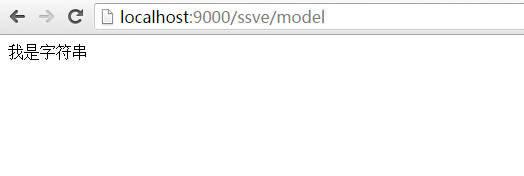
然后我们访问页面 访问地址: http://localhost:9000/ssve/model
2.Each
            Get["/each"] = r =>

            {

                var arr = new int[] { , , , , , , , ,  };

                return View["each", arr];

            };
each.html
<!DOCTYPE html>

<html lang="en" xmlns="http://www.w3.org/1999/xhtml">

<head>

    <meta charset="utf-8" />

    <title></title>

</head>

<body>

    @Each

        <p>@Current</p>

    @EndEach

</body>

</html>
访问地址: http://localhost:9000/ssve/each
3.If
            Get["/if"] = r =>

            {

                return View["if", new { HasModel = true }];

            };
if.html
<!DOCTYPE html>

<html lang="en" xmlns="http://www.w3.org/1999/xhtml">

<head>

    <meta charset="utf-8" />

    <title></title>

</head>

<body>

    @If.HasModel

    <p>我出现了</p>

    @EndIf

    @IfNot.HasModel

    <p>我没办法出现</p>

    @EndIf

</body>

</html>
访问地址: http://localhost:9000/ssve/if
4.Partials
@Partial['header.html']
在SSVE 下添加header.html 然后在页面添加这句即可。
5.Master pages and sections
master.html
<!DOCTYPE html>

<html lang="en" xmlns="http://www.w3.org/1999/xhtml">

<head>

    <meta charset="utf-8" />

    <title></title>

</head>

<body>

    @Partial['header.html']

    @Section['Content']

</body>

</html>
使用 master
@Master['master.html']

@Section['Content']

<p>master partial content 结合</p>

    @Model

@EndSection
SSVEModule.cs
using Nancy;

using System;

using System.Collections.Generic;

using System.Linq;

using System.Text;

using System.Threading.Tasks;

namespace NancyDemo

{

    public class SSVEModule : NancyModule

    {

        public SSVEModule():base("/ssve")

        {

            Get["/"] = r =>

            {

                var os = System.Environment.OSVersion;

                return "Hello SSVE<br/> System:" + os.VersionString;

            };

            Get["/model"] = r =>

            {

                var model = "我是字符串";

                return View["model", model];

            };

            Get["/each"] = r =>

            {

                var arr = new int[] { , , , , , , , ,  };

                return View["each", arr];

            };

            Get["/if"] = r =>

            {

                return View["if", new { HasModel = true }];

            };

        }

    }

}
SSVE视图引擎源码:https://github.com/grumpydev/SuperSimpleViewEngine
Razor View Engine
Razor 相信大家都是非常熟悉,所以也就不在这里过多做语法讲解。
主要是讲解在Nancy中使用Razor 视图引擎。
Nancy 的Razor 是自定义实现的,所以与ASP.NET MVC 中的Razor 有所不同。
在Nancy中绑定模型是@Model 不是ASP.NET MVC @model
安装
要在Nancy中使用Razor 需要安装 Nancy.ViewEngines.Razor
Nuget:Install-Package Nancy.Viewengines.Razor
添加Razor以后,会默认在app.config 添加Razor相关配置。
使用
建议大家新建一个空的web项目,这样便于编写视图。
在视图中声明 关键字为:@inherits
@inherits Nancy.ViewEngines.Razor.NancyRazorViewBase<dynamic>
其他语法与ASP.NET MVC Razor相同。
我还是在原项目上进行添加。
先创建一个Module RazorModule
然后添加Views文件夹 -》然后再在其下添加 Razor文件夹 -》添加对应的View 页。以 cshtml结尾的文件,也就是视图文件。
1.Model
            Get["/index"] = r =>

            {

                var model = "我是 Razor 引擎";

                return View["index",model];

            };
index.cshtml
@inherits Nancy.ViewEngines.Razor.NancyRazorViewBase<dynamic>

<!DOCTYPE html>

<html lang="en" xmlns="http://www.w3.org/1999/xhtml">

<head>

    <meta charset="utf-8" />

    <title></title>

</head>

<body>

    @Model

</body>

</html>
访问地址: http://localhost:9000/razor/index
2.each
            Get["/each"] = r =>

            {

                var arr = new int[] { , , , , , , , ,  };

                return View["each", arr];

            };
虽然Module中的代码与前面相同。但View 就不一样了。
each.cshtml
@inherits Nancy.ViewEngines.Razor.NancyRazorViewBase<dynamic>

<!DOCTYPE html>

<html lang="en" xmlns="http://www.w3.org/1999/xhtml">

<head>

    <meta charset="utf-8" />

    <title></title>

</head>

<body>

    @foreach (var item in Model)

    {

        <p>@item</p>

    }

</body>

</html>
访问地址: http://localhost:9000/razor/each
RazorModule.cs
using System;

using System.Collections.Generic;

using System.Linq;

using System.Text;

using System.Threading.Tasks;

using Nancy;

namespace NancyDemo

{

    public class RazorModule:NancyModule

    {

        public RazorModule() :base("/razor")

        {

            Get["/"] = r =>

            {

                var os = System.Environment.OSVersion;

                return "Hello Razor<br/> System:" + os.VersionString;

            };

            Get["/index"] = r =>

            {

                var model = "我是 Razor 引擎";

                return View["index",model];

            };

            Get["/each"] = r =>

            {

                var arr = new int[] { , , , , , , , ,  };

                return View["each", arr];

            };

        }

    }

}
项目结构
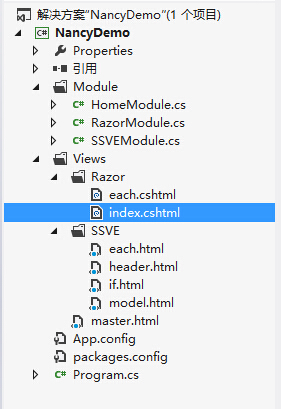
因为我使用的项目是控制台程序,Views 文件夹下的文件必须都要在 属性 选择 始终复制 。
在linux上运行可以参考上篇文章。
最后留个坑,下一篇:Nancy 学习-进阶部分 继续跨平台。请大家多多支持。
参考链接:
https://github.com/NancyFx/Nancy/wiki/The-Super-Simple-View-Engine
如果你觉得本文对你有帮助,请点击“推荐”,谢谢。
Nancy 学习-视图引擎 继续跨平台的更多相关文章
- Nancy 学习-进阶部分 继续跨平台
前面两篇,讲解Nancy的基础,及Nancy自宿主和视图引擎. 现在来学习一些进阶部分. Bootstrapper Bootstrapper 就相当于 asp.net 的Global.asax . 我 ...
- Nancy 学习-自宿主 继续跨平台
Nancy简介 Nancy是一个轻量级的独立的框架,下面是官网的一些介绍: Nancy 是一个轻量级用于构建基于 HTTP 的 Web 服务,基于 .NET 和 Mono 平台,框架的目标是保持尽可能 ...
- Nancy in .Net Core学习笔记 - 视图引擎
前文中我们介绍了Nancy中的路由,这一篇我们来介绍一下Nancy中的视图引擎. Nancy中如何返回一个视图(View) 在ASP.NET Mvc中,我们使用ViewResult类来返回一个视图.N ...
- MVC系列——MVC源码学习:打造自己的MVC框架(四:了解神奇的视图引擎)
前言:通过之前的三篇介绍,我们基本上完成了从请求发出到路由匹配.再到控制器的激活,再到Action的执行这些个过程.今天还是趁热打铁,将我们的View也来完善下,也让整个系列相对完整,博主不希望烂尾. ...
- ASP.Net MVC开发基础学习笔记:三、Razor视图引擎、控制器与路由机制学习
一.天降神器“剃须刀” — Razor视图引擎 1.1 千呼万唤始出来的MVC3.0 在MVC3.0版本的时候,微软终于引入了第二种模板引擎:Razor.在这之前,我们一直在使用WebForm时代沿留 ...
- ASP.Net MVC开发基础学习笔记(3):Razor视图引擎、控制器与路由机制学习
一.天降神器“剃须刀” — Razor视图引擎 1.1 千呼万唤始出来的MVC3.0 在MVC3.0版本的时候,微软终于引入了第二种模板引擎:Razor.在这之前,我们一直在使用WebForm时代沿留 ...
- Razor视图引擎 语法学习(一)
ASP.NET MVC是一种构建web应用程序的框架,它将一般的MVC(Model-View-Controller)模式应用于ASP.NET框架: ASP.NET约定优于配置:基本分为模型(对实体数据 ...
- MVC学习三:Razor视图引擎
1.Razor视图引擎,主要是把View的HTML代码编译到View视图类对象中
- ASP.NET MVC学习---(七)Razor视图引擎语法
之前体验过razor视图引擎@符号的威力了吧~ 连我这个初学者都能感觉到确实省时省力方便快捷 简直就是居家旅行*人*货必备之物啊(这里和谐两个字~) 那么现在就开始对razor的语法进一步介绍~ 1. ...
随机推荐
- C# 关于Try/Catch对系统性能影响的总结
自从开始考虑代码的运行效率和性能以后,写代码考虑的东西越来越多了,比如什么时候应该加try/catch?加太多的try/catch会不会降低性能?今天就来分享一下对try/catch对性能影响的一些看 ...
- [51单片机] 以从0开始做4位8段共阴数码管3461AS驱动谈细节决定高质量DIY
目录 1)问题产生 2)失败尝试 3)最终方案 4)使用方法 5)知识共享 1)问题产生 在上一篇“以PWM控制直流电机为例建一个简单的51工程框架”中已向大家介绍了一个封装好的8位8段数码管的驱动( ...
- 翻译-高效DevOps的10项实践
原文链接: http://www.drdobbs.com/architecture-and-design/top-10-practices-for-effective-devops/240149363 ...
- Spring-Context之九:在bean定义中使用继承
定义bean时有个abstract属性,可以设置为true或false,默认为false. 1 2 3 4 <bean id="animal" class="Ani ...
- ECMAScript5 Object的新属性方法
虽然说现在并不是所有的浏览器都已经支持ECMAScript5的新特性,但相比于ECMAScript4而言ECMAScript5被广大浏览器厂商广泛接受,目前主流的浏览器中只有低版本的IE不支持,其它都 ...
- MySQL模糊查询(like)时区分大小写
问题说明:通过上面的语句,你会发现MySQL的like查询是不区分大小写的,因为我的失误,把Joe写成了joe才发现了这个东东吧.但是,有时候,我们需要区分大小写的是,该怎么办呢?解决方法如下: 方法 ...
- (转)Hibernate事务管理
Hibernate的事务管理 事务(Transaction)是工作中的基本逻辑单位,可以用于确保数据库能够被正确修改,避免数据只修改了一部分而导致数据不完整,或者在修改时受到用户干扰.作为一名软件设计 ...
- IOS Animation-CABasicAnimation、CAKeyframeAnimation详解&区别&联系
1.先看看网上流传的他们的继承图: 从上面可以看出CABasicAnimation与CAKeyframeAnimation都继承于CAPropertyAnimation.而CAPropertyAnim ...
- 选课数据库SQL语句练习题
表(一)Student (学生表) 属性名 数据类型 可否为空 含 义 Sno varchar (20) 否 学号(主码) Sname varchar (20) 否 学生姓名 Ssex varchar ...
- JavaScript函数后面加不加括号的区别
<!DOCTYPE html> <html> <head lang="en"> <meta charset="UTF-8&quo ...