
struts2+spring+hibernte整合示例
简单实现添加用户功能,仅供初学者参考,可自行扩展程序功能(增删改查)。
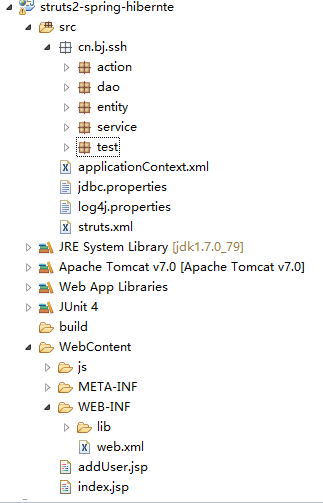
这里贴下代码,需要的可以下载看(因为比较懒)。
applicationContext.xml
<?xml version="1.0" encoding="UTF-8"?>

<beans xmlns="http://www.springframework.org/schema/beans" xmlns:context="http://www.springframework.org/schema/context" xmlns:xsi="http://www.w3.org/2001/XMLSchema-instance" xmlns:aop="http://www.springframework.org/schema/aop"

    xmlns:tx="http://www.springframework.org/schema/tx" xmlns:p="http://www.springframework.org/schema/p" xmlns:util="http://www.springframework.org/schema/util" xmlns:jdbc="http://www.springframework.org/schema/jdbc"

    xmlns:cache="http://www.springframework.org/schema/cache"

    xsi:schemaLocation="

    http://www.springframework.org/schema/context

    http://www.springframework.org/schema/context/spring-context.xsd

    http://www.springframework.org/schema/beans

    http://www.springframework.org/schema/beans/spring-beans.xsd

    http://www.springframework.org/schema/tx

    http://www.springframework.org/schema/tx/spring-tx.xsd

    http://www.springframework.org/schema/jdbc

    http://www.springframework.org/schema/jdbc/spring-jdbc-3.1.xsd

    http://www.springframework.org/schema/cache

    http://www.springframework.org/schema/cache/spring-cache-3.1.xsd

    http://www.springframework.org/schema/aop

    http://www.springframework.org/schema/aop/spring-aop.xsd

    http://www.springframework.org/schema/util

    http://www.springframework.org/schema/util/spring-util.xsd">

   <!-- 引入外部配置文件 -->

   <context:property-placeholder location="classpath:jdbc.properties"/>

   <!-- 配置连接池 -->

   <bean id="dataSource"  class="com.mchange.v2.c3p0.ComboPooledDataSource">

           <property name="driverClass" value="${jdbc.driverClass}"/>

           <property name="jdbcUrl" value="${jdbc.url}"/>

           <property name="user" value="${jdbc.username}"/>

           <property name="password" value="${jdbc.password}"/>

   </bean>

   <!-- 配置Hibernate相关属性 -->

   <bean id="sessionFactory" class="org.springframework.orm.hibernate4.LocalSessionFactoryBean">

           <!-- 注入连接池 -->

           <property name="dataSource" ref="dataSource"/>

           <!-- 配置Hibernate的属性 -->

           <property name="hibernateProperties">

               <props>

                   <prop key="hibernate.dialect">org.hibernate.dialect.MySQLDialect</prop>

                   <prop key="hibernate.show_sql">true</prop>

                   <prop key="hibernate.format_sql">true</prop>

                   <prop key="hibernate.hbm2ddl.auto">update</prop>

               </props>

           </property>

           <!-- 加载Hibernate中的映射文件 -->

           <property name="mappingResources">

               <list>

                   <value>cn/bj/ssh/entity/User.hbm.xml</value>

               </list>

           </property>

   </bean>

   <!-- 配置Action类 -->

   <bean id="userAction" class="cn.bj.ssh.action.UserAction" scope="prototype">

           <!-- 手动注入service -->

           <property name="userService" ref="userService"/>

   </bean>

   <!-- 配置业务的类 -->

   <bean id="userService" class="cn.bj.ssh.service.UserService">

           <property name="userDao" ref="userDao"/>

   </bean>

   <!-- 配置DAO的类 -->

   <bean id="userDao" class="cn.bj.ssh.dao.UserDao">

           <property name="sessionFactory" ref="sessionFactory"/>

   </bean>

   <!-- 配置事务管理器 -->

   <bean id="transactionManager" class="org.springframework.orm.hibernate4.HibernateTransactionManager">

           <property name="sessionFactory" ref="sessionFactory"/>

   </bean>

   <!-- 开启注解事物 -->

   <tx:annotation-driven transaction-manager="transactionManager"/>

 </beans>
连接数据库配置:jdbc.properties
# JDBC Configuration

jdbc.driverClass=com.mysql.jdbc.Driver

jdbc.url=jdbc:mysql://127.0.0.1:3306/ssh

jdbc.username=root

jdbc.password=root
struts.xml
<?xml version="1.0" encoding="UTF-8" ?>

<!DOCTYPE struts PUBLIC

    "-//Apache Software Foundation//DTD Struts Configuration 2.3//EN"

    "http://struts.apache.org/dtds/struts-2.3.dtd">

<struts>

    <!-- 交由spring管理  直接写id即可 -->

    <package name="ssh" extends="struts-default" namespace="/">

        <action name="user_*" class="userAction" method="{1}">

            <result name="loginSuccess">/index.jsp</result>

                <!-- <result name="success_save">/index.jsp</result>-->

        </action>

    </package>

</struts>
UserAction.java
package cn.bj.ssh.action;

import com.opensymphony.xwork2.ActionSupport;

import com.opensymphony.xwork2.ModelDriven;

import cn.bj.ssh.entity.User;

import cn.bj.ssh.service.UserService;

public class UserAction extends ActionSupport implements ModelDriven<User>{

    private static final long serialVersionUID = 1L;

    //模型驱动使用的类

    private User user = new User();

    //自动注入

    private UserService userService;

    public void setUserService(UserService userService) {

        this.userService = userService;

    }

    @Override

    public User getModel() {

        return user;

    }

    //保存用户

    public String save(){

        userService.save(user);

        return "loginSuccess";

    }

}
UserService.java(由于比较简单,看起来更直观,service和dao就没有写接口)
package cn.bj.ssh.service;

import org.springframework.transaction.annotation.Transactional;

import cn.bj.ssh.dao.UserDao;

import cn.bj.ssh.entity.User;

@Transactional

public class UserService{

    private UserDao userDao;

    public void setUserDao(UserDao userDao) {

        this.userDao = userDao;

    }

    public void save(User user){

        userDao.save(user);

    }

}
UserDao.java
package cn.bj.ssh.dao;

import org.hibernate.SessionFactory;

import cn.bj.ssh.entity.User;

public class UserDao {

    private SessionFactory sessionFactory;

    public void setSessionFactory(SessionFactory sessionFactory) {

        this.sessionFactory = sessionFactory;

    }

    public String save(User user) {

        this.sessionFactory.getCurrentSession().save(user);

        return "success_save";

    }

}
实体类User.jsp
package cn.bj.ssh.entity;

public class User {

    private Integer pid;

    private String name;

    private String password;

    private Double height;

    public User(){}

    public User(Integer pid, String name, String password,Double height) {

        super();

        this.pid = pid;

        this.name = name;

        this.password = password;

        this.height = height;

    }

    public Integer getPid() {

        return pid;

    }

    public void setPid(Integer pid) {

        this.pid = pid;

    }

    public String getName() {

        return name;

    }

    public void setName(String name) {

        this.name = name;

    }

    public String getPassword() {

        return password;

    }

    public void setPassword(String password) {

        this.password = password;

    }

    public Double getHeight() {

        return height;

    }

    public void setHeight(Double height) {

        this.height = height;

    }

}
映射文件:User.hbm.xml
<%@ page language="java" contentType="text/html; charset=UTF-8"

    pageEncoding="UTF-8"%>

<%@ taglib uri="/struts-tags" prefix="s"%>

<!DOCTYPE html PUBLIC "-//W3C//DTD HTML 4.01 Transitional//EN" "http://www.w3.org/TR/html4/loose.dtd">

<html>

<head>

<meta http-equiv="Content-Type" content="text/html; charset=UTF-8">

<title>Insert title here</title>

</head>

<body>

    <h1>保存用户页面</h1>

    <s:form action="user_save" method="post" namespace="/" theme="simple">

        <table border="1" width="400">

            <tr>

                <td>用户名</td>

                <td><s:textfield name="name" /></td>

            </tr>

            <tr>

                <td>用户密码</td>

                <td><s:textfield name="password" /></td>

            </tr>

            <tr>

                <td>用户身高</td>

                <td><s:textfield name="height" /></td>

            </tr>

            <tr>

                <td colspan="2"><input type="submit" value="添加" /></td>

            </tr>

        </table>

    </s:form>

</body>

</html>
添加用户页面:addUser.jsp
<?xml version="1.0" encoding="UTF-8"?>

<!DOCTYPE hibernate-mapping PUBLIC

        "-//Hibernate/Hibernate Mapping DTD 3.0//EN"

        "http://hibernate.sourceforge.net/hibernate-mapping-3.0.dtd">

<hibernate-mapping>

    <class name="cn.bj.ssh.entity.User" table="user">

       <id name="pid" column="pid">

            <generator class="native"/>

       </id>

       <property name="name" column="name" length="20"></property>

       <property name="password" column="password" length="20"/>

        <property name="height" column="height"/>

    </class>

</hibernate-mapping>
Demo链接,有兴趣的可以下载看看。
http://share.weiyun.com/b0a8c4fb51feaed92c69af29c5232d81
struts2+spring+hibernte整合示例的更多相关文章
- Struts2 Spring hibernate 整合示例 .
示例工具:MyEclipse 8.5.Tomcat 6.0.MySql 步骤: 1.创建一个WEB工程,命名为BookShop(名字自己取,此处为示例工程名): 2.导入struts2的核心jar包, ...
- Struts2+Spring+Hibernate整合开发(Maven多模块搭建)
Struts2+Spring+Hibernate整合开发(Maven多模块搭建) 0.项目结构 Struts2:web层 Spring:对象的容器 Hibernate:数据库持久化操作 1.父模块导入 ...
- WebService之Spring+CXF整合示例
一.Spring+CXF整合示例 WebService是一种跨编程语言.跨操作系统平台的远程调用技术,它是指一个应用程序向外界暴露一个能通过Web调用的API接口,我们把调用这个WebService的 ...
- struts2 spring mybatis 整合(test)
这几天搭了个spring+struts2+mybatis的架子,练练手,顺便熟悉熟悉struts2. 环境:myEclipse10+tomcat7+jdk1.6(1.8的jre报错,所以换成了1.6) ...
- Spring、Struts2+Spring+Hibernate整合步骤
所使用的Jar包: Hibernate: Spring(使用MyEclipse自动导入框架功能) Struts2: 注解包和MySql驱动包: 1.配置Hibernate和Spring: <be ...
- Struts2框架07 Struts2 + Spring + Mybatis 整合
1 导包 <project xmlns="http://maven.apache.org/POM/4.0.0" xmlns:xsi="http://www.w3.o ...
- 三大框架SSH(struts2+spring+hibernate)整合时相关配置文件的模板
最近在学SSH三大框架的整合,在此对他们整合时相关配置文件做一简单的模板总结,方便以后复用! 首先是web.xml配置文件,这里面就配置一些简单的监听器.过滤器,包括spring核心配置文件appli ...
- Struts2+Spring+Hibernate3整合
这几天正在复习三大框架的知识,特意把写出来,如有错误,希望大家多指教! 代码地址:https://git.coding.net/puchenglin/SSHDemo.git 1. 引入jar包 Str ...
- Struts2 + Spring + Hibernate
Struts2 + Spring + Hibernate整合. 使用的是无配置方法进行SSH的整合,struts-convertion plugin + spring annotation + hib ...
随机推荐
- js_保留关键字
网页可以被我们分为三个大的部分:结构,表现,形式而js就是专对于表现的,js是一门编程的解释性脚本语言,和其他的语言相同js也有自己的保留的关键字,下面我们来看看js保留的关键字吧!js一共有56个关 ...
- [Machine-Learning] 熟悉Matlab
浮点数取整的几个函数 floor: 向下取整 ceil: 向上取整 round: 取最接近的整数 fix: 向0取整 不等于 Matlab 中,使用~=表示不等于. 数组相关操作 使用 [] 命名数组 ...
- Trading
http://v.youku.com/v_show/id_XMTA0OTcxMjgw.html?from=y1.2-1-87.3.8-1.1-1-1-7
- Mysql修改字段长度
alter table '表名' modify column '列名' varchar(50);
- Links for Introduction To Calculus
The links to download the material for the course Introduction To Calculus are provided in the follo ...
- linux -- nano
今天在git commit的时候碰到了一种编辑方式 -- 不会用 T.T,然后找了下相关的文档. ^G -- ctrl+g 帮助文档 ^O -- ctrl+o 写出,会出现下面的一行提示,是否保存,直 ...
- 【转】如何查看当前Open的Cursor
遇到错误:A cursor with thename ' ' already exists,想要看是什么代码导致的.找到下面几种方法. --测试声明Cursor并且打开 DECLARE vend_cu ...
- Python之操作Redis、 RabbitMQ、SQLAlchemy、paramiko、mysql
一.Redis Redis是一个开源的使用ANSI C语言编写.支持网络.可基于内存亦可持久化的日志型.Key-Value数据库,并提供多种语言的API.Redis是一个key-value存储系统.和 ...
- jQuery EasyUI教程之datagrid应用(二)
上次写到了让数据库数据在网页datagrid显示,我们只是单纯的实现了显示,仔细看的话显示的信息并没有达到我们理想的效果,这里我们丰富一下: 上次显示的结果是这样的 点击查看上篇:jQuery Eas ...
- 结合nodejs开发aspnet5项目
1.安装kvm 官方教程地址:https://github.com/ligershark/Kulture 打开 powershell命令窗口,找不到可以在开始菜单菜单那块输入 powershell ...