
Getting Started with JD Edwards EnterpriseOne Interoperability

Overview
Every enterprise holds a forest of branched system spread across a number of business units deployed over time. Moreover these systems bring a natural challenge for data migration at the time of system migration towards any ERP suite such as Oracle JD Edwards. Fortunately these data migration challenges are well covered inside JDE through multiple mechanisms. In the series of blog posts I am going to cover some of the possibilities of data migration with Oracle JD Edwards
Definition of Interoperability
According to Wikipedia
“Interoperability is the ability of diverse systems and organizations to work together (inter-operate).”
As any ERP system needs to work together in a heterogeneous environment, Oracle JD Edwards is also not far off, and provides number of mechanism to interoperate with other legacy system with not only the ability to import the data from other systems but also provide communication mechanism to export the data out through number of different mediums.
Available Models for Interoperability
Following diagram outlines the number of interoperability options available with JD Edwards Enterprise One
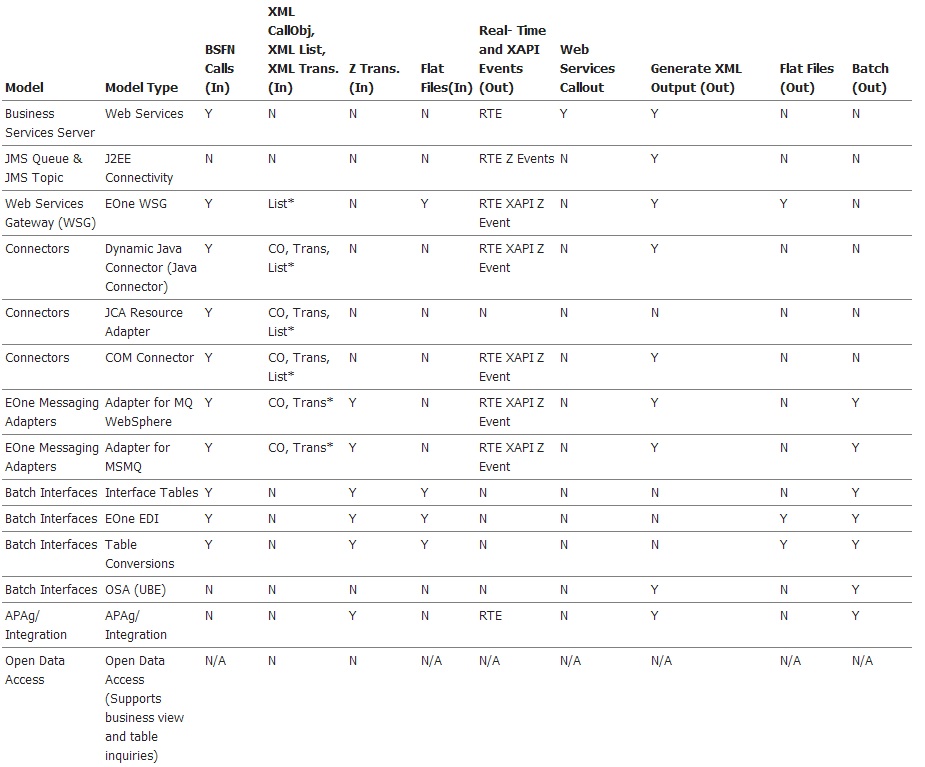
As you can see a number of different in/out communication options are available ranging from exposed Web Services, COM or Java based Connectors, but also to standard EDI based flat file imports.
Interoperability Scenario
In this article we are going to cover a typical interoperability scenario as follows
We are going to be receiving inventory records from our legacy system using a flat file to populate our Item Master table (F4101). In the first stage, we will be using Table Conversion(TC) to import our incoming flat file in to our intermediary Z Table (F4101Z1) and in the second stage we will be using a batch application(R4101Z1I) to transfer these imported records from our Z Table safely to our Item Master table (F4101).
Important Terminologies
You must be wondering about some of the terminologies in the given scenario so its best to explain them first
- Batch Applications, These applications allows the execution of large variety of business related functions and can be scheduled with the power of CNC (Configurable Network Computing) and can share their process load through the use of different application servers.
- Table Conversion, A batch application that allows multiple modes of mechanism to transfer data from one source to another. A source/destination can be internal JDE table or a flat file etc. It provides multitude of features for connectivity & filtration of data stream.
- Z Table, In a nutshell,these hosts of internal tables provides a safe mechanism to review & audit input data before the final migration in live environment.
Now with these definitions in place, let’s begin
Stage-1: Import from Flat File to Z Table through Table Conversion
Prerequisite
Ensure a properly formatted file format with all the required fields to be populated in the Z-Table. It is highly recommended to review and understand the target table structure

Execution
- From the Object Management Workbench (OMW) create a new batch application.
- On the “Add Object” screen, provide an “Object Name” & “Description” for your object & select the “Table Conversion” checkbox. Provide other information & Save your entry.
- On the “Batch Application Design” screen, switch to “Design Tools” tab and press the “Start Table Design Aid” button. This will launch the “Table Conversion Director”. At this point a Wizard will be launched to guide you in a step by step formation to create your table conversion.
- On the “Introduction” screen, select the “Data Conversion” option (selected by default) and press the “Next” button.
- On the “Select Environment” screen, select “<LOGIN ENV>” for both input and output environment and press the “Next” button.
- On the “Select Input” screen, switch to “Text File” tab. Provide the complete path to your source flat file in the top textbox and press the “Use” button. As your file is in a custom format, now you need to define it. Check the “User Defined Format” checkbox and press the “Define format(s)” button.
- On the “User Defined Format-Type” screen, select the “Delimited” option in format type and select “Single Format” in row formats. Press the “Next” button.
- On the “Column Delimiter” screen, select the “Comma” in the “Column Delimiter” and “Double Quotation” for “Textual Qualifier”. Press the “Next” button.
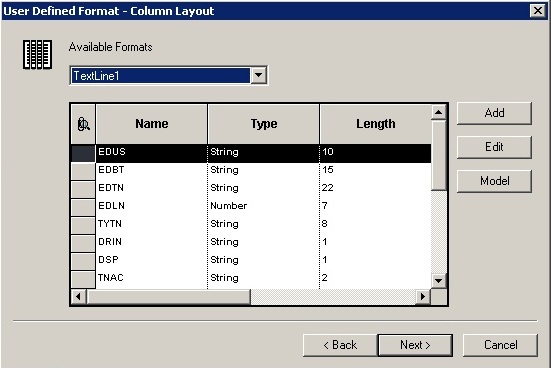
- On the “Column Layout” screen, define the format of your source file. Use the “Add” button to add entries as shown in the following diagram. Press “Next” when you are done.
- Press “Next” on the Summary screen.
- On the “Select Outputs” screen, select the “Table” tab and filter out for “F4101Z1” table. Double click to select it. Press the “Next” button to proceed.
- On the “Table Options”, uncheck the “Run Currency Trigger” checkbox as we are not doing any currency conversions. Press the “Next” button to proceed.
- On the “Mapping” screen, we now have to defined the mapping for our transfer from our source file format to our Z table. Follow the steps below
- From the “Events” drop down, select the “Row Fetched” event and check the “Issue a Write for this Event?”.
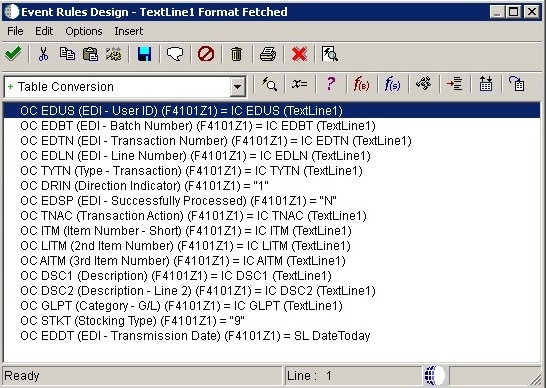
- Next, from the “Events” drop down, select the “TextLine1 Format Fetched” event and press the “Advanced ER” button.
- In the “Event Rules Design”, you now need to provide your mapping from input to output. Use the “x=” option to provide these mappings as shown below.
- Save your entries and Exit from “Events Rules Design”. Press “Next” button to proceed.
- On the “Logging Options” screen, select “Log All Errors” and press the “Next” button to proceed.
- On the final screen, select the “Yes, create a version of this table conversion” and provide name for your table conversion version. Press “Finish” to close.
- Exit from “Table Conversion Director”.
- On the “Batch Application Design” screen, on “Design Tools” tab, select the “Version List” button. This launches the (P98305)“Working with Batch Versions – Available Versions” application.
- At this point you should be able to see your Table Conversion created version, double click to select it.
- On the “Table Conversion Prompting” screen, leave all the values to default and press the “Submit” button.
- At this point, your table conversion will be submitted for processing.
- Once done you can review your Z Table (F4101Z1) using Universal Table Browser(UTB) to confirm your entries.
Stage-2: Import from Z Table to Master Table
Prerequisite
At this point, your entries have been transferred from the flat file to the target Z Table. Review your entries using the UTB and ensure appropriate transfer of the entries. Once satisfied, you are now ready to transfer these entries from your Z Table to your Master table.
Execution
- From the FAT client, type “bv” in the FAST Path to launch the (P98305) “Working with Batch Versions – Available Versions”.
- In the “Batch Application” field type “R4101Z1I” (without quotes) and press tab key. Your version list should now be populated.
- Select the “ZJDE001” version by double clicking on it.
- At this point, if you want to filter your specific records, you can check the “Data Selection” checkbox, otherwise press the Submit button to submit your batch version.
- On the “Processing Options” screen, press OK to proceed.
- On the “Report Output Destination”, select the “On Screen” entry press “OK”.
- Upon completion of the execution, your PDF report will be displayed that specifies the entries processed. If the entries were successfully transferred, the “Processed (Y/N)” column will say “Y” for those entries.
Troubleshooting
In case of issues, the first thing you should do is review the “Work Center” which can be accessed from the FAT client (Tools > Message Management > Work Center) for any reported errors in your data / import process. Review this information very closely as provides relative guideline for corrective actions as well. If that doesn’t resolute to a solution, JDE Logs along with Debugging your table conversion and batch application are the best available option for troubleshooting the entire process.
Finale
As you can see that Oracle JD Edwards provide a huge variety of solution for managing your data migration, in the subsequent post we will discuss other forms of methods available.
Getting Started with JD Edwards EnterpriseOne Interoperability的更多相关文章
- Hyperion Business Modeling for Microsoft Windows (32-bit)
介质包搜索 常见问题 说明 复查 许可证列表 以确定需要下载的产品程序包. 请选择产品程序包和平台,然后单击“查找”. 如果只有一项结果,则可以看到下载页.如果有多个结果,请选择一个,然后单 ...
- JDE开发端安装问题(JDE初步卸载重装)
JDE版本:9.1.4 所遇场景:安装JDE客户端.WEBServer后,卸载重新安装.在安装client后提示找不到DV\PY包. 日志installActionsXXX.log中显示 信息: 10 ...
- JDE开发端安装笔记
JDE版本:JD Edwards EnterpriseOne 9.1.4 for Microsoft 64bit Oracle客户端:Oracle Database 11g Release 2 Cli ...
- EBS条形码打印
Oracle 提供两种方式实现 128 码的编码 第一种方式是使用 Reports Builder 实现对 128 码编码, 在 Metalink 305090.1[1] 有 比较详尽的描述,其中 ...
- 透明数据加密 (TDE)常见问题解答
透明数据加密 (TDE)常见问题解答问题任何人只要有权访问加密数据就能对其进行解密吗?TDE 会带来哪些开销?哪些加密算法可与 TDE 一同使用?可以使用第三方加密算法代替 TDE 提供的算法吗?可以 ...
- Oracle Erp常用网站
2014-01-01 Created By BaoXinjian
- Oracle EBS 常用网站列表
http://www.lifandong.com/erp/356 Oracle EBS 常用网站列表 英文站: Oracle EBS R12 官方参考手册(User Guide, Implementa ...
- 大数据之ETL工具Kettle的--1功能介绍
Kettle是一款国外开源的ETL工具,纯java编写,可以在Window.Linux.Unix上运行. 说白了就是,很有必要去理解一般ETL工具必备的特性和功能,这样才更好的掌握Kettle的使用. ...
- Configuring Oracle E-Business Suite Integrated SOA Gateway Release 12.1.2 and Release 12.1.3 in a Multinode Environment (Doc ID 1081100.1)
Configuring Oracle E-Business Suite Integrated SOA Gateway Release 12.1.2 and Release 12.1.3 in a Mu ...
随机推荐
- PV、UPV、UV简介
1.PV: PV的全称是Pageview,中文的意思是:综合浏览量. 浏览量.页面的浏览次数,衡量网站用户访问的网页数量,用户每打开/刷新一次页面就记录一次,多 次打开会累计. 2.UPV: UPV的 ...
- iOS设计规范整理|汇总
来源 UI中国
- 在Excel中制作金字塔条形图
使用场景:一项市场调查研究中,男性和女性.赞同和反对.满意和不满意的两方面的消费者,他们在某些项目上的指标分布特性一项产品组合决策中,乐观场景和悲观场景下各产品的获利情况一个产品试销活动中,不同门店渠 ...
- 一行R代码来实现繁琐的可视化
ggfortify 有着简单易用的统一的界面来用一行代码来对许多受欢迎的R软件包结果进行二维可视化的一个R工具包.这让许多的统计学家以及数据科学家省去了许多繁琐和重复的过程,不用对结果进行任何处理就能 ...
- Python3基础 casefold 将字符串中的所有字符变成小写
镇场诗:---大梦谁觉,水月中建博客.百千磨难,才知世事无常.---今持佛语,技术无量愿学.愿尽所学,铸一良心博客.------------------------------------------ ...
- angular手势事件之on-Hold
.controller( 'actionsheetCtl',['$scope',function($scope){ $scope.onHold=function(){ console.log(even ...
- 长时间停留在calculating requirements and dependencies 解决方案
如果Eclipse花费了很长的时间calculating requirements and dependencies(计算需求和依赖性 ) 这个问题通常就是在点击安装之后显示“Calculating ...
- PHP入门二【PHP include 和 require的区别】
include (或 require)语句会获取指定文件中存在的所有文本/代码/标记,并复制到使用 include 语句的文件中.包含文件很有用,如果您需要在网站的多张页面上引用相同的 PHP.HTM ...
- UAT SIT QAS DEV PET
UAT: User Acceptance Testing 用户验收测试SIT: System Integration Testing 系统集成测试PET: Performance Evaluation ...
- 虚拟现实外包公司—焰火工坊CTO团队外包难把VR真正做起来,讲故事可能将伤害产业链
CTO王明杨,带着他的焰火工坊,正在为自家VR播放器和系统的上线做最后准备.不少投资机构,有传言称包括小米在内巨头都试图染指VR领域,而上月上市的暴风影音正是倚靠VR的概念成功助推了其高股价.对此,王 ...