
SqlServer性能优化 查询和索引优化(十二)
查询优化的过程:
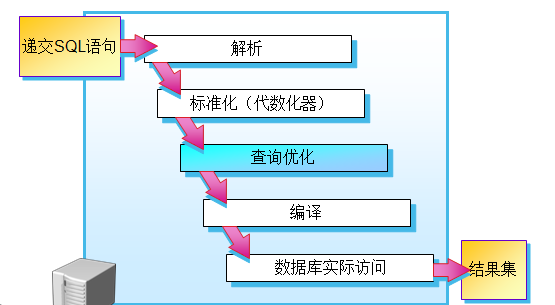
查询优化:
功能:分析语句后最终生成执行计划
分析:获取操作语句参数
索引选择
Join算法选择
创建测试的表:
select * into EmployeeOp from AdventureWorks2014.HumanResources.Employee
建立非聚集索引:
create nonclustered index nc_employee_vacationhours on employeeop(vacationhours)
执行语句:
select LoginID,JobTitle,VacationHours,SickLeaveHours from EmployeeOp where VacationHours>40 --table scan>10%

执行语句:
select LoginID,JobTitle,VacationHours,SickLeaveHours from EmployeeOp where VacationHours>99 --nonclustered index
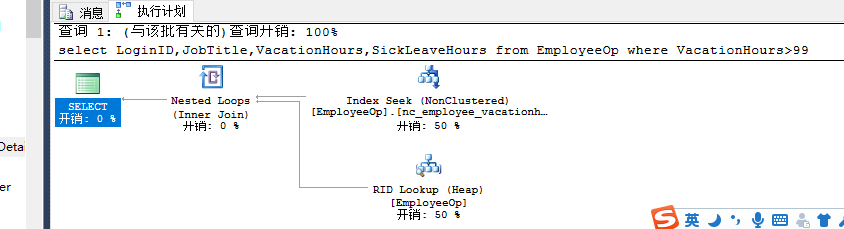
查询结果集的数据范围影响对索引的选择。
两个查询条件:
	select LoginID,JobTitle,VacationHours,SickLeaveHours from EmployeeOp where VacationHours>40

and SickLeaveHours>60--scan

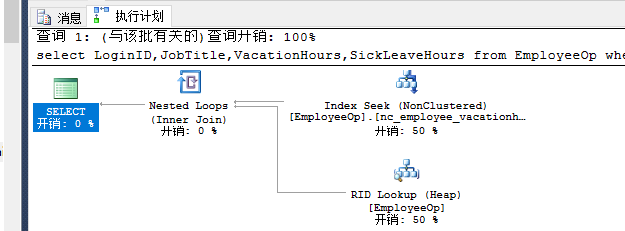
Sqlserver 的查询结果集会认为用哪个列查询的结果少,就选择哪个。在去and 的第二个结果,最终返回结果集。
select LoginID,JobTitle,VacationHours,SickLeaveHours from EmployeeOp where VacationHours>99

and SickLeaveHours>60--nonclustered index nc_employee_vacationhours
单独选择:
select LoginID,JobTitle,VacationHours,SickLeaveHours from EmployeeOp where SickLeaveHours>60--table scan

创建非聚集索引:
create nonclustered index nc_employee_sickleavehours on EmployeeOp(SickLeaveHours)
执行:
select LoginID,JobTitle,VacationHours,SickLeaveHours from EmployeeOp where SickLeaveHours>60--table scan
执行:
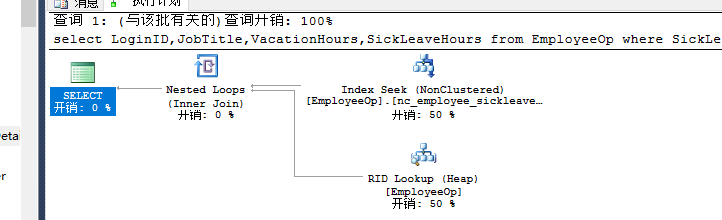
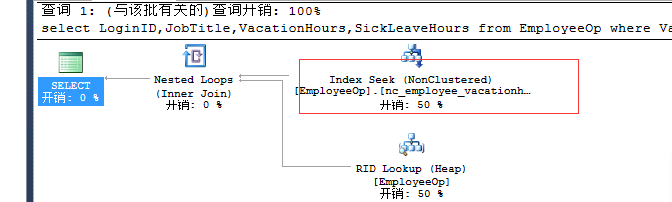
select LoginID,JobTitle,VacationHours,SickLeaveHours from EmployeeOp where SickLeaveHours>88--nc_employee_sickleavehours
执行:
select LoginID,JobTitle,VacationHours,SickLeaveHours from EmployeeOp where VacationHours>99

and SickLeaveHours>88--nonclustered index nc_employee_vacationhours
在两列上做一个索引:
create nonclustered index nc_employee_vacationsickleavehours on EmployeeOp(VacationHours,SickLeaveHours)
执行语句:(使用了符合索引)
select LoginID,JobTitle,VacationHours,SickLeaveHours from EmployeeOp where VacationHours>99

and SickLeaveHours>88-- nc_employee_vacationsickleavehours
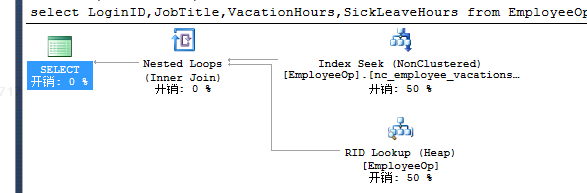
执行:(随机)
select LoginID,JobTitle,VacationHours,SickLeaveHours from EmployeeOp where VacationHours>99
--nc_employee_vacationhours  nc_employee_vacationsickleavehours
执行:
select LoginID,JobTitle,VacationHours,SickLeaveHours from EmployeeOp where SickLeaveHours>88

--nc_employee_sickleavehours
执行:
select * from EmployeeOp where SickLeaveHours>88 --nc_employee_sickleavehours
创建聚集索引:
create clustered index c_Employee_BusinessEntityID on EmployeeOp(BusinessEntityID)
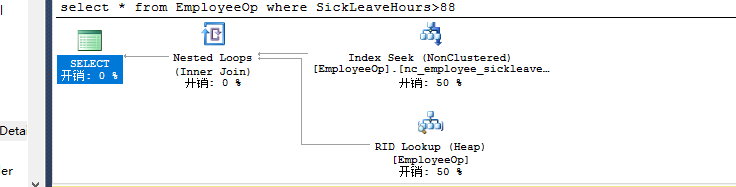
执行:
select * from EmployeeOp where SickLeaveHours>88 --nc_employee_sickleavehours key连 c_ID聚集索引
建立include索引:
create nonclustered index nc_employee_vacationsickleavehoursinclude on EmployeeOp(VacationHours,

SickLeaveHours) include(LoginID,JobTitle)
执行:
select LoginID,JobTitle,VacationHours,SickLeaveHours from EmployeeOp where VacationHours>99

and SickLeaveHours>88 --nc_employee_vacationsickleavehoursinclude

执行:(采用覆盖索引)
select LoginID,JobTitle,VacationHours,SickLeaveHours from EmployeeOp where VacationHours>60

and SickLeaveHours>10--nc_employee_vacationsickleavehoursinclude--0.0048

select LoginID,JobTitle,VacationHours,SickLeaveHours from EmployeeOp where VacationHours>60
--nc_employee_vacationsickleavehoursinclude

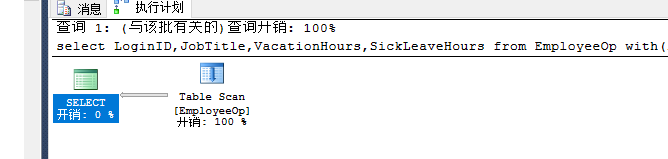
执行:(指定使用的索引)
select LoginID,JobTitle,VacationHours,SickLeaveHours from EmployeeOp

with(index=0) where VacationHours>60

and SickLeaveHours>10
索引的优化:
select * from EmployeeOp
--创建非聚集索引
create nonclustered index nc_EmployeeOp on employeeop (VacationHours,SickLeaveHours) include (LoginID,JobTitle)

create nonclustered index nc_EmployeeOp_Vacation on employeeop(VacationHours)
include(LoginID,JobTitle)

--创建聚集索引
set statistics io on
create clustered index c_Employee_id on employeeop(BusinessEntityID)  --7,9,9
set statistics io off

总结:先创建聚集索引在创非聚集索引
聚集索引键宽与窄:
create table temptable(c1 int not null,c2 int)

 declare @c int

  set @c=0

  while @c<50000

  begin

  insert temptable values(@c,@c)

  set @c=@c+1

  end

create clustered index c_temptable_c1 on temptable(c1)

set statistics io on

select * from temptable where c1<=25000  --0.07

set statistics io off

创建Guid的列:
create table temptable(c1 uniqueidentifier,c2 int)

declare @c int

  set @c=0

  while @c<50000

  begin

  insert temptable values(newid(),@c)

  set @c=@c+1

  end

  create clustered index c_temptable_c1 on temptable(c1)

set statistics io on

select * from temptable where c1<='D144242D-BFA3-4A8C-8DCE-C35A880E8BBE'  --0.11

set statistics io off

索引设计建议:
1.where子句与连接条件列(where子句后面的列建立非聚集索引,有多列查询做成组合索引,并用inclued的方式把经常访问的列信息给包含到非聚集索引的页集,查询用到链接时(join):join的条件列做到非聚集索引中)
2.使用窄索引:索引列少、索引列数据类型空间少
1.减少IO数量
2.提高缓存效率
3.减少数据存储的空间
4.动态管理视图: sys.dm_db_index_physical_stats
选择性能高的列应该创建索引,如果有多列筛选,并尽量放置经常筛选的列和低密度的列到组合索引前面
int类型上创建索引与char 型上创建索引
create nonclustered  index nc_employee_vacationsickleavehours on  employeeop(vacationhours,

sickleavehours) include(LoginID,JobTitle)

create nonclustered index nc_employee_sickvacationleavehours  on employeeop(sickleavehours,vacationhours)

include(LoginID,JobTitle)

select LoginID,JobTitle from EmployeeOp where VacationHours>40 and SickLeaveHours>90  -- nc_sickleavevacation
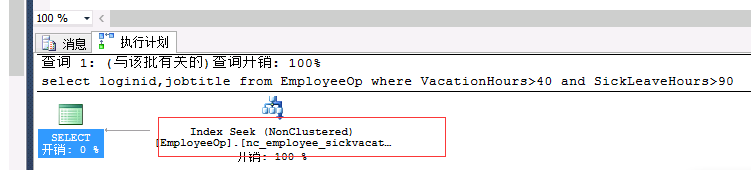
select loginid,jobtitle from EmployeeOp where VacationHours>99 and SickLeaveHours>10--nc_vacationsickleave
总结:会自动进行筛选与and的顺序无关。(谁的选择性度高)
非聚集索引:RID指针指向堆得行标识符或聚集索引的键值
如果有非聚集索引,一定要创建一个聚集索引
先创建聚集索引,在创建非聚集索引
保持聚集索引窄:提高非聚集索引性能,提高聚集索引性能
使用聚集索引的时机:
1.Group by列
2.Order by 列
3.没有针对某个筛选条件的非聚集索引
不合适使用聚集索引:
1.索引列值频繁跟新:频繁跟新非聚集索引降低性能
2.并发的大量的插入
如果非聚集索引需要书签查找,则建议通过聚集索引查找
建议创建覆盖索引
不适合使用非聚集索引:
1.需要获取大量的行
2.需要获取大量的字段
交叉索引:针对筛选条件分别建立非聚集索引,在查询时,获得两个子集的索引交叉,解决覆盖索引非常宽的问题
建议使用过滤索引:针对查询必然需要筛选掉的条件做成索引的过滤条件
create nonclustered index nc_employee_sickvacationleavehours on employeeop(sickleavehours,vacationhours) include (LoginID,JobTitle) where salariedFlag=1
恰当使用索引视图使连接与聚合实物化,平衡查询性能提升与维护视图性能开销
复合索引每列可以不按照相同排序规则
可以在计算列上创建索引,建议使用持久化的计算列
指定并行度CPU个数、制定联机索引
经常使用数据库引擎优化顾问
尽量减少书签查找
查询优化统计方面的应用:
查询优化器对索引的选择依赖于统计
统计被自动创建和更新,也可以设置异步更新统计
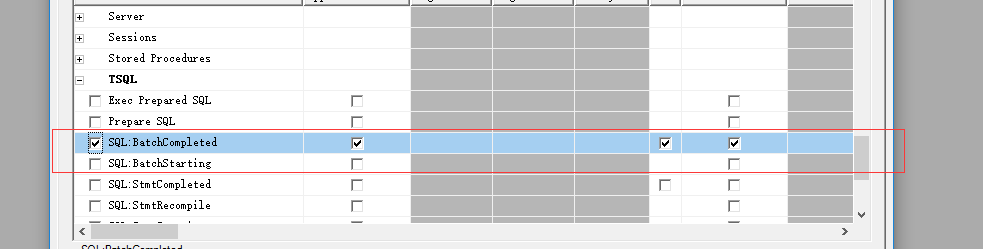
通过Profiler跟踪统计事件
过时统计造成查询优化器无法选择最优的执行计划
自动创建统计也会在非索引列上创建统计
跟新自动统计:

Sql完成情况:
开启跟踪:
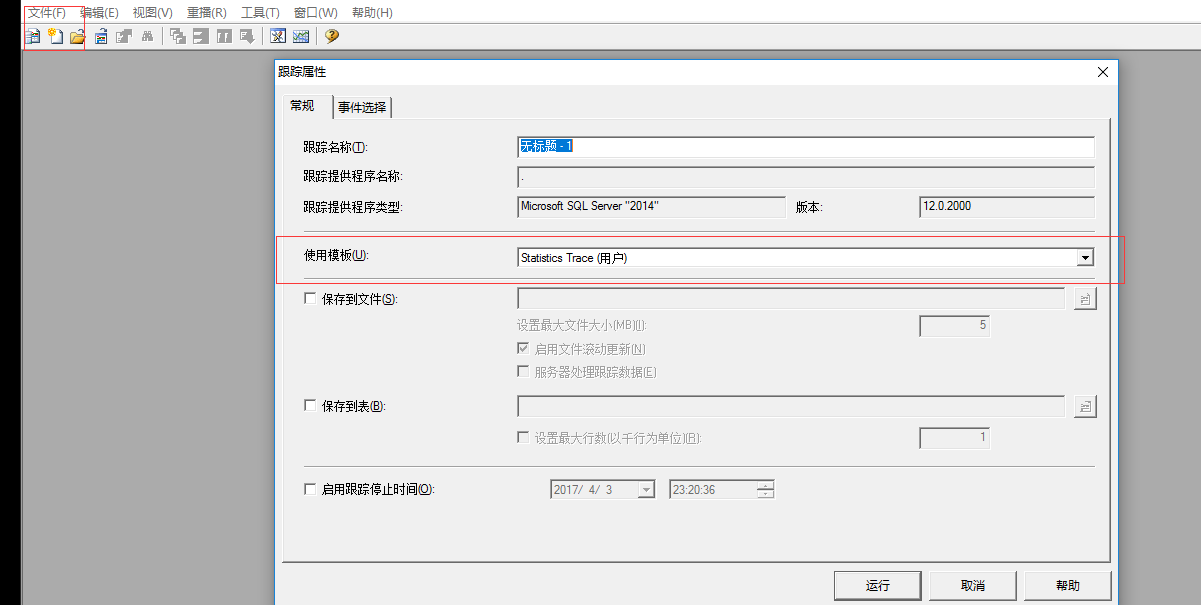
验证事件:

创建跟踪统计的表:
create table StatisticsTB(c1 int identity(1,1),c2 int)

declare @n int

set @n=0

while @n<5000

begin

 insert StatisticsTB values(@n)

 set @n=@n+1

end

create nonclustered index  nc_StatisticsTB_t2 on StatisticsTB(c2)

declare @n int

set @n=5001

while @n<50000

begin

insert StatisticsTB values(@n)

set @n=@n+1

end

select * from StatisticsTB where c2<10--index

 select * from StatisticsTB where c2>10--Scan
自动统计功能出现故障:
--自动统计出现故障后

declare @n int

set @n=50001

while @n<130000

begin

insert StatisticsTB values(@n)

set @n=@n+1

end
本来是表扫描的就弄成索引。
select * from StatisticsTB where c2>4990--index
查看统计信息:
--查看统计信息

dbcc show_statistics('Employeeop',nc_Employee_vacation)--密度:0.01

dbcc show_statistics('Employeeop',nc_Employee_vacationsickleave)--密度:0.009
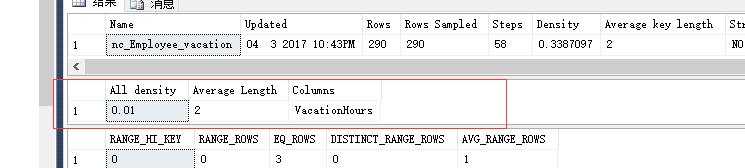

更新统计:
--更新统计

  use HRDB

go

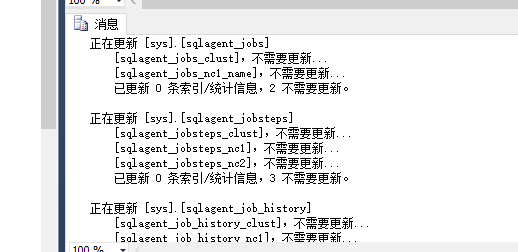
Sp_Updatestats
--创建统计:
create statistics s_Employee_c2 on StatisticsTB(c2)
在非索引列上创建统计:
create table t1(c1 int identity(1,1),c2 int)

insert t1 values(2)

declare @count int

set @count=0

while @count<1000

begin

insert t1 values(1)

set @count=@count+1

end

create table t2(c1 int identity(1,1),c2 int)

insert t2 values(1)

declare @count int

set @count=0

while @count<1000

begin

insert t1 values(2)

set @count=@count+1

end
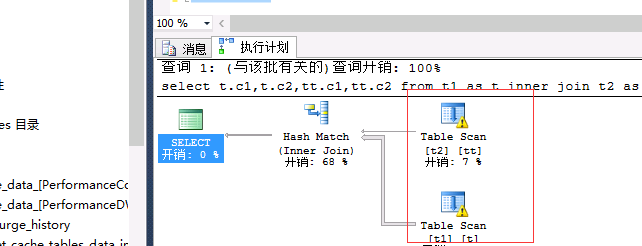
关闭统计的情况:
select t.c1,t.c2,tt.c1,tt.c2 from t1 as t inner join t2 as tt on

t.c2=tt.c2--0.045
删除重新创建表:
drop table t1

drop table t2

create table t1(c1 int identity(1,1),c2 int)

insert t1 values(2)

declare @count int

set @count=0

while @count<1000

begin

insert t1 values(1)

set @count=@count+1

end

create table t2(c1 int identity(1,1),c2 int)

insert t2 values(1)

declare @count int

set @count=0

while @count<1000

begin

insert t1 values(2)

set @count=@count+1

end

select t.c1,t.c2,tt.c1,tt.c2 from t1 as t inner join t2 as tt on

t.c2=tt.c2--0.045
统计建议:

查看索引是否有碎片:
--查看索引是否有碎片

select * from sys.dm_db_index_physical_stats(db_id('HRDB'),object_id('EmployeeOp'),null,

null,'Detailed')
做碎片的整理:
--对页面进行重排:
alter index nc_Employee_Vacation on EmployeeOp Reorganize
重建索引:
alter index nc_Employee_Vacation on employeeop rebuild with(fillfactor=40)
填充因子的方式重建索引:
--指定填充因子重建索引

create nonclustered index nc_Employee_Vacation on Employeeop (VacationHours) with(fillfactor=40,drop_existing=on)
查询优化器Join的选择:
1.嵌套循环的join NestedLoop Join
2.合并的join Merge Join算法
1.链接表记录数都比较多,并且针对连接列进行了物理排序
2.Inner表的行有范围约束
3.Hash join算法
对Join算法的选择:
create table parenttb(c1 int,name varchar(500))

declare @c int

set @c=0

while @c<10

begin

insert parenttb values(@c,GETDATE())

set @c=@c+1

end

go

create table subtb(c1 int,cardid uniqueidentifier)

declare @c int

set @c=0

while @c<250

begin

insert subtb values(@c,NEWID())

set @c=@c+1

end
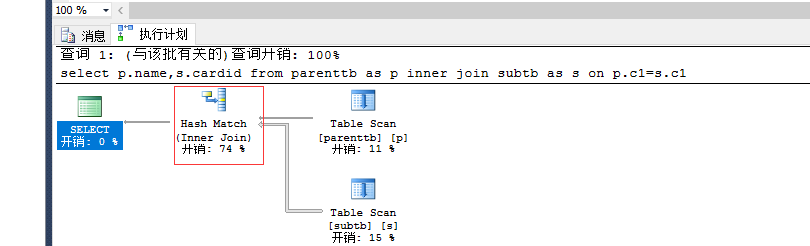
执行语句:
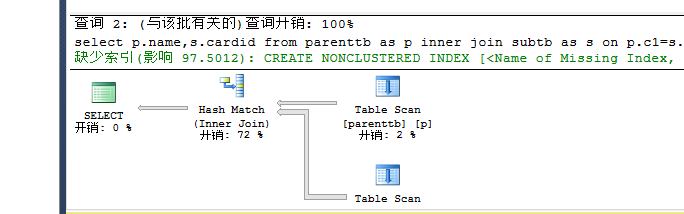
select p.name,s.cardid from parenttb as p inner join subtb as s on p.c1=s.c1 --hash --0.29 io:

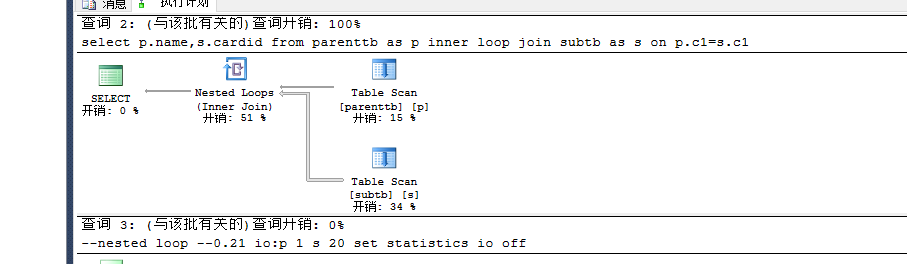
手工指定:
   set statistics io on

select p.name,s.cardid from parenttb as p inner loop join subtb as s

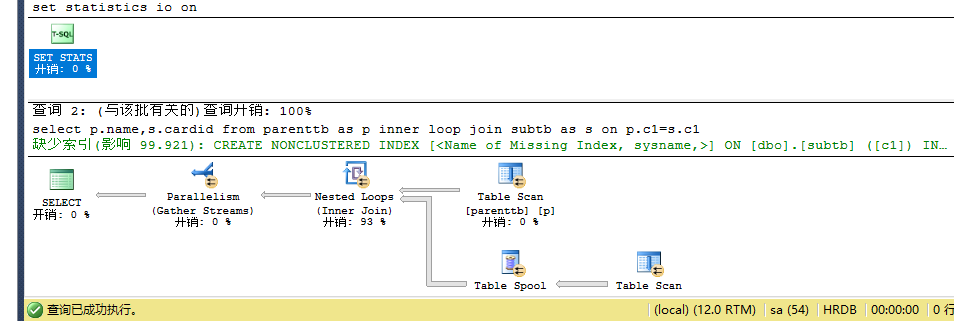
 on p.c1=s.c1--nested loop --0.21 io:p 1 s 20

set statistics io off

多添加一些记录:
create table parenttb(c1 int,name varchar(500))

declare @c int

set @c=0

while @c<1000

begin

insert parenttb values(@c,getdate())

set @c=@c+1

end

go

create table subtb(c1 int,cardid uniqueidentifier)

declare @c int

set @c=0

while @c<25000

begin

insert subtb values(@c,NEWID())

set @c=@c+1

end
执行语句:
set statistics io on

select p.name,s.cardid from parenttb as p inner join subtb as s on p.c1=s.c1--hash --0.5 io:p 7 s 140

set statistics io off

set statistics io on

select p.name,s.cardid from parenttb as p inner loop join subtb as s on p.c1=s.c1--loop --64 io:p 7 s 560

set statistics io off


创建唯一的聚集索引:
--创建唯一的聚集索引

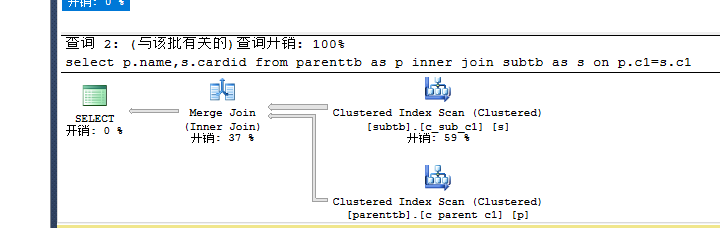
create unique clustered index c_parent_c1  on Parenttb(c1)

create unique clustered index c_sub_c1  on Subtb(c1)
执行:
set statistics io on

select p.name,s.cardid from parenttb as p inner join subtb as s on p.c1=s.c1--Merge --0.16 io:p 6 s 7

set statistics io off

SqlServer性能优化 查询和索引优化(十二)的更多相关文章
- 性能优化之mysql索引优化
sql及索引优化 如何通过慢查询日志发现有问题的sql? 查询次数多且每次查询占用时间长的sql通常为pt-query-digest分析的前几个查询 IO大的sql注意pt-query-digest分 ...
- MySQL的一次优化记录 (IN子查询和索引优化)
这两天实习项目遇到一个网页加载巨慢的问题(10多秒),然后定位到是一个MySQL查询特别慢的语句引起的: SELECT * FROM ( SELECT DISTINCT t.vc_date, t.c_ ...
- MySQL性能优化,MySQL索引优化,order by优化,explain优化
前言 今天我们来讲讲如何优化MySQL的性能,主要从索引方面优化.下期文章讲讲MySQL慢查询日志,我们是依据慢查询日志来判断哪条SQL语句有问题,然后在进行优化,敬请期待MySQL慢查询日志篇 建表 ...
- sql优化策略之索引失效情况二
详见: http://blog.yemou.net/article/query/info/tytfjhfascvhzxcytp63 接第一篇索引失效分析:http://grefr.iteye.co ...
- MySQL查询语句执行过程及性能优化-查询过程及优化方法(JOIN/ORDER BY)
在上一篇文章MySQL查询语句执行过程及性能优化-基本概念和EXPLAIN语句简介中介绍了EXPLAIN语句,并举了一个慢查询例子:
- Mysql性能优化二:索引优化
1 索引的类型 UNIQUE唯一索引 不可以出现相同的值,可以有NULL值. INDEX普通索引 允许出现相同的索引内容. PRIMARY KEY主键索引 不允许出现相同的值,且不能为NULL值,一个 ...
- 优化SQLServer--表和索引的分区(二)
简介 之前一篇简单的介绍了语法和一些基本的概念,隔了一段时间,觉得有必要细致的通过实例来总结一下这部分内容.如之前所说,分区就是讲大型的对象(表)分成更小的块来管理,基本单位是行.这也就产生了很大优势 ...
- mysql优化工具(索引优化)
mysql优化工具 1.pt-duplicate-key-checker(检查数据库的重复索引),这款工具可以帮助我们找到重复的索引并且还会给你删除重复索引的建议语句,非常好用. 2.
- mysql性能优化-慢查询分析、优化索引和配置
一.优化概述 二.查询与索引优化分析 1性能瓶颈定位 Show命令 慢查询日志 explain分析查询 profiling分析查询 2索引及查询优化 三.配置优化 1) max_connec ...
随机推荐
- php案列4
一个最简单的利用php生成随机数或者随机字符串的函数.$chars变量中的字符自己修改就能达到数字或者字符串的目的 $len表示长度,代码如下: 复制代码 代码如下: /** * 产生随机字符 ...
- Codeforces Round #372 (Div. 2) C. Plus and Square Root
题目链接 分析:这题都过了2000了,应该很简单..写这篇只是为了凑篇数= = 假设在第级的时候开方过后的数为,是第级的系数.那么 - 显然,最小的情况应该就是, 化简一下公式,在的情况下应该是,注意 ...
- eclipse导入外部jar包
首先在项目下创建一个文件夹,保存我们的jar包. 在项目名上右击,依次点击[New]-->[Floder],打开新建文件夹窗口输入文件夹名称[lib],点击[ok].我们通常在lib文件夹中存放 ...
- EF6 CodeFirst+Repository+Ninject+MVC4+EasyUI实践(六)
前言 在接下来的篇幅里将对系统的模块功能进行编写.主要以代码实现为主.这一篇我们需要完成系统模块“角色管理”的相关功能.完成后可以对系统框架结构有进一步了解. Abstract层 之前说过,Abstr ...
- Ubuntu 下 kazam 录屏 没声音解决方案
以下内容参考https://www.youtube.com/watch?v=5NZ0qwp2L04,我做了些修改,让它好懂些. 在应用商店里搜索 PulseAudio Volume Control 在 ...
- UIScrollView无法滚动的解决办法及UIScrollView的代理(delegate)
1•如果UIScrollView无法滚动,可能是以下原因: Ø没有设置contentSize ØscrollEnabled = NO Ø没有接收到触摸事件:userInteractionEnabled ...
- javascript快速排序
function quickSort(arr){ if(arr.length <= 1) return arr;//判断是否有效数组 var cut = Math.floor(arr.lengt ...
- K2新网站(官网和BPM社区)正式上线了
K2新网站(官网和BPM社区)正式上线了 K2新网站(官网和BPM社区)正式上线了 K2新网站(官网和BPM社区)正式上线了 通常重要的事情要讲三遍, 官网:www.k2software.cn 社区: ...
- HttpServletResponse常用的方法
所有Servlet响应都实现ServletResponse接口.ServletResponse接口主要有以下方法: (1)从Servlet中可以通过getWriter方法取得PrintWriter对象 ...
- gif显示
public void gifplay(string path,ref Panel panel) { try{ Bitmap animatedGif = new Bitmap(path ); Grap ...