
SpeechLib 语音播报
SpeechLib这的dll专门用来播放语音,能够识别英语、简体和繁体。并且可以播放声音文件,支持WAV格式,但不支持MP3。在报警场合下已经够用了。
基本播放语音及文件。支持异步。
using System;

using System.Threading;

using SpeechLib;

namespace  Model.AlarmHandle

{

    /// <summary>

    ///语音播报

    /// </summary>

    public class SpeechVoice

    {

        /// <summary>

        /// The _voice

        /// </summary>

        private SpVoice _voice;

        private SpVoiceClass spVoice;

        private readonly SpFileStreamClass spFile;

        /// <summary>

        /// Initializes a new instance of the <see cref="SpeechVoice"/> class.

        /// </summary>

        public SpeechVoice()

        {

            _voice = new SpVoice();

            spVoice = new SpVoiceClass();

            spFile = new SpFileStreamClass();

        }

        /// <summary>

        /// 播放

        /// </summary>

        /// <param name="text">The text.</param>

        /// <param name="speakFlag">The speak flag.</param>

        public void Speak(string text, SpeechVoiceSpeakFlags speakFlag = SpeechVoiceSpeakFlags.SVSFDefault)

        {

            _voice.Speak(string.Empty); _voice.Speak(text, speakFlag);

        }

        /// <summary>

        /// 异步播放

        /// </summary>

        /// <param name="text">The text.</param>

        public void SpeakAsync(string text)

        {

            _voice.Speak(text, SpeechVoiceSpeakFlags.SVSFlagsAsync);

        }

        /// <summary>

        /// Plays the sound.

        /// </summary>

        /// <param name="fileName">Name of the file.</param>

        public void PlaySound(string fileName)

        {

            //要加载COM组件:Microsoft speech object Library

            if (!System.IO.File.Exists(fileName)) return;

            spFile.Open(fileName, SpeechStreamFileMode.SSFMOpenForRead, true);

            var istream = spFile as ISpeechBaseStream;

            spVoice.SpeakStream(istream, SpeechVoiceSpeakFlags.SVSFIsFilename);

            spFile.Close();

        }

        /// <summary>

        /// 暂停

        /// </summary>

        public void Pause()

        {

            if (_voice != null)

                _voice.Pause();

        }

        /// <summary>

        /// Stops the voice.

        /// </summary>

        public void StopVoice()

        {

            _voice.Pause();

            _voice.Speak(string.Empty, SpeechVoiceSpeakFlags.SVSFPurgeBeforeSpeak);

        }

        /// <summary>

        /// Pauses the file.

        /// </summary>

        public void StopFile()

        {

            try

            {

                spFile.ISpStream_Close();

            }

            catch (Exception)

            {

            }

        }

        /// <summary>

        /// 恢复

        /// </summary>

        public void Resume()

        {

            if (_voice != null)

                _voice.Resume();

        }

    }

    /// <summary>

    ///语音播报状态

    /// </summary>

    public enum VoiceStatus

    {

        /// <summary>

        /// The play

        /// </summary>

        Play,

        /// <summary>

        /// The ready

        /// </summary>

        Ready,

        /// <summary>

        /// The pause

        /// </summary>

        Pause,

    }

}
但真的运用时,还需要支持循环播放,以及播放状态。
   private SpeechVoice _speaker;

   private bool _isLoopAudioFile; // 是否循环播放声音文件

   private bool _isLoopSpeech;  //循环语音

  private VoiceStatus speakStatus=VoiceStatus.Ready;

  private bool IsStopPlayFile;    //是否停止

 private bool IsStopPlayVoice;

     /// <summary>

        /// 播放文件结束

        /// </summary>

        public event EventHandler PlayFileComplete;

        /// <summary>

        /// 播放文件开始

        /// </summary>

        public event EventHandler PlayFileStart;

        /// <summary>

        /// 播放文件结束

        /// </summary>

        public event EventHandler PlayAudioComplete;

        /// <summary>

        /// 播放文件开始

        /// </summary>

        public event EventHandler PlayAudioStart;

  /// <summary>

        /// 播放语言

        /// </summary>

        /// <param name="voiceContent">Content of the voice.</param>

        public void SpeechVoice(string voiceContent)

        {

            IsStopPlayVoice = false;

            if (speakStatus == VoiceStatus.Play) return; //正在播放就返回

            Speaker.Resume();

            Action invoke = () =>

            {

                OnPlayAudioStart();//触发开始播放事件

                speakStatus = VoiceStatus.Play;

                Speaker.Speak(voiceContent);

            };

            invoke.BeginInvoke(VoiceCallback, invoke);

        }

  private void VoiceCallback(IAsyncResult ar)

        {

            var ac = ar.AsyncState as Action;

            if (ac != null)

            {

                try//原dll不能多次停止 所以加了try catch 和状态判断

                {

                    if ((IsLoopSpeech) && !IsStopPlayVoice)

                    {

                        //一次播放结束之后如果是循环播放 就继续播放

                        ac.BeginInvoke(VoiceCallback, ac);

                    }

                    else

                    {

                        speakStatus = VoiceStatus.Pause;

                        //触发停止事件

                        OnPlayAudioComplete(this, new EventArgs());

                        ac.EndInvoke(ar);

                    }

                }

                catch (Exception)

                {

                }

            }

        }

//以下同理

  /// <summary>

        /// 暂停播放

        /// </summary>

        public void StopSpeechVoice()

        {

            if (IsStopPlayVoice) return;

            IsStopPlayVoice = true;

            speakStatus = VoiceStatus.Pause;

            Action invoke = () => Speaker.StopVoice();

            invoke.BeginInvoke(null, invoke);

            OnPlayAudioComplete(this, new EventArgs());

        }

        /// <summary>

        /// 停止播放声音文件

        /// </summary>

        public void StopPlayer()

        {

            if (IsStopPlayVoice) return;

            IsStopPlayFile = true;

            speakStatus = VoiceStatus.Pause;

            Speaker.PauseFile();

            OnPlayFileComplete(this, new EventArgs());

        }

        /// <summary>

        /// 播放声音文件

        /// </summary>

        public void PlayAudioFile()

        {

            player = new SoundPlayer { SoundLocation = _audioFile.FilePath };

            if(speakStatus==VoiceStatus.Play) return;

            IsStopPlayFile = false;

            if (File.Exists(_audioFile.FilePath))

            {

                Action invoke = () =>

                {

                    OnPlayFileStart();

                    speakStatus = VoiceStatus.Play;

                    Speaker.PlaySound(_audioFile.FilePath);

                };

                invoke.BeginInvoke(Callback, invoke);

            }

        }

       /// <summary>

        /// Called when [play start].

        /// </summary>

        public void OnPlayFileStart()

        {

            var handler = PlayFileStart;

            if (handler != null) handler(this, EventArgs.Empty);

        }

        /// <summary>

        /// Called when [play start].

        /// </summary>

        public void OnPlayAudioStart()

        {

            var handler = PlayAudioStart;

            if (handler != null) handler(this, EventArgs.Empty);

        }

        /// <summary>

        /// Called when [play complete].

        /// </summary>

        /// <param name="sender">The sender.</param>

        /// <param name="e">The <see cref="EventArgs"/> instance containing the event data.</param>

        public void OnPlayAudioComplete(object sender, EventArgs e)

        {

            EventHandler handler = PlayAudioComplete;

            if (handler != null) handler(this, EventArgs.Empty);

        }

        /// <summary>

        /// Called when [play complete].

        /// </summary>

        /// <param name="sender">The sender.</param>

        /// <param name="e">The <see cref="EventArgs"/> instance containing the event data.</param>

        public void OnPlayFileComplete (object sender, EventArgs e)

        {

            EventHandler handler = PlayFileComplete;

            if (handler != null) handler(this, EventArgs.Empty);

        }

             /// <summary>

        /// Callbacks the specified ar.

        /// </summary>

        /// <param name="ar">The ar.</param>

        private void Callback(IAsyncResult ar)

        {

            var ac = ar.AsyncState as Action;

            if (ac != null)

            {

                OnPlayFileComplete(this,new EventArgs());

                try

                {

                    if ((IsLoopAudioFile)&& !IsStopPlayFile)

                    {

                        ac.BeginInvoke(Callback, ac);

                    }

                    else

                    {

                        speakStatus = VoiceStatus.Pause;

                        ac.EndInvoke(ar);

                    }

                }

                catch (Exception)

                {

                }

            }

        }
语音播放小Demo:SpeechVoice
在繁体系统,或者英文系统下面,有时候出现只能播报英文的情况,这个是犹豫语言资源没有安装。
判断操作系统是否安装中文最简单的方法:
64位系统:查看C:\Program Files (x86)\Common Files\SpeechEngines\Microsoft\TTS20路径下是否有zh-CHS文件夹
32位系统:查看C:\Program Files\Common Files\SpeechEngines\Microsoft\TTS20路径下是否有zh-CHS文件夹
如果不存在则表明缺少中文语言包,一般情况下,win7及以上的中文操作系统都自带了,不需要安装,其他操作系统基本上都没有安装,简体XP系统也没有安装
安装方法是:
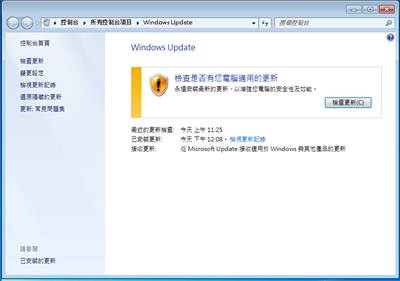
1、 打开控制面板的window update,见下图:
2. 选择检查更新按钮,然后再更新列表中选择“可用的附件程序”
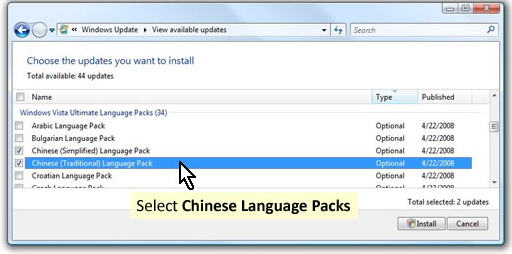
3、 选择简体中文语言包,勾选并安装即可
4、 安装完成后可以检查C:\Program Files (x86)\Common Files\SpeechEngines\Microsoft\TTS20路径下是否有zh-CHS文件夹,有则表明安装成功
安装成功以后就可以使用语音播报功能了。
SpeechLib 语音播报的更多相关文章
- 语音合成,语音播报功能(系统)-b
第一次接触语音合成,只实现了很简单的功能,记录一下,以后免得去网上四处找资料 最近在做高德地图导航的时候有个语音播报的功能,高德sdk已经提供了要语音的字符串.我要做的就是把这些字符串读出声音来即可. ...
- 实现百度地图导航Demo的语音播报功能
上文中实现了在本地导入百度地图导航Demo,那么在此基础上如何实现导航的语音播报呢? 一.为该应用申请语音播报(也叫注册) http://developer.baidu.com/map/index.p ...
- iOS语音识别,语音播报,文字变语音播报,语音变文字
首先使用的是科大讯飞的sdk 1.语音识别部分 AppDelegate.m #import "AppDelegate.h" #import <iflyMSC/iflyMSC. ...
- C# 使用System.Speech 进行语音播报和识别
C# 使用System.Speech 进行语音播报和识别 using System.Speech.Synthesis; using System.Speech.Recognition; //语音识别 ...
- Xamarin Essentials教程语音播报TextToSpeech
Xamarin Essentials教程语音播报TextToSpeech 语音播报是一种将文本信息转化为音频信息的技术.使用该技术,开发者可以让用户不用盯着屏幕,就可以获取到信息.例如,支付宝为商 ...
- element vuex 语音播报
data () { return { showDetail: false, height: 1, // 1 不可用 0 正常 2运维中 result: [], tableData: [], // 应用 ...
- Android短信收到,语音播报
发送短信功能界面 /** * 发送短信Demo * * @description: * @author ldm * @date 2016-4-22 上午9:07:53 */ public class ...
- Android自带语音播报+讯飞语音播报封装(直接用)
一.Android自带的语音播报 1.查看是否支持中文,在测试的设备中打开‘设置’ -->找到 '语言和输入法'-->查看语音选项,是否支持中文,默认仅支持英文. 使用如下: public ...
- iOS语音播报文字
记得大学的时候学微软Window Phone时,有语音识别类似苹果的嘿,Siri.今天无聊百度搜了一下,搜到苹果语音播报文字.自己试了下还挺好玩. 1.引入框架#import <AVFounda ...
随机推荐
- Cordova系列(一)
1.安装 这里推荐用npm安装cordova,至于npm的安装,网上有很多的.打开命令行,输入 npm install -g cordova 这里就安装了好了最新版的cordova,虽然绝大多数会成功 ...
- 《Objective-C编程》部分示例
<Objective-C编程>部分示例 最近在看<Objective-C编程>顺带实现了书中部分示例代码.如果感兴趣可以自行 下载(点我). 通过本书大致了解了Objectiv ...
- 对于cookie和session的形象解释
生活中的场景: 一群人,买豆浆,也不排队,乱哄哄的 豆浆现磨. 先交钱,交完钱蹲在一边等. 这个老板非常健忘! 记忆时间:转脸就忘. 李四给老板钱<--->"大杯黄豆!" ...
- 完美解决全面屏蔽Google教程(终结者)
最近谷歌的IP被大范围的禁用了.身处一个连谷歌都用不了的过度的程序员,深感命运多舛.幸好,魔高一尺,道高一丈.下面是几种可以使用谷歌的方法. 方法一 1)在chrome浏览器中输入:chrome:// ...
- ros学习笔记 - 深度传感器转换成激光数据(hector_slam)
前提条件:1,确保读者已经安装了kinect或者其他深度摄像头的驱动,如果未安装,可以直接在网盘下载:http://pan.baidu.com/s/1hqHB10w 提取密码:wrmn 利用深度相机仿 ...
- 异常:System.Data.EvaluateException: 未找到列[District].
异常:System.Data.EvaluateException: 未找到列[District]. 这里存在的问题不一定是说,数据源表没有该字段.此问题在于数据库字段包含空格字符.
- SQL事物隔离级别
标准SQL定义了4个隔离级别 Read uncommitted 未提交读 Read committed 已提交读 Repeatable read 可重复读 Serializable 可序列化 基本语法 ...
- AKI
KDIGO 2012定义:尿量<0.5ml/kg/h 6h+:scr上升50%+ 7d-:scr上升26.5 2d- 但面对录入窗口,又想不出说什么了,继续看aki?刚才想的是什么呢?入冬,好像 ...
- <c:if>标签的使用-流程控制标签
<c:if>标签必须要有test属性,${ }表达式为ture,则执行body内容;否则不执行. 原始代码: <c:if test="${all == 1}"&g ...
- hdu 3397 Sequence operation(线段树:区间更新)
题目链接:http://acm.hdu.edu.cn/showproblem.php?pid=3397 题意:给你一个长度为n的0,1序列,支持下列五种操作, 操作0(0 a b):将a到b这个区间的 ...