
iOS UITableView , UITableViewController ,UITableViewCell实现全国各省市遍历,选择相应的地区
我们先看一下效果
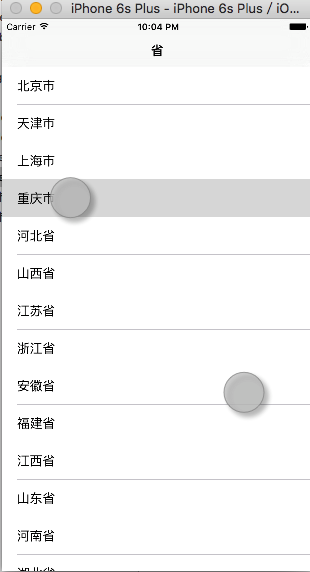

代码如下
首先是第一个页面
rootTableViewController.h
#import <UIKit/UIKit.h>

#import "cityTableViewController.h"

@interface rootTableViewController : UITableViewController

@property(nonatomic,strong)NSArray *arr;

@end
rootTableViewController.m
#import "rootTableViewController.h"

@interface rootTableViewController ()

@end

@implementation rootTableViewController

- (void)viewDidLoad {

    [super viewDidLoad];

    //读取文件

    self.arr= [NSArray arrayWithContentsOfFile: [[NSBundle mainBundle]pathForResource:@"area.plist" ofType:nil]];

    //设置标题

    self.title=@"省";

//    NSLog(@"%@",self.arr);

    //设置tableView 读取信息

    [self.tableView registerClass:[UITableViewCell class] forCellReuseIdentifier:@"reuseIdentifier"];

//

    // Uncomment the following line to preserve selection between presentations.

    // self.clearsSelectionOnViewWillAppear = NO;

    // Uncomment the following line to display an Edit button in the navigation bar for this view controller.

//     self.navigationItem.rightBarButtonItem = self.editButtonItem;

}

- (void)didReceiveMemoryWarning {

    [super didReceiveMemoryWarning];

    // Dispose of any resources that can be recreated.

}

#pragma mark - Table view data source

- (NSInteger)numberOfSectionsInTableView:(UITableView *)tableView {

    return ;

}

#pragma mark - 每个分组的里面的个数

- (NSInteger)tableView:(UITableView *)tableView numberOfRowsInSection:(NSInteger)section {

    return self.arr.count;

}

#pragma mark - 设置显示信息

- (UITableViewCell *)tableView:(UITableView *)tableView cellForRowAtIndexPath:(NSIndexPath *)indexPath {

    UITableViewCell *cell = [tableView dequeueReusableCellWithIdentifier:@"reuseIdentifier" forIndexPath:indexPath];

       cell.textLabel.text=self.arr[indexPath.row][@"State"];

    return cell;

}

#pragma mark - 选中行的信息

-(void)tableView:(UITableView *)tableView didSelectRowAtIndexPath:(NSIndexPath *)indexPath{

    cityTableViewController *city=[[cityTableViewController alloc]init];

    city.rows=(int)indexPath.row;

    city.city=self.arr;

//    NSLog(@"%d",city.rows);

    [self.navigationController pushViewController:city animated:YES];

}

#pragma mark - 行高

-(CGFloat)tableView:(UITableView *)tableView heightForRowAtIndexPath:(NSIndexPath *)indexPath{

    return ;

}

/*

// Override to support conditional editing of the table view.

- (BOOL)tableView:(UITableView *)tableView canEditRowAtIndexPath:(NSIndexPath *)indexPath {

    // Return NO if you do not want the specified item to be editable.

    return YES;

}

*/

/*

// Override to support editing the table view.

- (void)tableView:(UITableView *)tableView commitEditingStyle:(UITableViewCellEditingStyle)editingStyle forRowAtIndexPath:(NSIndexPath *)indexPath {

    if (editingStyle == UITableViewCellEditingStyleDelete) {

        // Delete the row from the data source

        [tableView deleteRowsAtIndexPaths:@[indexPath] withRowAnimation:UITableViewRowAnimationFade];

    } else if (editingStyle == UITableViewCellEditingStyleInsert) {

        // Create a new instance of the appropriate class, insert it into the array, and add a new row to the table view

    }

}

*/

/*

// Override to support rearranging the table view.

- (void)tableView:(UITableView *)tableView moveRowAtIndexPath:(NSIndexPath *)fromIndexPath toIndexPath:(NSIndexPath *)toIndexPath {

}

*/

/*

// Override to support conditional rearranging of the table view.

- (BOOL)tableView:(UITableView *)tableView canMoveRowAtIndexPath:(NSIndexPath *)indexPath {

    // Return NO if you do not want the item to be re-orderable.

    return YES;

}

*/

/*

#pragma mark - Navigation

// In a storyboard-based application, you will often want to do a little preparation before navigation

- (void)prepareForSegue:(UIStoryboardSegue *)segue sender:(id)sender {

    // Get the new view controller using [segue destinationViewController].

    // Pass the selected object to the new view controller.

}

*/

@end
第二个页面 cityTableViewController.h
#import <UIKit/UIKit.h>

@interface cityTableViewController : UITableViewController

@property(nonatomic,assign)int rows;

@property(nonatomic,strong)NSArray *city;

@end
第二个页面 cityTableViewController.m
#import "cityTableViewController.h"

@interface cityTableViewController ()

@property(strong,nonatomic)NSMutableArray *array;

@end

@implementation cityTableViewController

- (void)viewDidLoad {

    [super viewDidLoad];

    self.array=[NSMutableArray array];

    self.title=@"地级市";

    //接收选择行的行数,及其数组

    for (NSDictionary *city in self.city[self.rows][@"Cities"]) {

        [self.array addObject:city[@"city"]];

    }

//    NSLog(@"%@",self.city[self.rows][@"State"]);

    [self.tableView registerClass:[UITableViewCell class] forCellReuseIdentifier:@"reuseIdentifier"];

    // Uncomment the following line to preserve selection between presentations.

    // self.clearsSelectionOnViewWillAppear = NO;

    // Uncomment the following line to display an Edit button in the navigation bar for this view controller.

    //返回上一页

    self.navigationItem.leftBarButtonItem=[[UIBarButtonItem alloc]initWithTitle:@"back" style: target:self action:@selector(backpage)];

}

-(void)backpage{

    [self.navigationController popToRootViewControllerAnimated:YES];

}

- (void)didReceiveMemoryWarning {

    [super didReceiveMemoryWarning];

}

#pragma mark - Table view data source

- (NSInteger)numberOfSectionsInTableView:(UITableView *)tableView {

    return ;

}

- (NSInteger)tableView:(UITableView *)tableView numberOfRowsInSection:(NSInteger)section {

    return self.array.count;

}

- (UITableViewCell *)tableView:(UITableView *)tableView cellForRowAtIndexPath:(NSIndexPath *)indexPath {

    UITableViewCell *cell = [tableView dequeueReusableCellWithIdentifier:@"reuseIdentifier" forIndexPath:indexPath];

    cell.textLabel.text=self.array[indexPath.row];

    return cell;

}

-(CGFloat)tableView:(UITableView *)tableView heightForRowAtIndexPath:(NSIndexPath *)indexPath{

    return ;

}

-(void)tableView:(UITableView *)tableView didSelectRowAtIndexPath:(NSIndexPath *)indexPath{

    UIAlertController *message=[UIAlertController alertControllerWithTitle:@"提示" message:[NSString stringWithFormat:@"您确定要选择%@%@",self.city[self.rows][@"State"],self.array[indexPath.row]] preferredStyle:UIAlertControllerStyleAlert];

    UIAlertAction *cancle=[UIAlertAction actionWithTitle:@"取消" style:UIAlertActionStyleCancel handler:nil];

    UIAlertAction *ok=[UIAlertAction actionWithTitle:@"确定" style:UIAlertActionStyleDefault handler:nil];

    [message addAction:ok];

    [message addAction:cancle];

    [self presentViewController:message animated:YES completion:nil];

}

/*

// Override to support conditional editing of the table view.

- (BOOL)tableView:(UITableView *)tableView canEditRowAtIndexPath:(NSIndexPath *)indexPath {

    // Return NO if you do not want the specified item to be editable.

    return YES;

}

*/

/*

// Override to support editing the table view.

- (void)tableView:(UITableView *)tableView commitEditingStyle:(UITableViewCellEditingStyle)editingStyle forRowAtIndexPath:(NSIndexPath *)indexPath {

    if (editingStyle == UITableViewCellEditingStyleDelete) {

        // Delete the row from the data source

        [tableView deleteRowsAtIndexPaths:@[indexPath] withRowAnimation:UITableViewRowAnimationFade];

    } else if (editingStyle == UITableViewCellEditingStyleInsert) {

        // Create a new instance of the appropriate class, insert it into the array, and add a new row to the table view

    }

}

*/

/*

// Override to support rearranging the table view.

- (void)tableView:(UITableView *)tableView moveRowAtIndexPath:(NSIndexPath *)fromIndexPath toIndexPath:(NSIndexPath *)toIndexPath {

}

*/

/*

// Override to support conditional rearranging of the table view.

- (BOOL)tableView:(UITableView *)tableView canMoveRowAtIndexPath:(NSIndexPath *)indexPath {

    // Return NO if you do not want the item to be re-orderable.

    return YES;

}

*/

/*

#pragma mark - Navigation

// In a storyboard-based application, you will often want to do a little preparation before navigation

- (void)prepareForSegue:(UIStoryboardSegue *)segue sender:(id)sender {

    // Get the new view controller using [segue destinationViewController].

    // Pass the selected object to the new view controller.

}

*/

@end
指定根目录AppDelegate.h
#import <UIKit/UIKit.h>

#import "rootTableViewController.h"

@interface AppDelegate : UIResponder <UIApplicationDelegate>

@property (strong, nonatomic) UIWindow *window;

@end
指定根目录AppDelegate.m
- (BOOL)application:(UIApplication *)application didFinishLaunchingWithOptions:(NSDictionary *)launchOptions {

    self.window.rootViewController=[[UINavigationController alloc]initWithRootViewController:[[rootTableViewController alloc]initWithStyle:UITableViewStylePlain]];

    return YES;

}
这个页面的关键点就在于,在他选中的时候,要把选中的行数,和集合传到页面二中
-(void)tableView:(UITableView *)tableView didSelectRowAtIndexPath:(NSIndexPath *)indexPath{
cityTableViewController *city=[[cityTableViewController alloc]init];
//接收所在行的行数
city.rows=(int)indexPath.row;
//接收整个集合
city.city=self.arr;
// NSLog(@"%d",city.rows);
[self.navigationController pushViewController:city animated:YES];
}
这个有点类似于页面跳转的属性传值,只要能传递要页面二中,后面的就好处理了
注:plist文件结构

iOS UITableView , UITableViewController ,UITableViewCell实现全国各省市遍历,选择相应的地区的更多相关文章
- IOS UITableView NSIndexPath属性讲解
IOS UITableView NSIndexPath属性讲解 查看UITableView的帮助文档我们会注意到UITableView有两个Delegate分别为:dataSource和deleg ...
- iOS UITableView的使用大全-备用
首先.对UITableView进行讲解,下面有对它进行实际的应用 UITableView 显示大型内容的列表 单行,多列 垂直滚动,没有水平滚动 大量的数据集 性能强大,而且普遍存在于iPhone的应 ...
- iOS UITableView左滑操作功能的实现(iOS8-11)
WeTest 导读 本文主要是介绍下iOS 11系统及iOS 11之前的系统在实现左滑操作功能上的区别,及如何自定义左滑的标题颜色.字体大小. 一.左滑操作功能实现 1.如果左滑的时候只有一个操作按钮 ...
- iOS UITableView划动删除的实现
标签:划动删除 iphone 滑动删除 ios UITableView 原创作品,允许转载,转载时请务必以超链接形式标明文章 原始出处 .作者信息和本声明.否则将追究法律责任.http://rainb ...
- iOS UITableView 解决估算行高和指定行高的矛盾
喜欢交朋友的加:微信号 dwjluck2013 1.一般来说 在iOS 中若UITableViewCell 固定行高, 会通过 - (CGFloat)tableView:(UITableView *) ...
- iOS UITableView Tips(2)
#TableView Tips(2) (本来想一章就结束TableView Tips,但是发现自己还是太天真了~too young,too simple) ##架构上的优化 在Tips(1)中指出了一 ...
- IOS UITableView 加载未知宽高图片的解决方案
在开发中遇到了UITableView列表 UITableViewCell装载图片但不知Image的宽高 问题. 在解决该问题的时候,首先想到的是异步加载图片 采用第三方框架SDWebImage 实现对 ...
- iOS:UITableView表格视图控件
UITableView:表格视图控件,继承滚动视图控件UIScrollView,(类似于UIPickerView选择器,它主要通过设置数据源代理和行为代理实现协议来设置单元格) 对表格的操作主要 ...
- ios UITableView 异步加载图片并防止错位
UITableView 重用 UITableViewCell 并异步加载图片时会出现图片错乱的情况 对错位原因不明白的同学请参考我的另外一篇随笔:http://www.cnblogs.com/lesl ...
随机推荐
- VUE 表单元素双向绑定总结
checkbox最基本用法: <input type="checkbox" v-model="inputdata" checked/> <in ...
- 【转】XPath的学习
xpath的作用就是两个字“定位”,运用各种方法进行快速准确的定位,推荐两个非常有用的的firefox工具:firebug和xpath checker 定位 1.依靠自己属性,文本定位 //td[ ...
- ASP.NET MVC处理JsonResult返回时间DateTime问题
在开发ASP.NET MVC时,如果你有使用jQuery的Ajax去获取一些json数据时,其中数据返回有包含日期时间的话,也许会觉得有点小问题. 现针对此问题,写一个小例子来演示一下,创建一个控制器 ...
- C语言写的流氓关机程序及破解
记得大二刚开始接触电脑的那个时候,偶尔会弹出一个强制关机的窗口,当时没有办法,如下: 现在看来只是一个小程序而已,用C语言编写的: #include<windows.h> int main ...
- iOS——使用StroryBoard页面跳转及传值
之前在网上搜iOS的页面跳转大多都是按回以前的那种xib的形式,但鄙人是使用storyboard的.这篇就只介绍利用storyboard进行页面跳转与传值. 新建页面 iOS的程序也是使用了MVC的思 ...
- App单个页面的最佳文本框个数是多少个?
[1].不同大小的手机屏幕,对应的App每页最佳文本框个数,是不同的. [1.1]如果是iPhone4的屏幕尺寸,分辨率为640x960px的时候, 文本框个数最大值为:2个文本框 [计算公式] 第 ...
- Asp.net Mvc模块化开发系列(目录)
模块化开发是非常重要的,模块化开发是个系统性问题,为此我觉得有必须要写一个系列的文章才能基本说的清楚 那又为什么要写一个目录呢? 其一.是对我昨天承诺写一个系列新的文章的回应 其二.是先写出一个大纲, ...
- git Submodule
http://www.kafeitu.me/git/2012/03/27/git-submodule.html https://git-scm.com/book/zh/v2/Git-%E5%B7%A5 ...
- jquery easyui 弹出消息框 (转载) jQuery EasyUI API 中文文档 - 消息框(Messager) http://www.cnblogs.com/hantianwei/archive/2012/03/19/2407113.html
<html> <head> <!-- 导入easyui插件的js和css样式; --> <link rel="stylesheet" ty ...
- 软件项目发展历史<人月神话>这本书好
几乎是计算机软件开发的发展历史 人月神话,增加人手并不一定能提高开发速度. 原因在于,有些任务是无法分解的,存在先后顺序.无法同步进行. 增加人手,增加的是沟通成本,相互牵制.可以分解的任务就 ...