
【Django笔记四】Django2.0中的表单
一、环境版本信息:
操作系统:windows10
Django版本:2.0.5
Python版本:3.6.4
Mysql版本: 5.5.53 安装mysql
二、基础信息
1、App中的模型models.py
from django.db import models

# Create your models here.

class users(models.Model):

    blog_username = models.CharField(max_length=20)

    blog_link = models.CharField(max_length=50)

class account(models.Model):

    blog_account = models.CharField(max_length=20)

    blog_password = models.CharField(max_length=20)

    blog_username = models.CharField(max_length=20)
app_users表插入数据:

app_account表插入数据:

2、在模板文件夹中新建londing.html
<!doctype html>

<html lang="zh-CN">

<head>

<meta charset="utf-8">

</head>

<body >

  <form action="/londing" method="get">

        账号:<input type="text" name="account">

        密码:<input type="text" name="password">

        <input type="submit" value="登陆">

  </form>

</body>

</html>
3、视图views.py
from django.shortcuts import render

from App.models import users,account

from django.http import HttpResponse

# Create your views here.

def index(request):

    user = users.objects.get(id=1)

    context = {'user':user}

    return render(request, 'index.html', context)

def londing_form(request): #添加表单页面

    context = {}

    return render(request,'landing.html',context)

def londing(request): #数据接收和处理

    if 'account' in request.GET:

        user_account = request.GET['account']

        password = request.GET['password']

        username = account.objects.get(blog_account = user_account).blog_username  #在数据库account表中获取账号对应的用户名(昵称)

        user = users.objects.get(blog_username = username)  #在users表中获取所有信息

        context = {'user':user}

    return render(request, 'index.html', context)  #在index.html中显示信息
4、修改路径urls.py
from django.contrib import admin

from django.urls import path

from App import views

urlpatterns = [

    path('admin/', admin.site.urls),

    path(r'index/',views.index),

    path(r'londing_form/',views.londing_form),

    path(r'londing/',views.londing),

]
三、GET请求测试
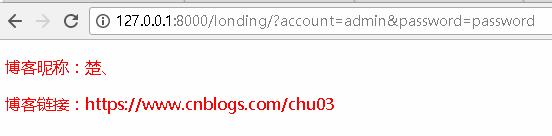
上面的代码都是以get请求写的直接开启服务器: python manage.py runserver

四、POST请求测试
1、修改landing.html 注意:action部分相比get请求结尾多了一个“/”
<!doctype html>

<html lang="zh-CN">

<head>

<meta charset="utf-8">

</head>

<body >

  <form action="/londing/" method="post">

      {% csrf_token %}    csrf 全称是 Cross Site Request Forgery。这是Django提供的防止伪装提交请求的功能。POST 方法提交的表格,必须有此标签。

        账号:<input type="text" name="account">

        密码:<input type="text" name="password">

        <input type="submit" value="登陆">

  </form>

</body>

</html>
2、修改views.py中的londing函数
def londing(request):

    if request.POST:

        user_account = request.POST['account']

        password = request.POST['password']

        username = account.objects.get(blog_account = user_account).blog_username

        user = users.objects.get(blog_username = username)

        context = {'user':user}

    return render(request, 'index.html', context)
3、测试


【Django笔记四】Django2.0中的表单的更多相关文章
- angular4.0中form表单双向数据绑定正确姿势
issue:用[(ngModel)]="property"指令双向数据绑定,报错. reason1:使用ngModel绑定数据需要注入FormsModule模块,在app.modu ...
- django中form表单的提交:
一,关于表单: 表单在百度百科的解释: 表单在网页中主要负责数据采集功能.一个表单有三个基本组成部分: 表单标签:这里面包含了处理表单数据所用CGI程序的URL以及数据提交到服务器的方法. 表单域 ...
- Django2.0中文文档
title: Django2.0中文文档 tags: Python,Django,入沐三分 grammar_cjkRuby: true --- Django2.0版本已经发布了,我们先来看一个图片 从 ...
- Python的Django框架中forms表单类的使用方法详解
用户表单是Web端的一项基本功能,大而全的Django框架中自然带有现成的基础form对象,本文就Python的Django框架中forms表单类的使用方法详解. Form表单的功能 自动生成HTML ...
- Django2.0中得url路由path得用法
Django2.0中,url得匹配规则更新了,在django1.0中,url是用正则表达式书写得,相对来说比较繁琐一些,在django2.0中进行了升级优化,改为了path from django.u ...
- python2.X现在不能安装Django了:Collecting django Using cached Django-2.0.tar.gz
使用pip安装django2: pip install django 报错: Collecting django Using cached Django-2.0.tar.gz Complete ...
- Django中的表单
目录 表单 Django中的表单 用表单验证数据 自定义验证 表单 HTML中的表单是用来提交数据给服务器的,不管后台服务器用的是 Django 还是 PHP还是JSP还是其他语言.只要把 inpu ...
- Django---ORM的常用字段和自定义字段,DjangoORM字段与数据库类型对应,字段参数和Meta的参数,Django的admin操作,13中orm操作方法,单标的双下方法
Django---ORM的常用字段和自定义字段,DjangoORM字段与数据库类型对应,字段参数和Meta的参数,Django的admin操作,13中orm操作方法,单标的双下方法 一丶ORM常用字段 ...
- JavaScript中的表单编程
表单编程 1获取表单相关信息 1.什么是表单元素 1.什么是表单元素 在H TML中表单就是指form标签,它的作用是将用户输入或选择的数据提交给指定的服务器 2.如何获取表单元素 <form ...
随机推荐
- asp.net core 错误定位 & vs2017 远程调试部署在centos上的asp.net core程序
前言 程序运行中会出现各种BUG. 排除BUG有三种方式. 一.访问页面直接报错误信息 出于安全,服务器是关闭这个功能的.在centos上可以用 命令设置环境变量来解决: export A ...
- freebsd默认不是gcc构建
xunsearch在freebsd上死活装不上,用gcc编译通过. freebsd默认不是gcc编译工程,所以下个gcc ./configure CC=gcc48 编译. 觉得clang编译器不可能有 ...
- mac安装brew, bower
Mac安装Brew 安装命令如下:curl -LsSf http://github.com/mxcl/homebrew/tarball/master | sudo tar xvz -C/usr/loc ...
- 面试题Spring Boot
Spring Boot 是微服务中最好的 Java 框架. 我们建议你能够成为一名 Spring Boot 的专家. 问题一 Spring Boot.Spring MVC 和 Spring 有什么区别 ...
- git下的团队合作模型及git基础知识汇集
https://www.atlassian.com/git/tutorials/syncing/git-fetch Syncing svn使用单个中央库来作为开发者之间沟通的桥梁,而协同合作是通过在开 ...
- leetcode Ch2-Dynamic Programming [2014]
1. Triangle class Solution { public: int minimumTotal(vector<vector<int> > &triangle ...
- mongodb 3.4 YUM安装
1:配置yum源vi /etc/yum.repos.d/mongodb-org-3.4.repo加入以下内容: [mongodb-org-3.4] name=MongoDB Repository ba ...
- console和windows子系统
https://blog.csdn.net/ilvu999/article/details/8050292
- January 21 2017 Week 3 Saturday
Courage is grace under pressure. 勇气就是压力下的优雅. In the face of stress, can you deal with your task smoo ...
- 一个asp.net小项目总结
写这篇文章之前先吐槽一下,最近换了一个公司,是给一个国企做外包,有两个月了,感觉这里的气氛有点不爽,还有点怀念以前的公司.具体听我说来,这里有几个团队,.net,java,手机开发,.net只有6个人 ...