
为IIS Host ASP.NET Web Api添加Owin Middleware
将OWIN App部署在IIS上
要想将Owin App部署在IIS上,只添加Package:Microsoft.OWIN.Host.SystemWeb包即可。它提供了所有Owin配置,Middleware注册等方面的Api.我们需要做的其实和SelfHost差不多。
- 我们依然需要实现Startup类,但是不是通过WebApp来启动了。我们需要通过将Startup类打上[assembly: OwinStartup(typeof(Startup))]来定义这是OWIN的Startup类,当应用运行的时候会自动发现并调用Configuration方法
- 在Startup类的Configuration方法中我们可以配置我们的Middleware。
SystemWeb其实是实现了一个OwinHttpModule来根据MiddleWare的需求注册IIS的各种事件,然后执行相关的Middleware.
先看一下IIS集成模式的HttpRequest处理的管道模型。
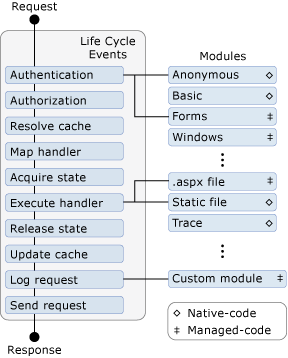
我们的Middleware运行在IIS管道中哪个环节是通过调用appBuilder.UseStageMarker(PipelineStage.Authenticate);这个扩展方法来定义的。其中PipelineState有如下可选值:
public enum PipelineStage

{

    Authenticate = ,

    PostAuthenticate = ,

    Authorize = ,

    PostAuthorize = ,

    ResolveCache = ,

    PostResolveCache = ,

    MapHandler = ,

    PostMapHandler = ,

    AcquireState = ,

    PostAcquireState = ,

    PreHandlerExecute = ,

}
以上枚举值对应IIS管道中的对应环节。Stage的指定有如下规则:
1. 默认的Stage为PreHandlerExecute
2. 每次UseStageMaker的调用指定了该次调用与前一次调用之间的注册的Middleware均在该次UseStageMaker中指定的Stage中运行
3. Stage的指定顺序应该与IIS管道的处理顺序一致
4. 如果Stage的指定顺序与IIS管道处理顺序不一致,在后面指定的在IIS管道中靠前的Stage会覆盖在其前面指定的在IIS管道中靠后的Stage.
听上去有点绕口。其实理解了原因和实现就容易理解了。这种规则的原因是:IIS管道是有固定顺序的,而OWIN中Middleware的执行也是按照注册的先后顺序的,而当OWIN部署在IIS中时Middleware的执行又是依赖与IIS管道事件的,所以只有当指定的Stage顺序与IIS管道顺序一致时才不会有冲突。
为Web Api添加Authenticate OWIN Middleware
我们首先创建一个普通的web api工程,添加如下接口,然后部署在IIS上。
[RoutePrefix("api/persons")]

    public class PersonController : ApiController

    {

        [Route("{id}")]

        [Authorize]

        // GET api/values/5

        public string Get(int id)

        {

            return "Jensen";

        }

    }
这时候如果去访问该接口会得到401未授权的错误。
接下来通过添加AuthMiddleware来作为WebApi验证模块。
首先添加AuthenticateMiddleware
public class AuthenticateMiddleware

    {

        private Func<IDictionary<string, object>, Task> nextAppFunc;

        public AuthenticateMiddleware(Func<IDictionary<string, object>, Task> nextMiddleWareFunc)

        {

            nextAppFunc = nextMiddleWareFunc;

        }

        public async Task Invoke(IDictionary<string, object> parameters)

        {

            Trace.WriteLine("Auth Middleware");

            Trace.WriteLine(HttpContext.Current.CurrentNotification);

            var identity = new GenericIdentity("jensen");

            parameters["server.User"] = new GenericPrincipal(identity, new string[] { "admin" });

            if (nextAppFunc != null)

            {

                await nextAppFunc.Invoke(parameters);

            }

        }

    }
然后添加Startup类来注册AuthenticateMiddleware,并指定运行Stage为Authenticate.
[assembly: OwinStartup(typeof(OwinIISHost.Startup))]

namespace OwinIISHost

{

    public class Startup

    {

        public void Configuration(IAppBuilder appBuilder)

        {

            appBuilder.Use<AuthenticateMiddleware>();

            appBuilder.UseStageMarker(PipelineStage.Authenticate);

        }

    }

}
这样当我们再次访问前面定义的api时,就能得到期望的结果了。因为在AuthenticateMiddleware中我们对所有请求都通过了验证。
这里一开始有点疑问,WebApi中是根据HttpContext.User来获取当前请求的用户信息的。但是我们在AuthenticateMiddleware中并没有直接给HttpContext.User赋值,而是将User信息赋值到key 为server.user的OWIN环境参数中。这中间有个断档。通过查看SystemWeb Package的源码,解答了我的疑问。
首先,我们的Middleware中接收到的OWIN环境参数类型为AspNetDictionary,可以查看其实现:
internal AspNetDictionary(IPropertySource propertySource)//构造函数,这里propertySource由外部传入

        {

            _propertySource = propertySource;

        }

object IDictionary<string, object>.this[string key]//索引属性,我们设置User信息给server.user key时该方法会被调用

        {

            get

            {

                object value;

                return PropertiesTryGetValue(key, out value) ? value : Extra[key];

            }

            set

            {

                if (!PropertiesTrySetValue(key, value))

                {

                    StrongExtra[key] = value;

                }

            }

        }

private bool PropertiesTrySetValue(string key, object value)

        {

            switch (key.Length)

            {

                //....ignore some code here

                case :

                    if (string.Equals(key, "server.User", StringComparison.Ordinal))

                    {

                        ServerUser = (IPrincipal)value;//赋值给ServerUser属性

                        return true;

                    }

                   break;

                //...ignore some code here

            }

            return false;

        }

internal IPrincipal ServerUser

        {

            get

            {

                return _propertySource.GetServerUser();

            }

            set

            {

                _propertySource.SetServerUser(value);//最后还是调了propertySource的SetServerUser方法

            }

        }
那现在关键就看_propertySource是如何实现的了。通过查看创建AspNetDictionary的代码发现_propetySource为OwinCallContext类型的实例。看看它对SetServerUser的实现:
void AspNetDictionary.IPropertySource.SetServerUser(IPrincipal value)

        {

            _httpContext.User = value;//真相大白,其实当我们给server.User key赋值时,value其实直接就赋给了HttpContext。

            Thread.CurrentPrincipal = value;

        }
参考:
AspNetKatana源码,包含SystemWebPackage
为IIS Host ASP.NET Web Api添加Owin Middleware的更多相关文章
- 为Asp.Net Web Api添加Http基本认证
Asp.net Web Api提供了RESTFul web服务的编程接口.默认RESTFul 服务没有提供任何验证或者基于角色的验证,这显然不适合Put.Post.Delete这些操作.Aps.net ...
- ASP.NET Web API与Owin OAuth:使用Access Toke调用受保护的API
在前一篇博文中,我们使用OAuth的Client Credential Grant授权方式,在服务端通过CNBlogsAuthorizationServerProvider(Authorization ...
- asp.net web api添加统一异常处理
1.自定义异常处理过滤器 /// <summary> /// 自定义异常处理过滤器 /// </summary> public class CustomExceptionFil ...
- ASP.NET Web API与Owin OAuth:调用与用户相关的Web API
在前一篇博文中,我们通过以 OAuth 的 Client Credential Grant 授权方式(只验证调用客户端,不验证登录用户)拿到的 Access Token ,成功调用了与用户无关的 We ...
- 自定义DelegatingHandler为ASP.NET Web Api添加压缩与解压的功能
HTTP协议中的压缩 Http协议中使用Accept-Encoding和Content-Encoding头来表示期望Response内容的编码和当前Request的内容编码.而Http内容的压缩其实是 ...
- Asp.net Web Api添加异常筛选器
一.定义一个异常筛选器 using System;using System.Collections.Generic;using System.Linq;using System.Web;using S ...
- ASP.NET Web API与Owin OAuth:调用与用户相关的Web API(非第三方登录)
授权完成添加属性 ClaimsIdentity oAuthIdentity = await CreateAsync(user/*userManager*/, OAuthDefaults.Authent ...
- [转] JSON Web Token in ASP.NET Web API 2 using Owin
本文转自:http://bitoftech.net/2014/10/27/json-web-token-asp-net-web-api-2-jwt-owin-authorization-server/ ...
- JSON Web Token in ASP.NET Web API 2 using Owin
In the previous post Decouple OWIN Authorization Server from Resource Server we saw how we can separ ...
随机推荐
- JAVA基础补漏--内部类
成员内部类 public class InnerClass { public static void main(String[] args) { System.out.println("++ ...
- Python连接MongoDB操作
1.安装PyMongo 注意:请勿安装“bson”软件包. PyMongo配有自己的bson包; 执行“pip install bson”或“easy_install bson”则会安装与PyMong ...
- stringToDateUtils 字符串转化日期
import java.text.ParseException; import java.text.SimpleDateFormat; import java.util.Calendar; impor ...
- 四十一 Python分布式爬虫打造搜索引擎Scrapy精讲—elasticsearch(搜索引擎)基本的索引和文档CRUD操作、增、删、改、查
elasticsearch(搜索引擎)基本的索引和文档CRUD操作 也就是基本的索引和文档.增.删.改.查.操作 注意:以下操作都是在kibana里操作的 elasticsearch(搜索引擎)都是基 ...
- 51nod 1154 dp
http://www.51nod.com/onlineJudge/questionCode.html#!problemId=1154 1154 回文串划分 基准时间限制:1 秒 空间限制:131072 ...
- IOS-RunTime(刨根问底)
方法调用 让我们看一下方法调用在运行时的过程(参照前文类在runtime中的表示) 如果用实例对象调用实例方法,会到实例的isa指针指向的对象(也就是类对象)操作.如果调用的是类方法,就会到类对象的i ...
- HBase Cassandra比较
转自:http://itindex.net/detail/22338-cassandra-hbase-%E8%AE%BE%E8%AE%A1 Cassandra HBase 一致性 Quorum ...
- Xcode And iOS9新特性
Xcode And iOS9 1. Xcode7 新特性 > 可直接在真机上运行自己的应用,只需要有苹果账号,无需购买苹果开发者账号. > 可设置在出现 EXC_BAD_ACCESS 错误 ...
- 【python】类file文件处理
[flush方法] 通常由于缓冲,write不将数据写入文件,而是写入内存的缓冲区,需要使用flush写入文件,并清空缓冲区 文件的flush方法的作用是强制清空缓存写入文件.默认每行flush一下? ...
- 用 hash 找出指定一个数, 这个数是数组两个值的总和, 找出两个值的坐标
var twoSum = function(nums, target) { var len = nums.length; var exist = {} //这里利用了hash来存放已知的 exist[ ...