
spring的RestTemplate使用指南
前言:现在restful接口越来越广泛,而如今很多接口摒弃了传统的配置复杂的webService开发模式,在java领域只需要很简单的springMvc就可以声明为一个控制器,再加上service层,就可以直接操作数据库成为一个灵活的接口。而我们请求接口的次数也会越来越多(最近我在和一个工具对接的时候,对方公司提供的接口全部由我们主动去调用),一般我们请求接口,都采用Apache Httpclient工具,这个工具稳定,既可以建立长连接,保持不错的性能,而它唯一的不足就是使用起来麻烦多变,并且要很多层判断处理,今天我要谈的就是spring对httpClient的再封装工具类,restTemplate,采用模板模式抽象出来的高效工具。有点类似于jdbcTemplate,今天我们就来一步步揭开它的使用方法
本篇博客的目录
一:restTemplate简介
二:restTemplate配置
三:restTemplat使用方法-restUtil
四:使用示例
五:总结
一:restTemplate简介
1.1:restTemplate的类结构

可以看出它继承自HttpAccessor这个统一的处理器,然后再继承自InterceptingHttpAccessor,这个拦截转换器,最终RestTemplate实现了封装httpClient的模板工具类
1.2:restTemplate的方法
Spring用于同步客户端HTTP访问的中心类。它简化了与HTTP服务器的通信,并执行RESTful原则。它处理HTTP连接,使应用程序代码提供URL,使用可能的模板变量,并提取结果。
注意:默认情况下,RestTemplate依赖于标准的JDK来建立HTTP连接。你可以切换使用不同的HTTP库,如Apache HttpComponents,Netty和OkHttp通过setRequestFactory属性。 内部模板使用HttpMessageConverter实例将HTTP消息转换为POJO和从POJO转换。主要MIME类型的转换器是默认注册的,但您也可以注册其他转换器通过setMessageConverters
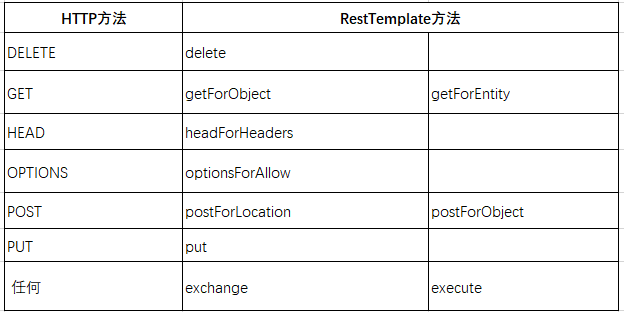
以下是http方法和restTempalte方法的比对映射,可以看出restTemplate提供了操作http的方法,其中exchange方法可以用来做任何的请求,一般我们都是用它来封装不同的请求方式。
二:restTemplate的配置方法
2.1:在springboot中的配置,springboot是一款简化传统xml配置式的开发方式,主要采用注解的方式来代替传统繁琐的xml配置,接下来我们就用springboot提供的注解来配置restTemplate:
@Configuration

public class RestTemplateConfig {

    private static final Logger logger= LoggerFactory.getLogger(RestTemplateConfig.class);

    @Bean

    public RestTemplate restTemplate() {

        // 添加内容转换器,使用默认的内容转换器

        RestTemplate restTemplate = new RestTemplate(httpRequestFactory());

        // 设置编码格式为UTF-8

        List<HttpMessageConverter<?>> converterList = restTemplate.getMessageConverters();

        HttpMessageConverter<?> converterTarget = null;

        for (HttpMessageConverter<?> item : converterList) {

            if (item.getClass() == StringHttpMessageConverter.class) {

                converterTarget = item;

                break;

            }

        }

        if (converterTarget != null) {

            converterList.remove(converterTarget);

        }

        HttpMessageConverter<?> converter = new StringHttpMessageConverter(StandardCharsets.UTF_8);

        converterList.add(1,converter);

        LOGGER.info("-----restTemplate-----初始化完成");

        return restTemplate;

    }

    @Bean

    public ClientHttpRequestFactory httpRequestFactory() {

        return new HttpComponentsClientHttpRequestFactory(httpClient());

    }

    @Bean

    public HttpClient httpClient() {

        // 长连接保持30秒

        PoolingHttpClientConnectionManager connectionManager = new PoolingHttpClientConnectionManager(30, TimeUnit.SECONDS);

        //设置整个连接池最大连接数 根据自己的场景决定

        connectionManager.setMaxTotal(500);

        //同路由的并发数,路由是对maxTotal的细分

        connectionManager.setDefaultMaxPerRoute(500);

        //requestConfig

        RequestConfig requestConfig = RequestConfig.custom()

                //服务器返回数据(response)的时间,超过该时间抛出read timeout

                .setSocketTimeout(10000)

                //连接上服务器(握手成功)的时间,超出该时间抛出connect timeout

                .setConnectTimeout(5000)

                //从连接池中获取连接的超时时间,超过该时间未拿到可用连接,会抛出org.apache.http.conn.ConnectionPoolTimeoutException: Timeout waiting for connection from pool

                .setConnectionRequestTimeout(500)

                .build();

        //headers

        List<Header> headers = new ArrayList<>();

        headers.add(new BasicHeader("User-Agent", "Mozilla/5.0 (Windows NT 6.1) AppleWebKit/537.36 (KHTML, like Gecko) Chrome/31.0.1650.16 Safari/537.36"));

        headers.add(new BasicHeader("Accept-Encoding", "gzip,deflate"));

        headers.add(new BasicHeader("Accept-Language", "zh-CN"));

        headers.add(new BasicHeader("Connection", "Keep-Alive"));

        headers.add(new BasicHeader("Content-type", "application/json;charset=UTF-8"));

        return HttpClientBuilder.create()

                .setDefaultRequestConfig(requestConfig)

                .setConnectionManager(connectionManager)

                .setDefaultHeaders(headers)

                // 保持长连接配置,需要在头添加Keep-Alive

                .setKeepAliveStrategy(new DefaultConnectionKeepAliveStrategy())

                //重试次数,默认是3次,没有开启

                .setRetryHandler(new DefaultHttpRequestRetryHandler(2, true))

                .build();

    }

}
首先解释以下@configuration,它的主要作用就是在spring容器启动的时候,初始化IOC,使用了这个注解,那么该类就会在spring启动的时候,把@Bean注解标识的类进行依赖注入。@Bean理解的话,就好比在配置文件中配置<bean id="xxx">.接下来就是在restTemplate的构造方法中添加httpRequest的工厂,使用连接池来优化http通信,默认使用长连接时间为30秒,再设置路由让http连接定向到指定的IP,然后设置并发数。再就是设置请求配置的超时时间,为了防止请求时间过长而引起资源的过渡浪费。如果在超过设置的timeout还没有数据返回,就直接断开连接。headers是添加默认的请求头,这里设置了传送的格式为json,语言为中-英等等属性。HttpClientBuilder.create设置请求头到HttpClient,然后在设置保持的时间,重试的次数,注入给httpClient进行封装。
在bean中的HttpMessageConverter,就是http信息转换器,它的主要作用就是转换和解析返回来的json数据,restTemplate默认使用jackson来作为底层的解析工具,而其它的比如Gson,fastjson等等第三方开源库放在headers这个list中,如果要使用,可以通过以下代码进行改变:
         this.restTemplate.getMessageConverters().clear();

        final List<HttpMessageConverter<?>> myHttpMessageConverter = new ArrayList<HttpMessageConverter<?>>();


        //自己实现的messgeConverter

        HttpMessageConverter<Object> messageConverter = new MyHttpMessageConverter<Object>();

        myHttpMessageConverter.add(messageConverter);

        this.restTemplate.setMessageConverters(myHttpMessageConverter);
三:restUtil工具类
restUtil就是通过包装restTemplate暴露出面向外界的方法,通过高度封装,可以隐藏内部细节,简单使用,在使用它的时候,我们只需要传入请求的url和对应的参数,然后就可以取到结果了。参数一般有两种形式,一种是直接传入json,另一种是key、value形式的,key/value形式的,可以直接使用execute方法,传入url和请求的方法类型就可以了。在开头看到了restTemplate基本上是支持所有http请求的,接下来的工具类就介绍一下post和get请求的主要封装方法
@Component

public class RestUtil {

    @Autowired

    private  RestTemplate restTemplate;

    //一些自定义的请求头参数

    public static final String supplierID="";

    public static final String interfacekey= "";

    /**

     * DLT专用执行方法

     * @param param 请求参数:可以添加一些常量请求值

     * @param url 访问的url

     * @param method 请求的方法

     * @return

     */

    public String execute(Map<String,Object> param, String url, HttpMethod method){

        HttpHeaders headers = this.getDefaultHeader();

        Map<String,Object> requestor = this.getDefaultParam();

        param.put("requestor",requestor);

        param.put("supplierID",supplierID);

        HttpEntity<Map<String,Object>> requestEntity = new HttpEntity<>(param, headers);

        ResponseEntity<String> response = restTemplate.exchange(url,method, requestEntity, String.class);

        return response.getBody();

    }

    /**

     * 获取默认的头请求信息

     * @return

     */

    public HttpHeaders getDefaultHeader(){

        String timestamp = ""+System.currentTimeMillis();

        String signature = EncoderByMd5(supplierID + timestamp + interfacekey);

        HttpHeaders headers = new HttpHeaders();

        headers.add("signature", signature);

        headers.add("timestamp", timestamp);

        return headers;

    }

    /**

     * 获取默认的参数

     * @return

     */

    public Map<String,Object> getDefaultParam(){

        Map<String,Object> defParam = new HashMap<>();

        defParam.put("invoker","xx");

        defParam.put("operatorName","xx");

        return defParam;

    }

    /**

     * 通过MD5加密

     * @param str

     * @return

     */

    public static String EncoderByMd5(String str){

        if (str == null) {

            return null;

        }

        try {

            // 确定计算方法

            MessageDigest md5 = MessageDigest.getInstance("MD5");

            BASE64Encoder base64en = new BASE64Encoder();

            // 加密后的字符串

            return base64en.encode(md5.digest(str.getBytes("utf-8"))).toUpperCase();

        } catch (NoSuchAlgorithmException | UnsupportedEncodingException e) {

            return null;

        }

    }

    /**

     * get请求

     * @param url 请求的url

     * @param jsonData 请求的json

     * @return

     */

    public String restGet(String url,String jsonData){

        return request(url, jsonData,HttpMethod.GET);

    }

    /**

     * @param url 请求的url

     * @param jsonData json数据

     * @param httpMethod

     * @return

     */

    private String request(String url, String jsonData,HttpMethod httpMethod) {

        ResponseEntity<String> response=null;

        try {

            if (Check.isEmpty(url)) {

                throw new IllegalArgumentException();

            }

            HttpEntity<String> requestEntity = new HttpEntity<String>(jsonData);

            response = restTemplate.exchange(url, httpMethod, requestEntity, String.class);

        }catch (Exception ex){

            ex.printStackTrace();

            return "";

        }

        return response.getBody().toString();

    }

    /**

     * Get请求获取实体类

     * @param url 请求的url

     * @param responseType 返回的类型

     * @param parms 不限定个数的参数

     * @param <T> 泛型

     * @return

     */

    public <T> T getForEntity(String url,Class<T> responseType,Object... parms){

        return (T) restTemplate.getForEntity(url,responseType,parms);

    }

   /**

    * Get请求

    * @param url

    * @param parm

    * @return

     */

   public String get(String url,Map<String,Object> parm){

    return restTemplate.getForEntity(url,String.class,parm).getBody();

 }

}
四:使用示例
4.1:首先我们用springBoot来搭建一个简单的rest请求链接,我们来模拟一个请求,传入年龄和性别、身高,计算出标准体重的接口,这段代码比较简单,我只给出示范代码:
@SpringBootApplication
@RestController
public class HealApplication {
    @RequestMapping(value = "weight", method = RequestMethod.GET)

    public ResultModel getWeight(@RequestParam(value = "height", required = false) Integer height,   @RequestParam(value = "sex", required = false) Integer sex, @RequestParam(value = "age", required = false) Integer age) {

        if (height == null || age == null || sex == null || (!sex.equals(0) && !sex.equals(1))) {

            return new ResultModel(400, "缺少请求参数或者参数错误", 0d);

        }

        double condition = getStandardWeight(sex, age, height);

        return new ResultModel(200, "请求成功", condition);

    }

    /**

     * 获取标准体重

     *

     * @param sex    性别 1:男  2:女

     * @param age    年龄

     * @param height

     * @return 体重(单位:kg)

     */

    public double getStandardWeight(int sex, int age, int height) {

        double weight = 0.0;

        switch (sex) {

            //男性

            case 1:

                if (age < 12 && age > 2) {

                    weight = age * 2 + 12;

                } else if (age > 12) {

                    weight = (height - 150) * 0.6 + 50;

                }

                break;

            case 0:

                if (age < 12 && age > 2) {

                    weight = age * 2 + 12;

                } else if (age > 12) {

                    weight = (height - 100) * 0.6 + 50;

                }

                break;

            default:

                weight = 0;

                break;

        }

        return weight;

    }
可以看到我们的控制器有个映射weight请求的方法,通过传入年龄、身高、性别,就可以计算出标准体重,我们来启动springBoot,先试着用浏览器访问一下,可以看出如下结果:


4.2:为了表明接口是通的,我们再用postman来试一下,可以看到返回结果正确:

4.3:在springboot里引入testNg单元测试类,测试一下访问这个链接的结果:
public class TestRestManager  extends OrderProviderApplicationTests {

    @Autowired

    private RestUtil restUtil;

    /**

     * 请求方法为GEt

     * @return

     */

    @Test

    private void  requestGet(){

        String url="http://localhost:8080/weight?age={age}&sex={sex}&height={height}";

        //组装请求参数

        Map<String,Object> parmMap =new HashMap<String,Object>();

        parmMap.put("age",35);

        parmMap.put("sex",1);

        parmMap.put("height",178);

        String result = restUtil.get(url, parmMap);

        System.out.println(result);

    }

}
结果返回以下内容:

五:总结
本篇博客讲述了RestTemplate的简介,还有配置方法和使用示例,作为一款非常不错的rest请求工具,屏蔽了复杂的HttpClient的实现细节,向外暴露出简单、易于使用的接口,使得我们的开发工作越来越简单、高效,更多的方法工具可以研究一下restTemplate的具体Api,打开源码,一切都了如指掌。在平时的工作中,应该多发现这种工具类,从而来代替一些传统的工具,对于提升工作效率有着突飞猛进的效果和不可言喻的方便。
spring的RestTemplate使用指南的更多相关文章
- Spring Cloud Alibaba迁移指南(一):一行代码从 Hystrix 迁移到 Sentinel
摘要: 本文对Hystrix.Resilience4j.Sentinel进行对比,并探讨如何使用一行代码这种极简的方式,将Hystrix迁移到Sentinel. Hystrix 自从前段时间 宣布停止 ...
- spring 4 升级踩雷指南
spring 4 升级踩雷指南 前言 最近,一直在为公司老项目做核心库升级工作.本来只是想升级一下 JDK8 ,却因为兼容性问题而不得不升级一些其他的库,而其他库本身依赖的一些库可能也要同步升级.这是 ...
- 对Spring 的RestTemplate进行包装
Spring的RestTemplate及大地简化了REST Client的开发,但每次还要编写大量的模板代码,代码不够简洁.我对他进行了一次包装,采用接口来声明REST接口,使用Annotation对 ...
- Spring WebSocket踩坑指南
Spring WebSocket踩坑指南 本次公司项目中需要在后台与安卓App间建立一个长连接,这里采用了Spring的WebSocket,协议为Stomp. 关于Stomp协议这里就不多介绍了,网上 ...
- Spring:JdbcTemplate使用指南
Spring:JdbcTemplate使用指南 Spring:JdbcTemplate使用指南 前言: 本文指在介绍Spring框架中的JdbcTemplate类的使用方法,涉及基本的Spring反转 ...
- Spring’s RestTemplate
Spring’s RestTemplate /** * After the word document is generated in memory we can upload it to the s ...
- Spring Cloud Alibaba迁移指南(二):零代码替换 Eureka
自 Spring Cloud 官方宣布 Spring Cloud Netflix 进入维护状态后,我们开始制作<Spring Cloud Alibaba迁移指南>系列文章,向开发者提供更多 ...
- 还不知道spring的RestTemplate的妙用吗
为什么要使用RestTemplate? 随着微服务的广泛使用,在实际的开发中,客户端代码中调用RESTful接口也越来越常见.在系统的遗留代码中,你可能会看见有一些代码是使用HttpURLConnec ...
- Spring的RestTemplate
Spring提供了一个RestTemplate模板工具类,对基于Http的客户端进行了封装,并且实现了对象与json的序列化和反序列化,非常方便.RestTemplate并没有限定Http的客户端类型 ...
随机推荐
- 银行系统ps:不太完善,蟹蟹评论
# 主程序运行 import time from guanli import GuanLi from atm import ATM from user import User def main(): ...
- Machine Learning笔记整理 ------ (三)基本性能度量
1. 均方误差,错误率,精度 给定样例集 (Example set): D = {(x1, y1), (x2, y2), (x3, y3), ......, (xm, ym)} 其中xi是对应属性的值 ...
- pandas协助工具
pandas有时候操作很不方便,也有可能是我不熟练吧,反正就是各种别扭.下面是我写的一个简单的json数据操作工具,能够完成简单的数据分析工作,后续会不断完善的 # coding=utf-8 impo ...
- 【转】使用CNPM搭建私有NPM
最近的Node项目中因为数据模型等问题,需要有一个对各个模块进行统一的管理,如果把私有的模型publish到公共的npm不太合适,所以决定使用cnpm搭建一个私有的npm,同时也可以对项目常用的npm ...
- http://www.cnblogs.com/120626fj/p/7545958.html
1.本周PSP 2.本周进度条: 代码行,博文字数,用到的知识点 3.累计进度图 3.1累计代码折线图 3.2累计博文字数折线图 4.本周PSP饼状图
- Thunder团队第一周 - Scrum会议3
Scrum会议3 小组名称:Thunder 项目名称:在线考试系统 Scrum Master:杨梓瑞 工作照片: 参会成员: 王航:http://www.cnblogs.com/wangh013/ 李 ...
- 寒假学习计划——MOOC
课程 西安交通大学[https://www.icourse163.org/course/XJTU-46006?tid=1002265006] 理由 本身中国大学mooc里c++课程不多,完结了能够有很 ...
- Java之Math类使用小结(转发)
Java的Math类封装了很多与数学有关的属性和方法,大致如下: public class Main { public static void main(String[] args) { // TOD ...
- spring框架(2)— 面相切面编程AOP
spring框架(2)— 面相切面编程AOP AOP(Aspect Oriented Programming),即面向切面编程. 可以说是OOP(Object Oriented Programming ...
- 团队组队&灰化肥挥发会发黑
1. 队伍展示 (1. 队名: 灰化肥挥发会发黑 (2. 队员风采 苏叶潇(队长) 201521123114 与众不同,擅长软件测试,对编程望而却步,希望成为测试人员. 宣言:不求最好,只求更好. 李 ...