
【转】XZip and XUnzip - Add zip and/or unzip to your app with no extra .lib or .dll
原文:http://www.codeproject.com/Articles/4135/XZip-and-XUnzip-Add-zip-and-or-unzip-to-your-app-w
Introduction
I have already introduced XZip in a previous article. This article presents XZip and also XUnzip, which together allow you to add zip and unzip to your application without using any .lib or .dll.
First, let me acknowledge the work of Lucian Wischik, who took the many .c and .h files from Info-ZIP and produced the .cpp and .h files that XZip is based on.
XZip and XUnzip Features
Most of the functions are demonstrated in the XZip demo app. Here are the main ones:
- CreateZip() - Create a zip archive file.
 Collapse | Copy Code
////////////////////////////////////////////////////////////////////////////// //// CreateZip() //// Purpose: Create a zip archive file //// Parameters: z - archive file name if flags is ZIP_FILENAME; for other // uses see below // len - for memory (ZIP_MEMORY) should be the buffer size; // for other uses, should be 0 // flags - indicates usage, see below; for files, this will be // ZIP_FILENAME //// Returns: HZIP - non-zero if zip archive created ok, otherwise 0 //
- ZipAdd() - Add a file to a zip archive.
Collapse | Copy Code////////////////////////////////////////////////////////////////////////////// //// ZipAdd() //// Purpose: Add a file to a zip archive //// Parameters: hz - handle to an open zip archive // dstzn - name used inside the zip archive to identify the file // src - for a file (ZIP_FILENAME) this specifies the filename // to be added to the archive; for other uses, see // below // len - for memory (ZIP_MEMORY) this specifies the buffer // length; for other uses, this should be 0 // flags - indicates usage, see below; for files, this will be // ZIP_FILENAME //// Returns: ZRESULT - ZR_OK if success, otherwise some other value //
- OpenZip() - Open an existing zip archive file.
Collapse | Copy Code////////////////////////////////////////////////////////////////////////////// //// OpenZip() //// Purpose: Open an existing zip archive file //// Parameters: z - archive file name if flags is ZIP_FILENAME; for // other uses see below // len - for memory (ZIP_MEMORY) should be the buffer size; // for other uses, should be 0 // flags - indicates usage, see below; for files, this will be // ZIP_FILENAME //// Returns: HZIP - non-zero if zip archive opened ok, otherwise 0 //
- GetZipItem() - Get information about an item in an open zip archive.
Collapse | Copy Code////////////////////////////////////////////////////////////////////////////// //// GetZipItem() //// Purpose: Get information about an item in an open zip archive //// Parameters: hz - handle of open zip archive // index - index number (0 based) of item in zip // ze - pointer to a ZIPENTRY (if ANSI) or ZIPENTRYW struct // (if Unicode) //// Returns: ZRESULT - ZR_OK if success, otherwise some other value //
- FindZipItem() - Find item by name and return information about it.
Collapse | Copy Code////////////////////////////////////////////////////////////////////////////// //// FindZipItem() //// Purpose: Find item by name and return information about it //// Parameters: hz - handle of open zip archive // name - name of file to look for inside zip archive // ic - TRUE = case insensitive // index - pointer to index number returned, or -1 // ze - pointer to a ZIPENTRY (if ANSI) or ZIPENTRYW struct // (if Unicode) //// Returns: ZRESULT - ZR_OK if success, otherwise some other value //
- UnzipItem() - Find item by index and unzip it.
Collapse | Copy Code////////////////////////////////////////////////////////////////////////////// //// UnzipItem() //// Purpose: Find item by index and unzip it //// Parameters: hz - handle of open zip archive // index - index number of file to unzip // dst - target file name of unzipped file // len - for memory (ZIP_MEMORY. length of buffer; // otherwise 0 // flags - indicates usage, see below; for files, this will be // ZIP_FILENAME //// Returns: ZRESULT - ZR_OK if success, otherwise some other value //
- CloseZip() - Close an open zip archive.
Collapse | Copy Code////////////////////////////////////////////////////////////////////////////// //// CloseZip() //// Purpose: Close an open zip archive //// Parameters: hz - handle to an open zip archive //// Returns: ZRESULT - ZR_OK if success, otherwise some other value //
How To Use
To integrate XZip into your app, you first need to add following the files to your project:
- XZip.cpp
- XZip.h
- XUnzip.cpp
- XUnzip.h
If you include XZip in a project that uses precompiled headers, you must change C/C++ Precompiled Headerssettings to Not using precompiled headers for XZip.cpp and XUnzip.cpp.
Next, include the header files XZip.h and XUnzip.h in appropriate project files. Now you are ready to start using XZip. There are many notes concerning usage of various functions in XZip.h and XUnzip.h. Please read all function headers for each function you wish to use.
Known Limitations
XZip and XUnzip have been tested only with files.
Demo App
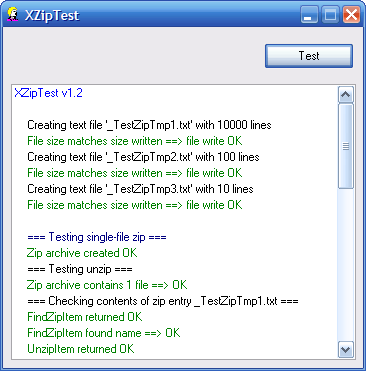
The XZipTest.exe demo tests the APIs in XZip and XUnzip. Here is some of the output:
Frequently Asked Questions
- Can I use XZip in non-MFC apps?
Yes. It has been implemented to compile with any Win32 program. - When I try to include XZip.cpp in my MFC project, I get the compiler error
XZip.cpp(2918) : fatal error C1010: unexpected end of file while looking for precompiled header directive. How can I fix this?
When using XZip in project that uses precompiled headers, you must change C/C++ Precompiled Headerssettings to Not using precompiled headers for XZip.cpp and XUnzip.cpp. Be sure to do this for All Configurations.

- When I try to build the demo app, I get the linker error
LINK : fatal error LNK1104: cannot open file "mfc42u.lib" Error executing link.exe. How can I fix this?
The default installation options of Visual C++ v6.0 don't install the Unicode libraries of MFC, so you might get an error that mfc42u.lib or mfc42ud.lib cannot be found. You can fix this either by installing the Unicode libs from the VC++ install CD, or by going to Build | Set Active Configuration and selecting one of the non-Unicode configurations.
You can configure the Visual Studio toolbars to include the Select Active Configuration combobox. This allows you to see at a glance what configuration you are working with.
- I don't need the Zip/Unzip functions. Can I exclude XZip.cpp/XUnzip.cpp?
Yes. You only need to include the .h/.cpp pair that you need. - Can we use XZip in our (shareware/commercial) app?
Yes, you can use XZip without charge or license fee, providing you follow the Info-ZIP restrictions as defined inXZip.cpp. - Does XZip handle pipes? in-memory zipping?
XZip has not been tested with anything other than files. - Can I use XZip in a VS2005 project?
Yes. There is a sample VS2005 project included in the download. - Does XZip work on Vista?
Yes.
Acknowledgments
- The code in XZip.cpp and XUnzip.cpp is included with the kind permission of Lucian Wischik. It is based on code from Info-ZIP. Please see XZip.cpp for Info-ZIP's copyright and restrictions.
- The CXListBox class is taken from my own article, XListBox - Owner-draw CListBox with selectable text and background colors.
Revision History
Version 1.3 - 2007 July 18
- Fixed problem with file size that is multiple of 16384, reported by Mathias Svensson.
- Fixed XZip to save file time in local time, suggested by Damir Valiulin.
Version 1.2 - 2007 June 30
- Added project for VS2005.
- Added
AddFolderContent()contributed by Renaud Deysine. - Fixed problem with
TUnzip::Open()reported by Pete Howells.Open()now returns correct success code. - Fixed several bugs reported by Warren Stevens.
- Fixed a problem in
unzReadCurrentFile()reported by Kochise. - Fixed bug in
EnsureDirectory()reported by craigmj. - Changed
ideflate()suggested by Michael B. Hansen. - Fixed problem with
time_treported by Ronney. - Fixed problems found by Boundschecker as reported by Warren Stevens.
- Made changes to
PUTSHORTandPUTBYTEmacros and toTZip::write(), suggested by vielheit.
Version 1.1 - 2003 May 7
- Initial public release
Usage
This software is released into the public domain. You are free to use it in any way you like, except that you may not sell this source code. If you modify it or extend it, please to consider posting new code here for everyone to share. This software is provided "as is" with no expressed or implied warranty. I accept no liability for any damage or loss of business that this software may cause.
License
This article, along with any associated source code and files, is licensed under The Code Project Open License (CPOL)
【转】XZip and XUnzip - Add zip and/or unzip to your app with no extra .lib or .dll的更多相关文章
- Linux中zip压缩和unzip解压缩命令详解
文章转自:http://www.jb51.net/LINUXjishu/105916.html 1.把/home目录下面的mydata目录压缩为mydata.zipzip -r mydata.zip ...
- 每天一个linux命令(63):Linux中zip压缩和unzip解压缩命令详解
文章转自:http://www.jb51.net/LINUXjishu/105916.html 1.把/home目录下面的mydata目录压缩为mydata.zipzip -r mydata.zip ...
- CentOS中zip压缩和unzip解压缩命令详解
以下命令均在/home目录下操作cd /home #进入/home目录1.把/home目录下面的mydata目录压缩为mydata.zipzip -r mydata.zip mydata #压缩myd ...
- CentOS7中zip压缩和unzip解压缩命令详解
安装zip.unzip应用 yum install zip unzip 以下命令均在/home目录下操作cd /home #进入/home目录1.把/home目录下面的mydata目录压缩为mydat ...
- 使用gunzip、tar、rar、(zip压缩和unzip解压缩)
---------------------20171119------------------------------ 解压gz后缀 使用gunzip filename.gz ------------ ...
- CentOS Linux中zip压缩和unzip解压缩命令详解
以下命令均在/home目录下操作cd /home #进入/home目录1.把/home目录下面的mydata目录压缩为mydata.zip zip -r mydata.zip myda ...
- zip压缩工具,unzip解压缩工具
zip压缩工具,unzip解压缩工具=================== [root@aminglinux tmp]# yum install -y zip[root@aminglinux tmp] ...
- zip 压缩文件 unzip查看zip压缩包内的内容
[root@GitLab tmp]# zip -r new.zip ./* adding: gitlab_key_file20161001-2668-1eu44mv (deflated 15%) ...
- Centos中压缩(zip)和解压(unzip)命令
摘自:http://liuzhichao.com/p/681.html 1.我下载了一个yasuo.zip文件,想解压缩: # unzip yasuo.zip 2.我当前目录下有abc1.zip,ab ...
随机推荐
- Exists/In/Any/All/Contains操作符
Exists/In/Any/All/Contains操作符 适用场景:用于判断集合中元素,进一步缩小范围. Any 说明:用于判断集合中是否有元素满足某一条件:不延迟.(若条件为空,则集合只要不为空就 ...
- java 并发(六) --- 锁
阅读前阅读以下参考资料,文章图片或代码部分来自与参考资料 概览 一张图了解一下java锁. 注 : 阻塞将会切换线程,切换内核态和用户态,是比较大的性能开销 各种锁 为什么要设置锁的等级 ...
- [android] 练习viewpagerindicator的使用(一)
主要是学习一下使用这个库 activity_main.xml <?xml version="1.0" encoding="utf-8"?> < ...
- Web开发:Bootstrap的应用
- weblogic11g(10.3.6)部署war包时,解决jar包冲突的超简方案
亲测有效:weblogic11g(10.3.6) + jdk7,打包使用jdk7或jdk8,注意weblogic用的jdk和打包时jdk的兼容. 分别配置web项目下pom.xml和weblogic. ...
- jquery点击导航栏选中更换样式
<!DOCTYPE html PUBLIC "-//W3C//DTD XHTML 1.0 Transitional//EN" "http://www.w3.org/ ...
- java.util.concurrent.Semaphore 使用
1. 概述 Semaphore(信号) 并不存在真正的许可 只是维护一个计数器, 通常用来限定进入一些资源的线程数 accquire() 方法获取许可 成功则计数器值-1 没有则阻塞直到一个可用的 ...
- jquery解析XML在IE7下不兼容的问题
jquery在解析XML内容的时候在IE7下无法显示,是因为数据格式的问题,解决办法如下: $.ajax({ type:"POST", url:&quo ...
- COGS2259 异化多肽
传送门 听说是多项式求逆的模板题,以后不怕没地方练多项式求逆啦哈哈…… …… 我们设使用一个氨基酸能组成质量为$n$的多肽数量这个数列为$\{a_n\}$,设它的生成函数为$A(x)$,显然有 \be ...
- Java jsp 自定义标签
1 自定义标签 1.1 引入 需求: 向浏览器输出当前客户的IP地址 (只能使用jsp标签) 1.2 第一个自定义标签开发步骤 1)编写一个普通的java类,继承SimpleTagSupport类,叫 ...