
Linux下多线程下载工具MWget和Axel使用介绍
linux运维在操作linux过程中,用得最多的linux下载工具想必一定是wget,没有看到哪一台服务器没装过wget的,或许有人使用ftp下载,也有人使用多线程的axel以及ProZilla,毫无疑问这两个工具都非常的出色,但是对于习惯使用wget的人来说显得不适应,于是老外便开发了多线程版本的wget工具mwget,m表示multi多线程的意思.
mwget
官方地址:http://sourceforge.net/projects/kmphpfm/?source=dlp
# cd /usr/local/src/
# wget http://jaist.dl.sourceforge.net/project/kmphpfm/mwget/0.1/mwget_0.1.0.orig.tar.bz2
# tar -xjvf mwget_0.1.0.orig.tar.bz2
# cd mwget_0.1.0.orig
# ./configure
# make
# make install
configure过程中如果出现如下错误,请安装大于等于0.35版本的intltool
checking for intltool >= 0.35.0... ./configure: line 6824: intltool-update: command not found
found
configure: error: Your intltool is too old. You need intltool 0.35.0 or later.
# yum install intltool
wget vs mwget速度测试
以下使用下载2.4.5版本的mongodb来取样.
mwget速度测试
# mwget http://fastdl.mongodb.org/linux/mongodb-linux-x86_64-2.4.5.tgz
Begin to download: mongodb-linux-x86_64-2.4.5.tgz
FileSize: 90M
36% [====> =====> ===> ====> ] [ 33M] [2.0M/s] [ETA:00:28]
mwget速度截图如下:
wget速度测试
# wget http://fastdl.mongodb.org/linux/mongodb-linux-x86_64-2.4.5.tgz
--2013-08-16 10:55:23-- http://fastdl.mongodb.org/linux/mongodb-linux-x86_64-2.4.5.tgz
Resolving fastdl.mongodb.org... 54.230.114.206, 54.230.113.36, 54.230.114.144, ...
Connecting to fastdl.mongodb.org|54.230.114.206|:80... connected.
HTTP request sent, awaiting response... 200 OK
Length: 94827295 (90M) [application/x-tar]
Saving to: “mongodb-linux-x86_64-2.4.5.tgz.1”
6% [==> ] 6,470,547 210K/s eta 6m 26s
wget速度截图如下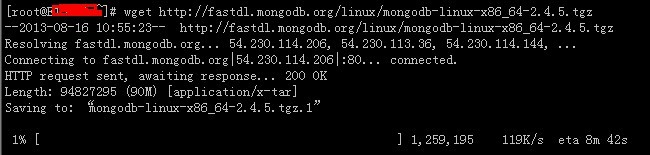
mwget用法:
# mwget -h
GNU MWget 0.1.0 ,a non-interactive and multiline network retriever of all POSTIX Systems.
Usage: mwget [Options]... [URL]...
Options:
-b, --debug Show the debug message
-c, --count=num Set the retry count to [num], no limit when "0", the default is "99"
-d, --directory=dir Set the local direcotry to [dir], the default is "."
-f, --file=file Rename the file to [file]
-h, --help A brief summary of all the options
-i, --interval=num Set the ftp retry interval to [num] seconds, the default is "5"
-n, --number=num Use [num] connections instead of the default (4)
-r, --referer=URL Include `Referer: [URL]' header in HTTP request.
-t, --timeout=num Set the connection timeout to [num] seconds, the default is "30"
-v, --version Show the version of the mwget and exit
-x, --proxy=URL Set the proxy [URL]
Mail bug reports and suggestions to <sa@kmlinux.tk><xiao_suo@hotmail.com>
On website bug reports and suggestions to <http://mwget.sourceforge.net/> <http://www.kmlinux.tk/>
We Welcome your BUG REPORT!
Axel
运维工作中,常常需要下载文件,因为网站下载速度限制或者网络等原因导致下载让人无法忍受,前面有介绍多线程wget工具mwget,提速不少,而且使用很简单。axel使用的人更多,不仅仅安装方法简单,命令更简单。往下看。
安装Axel
RPM安装Axel(方法一)
下载地址:http://pkgs.repoforge.org/axel/
如图,选择适合你服务器的RPM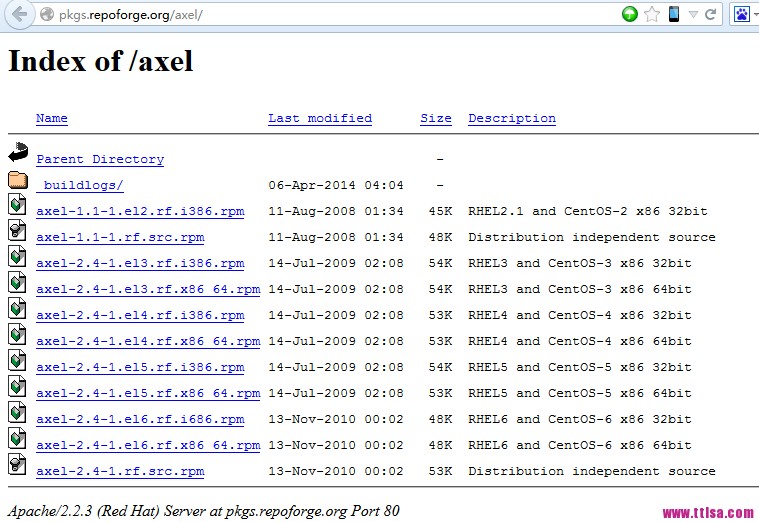
root@ttlsa # wget http://pkgs.repoforge.org/axel/axel-2.4-1.el6.rf.x86_64.rpm
root@ttlsa # rpm -ivh axel-2.4-1.el6.rf.x86_64.rpm
Preparing... ########################################### [100%]
1:axel ########################################### [100%]
yum安装Axel(方法二)
root@ttlsa # yum install axel
apt-get安装Axel
如果你是Ubuntu系统
root@ttlsa # axel -h
Usage: axel [options] url1 [url2] [url...]
--max-speed=x -s x 最大速度 (字节/秒)
--num-connections=x -n x 最大连接数
--output=f -o f 指定文件名
--search[=x] -S [x] Search for mirrors and download from x servers
--header=x -H x 添加header
--user-agent=x -U x 设置用户代理
--no-proxy -N 不使用任何代理
--quiet -q Leave stdout alone
--verbose -v 显示更多状态信息
--alternate -a 显示简单进度条
--help -h 帮助
--version -V 版本信息
axel使用实例
下载centos
root@ttlsa # axel http://mirrors.btte.net/centos/6.5/isos/x86_64/CentOS-6.5-x86_64-bin-DVD1.iso
[ 1%] .......... .......... .......... .......... .......... [4654.5KB/s]
[ 1%] .......... .......... .......... .......... .......... [4657.1KB/s]
[ 1%] .......... .......... .......... .......... .......... [4656.5KB/s]
[ 1%] .......... .......... .......... .......... .......... [4659.3KB/s]
下载运维生存时间某图片
root@ttlsa # axel http://www.ttlsa.com/wp-content/uploads/2014/04/<a href="http://www.ttlsa.com/monitor/zabbix/" title="zabbix"target="_blank">zabbix</a>-adduser-01.jpg
Initializing download: http://www.ttlsa.com/wp-content/uploads/2014/04/zabbix-adduser-01.jpg
File size: 73009 bytes
Opening output file zabbix-adduser-01.jpg
Starting download</p> <p>root@ttlsa # axel http://www.ttlsa.com/wp-content/uploads/2014/04/zabbix-adduser-01.jpg
Initializing download: http://www.ttlsa.com/wp-content/uploads/2014/04/zabbix-adduser-01.jpg
File size: 73009 bytes
Opening output file zabbix-adduser-01.jpg
Starting download
[ 0%] .......... .......... .......... .......... .......... [ 598.0KB/s]
[ 70%] .......... .......... .
Connection 0 finished
Downloaded 71.3 kilobytes in 0 seconds. (710.02 KB/s)
简单进度条
默认情况下,整个屏幕都是进度条,加上-a参数,进度条类似wget。
root@ttlsa # axel -a http://mirrors.btte.net/centos/6.5/isos/x86_64/CentOS-6.5-x86_64-bin-DVD1.iso
Initializing download: http://mirrors.btte.net/centos/6.5/isos/x86_64/CentOS-6.5-x86_64-bin-DVD1.iso
File size: 4467982336 bytes
Opening output file CentOS-6.5-x86_64-bin-DVD1.iso
Starting download</p> <p>[ 1%] [0 1 2 3 ] [ 3.2MB/s] [21:47]
下载限速
ttlsa的网站带宽有限制,我要保证下载的同时又不影响用户的访问,例如限制为1MB/s的下载速度,如下可以看到速度基本保证在1MB以内。
root@ttlsa # axel -s 1024000 http://mirrors.btte.net/centos/6.5/isos/x86_64/CentOS-6.5-x86_64-bin-DVD1.iso
Initializing download: http://mirrors.btte.net/centos/6.5/isos/x86_64/CentOS-6.5-x86_64-bin-DVD1.iso
File size: 4467982336 bytes
Opening output file CentOS-6.5-x86_64-bin-DVD1.iso
State file found: 30522952 bytes downloaded, 4437459384 to go.
Starting download
,,,,,,,... .......... .......... .......... .......... [ 394.8KB/s]
[ 0%] .......... .......... .......... .......... .......... [ 689.2KB/s]
[ 0%] .......... .......... .......... .......... .......... [ 879.5KB/s]
[ 0%] .......... .......... .......... .......... .......... [ 974.5KB/s]
[ 0%] .......... .......... .......... .......... .......... [1086.4KB/s]
[ 0%] .......... .......... .......... .......... .......... [ 967.5KB/s]
[ 0%] .......... .......... .......... .......... .......... [ 943.8KB/s]
[ 0%] .......... .......... .......... .......... .......... [1021.0KB/s]
[ 0%] .......... .......... .......... .......... .......... [1066.1KB/s]
最后
完成,方法很简单,功能很简单。运维生存时间的服务器以及安装了axel,你的安装了吗?
Linux下多线程下载工具MWget和Axel使用介绍的更多相关文章
- Linux下多线程下载工具myget
[root@superdba ~]# mytgetMytget 0.0.99: A download accelerator for GNU/LinuxUsage: mytget [options]. ...
- Linux下多线程下载工具 - Axel
Axel 是 Linux 下一个不错的HTTP/FTP高速下载工具.支持多线程下载.断点续传,且可以从多个地址或者从一个地址的多个连接来下载同一个文件.适合网速不给力时多线程下载提高下载速度.比如在国 ...
- Axel linux下多线程下载工具
Axel 是 Linux 下一个不错的HTTP/FTP高速下载工具.支持多线程下载.断点续传,且可以从多个地址或者从一个地址的多个连接来下载同一个文件.适合网速不给力时多线程下载提高下载速度.比如在国 ...
- linux多线程下载工具mwget
linux多线程下载工具mwget 经常使用wget进行文件下载,然而wget的处理速度并不如人意.遇到一些国外的站点,经常慢得像蜗牛一般.然而为了解决这个问题,便有了mwget:m表示multi多线 ...
- Linux下的下载工具介绍----aria2
ariac 项目地址:http://aria2.sourceforge.net/ 下载地址:http://sourceforge.net/projects/aria2/files/stable/ari ...
- Linux下的多线程下载工具mwget
之前在做项目的时候,遇到一个难题,需要一个多线程下载器,于是阴差阳错的看到了这款工具--mwget,之所以是阴差阳错,是因为mwget的多线程下载功能,并不是我们想要的多线程. wget大家都知道吧, ...
- linux常用多线程下载工具
1.axel 下载安装yum install axel 这个软件下载速度实时显示
- Linux下多线程下载利器 axel
参考 https://teddysun.com/377.html 使用示例: axel -an https://ubuntu-mate.org/raspberry-pi/ubuntu-mate-16. ...
- Linux下多线程查看工具(pstree、ps、pstack),linux命令之-pstree使用说明, linux 查看线程状态。 不指定
0.最常用 pstree:[root@iZ25dcp92ckZ temp]# pstree -a|grep multe | | `-multepoolser | | ...
随机推荐
- Laravel5.1 搭建博客 --后台登录
今天咱来实现后台的登录. 首先我们的后台需要三个控制器: PostController:管理文章. TagController:管理文章标签. UploadController:上传文件. 当我们访问 ...
- Python实现生命游戏
1. 生命游戏是什么 生命游戏是英国数学家约翰·何顿·康威在1970年发明的细胞自动机.它包括一个二维矩形世界,这个世界中的每个方格居住着一个活着的或死了的细胞.一个细胞在下一个时刻生死取决于相邻八个 ...
- centos6.5下安装samba服务器与配置
转自:http://www.centoscn.com/CentosServer/ftp/2014/1023/3989.html http://www.cnblogs.com/x_wukong/p/56 ...
- 【BZOJ4380】[POI2015]Myjnie 区间DP
[BZOJ4380][POI2015]Myjnie Description 有n家洗车店从左往右排成一排,每家店都有一个正整数价格p[i].有m个人要来消费,第i个人会驶过第a[i]个开始一直到第b[ ...
- 【BZOJ2653】middle 二分+可持久化线段树
[BZOJ2653]middle Description 一个长度为n的序列a,设其排过序之后为b,其中位数定义为b[n/2],其中a,b从0开始标号,除法取下整.给你一个 长度为n的序列s.回答Q个 ...
- angualar入门学习-- 自定义指令 指令编译执行过程
3个阶段: 一.加载阶段 加载angular.js的源码,找到ng-app确定应用边界范围. 二.编译阶段 compile 查找所有指令,保存在一个列表中 对所有指令按优先级(property属性值) ...
- 获取当前日期和农历的js代码
来自:http://www.cnblogs.com/Gnepner/archive/2011/09/07/2169822.html 获取当前日期 getToday.js: function GetCu ...
- event chrome firefox 获取点击对象的 id 类
<!doctype html><html lang="en"><head> <meta charset="UTF-8" ...
- The Log: What every software engineer should know about real-time data's unifying abstraction
http://engineering.linkedin.com/distributed-systems/log-what-every-software-engineer-should-know-abo ...
- Java 常用语法和数据结构
Collection 首先Java中的collection都是支持泛型和类型安全 由于Java单根继承, 所以不指定, 可以在collection里面放任何对象, collection会都当作obje ...