
加密解密,CryptoStream()的使用
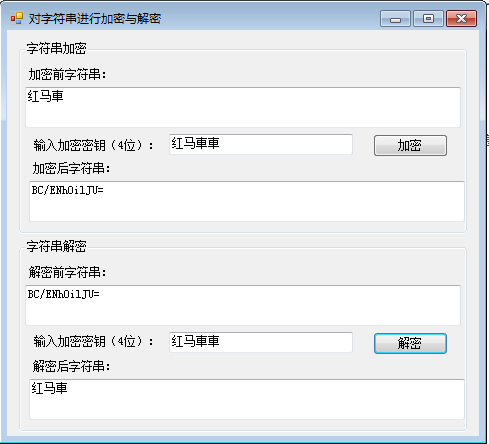
一:上图
二:代码
主界面代码
using System;

using System.Collections.Generic;

using System.ComponentModel;

using System.Data;

using System.Drawing;

using System.Linq;

using System.Text;

using System.Windows.Forms;

namespace StringEncrypt

{

    public partial class Frm_Main : Form

    {

        public Frm_Main()

        {

            InitializeComponent();

        }

        private void btn_Encrypt_Click(object sender, EventArgs e)

        {

            if (txt_password.Text.Length == )//判断加密密钥长度是否正确

            {

                try

                {

                    txt_EncryptStr.Text = //调用实例ToEncrypt方法得到加密后的字符串

                        new Encrypt().ToEncrypt(

                        txt_password.Text, txt_str.Text);

                    //Encrypt P_Encrypt = new Encrypt();

                    //P_Encrypt.ToEncrypt(""

                }

                catch (Exception ex)//捕获异常

                {

                    MessageBox.Show(ex.Message);//输出异常信息

                }

            }

            else

            {

                MessageBox.Show("密钥长度不符!", "提示");//提示用户输入密钥长度不正确

            }

        }

        private void btn_UnEncrypt_Click(object sender, EventArgs e)

        {

            if (txt_password2.Text.Length == )//判断加密密钥长度是否正确

            {

                try

                {

                    txt_str2.Text = //调用ToDecrypt方法得到解密后的字符串

                        new Encrypt().ToDecrypt(

                        txt_password2.Text, txt_EncryptStr2.Text);

                }

                catch (Exception ex)//捕获异常

                {

                    MessageBox.Show(ex.Message);//输出异常信息

                }

            }

            else

            {

                MessageBox.Show("密钥长度不符!", "提示");//提示用户输入密钥长度不正确

            }

        }

    }

}
加密解密类代码
using System;

using System.Collections.Generic;

using System.IO;

using System.Linq;

using System.Security.Cryptography;

using System.Text;

namespace StringEncrypt

{

    public class Encrypt

    {

        /// <summary>

        /// 加密

        /// </summary>

        /// <param name="encryptKey">密钥</param>

        /// <param name="str">信息</param>

        /// <returns></returns>

        internal string ToEncrypt(string encryptKey, string str)

        {

            try

            {

                byte[] P_byte_key = //将密钥字符串转换为字节序列

                    Encoding.Unicode.GetBytes(encryptKey);

                byte[] P_byte_data = //将字符串转换为字节序列

                    Encoding.Unicode.GetBytes(str);

                MemoryStream P_Stream_MS = //创建内存流对象

                    new MemoryStream();

                CryptoStream P_CryptStream_Stream = //创建加密流对象

                    new CryptoStream(P_Stream_MS,new DESCryptoServiceProvider().

                   CreateEncryptor(P_byte_key, P_byte_key),CryptoStreamMode.Write);

                P_CryptStream_Stream.Write(//向加密流中写入字节序列

                    P_byte_data, , P_byte_data.Length);

                P_CryptStream_Stream.FlushFinalBlock();//将数据压入基础流,用缓冲区的当前状态更新基础数据源或储存库,随后清除缓冲区。

                byte[] P_bt_temp =//从内存流中获取字节序列

                    P_Stream_MS.ToArray();

                P_CryptStream_Stream.Close();//关闭加密流

                P_Stream_MS.Close();//关闭内存流

                return //方法返回加密后的字符串

                    Convert.ToBase64String(P_bt_temp);

            }

            catch (CryptographicException ce)

            {

                throw new Exception(ce.Message);

            }

        }

        internal string ToDecrypt(string encryptKey, string str)

        {

            try

            {

                byte[] P_byte_key = //将密钥字符串转换为字节序列

                    Encoding.Unicode.GetBytes(encryptKey);

                byte[] P_byte_data = //将加密后的字符串转换为字节序列

                    Convert.FromBase64String(str);

                MemoryStream P_Stream_MS =//创建内存流对象并写入数据

                    new MemoryStream(P_byte_data);

                CryptoStream P_CryptStream_Stream = //创建加密流对象

                    new CryptoStream(P_Stream_MS,new DESCryptoServiceProvider().

                    CreateDecryptor(P_byte_key, P_byte_key),CryptoStreamMode.Read);

                byte[] P_bt_temp = new byte[];//创建字节序列对象

                MemoryStream P_MemoryStream_temp =//创建内存流对象

                    new MemoryStream();

                int i = ;//创建记数器

                while ((i = P_CryptStream_Stream.Read(//使用while循环得到解密数据

                    P_bt_temp, , P_bt_temp.Length)) > )//(1\从当前流中读取200个字节-并将它们存储在 P_bt_temp 中 2\P_bt_temp 中的字节偏移量-从该偏移量开始存储从当前流中读取的数据 3\读入缓冲区中的总字节数)

                {

                    P_MemoryStream_temp.Write(//将解密后的数据放入内存流

                        P_bt_temp, , i);

                }

                return //方法返回解密后的字符串

                    Encoding.Unicode.GetString(P_MemoryStream_temp.ToArray());

            }

            catch (CryptographicException ce)

            {

                throw new Exception(ce.Message);

            }

        }

    }

}
加密解密,CryptoStream()的使用的更多相关文章
- 利用CryptoStream进行加密解密
public class DBSecurity { //sKey sIV这两个自己随意设定,不能外泄 private const string sKey = "11,22,33,43,34, ...
- C#原生加密方法: System.Security.Cryptography.CryptoStream DataSet加密解密
采用16位密钥形式加密,把数据 dataset或文本转换为二进制流,然后进行加密解密.代码如下: using System; using System.Collections.Generic; usi ...
- .NET和JAVA中BYTE的区别以及JAVA中“DES/CBC/PKCS5PADDING” 加密解密在.NET中的实现
场景:java 作为客户端调用已有的一个.net写的server的webservice,输入string,返回字节数组. 问题:返回的值不是自己想要的,跟.net客户端直接调用总是有差距 分析:平台不 ...
- 【转】asp.net(c#)加密解密算法之sha1、md5、des、aes实现源码详解
原文地址:http://docode.top/Article/Detail/10003 目录: 1..Net(C#)平台下Des加密解密源代码 2..Net(C#)平台下Aes加密解密源代码 3..N ...
- .Net(c#)加密解密之Aes和Des
.Net(c#)加密解密工具类: /// <summary> /// .Net加密解密帮助类 /// </summary> public class NetCryptoHelp ...
- C# 常用加密解密帮助类
public static class EncryptUtil { #region MD5加密 /// <summary> /// MD5加密 /// </summary> p ...
- .Net中的加密解密
返回博客列表 转 .Net中的加密解密 李朝强 发布时间: 2015/11/23 12:55 阅读: 33 收藏: 3 点赞: 0 评论: 0 在一些比较重要的应用场景中,通过网络传递数据需要进行加密 ...
- DES加密解密
加密后生成Base64字符串,并去除'='字符. 加密后替换掉'+',这样加密后的字符串可以作为url参数传递. using System; using System.IO; using System ...
- C#的3DES加密解密算法
C#类如下: using System; using System.Collections.Generic; using System.Text; using System.Security.Cryp ...
随机推荐
- 为什么选择我--ReactJS
在页面中如何大面积操作DOM的话,性能肯定是一个很大的问题,然而聪明的ReactJS实现了Virtual DOM技术,这是他的亮点之一.将组件的DOM结构映射到这个Virtual DOM对象上,并且R ...
- C# 各种集合
大多数集合都在 System.Collections,System.Collections.Generic两个命名空间. 其中System.Collections.Generic专门用于泛型集合. ...
- html input 文本框的一些操作(限制输入...)
1.取消按钮按下时的虚线框 在input里添加属性值 hideFocus 或者 HideFocus=true 2.只读文本框内容 在input里添加属性值 readonly 3.防止退后清空的TEXT ...
- Javascript实现Web颜色值转换
最近一直忙碌于完成业务需求,好长时间没有写博客了.今天稍微有些时间,翻看了一下最近项目中的一些前端代码,看到Web颜色转换功能的时候,突然想到当我们在做一些颜色设置/编辑的需求时,经常会涉及到各种颜色 ...
- 浅析angular框架的cookie
相信接触过网页编程的基本上都知道cookie这个东西吧,一个毫不起眼,但是又十分的重要的东西,今天我们就来分析一下这个小东西,我们都知道客服端通过发送http请求到服务器请求我们的数据,当我们的服务器 ...
- 《Python 二三事》——python学习必看(转载)
面向初学者介绍Python相关的一些工具,以及可能遇到的常见问题. 原文出处 原文作者:八八年出生的男性,互联网上常用id是 jagttt .目前正从事 IT 行业的工作.业余爱好是动漫游加电 ...
- JqGrid自定义toolbar
1.设置toolbar参数为[true,"top"],其意思是toolbar显示在Grid顶部,且其id为t_+Grid的id.e.g.: Grid的id为myGrid,toolb ...
- 字体圆润属性的使用-webkit-font-smoothing: antialiased
字体渲染和抗锯齿技术 据称该属性在window下不起作用,不知win10如何,但是在OS和ios中会有不同的展示效果,主要也是展示在webkit内核中,以及android和ios中 大概是说字体渲染的 ...
- ICE学习第四步-----客户端请求服务器返回数据
这次我们来做一个例子,流程很简单:客户端向服务器发送一条指令,服务端接收到这条指令之后,向客户端发送数据库中查询到的数据,最终显示在DataGridView上. 根据上一篇文章介绍的Slice语法,我 ...
- jquery 自定义tab
<!DOCTYPE html> <html> <head> <script src="/jquery/jquery-1.11.1.min.js&qu ...